
The best desktop processors balance gaming performance, productivity needs, and compatibility with the rest of your PC. I rank the AMD Ryzen 7 9800X3D as the best overall pick for a gaming-focused build, while the Ryzen 5 9600X suits buyers who want a current-generation six-core option and the Ryzen 9 9950X3D stands out for demanding mixed workloads. The main tradeoffs are core count versus gaming-focused cache, newer platform support versus older-platform reuse, and processor speed versus cooling and power demands. Your motherboard, memory, and intended software can change which chip makes the most sense. Read on for the full breakdown and buying advice for all seven desktop processors.

Get business pricing on tech for your team
- Business-only prices and quantity discounts
- Tax-exempt purchasing
- Multiple users, one account, clear invoices
Key Takeaways
- The Ryzen 7 9800X3D earns the lead for a gaming-first build, while the Ryzen 9 9950X3D is a stronger fit when heavy productivity work shares time with gaming.
- The Ryzen 5 9600X offers a current-generation six-core route; its lower core count makes it less suited to sustained, heavily threaded work than the Ryzen 9 models.
- The Ryzen 9 5900XT and Ryzen 7 5800X3D use the older AM4 platform, which can make sense for a compatible system upgrade but offers less forward-looking platform flexibility.
- The Ryzen 5 5500 includes a Wraith Stealth cooler, making it the roundup’s clearest entry-level option, though its AM4 platform and six-core design are less compelling for a new high-end build.
- The Ryzen 7 7800X3D and 5800X3D show why gaming-focused cache can matter, but choosing between them depends heavily on whether you are building on AM5 or upgrading an existing AM4 PC.
| AMD Ryzen 5 9600X 6-Core, 12-Thread Unlocked Desktop Processor |  | Best for a Modern Midrange Build | Architecture: AMD Zen 5 | Cores / threads: 6 / 12 | Base speed: 3.9 GHz | VIEW LATEST PRICE | See Our Full Breakdown |
| AMD Ryzen 7 7800X3D 8-Core, 16-Thread Desktop Processor | 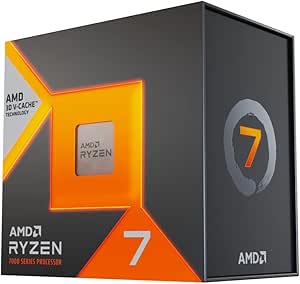 | Best for Cache-Heavy Gaming | Processor model: Ryzen 7 7800X3D | Cores / threads: 8 / 16 | Processor speed: 4.2 GHz | VIEW LATEST PRICE | See Our Full Breakdown |
| AMD Ryzen 9 5900XT 16-Core, 32-Thread Unlocked Desktop Processor |  | Best for Reusing an AM4 Workstation | Architecture: AMD Zen 3 | Cores / threads: 16 / 32 | Base speed: 3.3 GHz | VIEW LATEST PRICE | See Our Full Breakdown |
| AMD Ryzen 9 9950X3D 16-Core Desktop Processor |  | Best Premium Gaming-and-Creation Processor | Architecture: AMD Zen 5 | Cores: 16 | Base clock: 4.3 GHz | VIEW LATEST PRICE | See Our Full Breakdown |
| AMD Ryzen 5 5500 6-Core, 12-Thread Desktop Processor with Wraith Stealth Cooler |  | Best Entry-Level AM4 Bundle | Cores / threads: 6 / 12 | Max boost speed: 4.2 GHz | Cache: 19 MB | VIEW LATEST PRICE | See Our Full Breakdown |
| AMD Ryzen 7 5800X3D 8-Core, 16-Thread Desktop Processor |  | Best AM4 Gaming Upgrade | Cores / threads: 8 / 16 | Maximum boost speed: 4.5 GHz | L3 cache: 96 MB | VIEW LATEST PRICE | See Our Full Breakdown |
| AMD Ryzen 7 9800X3D 8-Core, 16-Thread Desktop Processor |  | Best Premium Gaming Pick | Cores / threads: 8 / 16 | Processor speed: 4.7 GHz | Maximum clock speed: Up to 5.2 GHz | VIEW LATEST PRICE | See Our Full Breakdown |
| desktop processor | Socket | Cores / threads | Power | Memory support |
|---|---|---|---|---|
| AMD Ryzen 5 9600X 6-Core | AM5 | 6 / 12 | 65 watts | DDR5-5600 |
| AMD Ryzen 7 7800X3D 8-Core | AM5 | 8 / 16 | 120 watts | — |
| AMD Ryzen 9 5900XT 16-Core | AM4 | 16 / 32 | 105 watts | DDR4-3200 |
| AMD Ryzen 9 9950X3D 16-Core De | AM5 | — | 170 watts | — |
| AMD Ryzen 5 5500 6-Core | AM4 | 6 / 12 | 65 watts | DDR4-3200 |
| AMD Ryzen 7 5800X3D 8-Core | AM4 | 8 / 16 | — | DDR4-3200 |
| AMD Ryzen 7 9800X3D 8-Core | AM5 | 8 / 16 | — | — |
More Details on Our Top Picks
AMD Ryzen 5 9600X 6-Core, 12-Thread Unlocked Desktop Processor
I’d pick the Ryzen 5 9600X for a new AM5 desktop when a current platform and responsive gaming performance matter more than maximum core count. Its Zen 5 architecture and boost speed up to 5.4 GHz suit games and everyday creative tasks, while six cores and 12 threads keep it below the Ryzen 9 9950X3D for heavily parallel editing or rendering. Compared with the older Ryzen 5 5500, it supports DDR5 memory and AM5, but that means a compatible motherboard and newer memory rather than reusing an AM4 setup. The 65-watt rating is a more modest power target than the 170-watt 9950X3D. My main caveats: no cooler is included, and PCIe 5.0 support depends on the motherboard.
Pros:- Zen 5 architecture with boost speeds up to 5.4 GHz
- Six cores and 12 threads cover gaming and common creative workloads
- Supports DDR5-5600 memory on the AM5 platform
- Unlocked for overclocking
Cons:- A cooler must be purchased separately
- PCIe 5.0 availability depends on the motherboard
- Requires an AM5 motherboard and DDR5 memory, limiting reuse of older parts
Best for: Builders starting an AM5 gaming or general-purpose desktop who want a six-core processor with DDR5 support and room to tune performance.
Not ideal for: AM4 owners looking to reuse their motherboard and DDR4 memory, or creators whose workloads benefit from the 16 cores in the Ryzen 9 9950X3D.
- Architecture:AMD Zen 5
- Cores / threads:6 / 12
- Base speed:3.9 GHz
- Max boost speed:5.4 GHz
- Cache:38 MB
- Socket:AM5
- Memory support:DDR5-5600
- Power:65 watts
- Cooler:Not included
Our verdict“Choose the Ryzen 5 9600X for a modern AM5 build focused on gaming and everyday work, not maximum multi-core throughput or low-cost AM4 upgrades.”
AMD Ryzen 7 7800X3D 8-Core, 16-Thread Desktop Processor
The Ryzen 7 7800X3D is the gaming-focused choice here: its 104 MB of combined cache and eight cores make it a stronger fit for cache-sensitive games than the six-core Ryzen 5 9600X. That doesn’t make it the automatic pick for every desktop. The Ryzen 9 9950X3D adds twice the cores and second-generation 3D V-Cache, making it the more capable match for buyers who split time between demanding games and substantial content creation. This 7800X3D’s 16 threads can handle multitasking, and its integrated Radeon graphics provide a basic display option, but the supplied data doesn’t establish it as a substitute for a discrete gaming GPU. AM5 compatibility also means a new platform for AM4 owners, and its 120-watt rating calls for a suitable cooling plan.
Pros:- Large 104 MB combined cache
- Eight cores and 16 threads support gaming alongside multitasking
- AM5 platform compatibility
- Integrated AMD Radeon graphics are included
Cons:- Requires an AM5 motherboard, so it is not a drop-in AM4 upgrade
- The 120-watt power rating calls for an appropriate cooling setup
- The 9950X3D offers more cores and newer-generation 3D V-Cache for mixed heavy workloads
Best for: AM5 gaming-PC builders prioritizing gaming performance and cache-sensitive workloads over maximum rendering or encoding throughput.
Not ideal for: AM4 upgraders who want to keep their motherboard, or creators who need the 16 cores of the Ryzen 9 9950X3D for sustained parallel workloads.
- Processor model:Ryzen 7 7800X3D
- Cores / threads:8 / 16
- Processor speed:4.2 GHz
- Combined cache:104 MB
- Socket:AM5
- Process technology:5 nm
- Graphics:AMD Radeon Graphics, 2200 MHz
- Power:120 watts
- Maximum operating temperature:89°C
Our verdict“Pick the Ryzen 7 7800X3D for an AM5 desktop centered on gaming, while creators needing more parallel performance should look at the Ryzen 9 9950X3D.”
AMD Ryzen 9 5900XT 16-Core, 32-Thread Unlocked Desktop Processor
For a buyer already on AM4, the Ryzen 9 5900XT offers a direct route to 16 cores and 32 threads without moving to an AM5 motherboard and DDR5 memory. That core count makes it better suited to highly threaded content creation than the six-core Ryzen 5 9600X, though the 9600X uses newer Zen 5 architecture and DDR5. The 5900XT’s Zen 3 design and DDR4-3200 support keep it tied to an older platform; PCIe 4.0 also trails the PCIe 5.0 support available on select AM5 boards. Compared with the Ryzen 9 9950X3D, it gives up newer architecture and 3D V-Cache, but may make more sense for a workstation upgrade that preserves existing AM4 parts. Plan for a separate cooler, and don’t choose it for a new build seeking the latest platform features.
Pros:- 16 cores and 32 threads for parallel workloads
- AM4 socket can support a platform-preserving upgrade
- Supports existing DDR4-3200 memory
- Unlocked for overclocking
Cons:- Zen 3 and PCIe 4.0 are older platform features than those offered by the AM5 Ryzen 5 9600X
- A cooler is not included
- Does not have the 3D V-Cache features of the Ryzen 9 9950X3D
Best for: AM4 desktop owners upgrading for heavily threaded editing, encoding, or other multi-core work while keeping their existing DDR4 platform.
Not ideal for: New-build shoppers seeking AM5, DDR5, or PCIe 5.0 capabilities, and gamers focused on the newer 3D V-Cache options.
- Architecture:AMD Zen 3
- Cores / threads:16 / 32
- Base speed:3.3 GHz
- Max boost speed:4.8 GHz
- Cache:72 MB
- Socket:AM4
- Memory support:DDR4-3200
- PCIe support:PCIe 4.0
- Power:105 watts
Our verdict“Choose the Ryzen 9 5900XT when an AM4 workstation needs more threads without a platform replacement, rather than for a fresh build centered on newer features.”
AMD Ryzen 9 9950X3D 16-Core Desktop Processor
The Ryzen 9 9950X3D is the lineup’s premium mixed-workload option, pairing 16 Zen 5 cores with second-generation 3D V-Cache and boost clocks up to 5.7 GHz. That combination targets buyers who want one desktop processor for demanding games and substantial content creation, rather than a system dedicated to only one task. Compared with the eight-core Ryzen 7 7800X3D, it has twice the core count and newer-generation cache technology; the 7800X3D is the more focused gaming pick if those extra cores aren’t useful. The tradeoff is a 170-watt power rating and a firm AM5 requirement, so the rest of the system needs to match its demands. This is a poor fit for an AM4 upgrade or a modest build where the Ryzen 5 9600X offers a more restrained platform role.
Pros:- 16 cores for demanding multi-threaded workloads
- Second-generation 3D V-Cache targets gaming performance
- Boost clock reaches up to 5.7 GHz
- Zen 5 architecture on the AM5 platform
Cons:- 170-watt power rating requires a capable system cooling and power plan
- Requires an AM5 motherboard
- Its 16-core design is more than gaming-only or basic desktop use may need
Best for: Enthusiasts and creators building an AM5 desktop for demanding gaming alongside multi-core editing, rendering, or similar workloads.
Not ideal for: AM4 upgraders, compact or power-conscious builders, and users who mainly game and would not benefit from 16 cores.
- Architecture:AMD Zen 5
- Cores:16
- Base clock:4.3 GHz
- Max boost clock:Up to 5.7 GHz
- Cache memory:144 MB
- Socket:AM5
- Power:170 watts
- Dimensions:1.6 x 1.6 inches
Our verdict“Choose the Ryzen 9 9950X3D for a premium AM5 system that must handle both demanding games and heavy creative workloads.”
AMD Ryzen 5 5500 6-Core, 12-Thread Desktop Processor with Wraith Stealth Cooler
The Ryzen 5 5500 is the practical starter choice for an AM4 desktop: it has six cores and 12 threads, and the included Wraith Stealth cooler means the processor comes with basic cooling in the box. That makes it easier to assemble than the Ryzen 5 9600X, which requires a separate cooler and a move to AM5 and DDR5. The tradeoff is a lower 4.2 GHz maximum boost speed, 19 MB of cache, and DDR4-3200 support, so it lacks the newer platform features of the 9600X. The 5500 also has no integrated graphics listed; a discrete graphics card is required for gaming. I’d favor it for a straightforward AM4 build, not for buyers seeking a graphics-ready desktop or an upgrade path based on AM5.
Pros:- Six cores and 12 threads for everyday computing and gaming with a discrete GPU
- Wraith Stealth air cooler is included
- Supports DDR4-3200 memory on the AM4 platform
- Unlocked for overclocking
Cons:- A discrete graphics card is required for gaming
- Maximum boost speed of 4.2 GHz and 19 MB cache trail the newer Ryzen 5 9600X
- AM4 and DDR4 support do not provide the newer platform features of AM5
Best for: First-time builders assembling an AM4 desktop with DDR4 memory who want an included cooler and plan to use a discrete graphics card.
Not ideal for: Builders who need integrated graphics, want DDR5 and AM5 features, or expect performance for demanding workloads closer to the Ryzen 9 processors.
- Cores / threads:6 / 12
- Max boost speed:4.2 GHz
- Cache:19 MB
- Socket:AM4
- Memory support:DDR4-3200
- Power:65 watts
- Cooling:Wraith Stealth air cooler included
- Warranty:3 years
Our verdict“Pick the Ryzen 5 5500 for a basic AM4 build that benefits from an included cooler, but choose the Ryzen 5 9600X for a newer AM5 platform.”
AMD Ryzen 7 5800X3D 8-Core, 16-Thread Desktop Processor
The Ryzen 7 5800X3D is a targeted choice for gamers who want to extend an existing AM4 desktop rather than replace its platform. Its 96 MB of L3 cache and 8 cores with 16 threads suit gaming-focused systems, while support for DDR4-3200 lets compatible builds retain their memory. Compared with the newer Ryzen 7 9800X3D, this model stays on AM4 and uses less listed power, but it lacks the newer chip’s up-to-5.2 GHz boost specification and AM5 support. That makes the 5800X3D a less compelling starting point for a new high-end build than a platform upgrade for an AM4 owner. It also ships without a cooler, and PCIe 4.0 support is specified for X570 and B550 motherboards.
Pros:- 96 MB of L3 cache with AMD 3D V-Cache technology
- 8 cores and 16 threads for gaming and multitasking
- Supports DDR4-3200 memory on the AM4 platform
- 105-watt TDP is lower than the Ryzen 7 9800X3D’s listed 140 watts
Cons:- No cooler is included, so the build needs separate cooling
- PCIe 4.0 support is specified for X570 and B550 motherboards
- AM4 and DDR4 support make it a platform-specific choice rather than an AM5 upgrade
Best for: AM4 desktop owners with a compatible X570 or B550 motherboard who want a gaming-focused processor while keeping their DDR4 memory.
Not ideal for: New-build buyers seeking an AM5 platform, or owners of other motherboards who need the listed PCIe 4.0 support.
- Cores / threads:8 / 16
- Maximum boost speed:4.5 GHz
- L3 cache:96 MB
- Total cache:100 MB
- Memory support:DDR4-3200
- Socket:AM4
- PCIe support:PCIe 4.0 on X570 and B550 motherboards
- TDP:105 watts
- Cooler included:No
Our verdict“Choose the Ryzen 7 5800X3D when you want a cache-rich gaming upgrade for a compatible AM4 system without changing platforms.”
AMD Ryzen 7 9800X3D 8-Core, 16-Thread Desktop Processor
For a new gaming-focused AM5 build, the Ryzen 7 9800X3D pairs 8 cores and 16 threads with 96 MB of L3 cache and next-generation 3D V-Cache. Its boost speed of up to 5.2 GHz gives this chip a higher listed ceiling than the AM4-based Ryzen 7 5800X3D, while Socket AM5 places it on a newer platform. It also has room for creative workloads, though its 8-core design is less geared toward heavily threaded work than the 16-core Ryzen 9 9950X3D in this roundup. The tradeoff is a listed 140-watt draw and the need to supply an external cooler. Buyers should choose it for an AM5 gaming build, not as a drop-in upgrade for an older AM4 system.
Pros:- 96 MB of L3 cache and next-generation 3D V-Cache
- Boost clock reaches up to 5.2 GHz
- 8 cores and 16 threads support gaming and creative workloads
- Socket AM5 suits new-platform builds
Cons:- Cooler is not included, requiring a separate cooling solution
- Listed wattage is 140 watts
- Its 8 cores are fewer than the Ryzen 9 9950X3D’s 16 cores for heavily threaded workloads
Best for: Builders creating an AM5 desktop centered on gaming, with some creative multitasking and a separate cooling solution.
Not ideal for: AM4 owners seeking a drop-in processor upgrade, or users whose main work depends on more cores than an 8-core chip provides.
- Cores / threads:8 / 16
- Processor speed:4.7 GHz
- Maximum clock speed:Up to 5.2 GHz
- L3 cache:96 MB
- Secondary cache:8 MB
- Socket:AM5
- Wattage:140 watts
- Cooling method:External cooler
- Cooler included:No
Our verdict“Pick the Ryzen 7 9800X3D for a premium AM5 gaming build if you can provide cooling and do not need a higher core count.”
How We Picked
I ranked these processors by matching their core strengths to common desktop workloads: gaming, content creation, everyday computing, and upgrades to existing systems. I weighed gaming-focused cache and core count alongside platform generation, cooler inclusion, and the practical demands each chip can place on a motherboard and cooling setup. A processor that suits a new build does not automatically outrank one that makes a more sensible drop-in upgrade.
The ranking favors the Ryzen 7 9800X3D for its focused gaming role and places the Ryzen 9 9950X3D high for buyers who need both gaming and substantial multi-threaded performance. The 9600X and 7800X3D serve more specific current-generation needs, while the AM4 models rank lower for new builds but remain relevant to compatible upgrades. The 5500’s included cooler and accessible six-core design earn it a distinct beginner role, though its older platform limits its appeal for buyers planning a fresh, long-lived system.
| desktop processor | Socket | Memory support |
|---|---|---|
| AMD Ryzen 5 9600X 6-Core | AM5 | DDR5-5600 |
| AMD Ryzen 7 7800X3D 8-Core | AM5 | — |
| AMD Ryzen 9 5900XT 16-Core | AM4 | DDR4-3200 |
| AMD Ryzen 9 9950X3D 16-Core De | AM5 | — |
| AMD Ryzen 5 5500 6-Core | AM4 | DDR4-3200 |
| AMD Ryzen 7 5800X3D 8-Core | AM4 | DDR4-3200 |
| AMD Ryzen 7 9800X3D 8-Core | AM5 | — |
Factors to Consider When Choosing Desktop Processors
Choosing a desktop processor is a system decision, not a contest to pick the largest core count. I’d start with your workload and current hardware, then check platform compatibility and cooling before comparing performance tiers.
Match Core Count to the Work You Actually Do
Games, office applications, video editing, and 3D rendering place different demands on a processor. Many gaming builds benefit more from strong per-core performance and a gaming-oriented cache design than from adding cores that remain idle. Frequent rendering, compiling, or encoding can make additional cores useful because those workloads can run many tasks at once. A common mistake is paying for a high-core-count chip when the graphics card or software is the real limit. I’d list the applications you use most and check whether they scale across cores before choosing a tier. If your work is mostly gaming and browsing, saving budget for the GPU, memory, or storage may produce a more balanced PC.
Check the Motherboard Socket Before Choosing a Chip
Socket and chipset compatibility decide whether a processor can work with your motherboard at all, and a BIOS update may be required even when the socket matches. The processors here span AM4 and AM5, so they do not share a single upgrade path. AM4 can be attractive when you already own a suitable board and memory, while AM5 is the platform to examine for a new build centered on the newer-generation options. Do not assume that a processor upgrade is a chip-only purchase: a platform change can also call for a motherboard and memory replacement. Check the motherboard maker’s CPU support list and BIOS instructions before ordering. This step can prevent a system that will not boot or an upgrade that costs more than expected.
Treat Gaming Cache as a Workload Feature, Not a Universal Upgrade
Processors with 3D V-Cache are aimed at workloads that benefit from keeping more game data close to the CPU. That can make them appealing for gaming, but cache does not improve every application equally. Productivity programs may respond more to core count, clock behavior, memory, or the graphics card. Buyers sometimes assume a gaming-focused processor will also be the fastest choice for all creative work; that is not a safe assumption. Compare performance in the specific games and programs you use, and include the resolution and graphics card in that comparison. At higher resolutions, the GPU can become the limit, reducing the difference between CPU options.
Plan Cooling, Power, and Case Airflow Together
A processor’s cooling needs depend on its design and workload, but the cooler included in a package is not the only factor in system temperature or noise. Check whether the chip comes with a cooler, whether that cooler suits your preferred noise level, and whether your case has enough airflow. Sustained multi-core work can place a different thermal load on a system than short bursts of everyday use. A frequent overspend is buying a powerful processor and then leaving too little room in the build for adequate cooling. On the other hand, an elaborate cooler may add little value if your workload is light and the included option meets your needs. Review motherboard power delivery guidance as well, especially for a high-core-count chip.
Compare the Cost of Reusing a Platform With Starting Fresh
An older-platform processor can be a sensible upgrade when it fits a motherboard and memory kit you already own. That calculation changes when you are starting from zero, since a newer platform may offer a more useful base for future component upgrades. The purchase decision should include the full platform bill: processor, board, memory, cooler, and any required BIOS work. Buyers often compare chip specifications alone and miss the cost of replacing otherwise serviceable parts. Before choosing an AM4 option for a new PC, compare the complete build against an AM5 configuration that meets the same workload. For an existing AM4 owner, however, a compatible CPU upgrade may avoid much of that expense.
Leave Headroom for the Graphics Card and Memory
A desktop processor does not determine gaming performance on its own. The graphics card often has the larger effect, while memory capacity and configuration can influence both responsiveness and demanding applications. If a CPU upgrade would force you to choose a weaker GPU or too little memory, the overall system may perform worse for your needs. Check that the processor and motherboard support the memory you plan to use, and follow the board maker’s setup guidance. For productivity, match memory capacity to the size of your projects rather than treating processor cores as a substitute. I’d prioritize a balanced parts list over choosing the most expensive CPU tier available.
Frequently Asked Questions
Should I choose the Ryzen 7 9800X3D or Ryzen 9 9950X3D for a gaming PC?
I’d choose the Ryzen 7 9800X3D when gaming is the main job and the system does not need frequent heavy multi-threaded work. The Ryzen 9 9950X3D is the more suitable match if you also run demanding production workloads alongside games. A larger core count is not automatically a gaming advantage, so check benchmarks for the games and graphics card you plan to use. Also include cooling and motherboard requirements in the full build comparison. If gaming is occasional and creative work dominates, prioritize the workload that takes most of your time.
Can I upgrade to an AM4 processor without replacing my motherboard?
Possibly, but the socket alone does not confirm compatibility. Check your exact motherboard model’s CPU support list, BIOS version, and any update steps before buying an AM4 processor. Some boards need a BIOS update before they can recognize a newer supported chip, and a system may need an older compatible CPU to perform that update. Also compare the cost of the upgrade with the performance you expect from your current graphics card and memory. If your board is supported and the upgrade avoids replacing other parts, AM4 can still be a practical route.
Is the Ryzen 5 5500’s included cooler enough for a beginner build?
The included Wraith Stealth cooler gives a beginner a straightforward starting point because it avoids a separate cooler purchase and installation step. Whether it suits your system depends on case airflow, room temperature, noise preferences, and sustained workload. Check the cooler’s installation instructions and confirm your case has clear airflow around the CPU area. If you plan long, demanding workloads or want quieter operation, a separate cooler may be worth comparing. The processor’s AM4 platform also matters: it is most appealing when the rest of the build fits that platform.
Does a desktop processor with more cores make games run faster?
Not by itself. Many games depend more on a balance of per-core performance, cache, and the graphics card than on having the highest core count. More cores can help when you stream, record, or run other demanding tasks while gaming, but the benefit varies by game and background workload. A high-core-count processor may be a better productivity choice without being the best gaming-focused pick. Compare results for your actual games and intended resolution rather than using core count as a shortcut.
For an existing AM4 gaming PC, should I choose the Ryzen 7 5800X3D or Ryzen 9 5900XT?
The choice depends on whether gaming or heavily threaded work is the larger priority. The Ryzen 7 5800X3D is the more gaming-focused option in this pair, while the Ryzen 9 5900XT’s 16 cores and 32 threads better suit workloads that can use many threads. Check support for your motherboard and BIOS before either upgrade, then compare performance in the applications you run. A CPU change may not help much if your current graphics card is already the limit in games. For a mixed-use PC, choose according to the task that occupies the most time rather than the biggest specification.
Conclusion
For most gaming-first builds, I recommend the Ryzen 7 9800X3D as the best overall choice in this lineup. The Ryzen 5 9600X is my value-oriented current-generation pick for buyers who do not need a large core count, while the Ryzen 9 9950X3D is the premium fit for a PC that must handle gaming and demanding multi-threaded work. Beginners building around a compatible AM4 setup may prefer the Ryzen 5 5500 with its included cooler, though I would compare the full platform cost before starting a new build. For an existing AM4 gaming PC, the Ryzen 7 5800X3D is the more gaming-specific upgrade; choose the Ryzen 9 5900XT when threaded productivity matters more. If you want a current-platform gaming alternative, the Ryzen 7 7800X3D remains a focused option, but check its fit against the newer 9800X3D and your complete system plan.
Halloween Picks
halloween
As an affiliate, we earn on qualifying purchases.