
Part 8 of a five-day series on the 2026 memory crunch. Part 7 ended at the VRAM cliff; this chapter is about the architecture that quietly walks around it.

Get tech for your team delivered free — and shop member deals
- Fast, free delivery on millions of items
- Access to Prime Big Deal Days deals on October 6–7
- Prime Video, Amazon Music and more included
Everything in the last chapter came down to one cruel rule: if your model doesn’t fit in your GPU’s video memory, performance falls off a cliff. The whole discrete-GPU world is organized around squeezing models into 24 or 32 gigabytes of VRAM, and the memory squeeze made every one of those gigabytes brutally expensive.
Apple spent years building a chip architecture that, almost by accident, sidesteps the worst of that. It wasn’t designed to beat a memory shortage — it was designed for efficiency in a laptop. But in 2026 it turns out to be the single best consumer answer to the capacity half of the squeeze. The advantage is real and worth understanding clearly — and so are its limits, including the fact that Apple isn’t immune to the shortage either.
Apple Silicon’s quiet memory advantage
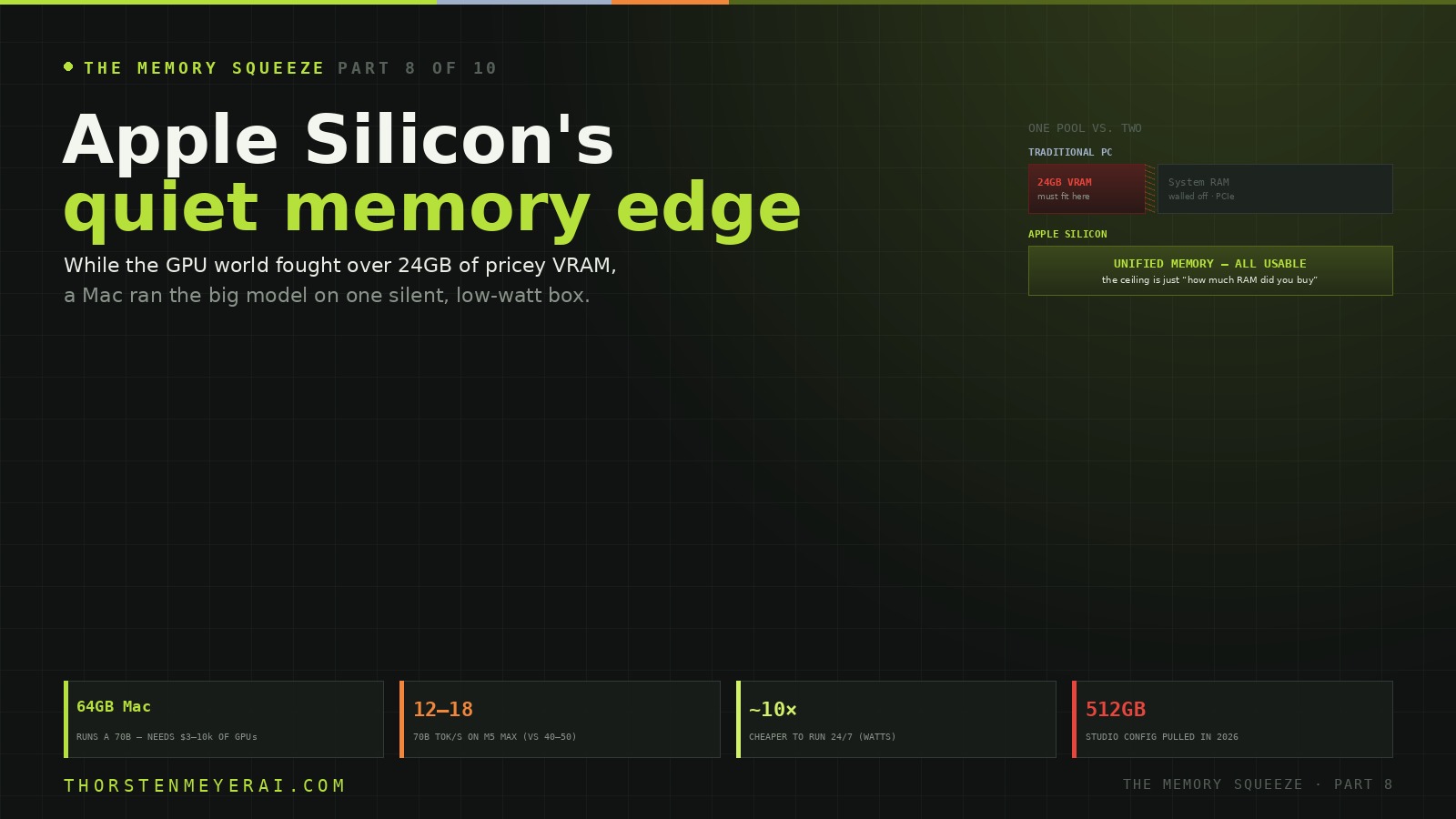
While the discrete-GPU world fought over 24GB of brutally expensive VRAM, a Mac quietly offered to run the big model on one silent, low-watt box. Not magic — but the rare place an architecture beats the squeeze.
Mac Studio 256GB holds a 70B at near-lossless Q8, or 200B+ at Q4 — no single GPU reaches that at any price. Win zone: 32–200B models at 10–30 tok/s for personal/dev use.
M5 Max ~614 GB/s vs RTX 4090’s 1,008. A 70B runs ~12–18 tok/s on M5 Max vs 40–50 on a 5090. You buy capacity, not raw throughput. Bandwidth & capacity matter — not FLOPs.
Apple turned a laptop-efficiency design — one shared memory pool — into the most elegant answer to the part of the squeeze that hurts most: capacity. Bonus: 25–90W vs a GPU rig’s 600–1,200, ~$35–55/yr to run 24/7 vs $300–400, and silent. Right for large models, privacy, low-power always-on; wrong for max speed on small models or heavy training. Next: Build, Rent, or Quantize.
What unified memory actually is
On a normal PC, there are two separate pools of memory. Your CPU has system RAM. Your GPU has its own, separate VRAM. They’re connected by a relatively narrow PCIe bus, and for AI inference, only the VRAM really counts — the model has to fit there, on the graphics card. An RTX 4090 has 24GB of it, full stop. A model larger than 24GB has to spill across the PCIe bottleneck into system RAM, and performance tanks 10-to-50×. That’s the cliff.
Apple Silicon has one pool. The CPU and GPU share the same physical memory, and all of it is usable by the model. Buy a Mac with 64GB, and your model has 64GB to live in — no separate VRAM island, no PCIe wall, no copying data between pools. The thing that’s a hard ceiling on a discrete GPU is, on an M-series chip, just “how much RAM did you buy.” For running large models, that single design decision changes everything.
As an affiliate, we earn on qualifying purchases.
The advantage: capacity, the scarce thing, without the premium
The squeeze made capacity the precious commodity — and capacity is exactly what unified memory hands you cheaply.
A 64GB Mac can run a 70B model that, on the NVIDIA side, requires a multi-GPU rig costing $3,000 to $10,000+ to assemble and power. A Mac Studio with 256GB can hold a 70B model at near-lossless Q8, or a 200B-plus model at Q4 — territory no single consumer graphics card can reach at any price. Apple Silicon is, simply, the only consumer way to get past roughly 100GB of effective video memory without stacking GPUs and the PSU, case, and thermal headaches that come with them. For the person who wants to run the biggest models locally, that’s not a marginal edge; it’s the difference between possible and impossible.
As an affiliate, we earn on qualifying purchases.
The trade-off: you buy capacity, not speed
Here’s the honest other half, and it matters. Apple Silicon is slower per token than NVIDIA, because — as established in Part 7 — inference is memory-bandwidth-bound, and Apple’s bandwidth is lower. An RTX 4090 moves data at about 1,008 GB/s. The M5 Max manages ~614 GB/s; the M4 Max 546; the M3 Ultra, Apple’s bandwidth king, 800. Lower bandwidth means fewer tokens per second on a model that would fit on both.
In practice: an M5 Max with 128GB runs a 70B model at roughly 12–18 tokens per second, where an RTX 5090 that can just barely fit the same model hits 40–50. So the Mac isn’t the choice when you want maximum speed on a model that fits a GPU anyway. Its win zone is specific and large: 32B-to-200B models that need lots of memory, where 10–30 tokens per second — faster than you read, ample for personal use, coding, and development — is perfectly fine. You’re buying size, not raw throughput, and for big-model work that’s exactly the right trade.
One consequence worth flagging: the specs that matter are bandwidth and memory capacity, not GPU FLOPs. And because Mac memory is soldered and can’t be upgraded later, the usual series advice inverts slightly — here you genuinely should buy more memory than you need today, because you can’t add it tomorrow. Just don’t moonshot to a capacity you’ll never fill; the discipline is “buy the tier you’ll grow into,” not “buy the maximum.”
professional GPU alternative for large models
As an affiliate, we earn on qualifying purchases.
As an affiliate, we earn on qualifying purchases.
The quiet bonus: watts and silence
There’s a second advantage that compounds for anything you run continuously. An M-series chug draws 25–90 watts under inference load; a discrete GPU rig draws 600–1,200. Run a model 24/7 and that gap becomes a real number: roughly $35–55 a year in electricity for a Mac Mini against $300–400 for an RTX 4090 rig — close to a 10× difference in operating cost — and the Mac does it silently, with no roaring fans. For an always-on local-inference box, low power and silence aren’t luxuries; they’re part of the total cost of ownership, and they tilt the long-run math further toward Apple than the sticker price suggests.
As an affiliate, we earn on qualifying purchases.
Apple isn’t immune to the squeeze either
Now the part an honest dispatch has to include, because it’s the most on-theme detail in the whole chapter. The memory shortage reached Apple too.
In 2026, amid the industry-wide RAM price squeeze, Apple withdrew the 512GB Mac Studio configuration from sale — the very flagship that made it the local-AI capacity champion. It discontinued the cheap 256GB Mac Mini, raising the base Mini’s entry price. And in late June it announced across-the-board price increases on Macs and the rest of its lineup. Apple had insulated itself longer than most through long-term memory contracts, but those contracts ran out, and when they did, the same wafer arithmetic that hit everyone else hit Cupertino. The architectural advantage is genuine; the pricing is not a force field. You still pay the AI tax — you just get more usable memory per dollar of it.
Who it’s actually for
Apple Silicon is the right local-AI machine if you want to run large models (32B and up) at personal-use speeds, value privacy and offline operation, want a low-power, silent, always-on box, or simply refuse to assemble and feed a multi-GPU tower. It is the wrong choice if you need maximum tokens-per-second on smaller models (a discrete NVIDIA card wins decisively there), or if you do heavy training and fine-tuning, where CUDA’s ecosystem and raw compute still rule. As ever, match the tool to the job.
The take
Apple turned a design decision made for laptop efficiency — one shared pool of memory — into the most elegant consumer answer to the part of the squeeze that hurts most: capacity. While the rest of the market fought over 24GB of brutally expensive VRAM, a Mac quietly offered to run the big model on a single, silent, low-watt box. That’s the quiet advantage the shortage made loud.
It is not magic. You trade speed for size, you pay Apple’s own (now higher) prices, and you commit to the memory you buy because you can’t add more later. But for the specific, common goal of running large models locally without a server rack, unified memory is the rare place in this entire story where an architecture beats the squeeze rather than merely surviving it.
Which sets up the question every builder is really asking by now: given all of this — the cliff, the cloud bill, the Apple option — what should I actually do with my money? Next, the decision chapter: Build, Rent, or Quantize.
Sources: Local AI Master (Apple Silicon chip rankings, bandwidth/capacity table, 512GB/256GB SKU withdrawals); PromptQuorum and AI Productivity (M5 Pro/Max tok/s benchmarks, power-draw and operating-cost figures, unified-memory explanation); LLMCheck (per-model Apple Silicon benchmarks); ThinkSmart.Life and SitePoint (MLX/Metal, quantization-on-Mac guidance); Apple Silicon AI Calculator (capacity tiers). Bandwidth and tok/s figures reflect community benchmarks; prices are point-in-time, late June 2026, and fast-moving. Analysis and recommendations are the author’s and not financial advice.
Fall Picks
fall essentials
As an affiliate, we earn on qualifying purchases.