
Disclosure: This article contains a few affiliate links, and as an Amazon Associate I earn from qualifying purchases — at no extra cost to you. This piece is mostly about technique, not products; I only mention gear I’d actually use.
Get ready for Prime Big Deal Days — try Prime free
Exclusive member deals on October 6–7, plus fast free delivery. Cancel anytime.
Start your free trialAs an affiliate, we earn on qualifying purchases.
This is the last lever, and it’s the one people reach for first and should reach for last. When a workstation is too loud, the instinct is to buy acoustic foam and line the case. But the single most effective thing you can do about noise isn’t to absorb it — it’s to put distance between you and the source. A rig you can’t hear because it’s in another room is quieter than any amount of foam will ever make a rig sitting on your desk.
So this guide is about the fifth lever from the pillar, How to Reduce Heat and Noise in a High-Power AI Workstation: moving the heat and noise out of your space entirely. It’s the lever that matters most once you’ve done everything else — and for a machine you mostly talk to over the network anyway, it’s often the easiest win of all.
Acoustic dampening
& the rig in the closet.
The most powerful noise fix isn’t a material — it’s a floor plan. A rig you can’t hear because it’s in another room beats any amount of foam. Tap the approaches in Part 1 to see what actually works.
(another room)
(levers 1–4)
(door / barrier)
(acoustic foam)
Contain the noise, not the heat
The hierarchy: do these in order
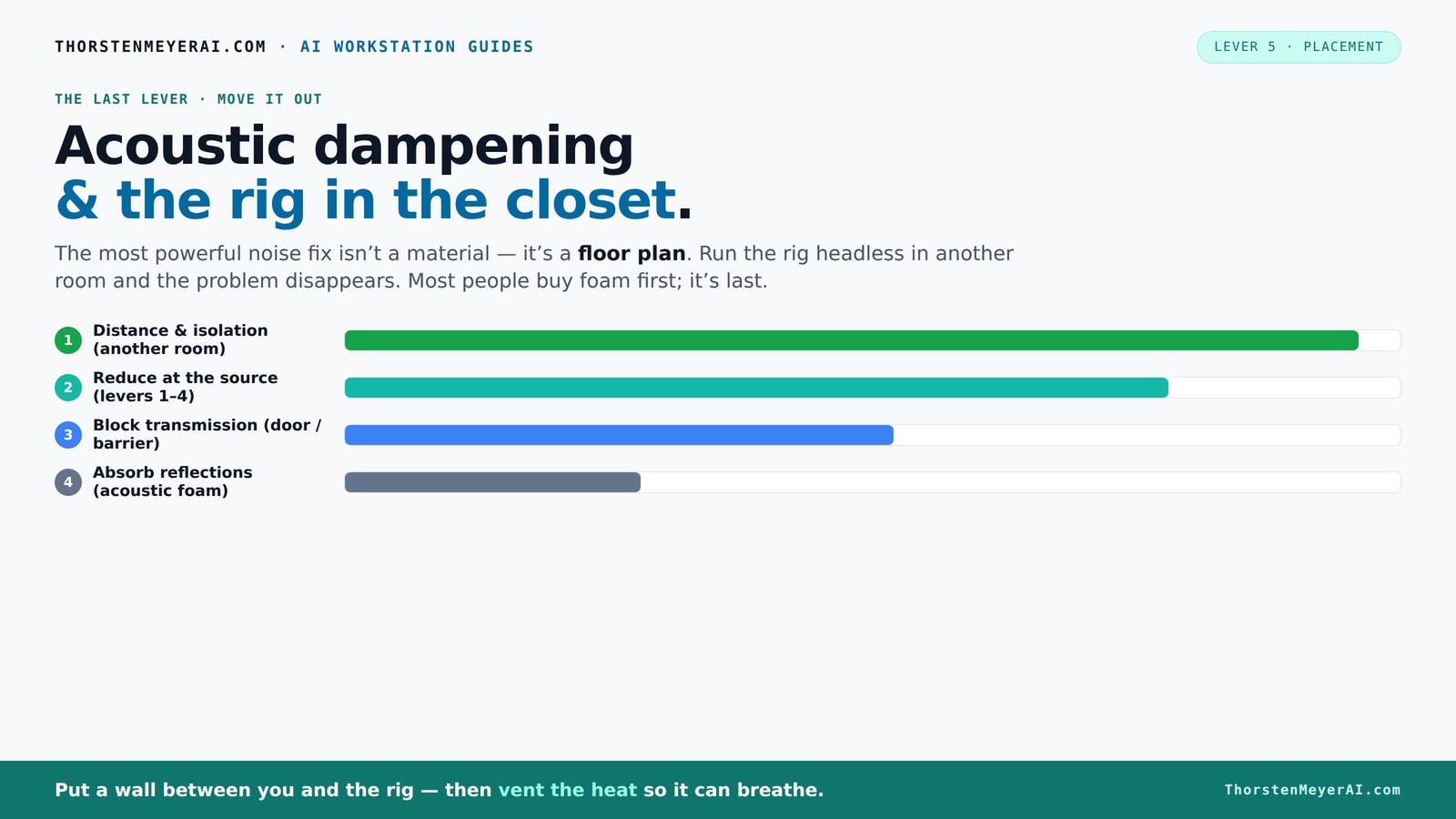
Acoustic treatment has a clear order of effectiveness, and most people get it backwards. From most to least effective:
- Distance and isolation — move the rig away from you, ideally into another room. Nothing else comes close.
- Reduce the noise at the source — the first four levers (undervolt, cooler, case, fans). A quiet rig needs no treatment.
- Block transmission — a barrier (a closed door, a sealed cabinet, a sound-barrier blanket) between the source and you.
- Absorb reflections — acoustic foam, which softens the sound within a space but doesn't stop it leaving.
Notice that foam — the thing people buy first — is dead last. That's because of a distinction that governs everything here.
soundproof room divider for computer workstation
As an affiliate, we earn on qualifying purchases.
As an affiliate, we earn on qualifying purchases.
Airborne vs structure-borne: the distinction that explains everything
There are two ways noise reaches your ears, and they need different fixes:
Airborne noise travels through the air — the whoosh of fans, the hum of the GPU. Acoustic foam absorbs it (reducing echo and reflections within a room), and a solid barrier blocks it (stopping it reaching the next room). Critically, foam absorbs but does not block — it makes a room less reverberant, but it won't stop sound passing through a wall. To stop noise leaking into the next room you need a barrier (a door, a dense panel, a sound-barrier blanket), not foam.
Structure-borne noise travels through solid material — the low-frequency hum a running machine transmits into the desk, floor, and walls it touches, which then radiate it as sound. No amount of foam touches this. The fix is mechanical decoupling: anti-vibration pads, rubber feet, or grommets between the machine and whatever it sits on. This is cheap, easy, and routinely overlooked — a few rubber feet under a tower can kill a hum that foam never would.
Get these two right and you've solved most of the problem. Now, the placement strategies.
acoustic isolation pads for PC case
As an affiliate, we earn on qualifying purchases.
As an affiliate, we earn on qualifying purchases.
Strategy 1: Just move it (the highest-value fix)
The best soundproofing is a wall. If you can put the workstation in a different room — a closet, a basement, a spare room, the other side of the office — and run it headless, you eliminate the noise problem instead of mitigating it. And here's the thing about an AI workstation specifically: you probably don't need to sit next to it.
A local inference rig is something you talk to over the network. You SSH in, you hit an API endpoint, you point your laptop's LLM client at it. The machine doing the work and the machine you're typing on don't have to be the same one, or even in the same room. This is the natural fit for a Mac-and-fleet workflow: your quiet laptop or Mac stays on your desk, and the loud GPU tower lives wherever its noise won't bother anyone — reached over SSH or a local endpoint. Done this way, the rig's acoustics simply stop mattering. It can roar all it likes in a closet while your workspace stays silent.
If you go this route, two things matter: a wired network connection (or strong wireless) to the rig, and — the part people forget — ventilation for wherever you put it, which brings us to the catch.
networked AI workstation enclosure
As an affiliate, we earn on qualifying purchases.
As an affiliate, we earn on qualifying purchases.
Strategy 2: The "rig in the closet" setup — and its one catch
Putting a hot, sustained-load machine in a closet or cabinet is a genuinely great noise solution with one serious caveat: a sealed space traps heat, and trapped heat is exactly what cooks a 24/7 rig. This is the same trap as the sealed-case problem from the case guide, scaled up to a room. A GPU tower dumping 600W+ of continuous heat into a closed closet will steadily raise the ambient temperature until the machine is pulling in its own hot exhaust — and then it throttles and the fans roar, defeating the entire point.
So the rule for any enclosed placement is: it must breathe. That means:
- Active ventilation — at minimum a passive vent path in and out; better, a quiet exhaust fan pulling hot air out of the space and drawing cooler air in. The heat has to have somewhere to go.
- Don't fully seal it unless you've provided thermostat-controlled airflow. Purpose-built soundproof cabinets exist precisely because they solve this — they combine acoustic foam lining with temperature-controlled exhaust fans and ducted airflow, suppressing noise (commonly up to ~36 dB, or even more in serious units) while still dissipating kilowatts of heat. They're not cheap, but they're the engineered answer to "quiet and cool in one box."
- Watch the ambient temperature — if the space warms up, that's the GPU breathing its own exhaust. This is also exactly the scenario where an AIO that exports heat out a radiator can help, by moving CPU heat out of the chassis more aggressively.
A closet with a vent and a quiet exhaust fan, or a proper soundproof cabinet, gives you the best of both: the noise is contained and you, but the heat still escapes.
As an affiliate, we earn on qualifying purchases.
Strategy 3: Treat what's left
Once the rig is as quiet as the first four levers can make it, and placed as far from you as practical, you can treat the remaining noise:
Anti-vibration first (it's the cheapest and most overlooked). Put rubber feet or anti-vibration pads under the tower so its hum doesn't transmit into the desk or floor. Soft-mount any spinning drives, or — better for a modern rig — use SSDs, which are silent. Mount fans on anti-vibration mounts if your case allows.
Then absorb, if noise reflects around the room. Acoustic foam panels on nearby hard surfaces reduce reverberation and make the space less harsh. Remember the limit: this softens the sound in the room; it doesn't stop it reaching the next one.
Then block, if noise leaks elsewhere. If the problem is the rig's noise bleeding into another room, you need a barrier at the boundary — a solid door, a dense panel, or a sound-barrier blanket — not foam. Foam and barriers solve different problems; match the treatment to whether you're trying to quiet this room or stop noise leaving it.
A few products worth knowing
This lever is mostly free technique, but a handful of items earn their place:
- Anti-vibration feet / pads — a few dollars, kills structure-borne hum. The single best value here. 👉 Check on Amazon
- A soundproof server cabinet — the engineered "quiet and cool" answer if you want to enclose the rig properly, with built-in thermostat-controlled exhaust. An investment, but it solves the whole problem in one box. 👉 Check on Amazon
- Acoustic foam panels — for taming reflections in the room the rig lives in (not for blocking transmission). 👉 Check on Amazon
- A quiet exhaust fan — to ventilate a closet or cabinet so the heat can leave. 👉 Check on Amazon
How to choose your approach
Can you put the rig in another room? Then do that first — run it headless over SSH or a local endpoint, and the noise problem largely disappears. This is the highest-value move for an AI workstation, because you rarely need to physically sit next to it.
Stuck with it in your room? Decouple it (anti-vibration pads), make sure the first four levers have done their job, and treat reflections with foam if the room is harsh. Accept that a hot rig in your room has a noise floor you can lower but not eliminate.
Want it enclosed and silent? A soundproof cabinet with active, thermostat-controlled ventilation — or a closet with a vent and a quiet exhaust fan — gives you containment without cooking the machine. Never seal a sustained-load rig without giving the heat a way out.
The bottom line
The most powerful noise lever isn't a material, it's a floor plan. Put distance between you and the rig — ideally a wall — and for an AI workstation you talk to over the network, that often means simply running it headless in another room. Decouple it with anti-vibration pads to kill structure-borne hum. If you enclose it, give the heat a way out (a vented closet or a thermostat-controlled soundproof cabinet), or you'll trade noise for throttling. And use foam to soften a room, barriers to stop noise leaving it — they're not interchangeable.
Pulled in order with the first four levers, this is what turns a 600W space heater of a workstation into something you genuinely cannot hear. The full sequence — produce less heat, cool it, contain it, tune it, then move it — is in the pillar guide.
Acoustic principles from server-room and quiet-PC soundproofing references; soundproof-cabinet noise/heat figures from manufacturer specs (StarTech, SysRacks, UCoustic and others). As an Amazon Associate I earn from qualifying purchases.
Fall yard work Picks
leaf blowers
As an affiliate, we earn on qualifying purchases.