Choosing the right mobile workstation laptops requires balancing raw computational power with portability and thermal management. The Lenovo ThinkPad P1 Gen 7 stands out as the best overall pick for professionals who need a sleek chassis without sacrificing the reliability of dedicated NVIDIA RTX graphics. For those prioritizing compact form factors, the Lenovo ThinkPad P14s Gen 7 offers impressive AMD Ryzen AI performance in a 14-inch frame, while the Dell Precision 7680 remains the go-to for heavy-duty engineering tasks requiring maximum thermal headroom. Most buyers face a tradeoff between battery life and sustained performance under load, with thinner models often throttling sooner than their thicker counterparts. Continue reading to see how these models compare in build quality, display accuracy, and workflow efficiency.

Get business pricing on tech for your team
- Business-only prices and quantity discounts
- Tax-exempt purchasing
- Multiple users, one account, clear invoices
Complete the kit


Key Takeaways
- The shift to Intel Core Ultra and AMD Ryzen AI chips has improved battery efficiency but may not yet match the peak multi-core performance of older HX-series processors for heavy rendering.
- Display quality is now a primary differentiator; OLED panels in models like the ThinkPad P16s Gen 4 offer superior contrast for creative work but consume more power than standard IPS options.
- Professional-grade drivers from NVIDIA RTX Ada and Blackwell architectures provide stability benefits that consumer GeForce cards cannot match, particularly in CAD and simulation software.
- Thermal design dictates longevity; chassis with advanced vapor chambers, such as the Dell Precision 7680, sustain higher clock speeds for longer periods than ultra-thin alternatives.
- Port selection remains a pain point; users requiring legacy connections like HDMI or Ethernet may need to rely on docks, as many premium models now favor Thunderbolt 4 exclusively.




| mobile workstation laptop | Processor | Graphics | Memory | Storage |
|---|---|---|---|---|
| Lenovo ThinkPad P16s Gen 4 16- | AMD Ryzen AI 7 PRO 350 | Integrated AMD Radeon 860M | 32 GB DDR5-5600 | 1 TB PCIe Gen4 SSD |
| Lenovo ThinkPad P14s Gen 7 Mob | AMD Ryzen AI 7 PRO 450 | Integrated AMD Radeon 860M | 32 GB DDR5-5600 | 1 TB PCIe Gen4 SSD |
| Lenovo ThinkPad P1 Gen 7 | Intel Core Ultra 7 165H vPro | NVIDIA RTX 3000 Ada 8GB GDDR6 | 32 GB LPDDR5x-7467 | 1 TB PCIe Gen4 SSD |
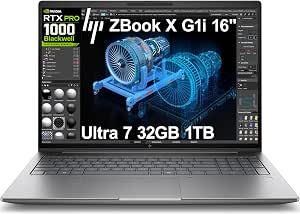
| HP ZBook X G1i 16-inch Laptop | Intel Core Ultra 7 265H | NVIDIA RTX PRO 1000 Blackwell 8GB GDDR7 | 32 GB DDR5 | 1 TB PCIe NVMe M.2 SSD |
| Dell Precision 7680 16-Inch Wo | Intel Core i7-13850HX vPro | NVIDIA RTX 2000 Ada 8GB GDDR6 | 64 GB DDR5 CAMM | 1 TB PCIe NVMe M.2 SSD |
| HP ZBook 8 G1i AI Mobile Works | Intel Core Ultra 7 255H | NVIDIA RTX 500 Ada (4GB) | 64GB DDR5 | 2TB PCIe NVMe SSD |
| HP ZBook 8 G1i AI Mobile Works | Intel Core Ultra 7 265H | NVIDIA RTX 500 Ada (4GB) | 32GB DDR5 | 1TB PCIe NVMe SSD |
| Dell Precision 7680 Laptop | Intel Core i7-13850HX | NVIDIA RTX 2000 Ada (8GB) | 32GB DDR5 | 1TB PCIe NVMe SSD |
| Lenovo ThinkPad P16s Gen 4 16- | Intel Core Ultra 7 255H | Integrated Intel Graphics | 32GB DDR5 | 1TB SSD |
| HP ZBook 8 G1i 16" Mobile Work | Intel Core Ultra 7 255H | Intel Arc 140T (4GB) | 32GB DDR5 | 1TB SSD |
More Details on Our Top Picks
Lenovo ThinkPad P16s Gen 4 16-inch OLED Touchscreen Mobile Workstation
This model stands out for its 4K OLED touchscreen, offering color accuracy that rivals dedicated monitors. Compared to the HP ZBook X G1i, which uses a standard IPS panel, the P16s delivers deeper blacks and vibrant hues essential for video editing or design review. However, it relies on integrated AMD Radeon graphics, meaning it cannot match the raw 3D rendering power of dedicated GPU options like the Dell Precision 7680. While the Ryzen AI processor handles multitasking well, heavy graphical workloads will bottleneck here. It is a trade-off: you gain superior visual output and a lighter chassis, but lose the GPU horsepower needed for complex CAD or simulation tasks. This is for creators who prioritize screen quality over raw compute intensity.
Pros:- Stunning 4K OLED display with 100% DCI-P3 color gamut
- Lighter chassis compared to traditional heavy workstations
- Broad connectivity including Thunderbolt 4 and Ethernet
- High-resolution touchscreen aids in intuitive design workflows
Cons:- Integrated graphics limit performance in heavy 3D tasks
- 60 Hz refresh rate may feel sluggish for motion-heavy work
- No dedicated GPU means slower rendering times
Best for: Video editors, graphic designers, and photographers who need accurate color reproduction and touch-based navigation.
Not ideal for: Engineers and 3D artists who require dedicated GPU acceleration for rendering or simulation workloads.
- Processor:AMD Ryzen AI 7 PRO 350
- Graphics:Integrated AMD Radeon 860M
- Memory:32 GB DDR5-5600
- Storage:1 TB PCIe Gen4 SSD
- Display:16-inch OLED Touch, 3840 x 2400, 100% DCI-P3
- Weight:Approximately 4 lbs
- Battery:86 Wh with Rapid Charge
Our verdict“Choose this if your priority is screen quality and portability rather than raw graphical horsepower.”
Lenovo ThinkPad P14s Gen 7 Mobile Workstation (2026) – 14″ Touch, AMD Ryzen AI 7 PRO, 32GB RAM, 1TB SSD
This 14-inch unit is the lightest option in the lineup at roughly 3 pounds, making it ideal for professionals who travel daily. Unlike the bulkier Dell Precision 7680, the P14s fits easily into smaller bags without sacrificing enterprise security features like AMD Pluton. It shares the integrated graphics limitation found in the ThinkPad P16s, so it is not built for heavy 3D rendering. However, its 500-nit anti-glare touchscreen and MIL-STD-810H durability certification make it robust for field work. The smaller screen is a compromise; you lose screen real estate compared to the 16-inch models, but gain significant mobility. This is the best choice for consultants and field engineers who value weight and durability over graphical intensity.
Pros:- Extremely lightweight at approximately 3 lbs
- MIL-STD-810H certified for enhanced durability
- Bright 500-nit anti-glare touchscreen display
- Enterprise-grade security with AMD Pluton and fingerprint reader
Cons:- Integrated graphics cannot handle complex 3D workloads
- 14-inch screen offers less workspace than 16-inch alternatives
- Base warranty is limited to one year
Best for: Field engineers, consultants, and travelers who prioritize a lightweight, durable chassis over screen size.
Not ideal for: Users who need a large canvas for multitasking or dedicated GPU power for heavy creative applications.
- Processor:AMD Ryzen AI 7 PRO 450
- Graphics:Integrated AMD Radeon 860M
- Memory:32 GB DDR5-5600
- Storage:1 TB PCIe Gen4 SSD
- Display:14-inch WUXGA IPS Touch, 500 nits
- Weight:Approximately 3 lbs
- Durability:MIL-STD-810H Certified
Our verdict“This is the go-to laptop for professionals who spend more time in transit than at a desk.”
Lenovo ThinkPad P1 Gen 7, w/ Ultra 7, NVIDIA RTX 3000, 16″ 2.8K, 32GB RAM
The P1 Gen 7 represents the premium tier of mobile workstations, combining a sleek design with serious power. It features a NVIDIA RTX 3000 Ada GPU, offering dedicated graphics performance that surpasses the integrated options in the ThinkPad P16s and P14s. While it doesn’t have the massive 64GB RAM of the Dell Precision 7680, its 32GB LPDDR5x and fast Intel Core Ultra processor provide snappy responsiveness for most professional tasks. The 165Hz display is a standout feature, providing smoother motion than the 60Hz screens on other ThinkPads. It balances portability and power better than the heavier Dell, though it commands a premium position in the market for this refined build quality.
Pros:- Dedicated NVIDIA RTX 3000 Ada graphics for accelerated workflows
- High-refresh 165Hz display for smoother visual interactions
- Premium, slim chassis design with excellent build quality
- Fast LPDDR5x memory supports efficient multitasking
Cons:- 32GB RAM may be limiting for massive data sets or virtualization
- Premium pricing relative to standard business laptops
- Non-touch display may hinder some interactive workflows
Best for: Professionals who need dedicated GPU power for creative or engineering tasks but refuse to compromise on build quality and screen refresh rate.
Not ideal for: Budget-conscious buyers or those needing extreme multitasking capabilities beyond 32GB RAM.
- Processor:Intel Core Ultra 7 165H vPro
- Graphics:NVIDIA RTX 3000 Ada 8GB GDDR6
- Memory:32 GB LPDDR5x-7467
- Storage:1 TB PCIe Gen4 SSD
- Display:16-inch WQXGA IPS, 165Hz, 500 nits
- Weight:Approximately 4.1 lbs
- Battery:90 Wh with Rapid Charge
Our verdict“This is the ideal balance of power, portability, and premium aesthetics for high-end professionals.”
HP ZBook X G1i 16-inch Laptop, Intel Core Ultra 7 265H, NVIDIA RTX PRO 1000 Blackwell 8GB
The ZBook X G1i offers a compelling value proposition by pairing the new Intel Core Ultra 7 processor with the emerging NVIDIA RTX PRO 1000 Blackwell GPU. It sits between the entry-level integrated models and the high-end Dell Precision in terms of cost and capability. While its 300-nit display is dimmer than the 500-nit panels on the ThinkPad P1 Gen 7 and P14s, the raw compute power is excellent for engineering simulations and AI development. It is heavier than the Lenovo counterparts but provides a more balanced spec sheet for general professional use. This machine is for users who want dedicated graphics and modern AI acceleration without jumping to the most expensive tier of workstations.
Pros:- Modern NVIDIA RTX PRO 1000 Blackwell graphics with 8GB VRAM
- Intel Core Ultra 7 processor with strong AI acceleration
- Supports up to three external 4K monitors for flexible setups
- Comprehensive port selection including SD card reader and Ethernet
Cons:- Display brightness is only 300 nits, limiting outdoor visibility
- Heavier chassis at 4.5 lbs compared to thinner competitors
- Integrated security features are less robust than enterprise-focused models
Best for: Engineers and developers who need balanced performance and modern AI capabilities without the premium price tag of top-tier workstations.
Not ideal for: Color-critical designers who need high-brightness, wide-gamut displays for outdoor or bright-office use.
- Processor:Intel Core Ultra 7 265H
- Graphics:NVIDIA RTX PRO 1000 Blackwell 8GB GDDR7
- Memory:32 GB DDR5
- Storage:1 TB PCIe NVMe M.2 SSD
- Display:16-inch WUXGA IPS, 300 nits, anti-glare
- Weight:4.5 pounds
- Connectivity:Wi-Fi 7, Bluetooth 5.4, Dual Thunderbolt 4
Our verdict“This is the smart choice for professionals seeking modern GPU and CPU power at a mid-range workstation level.”
Dell Precision 7680 16-Inch Workstation Laptop, Intel Core i7-13850HX, NVIDIA RTX 2000 Ada 8GB, 64GB DDR5, 1TB SSD
The Dell Precision 7680 is built for extreme multitasking, featuring a massive 64GB of DDR5 CAMM memory. This capacity far exceeds the 32GB found in the Lenovo ThinkPad P1 Gen 7 and HP ZBook X, making it suitable for running multiple virtual machines or handling huge datasets. It also supports up to four external 4K displays without a dock, a feature unmatched by the other options in this list. However, this power comes at a cost: it is significantly heavier at 5.9 pounds and features a lower-quality display with only 45% NTSC color gamut. It is a desktop replacement, not a travel companion. Choose this for raw throughput and connectivity, not for screen quality or portability.
Pros:- Massive 64GB DDR5 memory for heavy multitasking and virtualization
- Supports up to four external 4K displays natively
- Robust MIL-STD-810H durability testing for professional environments
- Dedicated NVIDIA RTX 2000 Ada graphics for reliable workstation performance
Cons:- Very heavy at 5.9 lbs, making it unsuitable for frequent travel
- Display has poor color accuracy with only 45% NTSC gamut
- Non-touch screen limits interactive usability
Best for: Data scientists, virtualization experts, and engineers who need massive RAM and multi-monitor support in a stationary setting.
Not ideal for: Travelers or designers who prioritize a light chassis or accurate color representation on the built-in screen.
- Processor:Intel Core i7-13850HX vPro
- Graphics:NVIDIA RTX 2000 Ada 8GB GDDR6
- Memory:64 GB DDR5 CAMM
- Storage:1 TB PCIe NVMe M.2 SSD
- Display:16-inch FHD+ IPS, anti-glare, 45% NTSC
- Weight:5.9 lb
- External Displays:Supports up to four 4K displays
Our verdict“This is the definitive choice for users who need maximum memory and screen real estate regardless of weight.”
HP ZBook 8 G1i AI Mobile Workstation Laptop (16″ FHD+ Touchscreen, Intel Ultra 7 255H, NVIDIA RTX 500 Ada, 64GB DDR5, 2TB SSD, Win 11 Pro)
This configuration stands out for its massive memory and storage capacity, making it ideal for engineers handling large simulation datasets. The 64GB of DDR5 RAM allows for seamless multitasking between CAD software, virtual machines, and browser tabs, a significant advantage over the 32GB found in the Dell Precision 7680. However, the NVIDIA RTX 500 Ada GPU is entry-level for professional graphics; it handles basic rendering but may struggle with complex 3D scenes compared to higher-tier options. The WUXGA touchscreen is convenient for annotation but lacks the color accuracy needed for high-end visual design. Buyers should note that this unit is a resealed device with upgraded components, which complicates the warranty coverage for the RAM and SSD specifically.Pros:- 64GB RAM allows for extensive multitasking and virtualization
- 2TB SSD provides ample space for large project files and local datasets
- Touchscreen display aids in direct annotation and navigation
Cons:- Entry-level RTX 500 Ada GPU limits complex 3D rendering capabilities
- WUXGA resolution lacks the pixel density and color accuracy of 4K panels
- Resealed status may affect warranty claims on upgraded memory and storage
Best for: Data analysts and engineers who prioritize RAM capacity for large datasets over graphical fidelity.
Not ideal for: Graphic designers or video editors who require color-accurate displays and higher-tier GPU performance.
- Processor:Intel Core Ultra 7 255H
- Graphics:NVIDIA RTX 500 Ada (4GB)
- Memory:64GB DDR5
- Storage:2TB PCIe NVMe SSD
- Display:16″ WUXGA Touchscreen
- Weight:3.8 lbs
Our verdict“This model is the best choice for those who need maximum memory for data-heavy workflows rather than graphical power.”
HP ZBook 8 G1i AI Mobile Workstation Laptop (16″ 4K 120Hz, Intel Ultra 7 265H, NVIDIA RTX 500 Ada 4GB, 32GB DDR5, 1TB SSD)
If visual precision is your priority, this 4K 120Hz display offers a sharp, smooth canvas that far exceeds the Lenovo ThinkPad P16s’s standard panel. The 100% DCI-P3 color gamut ensures accurate color reproduction for design work, while the 500-nit brightness makes it usable in bright environments. The Intel Ultra 7 265H provides a slight performance bump over the 255H, but the RTX 500 Ada GPU remains a bottleneck for heavy GPU-accelerated tasks. With 32GB of RAM, it is well-balanced for most professional workflows, though users with massive datasets might find the memory limit restrictive compared to the 64GB variant of the same chassis. The high refresh rate also impacts battery life, requiring frequent charging during intensive use.Pros:- 4K resolution with 120Hz refresh rate delivers crisp, smooth visuals
- 100% DCI-P3 color gamut supports professional creative workflows
- Bright 500-nit panel remains readable in well-lit environments
Cons:- High-resolution display drains battery faster than 1080p alternatives
- RTX 500 Ada GPU is insufficient for complex 3D modeling or rendering
- 32GB RAM may be limiting for users managing extremely large project files
Best for: Designers and content creators who need color accuracy and high resolution for visual fidelity.
Not ideal for: Users who primarily run CPU-bound simulations and do not require a high-resolution screen.
- Processor:Intel Core Ultra 7 265H
- Graphics:NVIDIA RTX 500 Ada (4GB)
- Memory:32GB DDR5
- Storage:1TB PCIe NVMe SSD
- Display:16″ 4K (3840 x 2400) 120Hz
- Weight:3.9 lbs
Our verdict“This option is best suited for visual professionals who prioritize screen quality over raw graphical horsepower.”
Dell Precision 7680 Laptop, NVIDIA RTX 2000 Ada 8GB, Intel i7-13850HX, 32GB DDR5
The NVIDIA RTX 2000 Ada GPU with 8GB of VRAM makes this the most capable option in this lineup for 3D rendering and GPU-accelerated tasks. Compared to the HP ZBook 8 G1i, which uses the weaker RTX 500 Ada, the Dell offers significantly more headroom for complex visualizations. The Intel i7-13850HX is a high-performance processor that handles multi-threaded workloads efficiently, though it generates more heat and consumes more power than the newer Ultra 7 chips. The tradeoff is portability; at 5.9 lbs, this laptop is significantly heavier than the Lenovo ThinkPad P16s or HP models. Additionally, the 45% NTSC display is poor for color-critical work, meaning designers will need an external monitor to see accurate colors.Pros:- RTX 2000 Ada GPU with 8GB VRAM handles complex 3D workloads
- High-performance i7-13850HX processor excels in multi-threaded tasks
- Robust build quality with MIL-STD-810H durability testing
Cons:- Heavy 5.9 lb weight makes it less portable than competitors
- Low color gamut display is unsuitable for professional design tasks
- Older 13th Gen Intel architecture lacks the efficiency of newer chips
Best for: 3D artists and engineers who need strong GPU performance for rendering and simulation.
Not ideal for: Users who travel frequently or require a color-accurate built-in display for design work.
- Processor:Intel Core i7-13850HX
- Graphics:NVIDIA RTX 2000 Ada (8GB)
- Memory:32GB DDR5
- Storage:1TB PCIe NVMe SSD
- Display:16″ FHD+ Anti-Glare
- Weight:5.9 lbs
Our verdict“Choose this laptop if you prioritize GPU power for 3D work and can tolerate a heavier chassis and mediocre screen.”
Lenovo ThinkPad P16s Gen 4 16-Inch Business Laptop
This ThinkPad P16s is designed for professionals who value mobility and battery life over raw graphical power. At 4.01 lbs, it is lighter than the Dell Precision 7680 and comparable to the HP ZBook models, but it relies on integrated Intel Graphics instead of a dedicated GPU. This makes it unsuitable for 3D rendering or heavy video editing, limiting it to CPU-bound tasks like coding, data analysis, and office productivity. The Intel Core Ultra 7 255H is efficient and capable for multitasking, and the inclusion of Wi-Fi 7 ensures future-proof connectivity. However, the 60Hz non-touch display feels dated compared to the 120Hz options available in the HP lineup, and the lack of discrete graphics means it cannot handle GPU-accelerated workflows.Pros:- Lightweight 4.01 lb chassis is easy to carry daily
- Integrated graphics offer excellent battery efficiency for office work
- Premium ThinkPad keyboard and durability features
Cons:- Lacks dedicated GPU, rendering it incapable of 3D or heavy creative work
- 60Hz display lacks smoothness compared to higher refresh rate alternatives
- Integrated graphics share system memory, reducing available RAM for apps
Best for: Business analysts, developers, and executives who need a reliable, portable machine for office tasks.
Not ideal for: Content creators, 3D designers, or engineers requiring dedicated graphics acceleration.
- Processor:Intel Core Ultra 7 255H
- Graphics:Integrated Intel Graphics
- Memory:32GB DDR5
- Storage:1TB SSD
- Display:16″ FHD+ 60Hz
- Weight:4.01 lbs
Our verdict“This is the best choice for non-graphical professional work where portability and battery life are paramount.”
HP ZBook 8 G1i 16″ Mobile Workstation – WUXGA – 60 Hz – Intel Core Ultra 7 255H – 32 GB – 1 TB SSD – Arc 140T GPU
This configuration serves as an entry-level workstation option, utilizing the Intel Arc 140T GPU instead of the dedicated NVIDIA RTX series found in other HP ZBook variants. While the Arc GPU is capable for basic acceleration and video encoding, it generally trails behind the RTX 500 Ada in professional driver support and raw performance for CAD applications. The 32GB of RAM is standard for this tier, offering a balance between cost and capability for mid-level multitasking. The WUXGA 60Hz display is functional but lacks the visual refinement of the 4K model. It is a sensible choice for those who need a certified workstation platform without the premium cost of high-end discrete graphics, but it may hit performance ceilings for demanding engineering simulations.Pros:- Intel Arc 140T GPU provides basic acceleration for modern workflows
- Lower cost entry point into the professional ZBook ecosystem
- Standard 32GB RAM handles typical multitasking needs well
Cons:- Intel Arc GPU lacks the professional software certification depth of NVIDIA
- 60Hz display is less responsive than 120Hz alternatives
- Performance ceiling is lower than models with dedicated RTX graphics
Best for: Students and junior professionals needing a certified workstation platform for general engineering tasks.
Not ideal for: Experienced engineers or designers who require proven NVIDIA driver compatibility for specialized software.
- Processor:Intel Core Ultra 7 255H
- Graphics:Intel Arc 140T (4GB)
- Memory:32GB DDR5
- Storage:1TB SSD
- Display:16″ WUXGA 60Hz
- Weight:3.8 lbs
Our verdict“This model is best for those entering the professional space who need a reliable platform without high-end graphics costs.”

How We Picked
I evaluated these mobile workstation laptops based on a strict set of professional criteria, prioritizing sustained performance over peak synthetic benchmarks. I looked at how each machine handles thermal throttling during extended workloads, such as video encoding or complex CAD assemblies, because a laptop that slows down after ten minutes is less useful than one that maintains consistent speed. I also weighed build quality and serviceability, favoring models with robust chassis materials and accessible components for upgrades, which is critical for enterprise fleets and long-term ownership.
Beyond raw specs, I considered the ecosystem compatibility of each device. This includes the quality of the keyboard, trackpad, and webcam, as well as the availability of professional ISV certifications. I ranked the products by identifying who each model serves best, ensuring that buyers with specific needs—such as color-critical designers or data scientists—could find a tailored recommendation rather than a generic high-spec option.
Factors to Consider When Choosing Mobile Workstation Laptops
Selecting a mobile workstation is not just about buying the highest numbers on a spec sheet. The right choice depends on your specific workflow, how you travel, and what software you run daily. Here are the key factors to weigh before making a decision.GPU Architecture and Professional Drivers
While consumer GPUs like the RTX 40 series offer great value for gaming, professional NVIDIA RTX Ada and Blackwell cards are engineered for stability in applications like SolidWorks, AutoCAD, and Adobe Creative Cloud. These professional drivers are certified by Independent Software Vendors (ISVs) to prevent crashes and graphical artifacts during critical tasks. If your work involves precise geometry or scientific visualization, skipping the professional driver certification is a risky gamble. However, if your workflow is primarily code compilation or general office productivity, a high-end integrated GPU or a mid-range consumer chip might offer better value per dollar. Always check the ISV certification list for your specific software version before purchasing.
Thermal Management and Chassis Thickness
There is a direct physical relationship between chassis thickness and sustained CPU/GPU performance. Thinner laptops like the ThinkPad P14s often use vapor chambers or advanced heat pipes to dissipate heat, but they still face limits that thicker workstations do not. If you frequently render 3D scenes or train machine learning models, a thicker model like the Dell Precision 7680 will maintain higher clock speeds for longer durations without thermal throttling. Buyers often mistake peak burst performance for sustained capability; check for reviews that measure performance after 30 minutes of load, not just the first few seconds. A laptop that throttles to 60% of its potential speed after a short burst is significantly less efficient for long tasks.
Display Technology and Color Accuracy
For designers and video editors, the display is the most important interface component. OLED panels offer infinite contrast ratios and deep blacks, making them ideal for HDR content creation, but they can suffer from burn-in over time if static UI elements remain on screen for years. Conversely, high-refresh-rate IPS panels are more durable and often brighter in outdoor conditions, though they lack the deep black levels of OLED. Consider whether your work requires color accuracy certifications like Pantone or VESA DisplayHDR 600. If you work primarily with text, code, or spreadsheets, a high-resolution IPS panel with low blue light emission may offer better long-term comfort and battery life than a power-hungry OLED.
Portability vs. Connectivity
Modern mobile workstations often sacrifice physical ports for thinner profiles, leaving users with only USB-C and Thunderbolt 4 connections. While docks solve this at a desk, they add bulk and cost to your travel setup. If you frequently connect to external monitors, projectors, or legacy peripherals without a dock, look for models that retain HDMI 2.1, USB-A, and RJ45 Ethernet ports. The HP ZBook X and Dell Precision series often strike a better balance here than the ultra-thin ThinkPad P series. Evaluate your daily commute and meeting scenarios; if you are always docking, you can prioritize thinness, but if you move between client sites, physical port variety becomes a practical necessity.
RAM Capacity and Upgrade Path
Many thin-and-light workstations now solder RAM directly to the motherboard, locking your memory capacity at the time of purchase. For tasks like virtualization, large dataset analysis, or complex 3D modeling, 32GB is the new baseline, and 64GB or more is often recommended. Before buying, verify if the model allows for user-upgradable RAM via SODIMM slots. Models like the Lenovo ThinkPad P16s Gen 4 and Dell Precision 7680 typically offer better upgrade paths than their ultra-slim counterparts. If you anticipate your workload growing, paying extra for a model with accessible RAM slots can extend the laptop’s useful life by two to three years, offering better long-term value than a cheaper, non-upgradable unit.
Frequently Asked Questions
Is an NVIDIA RTX professional GPU necessary for coding and data science?
Not always. For pure coding and CPU-bound data science tasks, the CPU performance and RAM capacity are far more critical than the GPU. However, if you work with local LLMs, TensorFlow, or PyTorch, a GPU with significant VRAM (like the 8GB found in the RTX 2000 Ada) allows for larger batch sizes and faster training times. For general web development or software engineering, a mid-range professional GPU or even a high-end integrated graphics solution is sufficient, allowing you to allocate budget toward more RAM and a faster SSD.
How does battery life compare between AMD and Intel mobile workstations?
Recent generations of AMD Ryzen AI chips have closed the gap with Intel Core Ultra processors regarding power efficiency. In many mixed-use scenarios, AMD models like the ThinkPad P14s Gen 7 can offer slightly longer battery life due to their efficient architecture and lower idle power consumption. However, under heavy sustained loads, the difference often comes down to thermal design rather than the CPU brand alone. Intel Core Ultra chips with NPU integration are also improving efficiency for specific AI-accelerated tasks. For the best battery life, prioritize models with larger battery capacities (80Wh+) and efficient display panels, regardless of the CPU vendor.
Can I use a gaming laptop as a mobile workstation?
You can, but it comes with tradeoffs. Gaming laptops often have higher peak performance per dollar but lack the ISV-certified drivers that ensure stability in professional applications. They also tend to have worse battery life, louder fans, and less durable chassis materials compared to dedicated workstations like the HP ZBook or Dell Precision series. If your work involves high-stakes presentations or critical engineering simulations, the risk of driver instability or thermal throttling on a gaming laptop may outweigh the initial cost savings. For creative professionals, the color accuracy and build quality of a true workstation are usually worth the premium.
What is the difference between the HP ZBook X and the HP ZBook 8 series?
The HP ZBook X series is generally positioned as a more accessible, mainstream professional line, often featuring slightly lower-tier components and a focus on value. The ZBook 8 series represents the flagship tier, offering higher-end displays (like 4K 120Hz), more robust chassis materials, and often better thermal configurations for sustained performance. If you need a reliable machine for general office productivity and light design work, the ZBook X is a cost-effective choice. However, for engineers and designers requiring precise color reproduction and maximum graphical throughput, the ZBook 8 series provides the necessary headroom and build quality.
Do OLED screens on workstations cause burn-in during long work sessions?
Modern OLED panels have significantly improved resistance to burn-in compared to early generations, but the risk is not zero, especially for workstations where static UI elements (like toolbars or IDE windows) remain on screen for hours. Lenovo and other manufacturers implement pixel shifting and screen dimming features to mitigate this. If your workflow involves static interfaces for 8+ hours daily, a high-quality IPS or mini-LED display might be a safer long-term choice. For video editors and designers who view dynamic content, the contrast benefits of OLED usually outweigh the minimal risk of burn-in over a typical 3-4 year ownership cycle.
Conclusion
Choosing the right mobile workstation laptop depends on aligning the machine’s strengths with your specific professional demands. The Lenovo ThinkPad P1 Gen 7 is the best overall choice for executives and consultants who need a premium blend of portability, display quality, and professional graphics power. For those on a tighter budget who still need reliable performance, the HP ZBook X G1i offers the best value, providing essential workstation features without the flagship price tag. If you are a student or early-career professional needing a lightweight entry point, the Lenovo ThinkPad P14s Gen 7 is the best for beginners, offering excellent keyboard ergonomics and modern AI capabilities in a compact frame. For heavy engineering and data science roles, the Dell Precision 7680 remains the best premium powerhouse, delivering the thermal headroom and connectivity needed for demanding, all-day workloads.