Portable SSDs offer quick, compact storage for backups, travel, and moving large files, but the right choice depends on how much capacity and speed you need—and which connections your devices support. My best overall pick is the Samsung T7 Portable SSD, a straightforward 1TB option with a USB 3.2 Gen 2 connection. For higher transfer speeds and more capacity, the SanDisk Extreme 2TB and Samsung T9 2TB stand out, while SSK’s smaller-capacity drives focus on basic portable storage. Read on for the full breakdown of the tradeoffs between speed, capacity, and everyday usability.

Get business pricing on tech for your team
- Business-only prices and quantity discounts
- Tax-exempt purchasing
- Multiple users, one account, clear invoices
Key Takeaways
- The Samsung T7 is the balanced pick: its 1TB capacity and USB 3.2 Gen 2 connection suit general backups and file transfers without requiring the higher-speed connection of the T9.
- The Samsung T9 and faster SanDisk Extreme models target demanding transfers: their advertised speeds reach up to 2,000 MB/s, but compatible host devices are needed to make the most of that performance.
- SanDisk’s Extreme lineup offers the widest capacity choice: this roundup includes 1TB, 2TB, and 4TB versions, so buyers can match storage to a growing library of large files.
- SSK’s 250GB and 500GB options favor smaller storage needs: the lineup also includes a 1TB SSK model, but buyers should compare their capacity and connection needs before choosing among these drives.
- Similar names can hide meaningful differences: the SanDisk Extreme models listed here include versions advertised at up to 1,050 MB/s and up to 2,000 MB/s, so checking the exact model and specification matters.
| SSK 500GB Portable External SSD with USB-C |  | Best for iPhone ProRes Recording | Storage capacity: 500 GB | Read speed: Up to 1050 MB/s | Write speed: Up to 1000 MB/s | VIEW LATEST PRICE | See Our Full Breakdown |
| SSK Portable 250GB External SSD, USB-C |  | Best for Small, Fast Transfers | Storage capacity: 250 GB | Read speed: Up to 1050 MB/s | Write speed: Up to 1000 MB/s | VIEW LATEST PRICE | See Our Full Breakdown |
| SanDisk 500GB Portable SSD, Up to 1000 MB/s Read Speed |  | Best for Simple, Rugged Everyday Carry | Storage capacity: 500 GB | Maximum read speed: Up to 1000 MB/s | Interface: USB 3.0 | VIEW LATEST PRICE | See Our Full Breakdown |
| SanDisk Extreme Portable SSD, 2TB, Up to 2000MB/s |  | Best for High-Capacity, Rugged Projects | Storage capacity: 2 TB | Read speed: Up to 2000 MB/s | Interface: USB 3.0 | VIEW LATEST PRICE | See Our Full Breakdown |
| SanDisk Extreme Portable SSD, 1TB, Up to 2,000MB/s | | Best for Rugged 1TB Portability | Storage capacity: 1 TB | Maximum read speed: Up to 2000 MB/s | Interface: USB 3.0 | VIEW LATEST PRICE | See Our Full Breakdown |
| Samsung T7 Portable SSD, 1TB, Titan Gray, USB 3.2 Gen 2 | 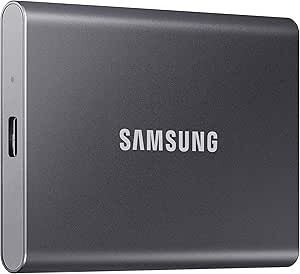 | Best Balanced Everyday Pick | Storage capacity: 1 TB | Interface: USB 3.0; USB 3.2 Gen 2 speeds require compatible equipment | Read speed: Up to 1,050 MB/s | VIEW LATEST PRICE | See Our Full Breakdown |
| SanDisk Extreme Portable SSD, 4TB, Up to 2000MB/s | | Best for High-Capacity Field Storage | Storage capacity: 4 TB | Interface: USB-C | Read speed: Up to 2,000 MB/s | VIEW LATEST PRICE | See Our Full Breakdown |
| Samsung T9 Portable SSD 2TB, USB 3.2 Gen 2×2, Up to 2,000 MB/s | 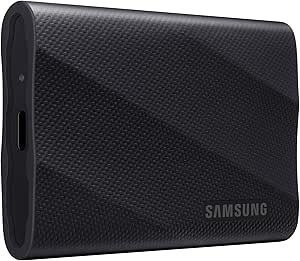 | Best for High-Speed Workflows | Storage capacity: 2 TB | Interface: USB 3.2 Gen 2×2 | Read speed: Up to 2,000 MB/s | VIEW LATEST PRICE | See Our Full Breakdown |
| SSK 1TB Portable External SSD with USB-C |  | Best for Lightweight Device Switching | Storage capacity: 1 TB | Read speed: Up to 1,050 MB/s | Write speed: Up to 1,000 MB/s | VIEW LATEST PRICE | See Our Full Breakdown |
| SanDisk Extreme Portable SSD 2TB, USB-C, Up to 1050MB/s |  | Best Rugged 2TB Pick | Storage capacity: 2 TB | Read speed: Up to 1,050 MB/s | Write speed: Up to 1,000 MB/s | VIEW LATEST PRICE | See Our Full Breakdown |
| portable ssd | Storage capacity | Read speed | Interface | Write speed |
|---|---|---|---|---|
| SSK 500GB Portable External SS | 500 GB | Up to 1050 MB/s | USB 3.2 Gen 2; USB-C and USB-A cables | Up to 1000 MB/s |
| SSK Portable 250GB External SS | 250 GB | Up to 1050 MB/s | — | Up to 1000 MB/s |
| SanDisk 500GB Portable SSD | 500 GB | — | USB 3.0 | — |
| SanDisk Extreme Portable SSD | 2 TB | Up to 2000 MB/s | USB 3.0 | — |
| SanDisk Extreme Portable SSD | 1 TB | — | USB 3.0 | — |
| Samsung T7 Portable SSD | 1 TB | Up to 1,050 MB/s | USB 3.0; USB 3.2 Gen 2 speeds require compatible equipment | Up to 1,000 MB/s |
| SanDisk Extreme Portable SSD | 4 TB | Up to 2,000 MB/s | USB-C | — |
| Samsung T9 Portable SSD 2TB | 2 TB | Up to 2,000 MB/s | USB 3.2 Gen 2×2 | Up to 2,000 MB/s |
| SSK 1TB Portable External SSD | 1 TB | Up to 1,050 MB/s | — | Up to 1,000 MB/s |
| SanDisk Extreme Portable SSD 2 | 2 TB | Up to 1,050 MB/s | — | Up to 1,000 MB/s |
More Details on Our Top Picks
SSK 500GB Portable External SSD with USB-C
I’d choose this SSK when a phone-friendly workflow matters as much as computer transfers. It supports compatible iPhones recording 4K60 ProRes HDR, and its included USB-C and USB-A cables make it easier to move files between newer phones, laptops, and older USB-A devices. The aluminum enclosure weighs 36.6 g, while SMART diagnostics and TRIM add useful drive-management features. Its rated speeds reach 1050 MB/s read and 1000 MB/s write, close to the 1TB SanDisk Extreme Portable SSD’s stated 2000 MB/s read ceiling but with less capacity and a lower maximum read rate. The tradeoff is storage headroom: 500GB can fill quickly with high-bitrate footage, and the SLC cache covers only 25% of available capacity. I’d pick it for mobile capture, not as a roomy project archive.
Pros:- Supports compatible iPhones recording 4K60 ProRes HDR
- Includes USB-C and USB-A cables for flexible connections
- Lightweight 36.6 g aluminum enclosure
- SMART diagnostics and TRIM support
Cons:- 500GB offers less room than the 1TB and 2TB SanDisk Extreme models
- SLC cache is limited to 25% of available capacity
- Windows may show about 465GB of usable capacity
Best for: iPhone owners recording compatible 4K60 ProRes HDR video who want a lightweight drive and cables for both USB-C and USB-A devices.
Not ideal for: Video editors keeping large projects on one drive, or buyers who need more than 500GB and sustained transfers beyond the stated SLC-cache limit.
- Storage capacity:500 GB
- Read speed:Up to 1050 MB/s
- Write speed:Up to 1000 MB/s
- Interface:USB 3.2 Gen 2; USB-C and USB-A cables
- Weight:36.6 g
- Dimensions:2.6 × 1.5 × 0.5 inches
- Enclosure:Aluminum alloy
- Features:LED activity light, SMART diagnostics, TRIM support, SLC caching
- Compatibility:Desktop, laptop, smartphone, tablet, iPhone, Xbox Series X, PlayStation 5
Our verdict“Choose this SSK for compatible iPhone ProRes capture and light cross-device transfers; choose a higher-capacity drive for larger ongoing projects.”
SSK Portable 250GB External SSD, USB-C
This is the lineup’s smallest-capacity route to a fast USB-C SSD: the SSK 250GB model carries the same rated 1050 MB/s read and 1000 MB/s write speeds as its 500GB sibling in a similarly light aluminum body. I’d give it the role of a compact transfer drive for current work files, phone media, or a modest library—not a catch-all backup. Included USB-C and USB-A cables help it fit mixed-device setups, and SMART diagnostics and TRIM provide drive-management support. Compared with the SSK 500GB Portable External SSD, it costs you half the listed capacity without a speed advantage, so the smaller model makes sense only when portability and a deliberately limited file set matter more than room to grow. Its 25% SLC cache limit and roughly 232GB reported capacity on Windows also narrow its usefulness for long or storage-heavy workloads.
Pros:- Rated read and write speeds up to 1050 MB/s and 1000 MB/s
- USB-C and USB-A cables are included
- Compact 36.6 g aluminum enclosure
- SMART diagnostics and TRIM support
Cons:- 250GB is substantially less storage than the SSK 500GB model
- SLC cache is limited to 25% of available capacity
- Windows may show about 232GB of usable capacity
Best for: Students or mobile workers who regularly shuttle a small set of documents, photos, and active files between USB-C and USB-A devices.
Not ideal for: Photographers, video editors, and backup buyers who need room for large libraries; the 250GB capacity leaves little headroom.
- Storage capacity:250 GB
- Read speed:Up to 1050 MB/s
- Write speed:Up to 1000 MB/s
- Connectivity:USB 3.2 Gen 2; USB-C and USB-A cables
- Weight:36.6 g
- Dimensions:2.6 × 1.5 × 0.5 inches
- Enclosure:Aluminum alloy
- Features:LED activity light, SMART diagnostics, TRIM support, SLC caching
Our verdict“Pick this SSK when you want a light, fast drive for a small working set, but step up to the 500GB version for roomier everyday storage.”
SanDisk 500GB Portable SSD, Up to 1000 MB/s Read Speed
I’d shortlist this SanDisk for buyers who want a straightforward portable drive with 2-meter drop protection and a USB-C connection that needs no driver setup. Its 500GB capacity and stated read speed of up to 1000 MB/s suit moving everyday photo libraries and work files, while the compact body is easy to pack. Compared with the SSK 500GB Portable External SSD, the SanDisk puts its clearest advantage in stated impact protection and uncomplicated connection; the SSK lists both read and write speeds and includes USB-C and USB-A cables. SanDisk does not provide a write-speed figure here, so I wouldn’t choose it for workloads where sustained write performance is a deciding factor. Its USB-C connector also means buyers relying on USB-A devices may need an appropriate cable. This is a simpler carry-and-transfer pick, not the most fully specified option in the group.
Pros:- Up to 1000 MB/s stated read speed
- Drop protection up to 2 meters
- Compact, lightweight design at 1.12 ounces
- USB-C connection requires no driver setup
Cons:- Write speed is not specified and may be lower than the stated read speed
- USB-C connector may require an additional cable or adapter for USB-A devices
- 500GB provides less capacity than the 1TB and 2TB SanDisk Extreme models
Best for: Commuters and students who carry a 500GB drive for documents and photos and want stated drop protection with a simple USB-C setup.
Not ideal for: Buyers who need a published write-speed figure, included USB-A connectivity, or more than 500GB for active projects.
- Storage capacity:500 GB
- Maximum read speed:Up to 1000 MB/s
- Interface:USB 3.0
- Connector:USB Type-C
- Drop protection:Up to 2 meters
- Weight:1.12 ounces
- Dimensions:1.77 × 3.35 × 0.39 inches
- Supported platforms:Mac, PC
Our verdict“Choose this SanDisk for a simple, drop-protected 500GB carry drive, but favor the SSK 500GB if published write speeds and included USB-A cabling matter more.”
SanDisk Extreme Portable SSD, 2TB, Up to 2000MB/s
For a portable SSD that needs to carry both sizable projects and survive rougher outings, I’d favor this 2TB SanDisk Extreme over the 1TB version in this lineup. It pairs twice the listed capacity with read speeds up to 2000 MB/s, plus IP65 dust and water resistance and drop protection up to 3 meters. Those protections make it a more suitable field companion than the SanDisk 500GB Portable SSD, whose stated drop protection is 2 meters and whose capacity is a quarter as large. The key caveat is that 2000 MB/s is a read-speed ceiling; no matching write figure is supplied, so large backups may not run at that rate. Password protection uses 256-bit AES, but the encryption software requires a download. I’d choose it for mobile work and sizeable libraries, not for buyers who want a minimal-capacity drive or setup without extra software.
Pros:- 2TB capacity suits larger project folders and media libraries
- Read speeds up to 2000 MB/s
- IP65-rated dust and water resistance
- Drop protection up to 3 meters and 256-bit AES password protection
Cons:- Write speed is lower than the stated maximum read speed, with no exact figure supplied
- Encryption software must be downloaded
- USB 3.0 and USB Type-C connection details do not specify a USB 3.2 Gen 2×2 interface
Best for: Photographers, video creators, and field workers who carry large files and want dust, water, and drop protection in a portable drive.
Not ideal for: Buyers with modest storage needs, or anyone who wants published write-speed performance and password protection without a software download.
- Storage capacity:2 TB
- Read speed:Up to 2000 MB/s
- Interface:USB 3.0
- Connector:USB Type-C
- Protection:IP65 dust and water resistance; up to 3 m drop protection
- Encryption:256-bit AES password protection
- Form factor:2.5-inch
- Compatible devices:Desktop, laptop, smartphone, tablet
- Compatible platforms:Mac, PC
Our verdict“Choose this 2TB model for sizeable field projects and added environmental protection, provided its unspecified write speed and software-based encryption fit your workflow.”
SanDisk Extreme Portable SSD, 1TB, Up to 2,000MB/s
This 1TB SanDisk Extreme is the middle ground for buyers who want more than a 500GB carry drive but don’t need the 2TB model’s extra room. It retains the lineup’s stated up to 2000 MB/s read speed, IP65 dust and water resistance, and drop protection up to 3 meters. Compared with the 2TB SanDisk Extreme Portable SSD, the main compromise is straightforward: half the capacity, with the same listed read ceiling and protective features. That makes this version easier to justify for a working photo library or a selection of current projects, while the 2TB model is better suited to larger archives. The write-speed figure is not supplied, so the advertised read ceiling should not be treated as a guarantee for backups or other write-heavy tasks. 256-bit AES password protection adds a privacy option, though using it requires a software download and supported operating systems.
Pros:- 1TB capacity offers more working room than the 500GB models
- Read speeds up to 2000 MB/s
- IP65-rated dust and water resistance
- Up to 3 m drop protection and 256-bit AES encryption
Cons:- Write speed is lower than the stated maximum read speed, with no exact figure supplied
- Password protection requires downloaded software and supported operating systems
- Half the capacity of the 2TB SanDisk Extreme model
Best for: Mobile professionals and photographers who need a rugged 1TB drive for current projects, travel backups, and cross-device file access.
Not ideal for: People archiving large video libraries, or buyers who need a stated write-speed rate or password protection that works without downloaded software.
- Storage capacity:1 TB
- Maximum read speed:Up to 2000 MB/s
- Interface:USB 3.0
- Connector:USB Type-C
- Drop protection:Up to 3 m
- Encryption:256-bit AES
- Weight:1.6 oz
- Dimensions:3.35 × 2 × 0.39 inches
- Compatible platforms:Mac, PC
Our verdict“Choose this model for a rugged 1TB working drive; move to the 2TB version if your projects or travel backups routinely outgrow that capacity.”
Samsung T7 Portable SSD, 1TB, Titan Gray, USB 3.2 Gen 2
I’d choose the Samsung T7 for everyday carry when a dependable balance of speed, size, and broad device support matters more than maximum capacity. Its claimed 1,050 MB/s read and 1,000 MB/s write speeds suit routine large-file transfers and compatible direct-to-drive video recording. The aluminum body is rated for drops up to six feet, and both USB-C and USB-A cables are included, so connecting to older and newer gear is straightforward. Compared with the Samsung T9, the T7 has half the capacity and lower peak speeds, but it is a sensible fit for buyers whose devices lack USB 3.2 Gen 2×2. The tradeoffs are that peak performance depends on a compatible host and UASP support, while operating-system compatibility can vary. Its 1TB capacity also offers less room than the 2TB and 4TB picks.
Pros:- Up to 1,050 MB/s read and 1,000 MB/s write speeds with compatible hardware
- Aluminum unibody with drop protection up to six feet
- Includes USB-C-to-USB-C and USB-C-to-USB-A cables
- 256-bit AES hardware encryption
Cons:- Maximum speeds depend on a compatible USB 3.2 Gen 2 setup and UASP support
- 1TB capacity is modest beside the 2TB and 4TB options in this lineup
- Compatibility and operating-system support can vary by device
Best for: Everyday travelers and creators who want a compact 1TB drive for mixed computers, Android devices, consoles, or compatible cameras.
Not ideal for: Buyers moving very large libraries or seeking 2,000 MB/s performance; the Samsung T9 and 4TB SanDisk Extreme offer more capacity or higher stated speeds.
- Storage capacity:1 TB
- Interface:USB 3.0; USB 3.2 Gen 2 speeds require compatible equipment
- Read speed:Up to 1,050 MB/s
- Write speed:Up to 1,000 MB/s
- Encryption:256-bit AES hardware encryption
- Construction:Aluminum unibody
- Drop protection:Up to 6 feet
- Compatibility:PC, Mac, Android devices, gaming consoles, and compatible cameras
- Included cables:USB Type-C to Type-C and USB Type-C to Type-A
Our verdict“Choose the Samsung T7 for a well-rounded, durable 1TB drive when broad connections matter more than the T9’s higher speed ceiling or the larger SanDisk capacities.”
SanDisk Extreme Portable SSD, 4TB, Up to 2000MB/s
When carrying one drive for an extensive photo or video library, I’d put the 4TB SanDisk Extreme ahead of the smaller-capacity picks. It combines substantial storage with stated read speeds up to 2,000 MB/s, which can shorten transfers when the computer and connection support that level. Its IP65 dust and water resistance and protection from drops up to three meters make it a more field-oriented choice than the Samsung T7, whose listed drop rating is shorter and which has no stated IP rating here. Password protection with 256-bit AES encryption adds a privacy option, though it requires a software download and supported operating systems. The compromises are that the write speed is lower than the advertised read speed and isn’t specified in this data, and the large capacity may be unnecessary for lighter workloads. I’d skip it if compact storage needs are better met by the SSK 1TB.
Pros:- 4TB capacity for large working libraries and backups
- Read speeds up to 2,000 MB/s with compatible equipment
- IP65 dust and water resistance
- Drop protection up to 3 meters and optional 256-bit AES password protection
Cons:- Write speed is lower than the stated read speed and is not specified here
- Password protection requires software and a supported operating system
- Peak read speed depends on the host connection and may not be available on every device
Best for: Photographers, videographers, and traveling professionals who need several terabytes of files on a pocket-sized drive with dust and water resistance.
Not ideal for: Casual users with smaller backups or buyers who need a clearly specified write-speed figure; the SSK 1TB or Samsung T7 may fit lighter storage needs.
- Storage capacity:4 TB
- Interface:USB-C
- Read speed:Up to 2,000 MB/s
- Durability:IP65 dust and water resistance; drop protection up to 3 m
- Security:256-bit AES encryption with password protection
- Compatible devices:Desktop, laptop, smartphone, and tablet
- Compatible platforms:Mac and PC
- Color:Black
Our verdict“Pick this SanDisk when high capacity and field protection matter more than a specified write speed or a smaller drive’s simpler, lighter storage needs.”
Samsung T9 Portable SSD 2TB, USB 3.2 Gen 2×2, Up to 2,000 MB/s
The Samsung T9 is the performance-focused pick here: its stated read and write speeds both reach 2,000 MB/s, making it better suited than the Samsung T7 for frequent transfers of large project files—provided the host supports USB 3.2 Gen 2×2. That condition matters: connected to a slower system, the T9’s headline advantage may not show up. Its thermal management is designed for extended use, while hardware encryption and drive-health monitoring add useful tools for active work. At 2TB, it holds more than the T7 and SSK 1TB but less than the 4TB SanDisk Extreme, so I’d favor it for speed rather than maximum archive space. Compatibility spans computers, consoles, tablets, and iPhone 15/16, though device performance can vary. The main tradeoff is paying in port requirements: buyers without compatible Gen 2×2 hardware may get more practical value from a slower drive.
Pros:- Up to 2,000 MB/s read and write speeds with compatible equipment
- Thermal management designed for extended use
- Hardware encryption and drive-health monitoring software
- Compatible with computers, gaming consoles, tablets, and iPhone 15/16
Cons:- Maximum speeds require a compatible USB 3.2 Gen 2×2 host, cable, and UASP support
- 2TB provides less archive capacity than the 4TB SanDisk Extreme
- Performance and compatibility vary by connected device
Best for: Video editors and other heavy-transfer users with a USB 3.2 Gen 2×2 computer who want 2TB and high stated read and write speeds.
Not ideal for: Owners of devices without USB 3.2 Gen 2×2 who want the T9’s full performance; the Samsung T7 is a more suitable match for a Gen 2 setup.
- Storage capacity:2 TB
- Interface:USB 3.2 Gen 2×2
- Read speed:Up to 2,000 MB/s
- Write speed:Up to 2,000 MB/s
- Additional features:Hardware encryption and thermal management
- Compatible devices:Gaming console, Mac, PC, tablet, and iPhone 15/16
- Compatible game console:Microsoft Xbox Series S
- Color:Black
Our verdict“Choose the T9 for demanding transfers if your computer supports USB 3.2 Gen 2×2; without that port, the T7 is a more practical speed match.”
SSK 1TB Portable External SSD with USB-C
The SSK 1TB Portable External SSD makes the most sense for people who move files among phones, laptops, and consoles and want a very light drive with both USB-C and USB-A cables. At 36.6 g, it is lighter than the Samsung T7’s aluminum-bodied everyday option by the impression its listed compact dimensions suggest, and the SSK adds an activity light plus SMART diagnostics and TRIM support. Its stated 1,050 MB/s read and 1,000 MB/s write speeds match the T7’s figures, and compatible iPhones can record 4K60 ProRes directly to it. However, top speeds are tied to the SLC cache, so sustained transfers may not hold that pace. Windows may also show about 931 GB because of capacity calculation. Unlike the SanDisk Extreme models, this listing gives no dust, water, or drop rating, so I’d choose it for device flexibility rather than rough outdoor handling.
Pros:- Up to 1,050 MB/s read and 1,000 MB/s write speeds
- Includes USB-C and USB-A cables for compatible devices
- Lightweight 36.6 g aluminum-alloy enclosure
- Supports compatible iPhone 4K60 ProRes recording, SMART diagnostics, and TRIM
Cons:- Peak transfer speeds apply within the SLC cache capacity
- Windows may display usable capacity as about 931 GB
- No dust, water, or drop-protection rating is listed
Best for: Phone and laptop users who want a light 1TB drive, included USB-C and USB-A cables, and compatible iPhone ProRes recording support.
Not ideal for: People who need a published water, dust, or drop-resistance rating, or who regularly transfer files beyond the SLC cache at peak speeds.
- Storage capacity:1 TB
- Read speed:Up to 1,050 MB/s
- Write speed:Up to 1,000 MB/s
- Connectivity:USB 3.2 Gen 2; USB-C and USB-A cables
- Dimensions:2.6 × 1.5 × 0.5 inches
- Weight:36.6 g
- Enclosure material:Aluminum alloy
- Features:LED activity light, SMART diagnostics, TRIM support, and SLC caching
- Compatibility:Desktop, laptop, smartphone, tablet, iPhone, and PlayStation 5
Our verdict“Choose the SSK for lightweight, cable-flexible 1TB storage and compatible iPhone recording, but pick a SanDisk Extreme if rated outdoor protection is a priority.”
SanDisk Extreme Portable SSD 2TB, USB-C, Up to 1050MB/s
For buyers who want 2TB without giving up outdoor protection, this SanDisk Extreme is the clearest fit in the group. Its read and write speeds—up to 1,050 MB/s and 1,000 MB/s—are in the same broad class as the Samsung T7, but SanDisk adds IP65 water and dust resistance, drop protection up to three meters, and a carabiner loop for attaching the drive to a bag. That makes it a better choice than the T7 for travel where dust, splashes, or accidental drops are more likely. The Samsung T9 is faster on paper, but its 2,000 MB/s figures rely on a compatible Gen 2×2 host; this SanDisk’s stated speeds are the more moderate tier. Password protection uses 256-bit AES hardware encryption, though Mac users need a software download. Performance still depends on the host device, and the 4TB SanDisk Extreme is a better fit for larger libraries.
Pros:- 2TB capacity with up to 1,050 MB/s read and 1,000 MB/s write speeds
- IP65 water and dust resistance
- Drop protection up to 3 meters
- Carabiner loop and 256-bit AES hardware encryption
Cons:- Actual performance varies with the host device and other factors
- Mac password protection requires a software download
- Lower stated peak speeds than the Samsung T9 and 4TB SanDisk Extreme
Best for: Traveling photographers and field workers who want 2TB, a way to attach the drive to a bag, and stated water, dust, and drop protection.
Not ideal for: Users prioritizing maximum transfer speeds or more than 2TB of storage; the Samsung T9 is faster on paper and the 4TB SanDisk Extreme holds more.
- Storage capacity:2 TB
- Read speed:Up to 1,050 MB/s
- Write speed:Up to 1,000 MB/s
- Connectivity:USB-C, USB 3.2 Gen 2
- Drop protection:Up to 3 meters
- Water and dust resistance:IP65
- Encryption:256-bit AES hardware encryption
- Operating temperature:-20°C to 85°C
- Model:SDSSDE61-2T00-G25
Our verdict“Pick this SanDisk for protected 2TB travel storage; choose the T9 for higher peak speeds or the 4TB Extreme when capacity comes first.”

How We Picked
I compared these 10 portable SSDs by the factors that change the day-to-day buying decision: stated transfer speeds, available capacity, connection standard, and how well each configuration suits common uses such as backups, travel, and working with large files. I also looked at how clearly the options serve different needs, from a compact-capacity drive to a high-capacity model intended for heavier storage demands. Since advertised performance depends on the connected device, I treated speed claims as a guide rather than a guarantee of real-world results.
The ranking favors useful balance and clear fit over the highest specification alone. The Samsung T7 earns the overall position for its 1TB capacity and familiar USB 3.2 Gen 2 connection; the higher-speed Samsung T9 and SanDisk Extreme models rank well for buyers with compatible devices and demanding workloads. Capacity, model differences, and the practical limits of host-device compatibility separate the remaining picks. I also considered where a buyer may be better served by a smaller-capacity SSK drive or a larger SanDisk option instead of paying for speed they cannot use.
| portable ssd | Read speed | Write speed | Interface |
|---|---|---|---|
| SSK 500GB Portable External SS | Up to 1050 MB/s | Up to 1000 MB/s | USB 3.2 Gen 2; USB-C and USB-A cables |
| SSK Portable 250GB External SS | Up to 1050 MB/s | Up to 1000 MB/s | — |
| SanDisk 500GB Portable SSD | — | — | USB 3.0 |
| SanDisk Extreme Portable SSD | Up to 2000 MB/s | — | USB 3.0 |
| SanDisk Extreme Portable SSD | — | — | USB 3.0 |
| Samsung T7 Portable SSD | Up to 1,050 MB/s | Up to 1,000 MB/s | USB 3.0; USB 3.2 Gen 2 speeds require compatible equipment |
| SanDisk Extreme Portable SSD | Up to 2,000 MB/s | — | USB-C |
| Samsung T9 Portable SSD 2TB | Up to 2,000 MB/s | Up to 2,000 MB/s | USB 3.2 Gen 2×2 |
| SSK 1TB Portable External SSD | Up to 1,050 MB/s | Up to 1,000 MB/s | — |
| SanDisk Extreme Portable SSD 2 | Up to 1,050 MB/s | Up to 1,000 MB/s | — |
Factors to Consider When Choosing Portable Ssds
Before choosing a portable SSD, I would match the drive to the devices and files it will actually serve. A headline speed or large capacity can be appealing, but neither helps much if your computer cannot use the connection or your storage needs are modest. These factors can help narrow the field beyond the individual product differences above.
Match the SSD Speed to Your Host Device
Advertised read speeds describe a ceiling under suitable conditions, not the transfer rate every laptop or phone will reach. Check the port and interface on the device you plan to use, along with the drive’s connection standard. A faster SSD connected to a slower port may still work, but its extra speed can go unused. That does not automatically make the faster model a bad choice if you plan to upgrade your computer or use it with another compatible device. For occasional document backups, connection compatibility may matter more than the highest speed claim. For repeated transfers of video or other large files, a suitable high-speed port can save more time.
Choose Capacity for the Files You Keep
Think about both your current library and how quickly it grows. Photos, project folders, and video files can take up space faster than everyday documents, so a drive that fits today’s needs may become limiting. On the other hand, buying much more capacity than you expect to use ties up your budget without improving transfer speed. Leave headroom for new files rather than planning to fill a drive completely. If the SSD will hold a single backup, estimate the size of the data set and its likely growth. If it will move files between devices, consider whether you need a large archive or just a working copy.
Check the Exact Model, Not Just the Product Family
Portable SSD families can include versions with different capacities and advertised speeds, and similar product names do not always identify the same specification. This roundup includes SanDisk Extreme models listed at both up to 1,050 MB/s and up to 2,000 MB/s, making the exact listing worth checking. Read the model details and connection information before buying, especially when you are choosing between a familiar name and a higher-performance variant. Do not assume that every drive in a product family shares the same interface or speed. Matching the exact model to your device helps prevent paying for features that are absent or unusable. It also makes comparisons between capacities more meaningful.
Decide Whether Portability Means Pocket Size or Rugged Use
A portable drive may travel in a pocket, camera bag, or work kit, and those situations put different demands on it. A small footprint can be convenient for commuting, while travel with valuable files may call for checking the specific model’s protection claims and care instructions. Do not assume that an SSD is protected from every drop, spill, or dusty environment just because it is portable. If the drive will stay at a desk, compactness may matter less than capacity or connection speed. For regular travel, think about how the drive will be carried and whether its cable and connector suit your setup. A protective case can also be a practical addition, but it does not replace a verified product rating.
Plan for Cables, Ports, and Multiple Devices
USB-C describes a connector shape, while the connection standard determines much of the potential transfer rate. A USB-C drive may still need a compatible port and cable to reach its advertised performance. Check what is included with the drive and whether it can connect to every device in your workflow. This matters if you move files between a newer laptop, an older computer, a tablet, or a phone. A hub or adapter can add convenience, but it may also affect speed or add another point of failure. If the SSD will travel between devices, broad compatibility may be more useful than choosing the fastest interface for a single computer.
Treat a Portable SSD as One Part of a Backup Plan
An external drive makes files easier to carry, but it is still a single device that can be lost, damaged, or left behind. For irreplaceable photos or work, keep another copy on a separate drive or in a suitable cloud backup. Do not treat a larger capacity as a substitute for having more than one copy. If you use the SSD for routine backups, decide how often those backups should run and check that the files can be opened from the drive. Encryption may matter when sensitive data travels with you, so check the drive’s software options and your computer’s built-in tools. A simple backup routine is more useful than storage capacity alone.
Frequently Asked Questions
Will a 2,000 MB/s portable SSD reach that speed on my computer?
Not necessarily: the computer’s port, cable, and storage workload all affect transfer performance. A drive advertised at up to 2,000 MB/s needs a compatible connection to approach that figure, and a slower port can limit it. Small files also transfer differently from a single large file, so everyday use may not match a maximum sequential-speed claim. Check your device specifications before paying for a faster model. If your current computer cannot make use of the speed, a more moderately rated drive may be a better fit.
Should I pick the 4TB SanDisk Extreme or a faster 2TB drive?
Choose the 4TB option if you need room for a large library, long-running projects, or files you want to keep together on one drive. A faster 2TB model makes more sense if capacity is sufficient and repeated large transfers are a regular part of your work. The speed difference only helps when your device supports the drive’s connection, while extra capacity helps only if you have files to store. You can also weigh whether splitting files across two drives would suit your backup plan better. Estimate your current storage use and likely growth before deciding.
Is 250GB enough for a first portable SSD?
A 250GB drive can work for a focused job such as carrying documents, a modest set of photos, or a temporary transfer between devices. It is less suited to a broad backup or a growing collection of video and creative projects. Leave free space for new files rather than planning to use every available gigabyte. If you expect your needs to grow, a larger drive may reduce the chance of replacing it soon. The 250GB SSK is most sensible when portability and a smaller storage task matter more than room to expand.
Can I use one portable SSD with both a Mac and a Windows PC?
Often, but the file system format determines how easily the drive can be read and written across both systems. Some formats work broadly, while others may require extra software or reformatting for full use on a different computer. Reformatting can erase existing files, so copy anything important elsewhere before changing a drive’s format. Check the requirements of every device in your workflow, including tablets or phones, rather than assuming a USB-C connector guarantees compatibility. If you move between operating systems frequently, pick a format supported by all of them.
Is one portable SSD a safe place for my only copy of important files?
No single drive should be the only home for files you cannot replace. Portable SSDs can be misplaced, damaged, or fail, and their compact size can make them easy to leave behind. Keep a second copy on another drive or in a separate backup service, ideally stored apart from the first. For work files, set a regular backup schedule and occasionally confirm that the saved files open correctly. A larger drive makes it easier to store more data, but it does not protect that data by itself.
Conclusion
For most buyers, I would start with the Samsung T7 as the best overall: its 1TB capacity and USB 3.2 Gen 2 connection offer a practical fit for everyday portable storage. The SSK 500GB model is my best value-style pick for lighter storage needs, while the Samsung T9 2TB is the best premium choice for buyers whose devices can use its faster connection. For beginners, the SanDisk 500GB Portable SSD is a straightforward way to add external storage without starting with a large-capacity or higher-speed model. Choose the SanDisk Extreme 4TB for capacity-heavy needs, or the smaller SSK models when a compact storage task matters more than room to grow. Before deciding, check the exact model, your device’s port, and the space your files are likely to need.