
When selecting a desktop processor, performance, value, and future-proofing are key considerations. The AMD Ryzen 7 7800X3D stands out as the best overall for its gaming prowess, while the Intel Core i7-14700K offers a strong balance of power and versatility. For budget-conscious users, the AMD Ryzen 5 5600 provides solid performance at a lower price. The main tradeoffs involve balancing raw speed, core count, and compatibility, especially as new architectures arrive. Continue reading for a detailed breakdown of these options to find the best fit for your needs.

Get business pricing on tech for your team
- Business-only prices and quantity discounts
- Tax-exempt purchasing
- Multiple users, one account, clear invoices
Key Takeaways
- Top-tier options like the AMD Ryzen 9 9950X3D excel in multi-threaded workloads, but come at a higher cost.
- Gaming performance is heavily influenced by cache and single-core speeds, which favors AMD‘s 3D V-Cache models.
- Core count remains a key factor for multitasking and content creation, with 12-core and 16-core options leading the pack.
- Budget picks like the Ryzen 5 5600 still deliver excellent value for general use, but lack the latest features.
- Compatibility and future-proofing depend on motherboard support and PCIe/DDR standards, not just CPU specs.




More Details on Our Top Picks
AMD Ryzen 7 9800X3D 8-Core, 16-Thread Desktop Processor
The AMD Ryzen 7 9800X3D stands out for its impressive gaming capabilities, thanks to Zen5 architecture and a massive 96MB L3 cache that accelerates data access. Compared with the Ryzen 7 7800X3D, it offers higher clock speeds up to 5.2GHz, making it better suited for gamers seeking top-tier performance. However, it requires a compatible AM5 motherboard and does not include a cooler, adding to overall cost and setup complexity. Its power efficiency is a bonus, but thermal management might need attention under prolonged load.
Pros:- Excellent gaming performance with Zen5 architecture
- Large 96MB L3 cache for faster game load times
- Supports high clock speeds up to 5.2GHz
- Efficient power consumption and thermal behavior
Cons:- Cooler not included, additional purchase needed
- Requires a compatible AM5 motherboard which can be costly
Best for: High-end gamers who want maximum frame rates and efficiency without overclocking complexity
Not ideal for: Casual users or small form-factor builds, since it demands a high-end motherboard and cooling solutions
- Cores:8
- Threads:16
- Cache:96MB L3
- Base Clock:up to 5.2GHz
- Socket:AM5
- Cooler Included:No
Our verdict“This processor is ideal for gamers prioritizing performance, but it demands a costly setup and cooling solution.”
AMD Ryzen 7 7800X3D 8-Core, 16-Thread Desktop Processor
The Ryzen 7 7800X3D is built on a 5nm process, offering excellent performance for multitasking and gaming with a 4.2GHz base clock. It shares core and thread count with the Ryzen 7 9800X3D but excels in power efficiency and integrated Radeon graphics, making it suitable for compact builds or systems where graphics card space is limited. Unlike the 9800X3D, it doesn’t require a high-end motherboard, but its high power consumption at maximum load can be a concern. It’s a solid choice for those valuing efficiency and graphics integration over raw speed.
Pros:- Built on a 5nm process for efficiency
- Integrated Radeon Graphics for casual gaming
- Fast 4.2 GHz base clock for responsive multitasking
- Lower power consumption compared to higher TDP models
Cons:- No cooling solution included, must purchase separately
- Potentially high power use at full load, impacting energy costs
Best for: Efficiency-focused users who want integrated graphics for light gaming or media tasks
Not ideal for: Users needing extreme overclocking headroom or high-end discrete graphics performance
- Processor Cores:8
- Threads:16
- Base Clock:4.2 GHz
- Graphics Frequency:2200 MHz
- Process Technology:5 nm
- Maximum Operating Temperature:89°C
Our verdict“This processor balances power efficiency and integrated graphics, making it ideal for compact or budget-conscious builds.”
AMD Ryzen 9 9950X3D 16-Core Processor
The Ryzen 9 9950X3D is designed for demanding users who need high core counts and fast boost speeds, offering a maximum clock of 5.7 GHz. Compared to the 7800X3D, it provides double the cores, making it better suited for gaming and content creation workflows that leverage multi-threading. The use of Zen 5 architecture ensures modern efficiency and performance, but its need for an AM5 motherboard and high power draw are significant considerations. It’s a premium choice for power users willing to invest in a high-end platform.
Pros:- High core count (16 cores) for demanding tasks
- Boost clock up to 5.7 GHz for fast performance
- Latest Zen 5 architecture enhances efficiency
- Ideal for multi-threaded applications
Cons:- High price point
- Requires a new AM5 motherboard
- High power consumption under load
Best for: Content creators and gamers needing maximum core count and speed for multitasking and rendering
Not ideal for: Budget-conscious buyers or those with existing AM4 systems, since it requires an AM5 motherboard
- Max Boost Clock:5.7 GHz
- Base Clock:4.3 GHz
- Cores:16
- Architecture:Zen 5
- Form Factor:Desktops
- Processor Type:Boxed Processor
Our verdict“This processor offers extreme performance for serious gaming and content creation, but at a premium cost and platform upgrade requirement.”
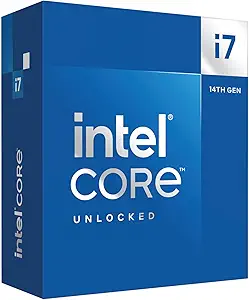
Intel Core i7-14700K Desktop Processor with 20 Cores and Integrated Graphics
The Intel Core i7-14700K delivers a robust combination of cores and threads with 20 cores (8 Performance and 12 Efficient), plus 28 threads, making it suitable for demanding multitasking and gaming. Its support for PCIe 5.0 and DDR5 ensures future-proofing, and the integrated Intel UHD Graphics 770 adds basic display capability without a discrete GPU. Compared to AMD’s Ryzen options, this CPU offers a more balanced core/thread count with strong overclocking potential, but its high power consumption of 125W and the need for a compatible motherboard with BIOS updates can complicate setup.
Pros:- High core and thread count for demanding applications
- Supports PCIe 5.0 and DDR5 for future upgrades
- Unlocked for overclocking
- Integrated graphics for basic display needs
Cons:- High power consumption at 125W
- Requires a compatible motherboard with BIOS update
- Expensive for casual or budget builds
Best for: Power users who want a versatile CPU with overclocking headroom and integrated graphics for gaming and productivity
Not ideal for: Users on a tight budget or those preferring AMD’s platform for gaming or content creation
- Processor Series:Core i7
- Processor Speed:5.6 GHz
- Processor Socket:LGA 1711
- Secondary Cache:33 MB
- Wattage:125 watts
- Processor Count:20
Our verdict“This processor offers a flexible, high-performance platform ideal for enthusiasts willing to pay a premium for future-proof features.”
AMD Ryzen 7 5800X3D 8-core, 16-Thread Desktop Processor with AMD 3D V-Cache Technology
The Ryzen 7 5800X3D excels in gaming due to its 3D V-Cache technology, which significantly boosts gaming performance by enlarging cache size to 100MB. While it shares core and thread counts with the 9800X3D, it runs on the older AM4 platform, making it suitable for existing Ryzen 5000 series motherboards. Its maximum boost clock of 4.5 GHz is slightly lower than newer models, but the large cache compensates for many gaming scenarios. However, it does not include a cooler, and its compatibility limits upgrade paths for those on newer platforms.
Pros:- Exceptional gaming performance with large 100MB cache
- Supports PCIe 4.0 on compatible motherboards
- Great choice for current AM4 platform upgrades
- Lower power consumption at 105W
Cons:- Cooler not included, high-performance cooling recommended
- Limited to AM4 platform, no upgrade path to Zen 5
Best for: Gaming enthusiasts with an AM4 motherboard looking for a high-cache CPU to maximize game performance
Not ideal for: Content creators or users seeking the latest architecture or platform upgrades
- Processor Series:Ryzen 7
- Processor Speed:4.5 GHz
- Processor Socket:Socket AM4
- Secondary Cache:100 MB
- Wattage:105 watts
- Processor Count:8
Our verdict“This CPU is perfect for gamers on AM4 systems prioritizing cache-driven performance, but it won’t benefit those seeking the latest tech or platform longevity.”
Intel Core i5-14400F Desktop Processor (14th Gen), 10 cores, up to 4.7 GHz
The Intel Core i5-14400F stands out for its hybrid architecture, combining 6 performance cores and 4 efficiency cores to handle both gaming and multitasking efficiently. Compared with the AMD Ryzen 5 5600, it offers a higher clock speed potential and support for DDR5 memory, making it more future-proof. However, the absence of integrated graphics means you’ll need a dedicated GPU, which could add to overall costs. Its compatibility with both PCIe 4.0 and 5.0 offers flexible upgrade paths, but it does require a BIOS update on some motherboards, adding a slight layer of complexity. As a versatile choice for gamers and productivity users, this CPU balances raw power with broad compatibility.
Pros:- Hybrid architecture with 10 cores and 16 threads for versatile workloads
- Supports PCIe 5.0 & DDR5 for future-proofing
- Compatible with a wide range of modern motherboards (Intel 600/700 series)
Cons:- Requires a discrete graphics card, adding extra cost
- Higher power consumption at 65W could impact cooling and energy use
Best for: PC builders seeking a high-performance, future-ready processor for gaming and productivity without going into premium pricing.
Not ideal for: Beginners or budget-conscious users who want an all-in-one solution with integrated graphics or lower upfront costs.
- Processor Series:Core i5
- Processor Speed:up to 4.7 GHz
- Processor Socket:LGA1700
- Secondary Cache:20 MB
- Wattage:65W
- Processor Count:10
Our verdict“This processor is ideal for users who want a flexible, high-performance CPU with broad compatibility, and are prepared to handle discrete graphics.”
AMD Ryzen 5 5600 6-Core 12-Thread Unlocked Desktop Processor with Wraith Stealth Cooler
The AMD Ryzen 5 5600 is tailored for gamers and enthusiasts who prioritize high frame rates; its 6-core, 12-thread design delivers solid performance for demanding titles. Compared to the Intel Core i5-14400F, it lacks DDR5 support but compensates with a lower price point and good overclocking potential. Its included Wraith Stealth cooler simplifies a build, but overclocking features are more limited than higher-end AMD models, which might constrain enthusiasts seeking maximum overclocking headroom. While it doesn’t support PCIe 5.0, its compatibility with DDR4 makes it easier to upgrade existing systems without replacing the motherboard. This CPU makes sense for budget-conscious gamers who want good performance without the latest memory tech.
Pros:- Excellent gaming performance for a 6-core CPU
- Unlocked for overclocking to boost speeds
- Includes Wraith Stealth cooler for easy setup
Cons:- Limited support for latest DDR5 memory and PCIe 5.0
- No integrated graphics, so a discrete GPU is necessary
Best for: Budget gamers or PC builders focusing on gaming performance with a limited budget and DDR4 memory.
Not ideal for: Users planning to build a future-proof system with DDR5 or PCIe 5.0, or those seeking extensive overclocking features.
- Cores:6
- Threads:12
- Cooler:Wraith Stealth
- Unlocked:Yes
- Max Boost Clock:3.9 GHz
- Memory Support:DDR4
Our verdict“This CPU is best suited for gamers who want strong performance at an affordable price, especially those sticking with DDR4 memory.”
AMD Ryzen 5 9600X 6-Core, 12-Thread Unlocked Desktop Processor
The AMD Ryzen 5 9600X offers a significant boost in clock speed, reaching up to 5.4 GHz, making it an excellent choice for gamers seeking high frame rates and overclocking potential. Compared with the Intel Core i5-14400F, it lacks PCIe 5.0 support but excels in raw gaming performance thanks to its high boost clock and larger cache (38 MB). It requires a compatible AM5 motherboard, which is an added consideration for those upgrading existing systems. Cooler not included means an extra purchase for overclockers, but the unlocked multiplier offers flexibility for tuning. This CPU fits users aiming for maximum gaming performance and overclocking potential in AMD’s platform.
Pros:- High boost clock up to 5.4 GHz for gaming
- Unlocked for overclocking
- Supports DDR5-5600 and PCIe 5.0
Cons:- Cooler not included, adding extra cost
- Requires a newer AM5 motherboard, increasing upgrade complexity
Best for: High-end gamers and overclockers investing in AMD platforms for maximum gaming throughput and tuning flexibility.
Not ideal for: Casual users or those seeking PCIe 5.0 features and DDR5 support on a budget.
- Cores:6
- Threads:12
- Max Boost Clock:5.4 GHz
- Cache:38 MB
- Memory Support:DDR5-5600
- Socket:AM5
Our verdict“This processor is suited for enthusiasts aiming for top gaming performance and overclocking in AMD’s latest platform.”
AMD Ryzen 5 5500 6-Core, 12-Thread Unlocked Desktop Processor with Wraith Stealth Cooler
The AMD Ryzen 5 5500 provides a balance of affordability and performance with a 6-core, 12-thread design that handles gaming and daily tasks well. Compared with the Intel Core i5-14400F, it supports only DDR4 memory at 3200 MHz and lacks PCIe 5.0, making it less suitable for future upgrades. The included Wraith Stealth cooler offers a simple cooling solution, but its overclocking potential is limited compared to higher-tier AMD models. Its lower max boost clock of 4.2 GHz might impact performance in CPU-intensive tasks, but it remains a solid choice for casual gamers or those upgrading on a tight budget. It’s a sensible pick for basic gaming and multitasking, especially when paired with a discrete GPU.
Pros:- Unlocked for overclocking to improve performance
- Includes Wraith Stealth cooler for easy setup
- Good performance for gaming and multitasking at a low cost
Cons:- Limited to DDR4-3200 memory, restricting future memory upgrades
- No PCIe 5.0 support, limiting compatibility with new hardware
Best for: Budget-conscious gamers and general users requiring decent multitasking without advanced features.
Not ideal for: Enthusiasts seeking PCIe 5.0, DDR5 memory, or maximum overclocking potential.
- Cores:6
- Threads:12
- Max Boost Clock:4.2 GHz
- Cooler:Wraith Stealth
- Memory Support:DDR4-3200
- Socket:AM4
Our verdict“This CPU is a practical choice for budget gamers and users who want reliable performance for everyday computing and light gaming.”

How We Picked
Our evaluation focused on performance benchmarks across gaming, productivity, and multitasking tasks, ensuring these processors meet a broad range of user needs. We also prioritized build quality, thermal efficiency, and power consumption, which impact daily usability and upgrade potential. Value was considered by comparing performance to price, helping identify options that deliver the best bang for your buck. Finally, we looked at compatibility with current and upcoming hardware standards to recommend processors that remain relevant over time. The ranking reflects a balance of these factors, emphasizing versatility for most users while highlighting premium and budget options.Factors to Consider When Choosing Desktop Processors
Choosing the right desktop processor involves considering several key factors beyond just raw speed. First, evaluate your primary use case—gaming, content creation, or general productivity—as this influences core count and architecture choices. Next, consider compatibility with your existing motherboard and whether it supports the latest standards like DDR5 RAM or PCIe 5.0, which can future-proof your build. Price-to-performance ratio is critical; investing in a slightly higher-tier processor might be worthwhile if it offers significant gains in multitasking or gaming. Additionally, thermal management and power consumption are often overlooked but can affect your overall system stability and noise levels. Avoid focusing solely on core count; architecture efficiency and cache also play major roles in real-world performance.Performance and Core Count
While more cores can improve multitasking and content creation, they don’t always translate into better gaming performance. Understanding the workload you prioritize helps determine whether a 6-core or 16-core processor makes sense. For most gamers and everyday users, high single-core performance and cache size matter more than sheer core numbers. Conversely, creators working with video editing or 3D rendering benefit from higher core counts. Strike a balance that aligns with your typical tasks, as over-investing in cores can lead to diminishing returns for certain workloads.
Compatibility and Future-Proofing
Assess your motherboard’s socket type and support for the latest standards like DDR5 memory and PCIe 5.0. A processor’s longevity depends heavily on these factors, ensuring you won’t need an immediate upgrade. Investing in a platform supporting upcoming technologies can extend the lifespan of your build. Keep in mind that some high-end CPUs may require premium motherboards with advanced VRMs and cooling solutions, adding to your total cost. Compatibility issues can also limit upgrade paths, so verify the manufacturer’s specs before committing to a processor.
Price-to-Performance Ratio
High-end processors deliver impressive benchmarks but often come with steep prices. Meanwhile, mid-range options like the Ryzen 7 7800X3D offer excellent gaming and multi-tasking performance without breaking the bank. Be cautious of paying a premium for features you don’t need, such as excessive core counts or overclocking capabilities if you primarily use your PC for browsing or media consumption. Budget processors can satisfy general needs but might fall short for demanding tasks or future upgrades. Matching your budget with realistic performance expectations helps avoid overpaying or underwhelming results.
Thermal and Power Considerations
Processors with higher core counts and clock speeds typically generate more heat and consume more power. Effective cooling solutions are vital to maintain performance and prevent thermal throttling. If you plan to overclock, ensure your cooling system is capable of handling increased heat output. Lower-power CPUs might be more suitable for compact cases or quieter environments. Overlooking cooling and power needs can cause system instability or reduce component lifespan, so factor these into your overall build plan.
Brand and Ecosystem Support
AMD and Intel processors each come with their own ecosystems, including compatible motherboards, chipsets, and software features. Consider which platform offers better upgrade paths, BIOS support, and integrated features like Wi-Fi or Thunderbolt. AMD’s AM5 platform supports newer technologies longer-term, while Intel’s latest sockets may require more frequent upgrades. Your choice of brand can influence the availability of future CPU updates, so select a platform that aligns with your upgrade ambitions and peripheral needs.
Frequently Asked Questions
How do I know if a processor is compatible with my motherboard?
Compatibility depends on matching the processor’s socket type and chipset with your motherboard. For example, AMD Ryzen processors typically use the AM4 or AM5 socket, while Intel’s latest use LGA 1700. Check your motherboard’s specifications to see which CPUs it supports, including supported BIOS versions. Upgrading to a newer processor may also require a BIOS update, so verify this beforehand. Compatibility is essential to avoid costly returns or motherboard replacements, making it a key step before purchasing.
Is it worth paying extra for a higher core count?
Higher core counts benefit multitasking, content creation, and heavily threaded applications like video editing or 3D rendering. However, for gaming alone, additional cores often have limited impact unless paired with a high-end GPU. If your workload involves professional tasks or future-proofing for evolving software, investing in more cores can be worthwhile. Otherwise, focusing on single-core performance and cache might give you better value for everyday use. Balancing your needs with budget constraints will guide whether higher core counts are justified.
Should I prioritize clock speed over core count?
Clock speed directly influences how quickly a processor handles single-threaded tasks, which is vital for gaming and some productivity workloads. Core count matters more for multitasking and multi-threaded applications. Many modern CPUs achieve high performance through a combination of both, but if your primary use involves gaming, higher clock speeds may provide more tangible benefits. For heavy multitasking or content creation, a balanced approach with sufficient cores and high clock speeds is ideal. Consider your typical tasks to decide which aspect deserves more emphasis.
How much should I spend on a processor for a mid-range build?
For most mid-range builds, spending around $200 to $350 on a processor offers a good balance of performance and affordability. CPUs like the AMD Ryzen 5 5600 or Intel Core i5-14400F deliver competent performance for gaming, streaming, and productivity without overspending. Going higher than this can provide incremental gains but may not be justified unless you have specific demanding tasks. Conversely, spending less might force you to accept lower performance, so aim for a processor that meets your workload needs within your budget.
Do I need a high-end processor if I only use my PC for browsing and media?
If your use is limited to browsing, streaming, and light office work, a mid-range or budget processor like the Ryzen 5 5500 or Intel Core i5-12400 is sufficient. These CPUs handle everyday tasks smoothly and are more cost-effective. Investing in a high-end processor would be unnecessary, as the performance gains won’t translate into noticeable improvements for such light workloads. Instead, allocate your budget toward a good GPU, SSD, or a better monitor to enhance your overall experience.
Conclusion
For general users and gamers, the AMD Ryzen 7 7800X3D offers a compelling mix of gaming performance and value. Creators and professionals working with multi-threaded applications should consider the AMD Ryzen 9 9950X3D or similar high-core-count options. Budget builders will find the AMD Ryzen 5 5600 satisfies most needs without overspending. Power users aiming for future-proofing should prioritize platforms supporting DDR5 and PCIe 5.0, with the Intel Core i7-14700K standing out as the top premium choice. Your ideal processor depends on your specific workload, budget, and upgrade plans—choose accordingly to maximize your investment.
As an affiliate, we earn on qualifying purchases.Halloween Picks

12.5-Foot Lighted Halloween Inflatable Archway

MGparty 10FT Halloween Inflatable Archway with LED Lights

Spirit Halloween Scary Sitting Scarecrow Animatronic, 4 ft 6 in