
By Thorsten Meyer

Get business pricing on tech for your team
- Business-only prices and quantity discounts
- Tax-exempt purchasing
- Multiple users, one account, clear invoices
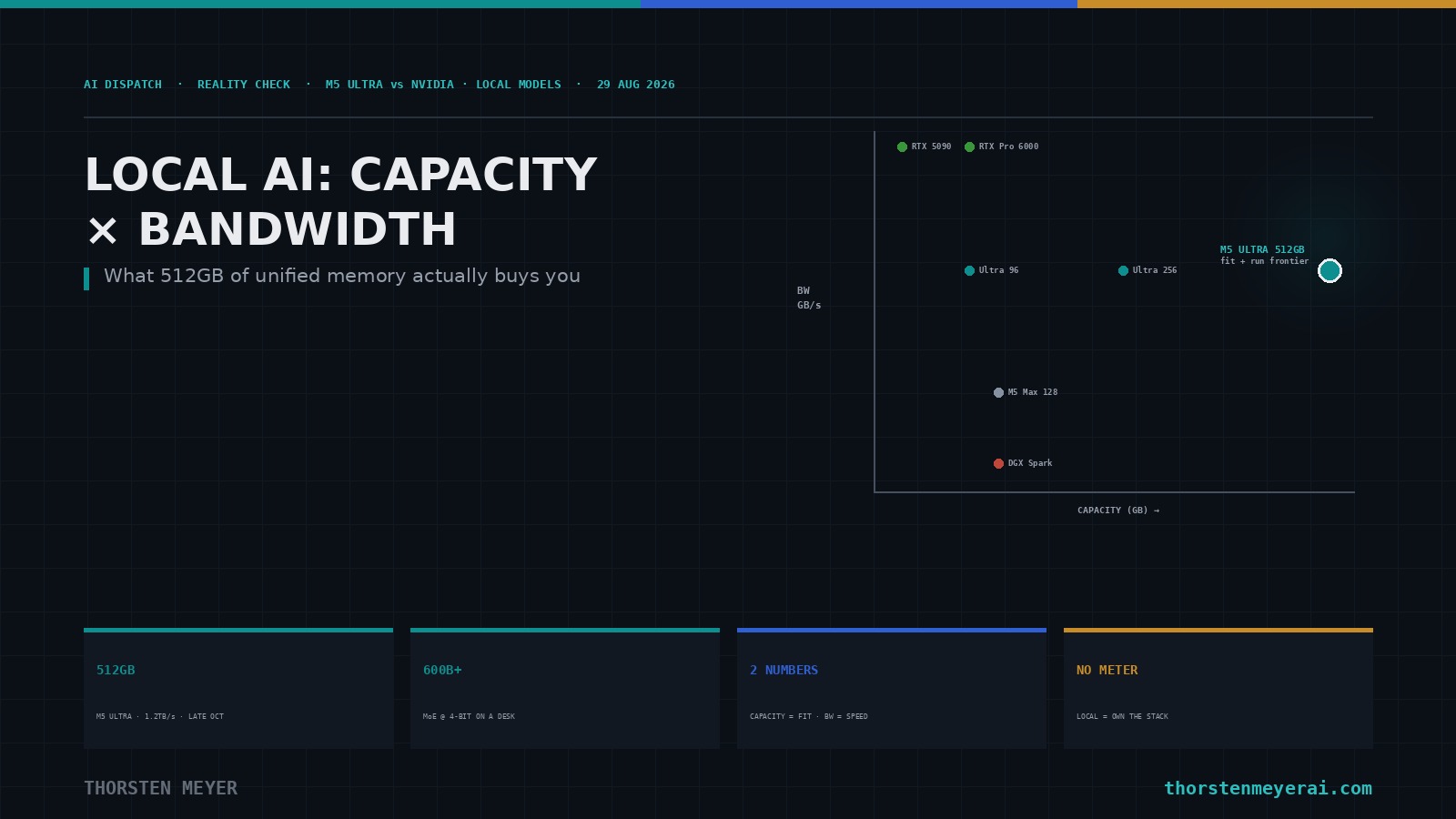
If you want to run large models on your own hardware, the spec sheet everyone stares at is the wrong one to stare at first. People compare teraflops and core counts; the two numbers that actually decide what you can do with a local language model are memory capacity and memory bandwidth, and they do completely different jobs. Capacity decides what you can load. Bandwidth decides how fast it runs. Almost every confused take about local AI hardware comes from collapsing those two into one. So before I put the new M5 Ultra Mac Studio next to NVIDIA’s options, let me fix that frame, because once you hold those two numbers apart, the whole comparison — and what the upcoming 512GB machine makes newly possible — becomes obvious.
First, one correction to the premise, stated plainly because it changes the analysis. The M5 Ultra does not come in a 128GB configuration. Its memory ladder is 96GB, 256GB, or 512GB, and the 256GB and 512GB tiers require the higher 36-core-CPU/80-core-GPU version of the chip. 128GB is the ceiling of the M5 Max, a different and cheaper machine that runs at roughly half the Ultra’s memory bandwidth. That distinction matters a lot for local inference, and I’ll use it.
Capacity decides what you can load. Bandwidth decides how fast it runs. Collapse them into one and every take on local-AI hardware goes wrong. Hold them apart and the field sorts itself.
The two numbers, and why they're different jobs
Capacity is straightforward: a model's weights have to fit in memory the GPU can reach, plus room for the KV cache that grows with your context length. A model's footprint is roughly its parameter count times the bytes per parameter at your chosen quantization — so a 70-billion-parameter model is about 35GB at 4-bit, about 70GB at 8-bit. If it doesn't fit, it doesn't run (or it spills to disk and crawls). Capacity is a hard wall.
Bandwidth is the subtler one, and it's the number that decides your tokens per second. Generating text is memory-bound: for each token, the machine has to read the relevant model weights out of memory, so your decode speed has a ceiling of roughly memory bandwidth divided by the bytes read per token. Real-world throughput lands well under that ceiling, but the ceiling is real and it scales with bandwidth. This is why a card with blazing bandwidth feels fast — and why a big-memory box with slow bandwidth can hold an enormous model and still generate text at a frustrating trickle.
Keep those two apart and here's the whole field at a glance.
| Machine | Memory (GPU-accessible) | Bandwidth | Complete computer | Approx. price (USD) |
|---|---|---|---|---|
| M5 Ultra — 96GB | 96 GB unified | 1,200 GB/s | Yes | from ~$6,799 |
| M5 Ultra — 256GB | 256 GB unified | 1,200 GB/s | Yes | ~$10,800 |
| M5 Ultra — 512GB | 512 GB unified | 1,200 GB/s | Yes | late Oct, unpriced (est. mid-teens) |
| M5 Max — 128GB (for contrast) | 128 GB unified | 614 GB/s | Yes | up to ~$8,900 |
| NVIDIA RTX 5090 | 32 GB GDDR7 | 1,792 GB/s | No (add-in card) | ~$4,400 street |
| NVIDIA RTX Pro 6000 Blackwell | 96 GB GDDR7 ECC | 1,792 GB/s | No (add-in card) | ~$16,000 |
| NVIDIA DGX Spark | 128 GB unified LPDDR5x | 273 GB/s | Yes | ~$4,000–4,700 |
(Prices verified against Apple's configurator math and current NVIDIA street pricing; the 256GB figure is Apple's $6,799 higher-tier chip plus its $4,000 memory upgrade — note this runs above the $9,499 some comparison tables show, which predates Apple's memory price increases. GPU street prices are volatile. The 512GB tier is unpriced and Apple has signaled it costs more than another $4,000 on top of the 256GB build.)
high memory bandwidth GPU for AI inference
As an affiliate, we earn on qualifying purchases.
As an affiliate, we earn on qualifying purchases.
Reading the field through those two numbers
Now the table tells a story instead of just listing parts.
The RTX 5090 is the bandwidth champion — 1,792 GB/s — and a capacity dwarf at 32GB. It will run anything that fits in 32GB faster than anything else here, which for a 4-bit-quantized model means up to roughly a 30B-class model with room for context. Past that, you're into multi-GPU territory, with all the cost, power, complexity, and it-isn't-even-a-computer caveats that implies. Superb for smaller models at speed; not a path to frontier-scale on its own.
The RTX Pro 6000 Blackwell is the "have both" card: the same 1,792 GB/s bandwidth and 96GB of memory. On paper it's the most capable single accelerator here for local LLMs — high speed and enough room for a 70B model at 8-bit or a larger one at 4-bit. The catch is that it's a $16,000 add-in card that still needs a host workstation around it, and 96GB, while generous, is a fraction of what the big Mac holds.
The DGX Spark is the instructive one, because it looks like a Mac competitor and behaves nothing like the big one. It's a complete little computer with 128GB of unified memory — good capacity — but only 273 GB/s of bandwidth. That's the whole story of the machine: it can load a large model its capacity allows and then generate from it slowly, at roughly a quarter of the M5 Ultra's decode ceiling. NVIDIA positions it honestly as a compact development and prototyping appliance, not a speed machine, and that's exactly right. If you want the cheapest complete box that can hold a 128GB-class model to poke at, it's compelling. If you want that model to actually respond briskly, its bandwidth is the ceiling you'll hit.
And the M5 Ultra occupies a quadrant nothing else here reaches: very high capacity and respectable bandwidth, in a complete, quiet computer. Its 1,200 GB/s is about two-thirds of the RTX cards' and roughly 4.4 times the DGX Spark's — while its memory goes up to 512GB, more than five times the RTX Pro 6000 and four times the Spark. It doesn't win the bandwidth race and it doesn't need to; it wins the only race where you both fit a frontier-scale model and run it at a speed a single user finds usable, on one machine you own outright. (Note the contrast with the M5 Max at 128GB: same idea, but 614 GB/s — half the bandwidth — so the Max is the choice for smaller models, the Ultra for large ones.)
512GB Mac Studio M5 Ultra RAM upgrade
As an affiliate, we earn on qualifying purchases.
As an affiliate, we earn on qualifying purchases.
What each Mac tier actually makes possible
Here's the part you asked about — what you can really do — with honest numbers. Treat every throughput figure below as an order-of-magnitude estimate: a theoretical ceiling (bandwidth ÷ bytes-per-token) discounted for real-world efficiency, and dependent on quantization, context length, KV cache, and whether you're running MLX or llama.cpp on Metal. These are not benchmarks; they're the shape of what to expect.
96GB M5 Ultra — comfortably holds a 70B-class model at 8-bit (~70GB) or a larger one at 4-bit, plus mixture-of-experts models whose total weights fit in 96GB. At 1,200 GB/s, a 70B at 4-bit (~35GB read per token) has a decode ceiling near 34 tokens/sec, realistically landing in the mid-teens to low-twenties — perfectly fluid for single-user chat and coding. This tier overlaps the DGX Spark and RTX Pro 6000 on capacity but runs far faster than the Spark and costs far less than the Pro 6000.
256GB M5 Ultra — the sweet spot for most serious local work. It holds models up to the ~200B-class comfortably, and big MoE models at 4-bit with room to spare, along with generous context. This is where you stop thinking about whether a model fits and start just running it.
512GB M5 Ultra — this is the one that does something genuinely new on a desk. At 512GB you can load a frontier-scale mixture-of-experts model in the 600B-plus-parameter class at 4-bit — roughly 340–380GB of weights — with headroom left for the KV cache. Because MoE models only activate a fraction of their parameters per token (often around 37B), the decode math is kind to them: reading ~18GB of active weights per token against 1,200 GB/s gives a ceiling in the sixties of tokens/sec, realistically settling into the tens — conversational speed, for a frontier-class model, running entirely on one quiet box in your office. You can alternatively hold a 400B-class dense model at 8-bit. A year ago that sentence required a rack and a five-figure monthly cloud bill; late this October it requires a single Mac Studio.
local AI hardware for large models
As an affiliate, we earn on qualifying purchases.
As an affiliate, we earn on qualifying purchases.
The honest limits, kept firmly attached
I run local inference for a living, so let me be the one to nail down where the enthusiasm stops, because the capacity number seduces people into forgetting the rest.
Every throughput figure above is single-stream, single-user. The moment you want to serve several people at once, per-user speed drops as you batch, and a desk machine is not a datacenter — this is a magnificent machine for one person (or a small team taking turns) running big models, not for serving production traffic at scale. Prefill — chewing through a long prompt before it starts answering — is compute-bound rather than bandwidth-bound, and here the high-bandwidth NVIDIA cards and their mature kernels often pull ahead, so very long-context work will feel the Mac's limits more than short chats do. The 512GB tier is a five-figure machine arriving late October into a memory-chip shortage, so expect it to be expensive and supply-constrained. And the software ecosystem, while much improved — MLX and llama.cpp on Metal are genuinely good now — still isn't the everything-runs-here maturity of the CUDA world, so some tools and optimizations will lag or need porting.
None of that undercuts the core point. It bounds it.
professional AI workstation with 512GB memory
As an affiliate, we earn on qualifying purchases.
As an affiliate, we earn on qualifying purchases.
Where I land
For raw speed on a model that fits in 32GB, and you already have a PC to host it, the RTX 5090 is the value play. For speed plus 96GB and a serious budget, the RTX Pro 6000 is the workstation-grade answer at workstation-grade cost. For the cheapest complete 128GB box to prototype on when speed isn't the point, the DGX Spark earns its place. But for the specific thing you asked about — loading and actually running frontier-scale models locally, on one machine you own, with your data never leaving the room — the M5 Ultra at 256GB or 512GB is in a category by itself, because it's the only option here that pairs frontier-scale capacity with bandwidth high enough to make that capacity usable.
That's the sovereignty case made concrete, and it's the same one I keep coming back to while the giants consolidate the cloud: run inference locally and there's no meter, no usage dashboard, no contract between two other companies that can cut you off. The 512GB Mac Studio won't replace a GPU cluster for serving the world, and anyone selling it that way is quoting the capacity number and hiding the bandwidth one. But as the first consumer-buyable box that lets one person hold and run a 600B-class model at conversational speed, on their own desk, with no cloud in the loop — it's the most compelling piece of own-it-yourself AI hardware yet, and it arrives in October.
Analysis and opinion from a builder, founder, and post-labor economist running a local-first inference operation. Specifications and pricing verified at time of writing against Apple's newsroom and configurator and reporting from Macworld, MacRumors, AppleInsider, PetaPixel, and others; NVIDIA capacities and bandwidths per the referenced comparison and public specs; GPU street prices are volatile. The M5 Ultra memory ladder is 96/256/512GB (256/512 require the 36-core/80-core chip); 512GB arrives late October and is unpriced. AI-performance and throughput figures are estimates or Apple's own claims, not independent benchmarks; the "capacity vs bandwidth" framework and all tokens/sec estimates are the author's analytical framing and depend heavily on model, quantization, context, and software. This is analysis, not investment advice. Point-in-time as of 29 August 2026.
Halloween Picks
halloween
As an affiliate, we earn on qualifying purchases.