
Sep 30, 2026 · @Thorsten Three

Get business pricing on tech for your team
- Business-only prices and quantity discounts
- Tax-exempt purchasing
- Multiple users, one account, clear invoices
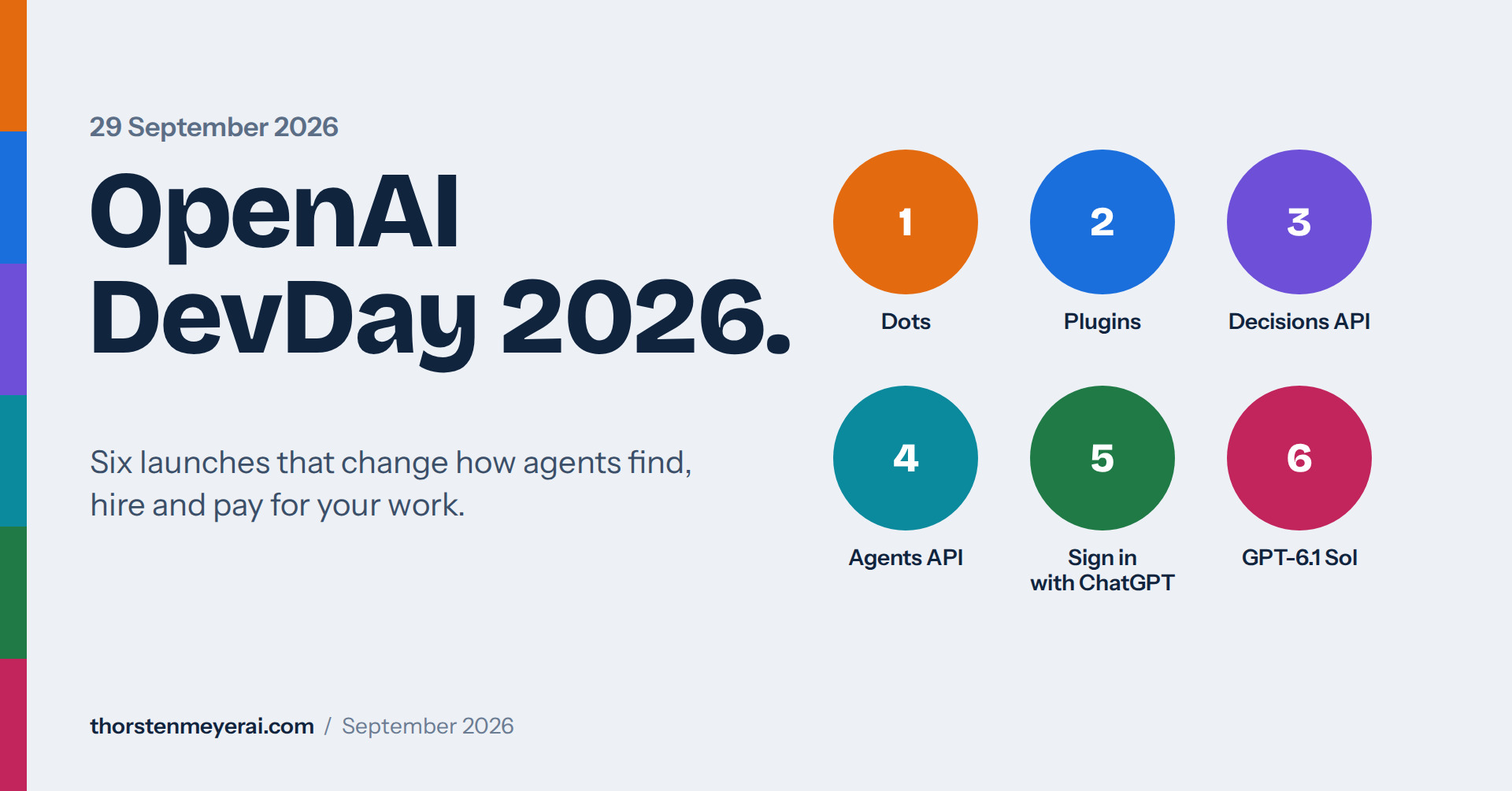
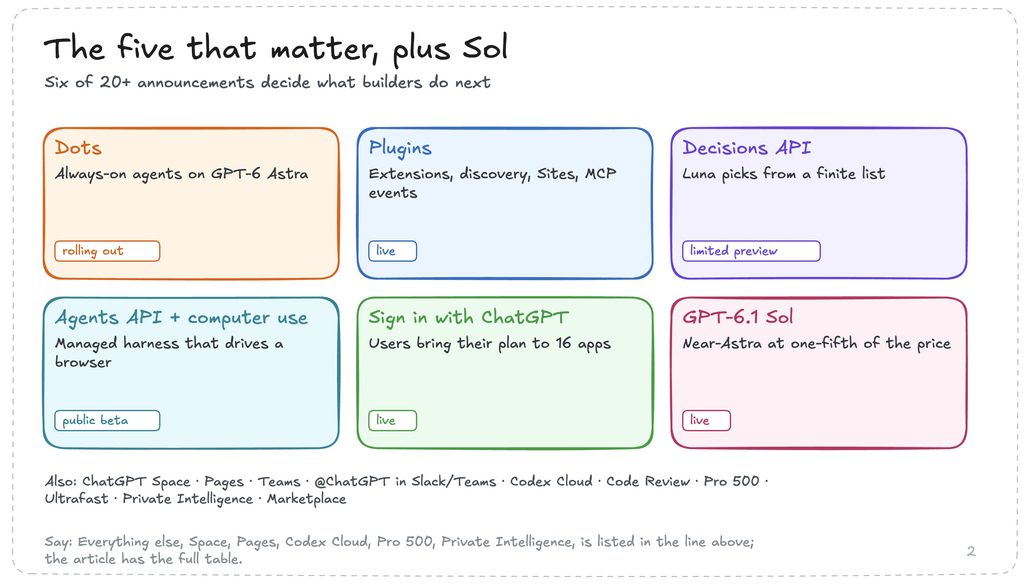
OpenAI used its DevDay on 29 September 2026 to move from chatbot to agent platform. It announced more than 20 products and features, and pitched ChatGPT as a shared surface for humans and agents that reaches 1.2 billion weekly users. Five announcements matter most if you build or sell software:
- Dots are always-on agents powered by GPT-6 Astra. Each has its own cloud computer and browser, and can reach over 4,000 apps through plugins.
- Plugins got a major upgrade: plugin extensions that live inside ChatGPT, a new creator and submission flow, better discovery, Sites that host plugins, and MCP events that trigger automations.
- The Decisions API hands narrow, repetitive choices to Luna, with answers drawn from a finite list you define. It is in limited preview.
- The Agents API now supports computer use, so agents can operate software through its interface. OpenAI runs the Codex harness for you.
- Sign in with ChatGPT lets users bring their existing plan to 16 launch partners, which makes a free core app with paid upsells workable.
OpenAI DevDay 2026 at a glance
The five launches that matter, plus Sol
The rest of the slate
Collaboration
ChatGPT SpacelivePagesliveCollaborative slidesnext few weeksTeams and Team Taskslive@ChatGPT in Slack and TeamsliveMeetings pluginbeta, macOSShareable profilesliveCodex
Codex CloudliveCLI refreshvoice, /agentsCode ReviewliveCodex Security CloudlivePlans, enterprise, speed
Pro 500$500, 25× PlusUltrafastAstra now, Sol soonPrivate IntelligencePrivate Inference this fallBedrock Managed Agentsruns in AWSOpenAI Marketplace32 partners, applyThe model news is GPT-6.1 Sol: near-Astra intelligence at one-fifth of Astra’s token prices. I cover it in its own section, along with Ultrafast, Pro 500 and the rest of the slate.
Dots: OpenAI’s personal agent platform
Dots are OpenAI’s biggest consumer bet. A dot is a persistent agent that works toward your goals around the clock, learns your preferences and standards over time, and keeps several projects moving at once. You name your first dot and make it your own, and OpenAI says it envisions teams of dots working together later.
| Question | Answer |
|---|---|
| What runs it | GPT-6 Astra, with its own cloud computer and browser |
| What it connects to | Over 4,000 apps through plugins; your laptop only if you grant permission |
| Where you reach it | ChatGPT on desktop, web and mobile, plus Slack and Teams. Voice calls work today, texting is coming |
| Who gets it | Pro and Business Premium in eligible markets now. Enterprise, Edu and Healthcare can use a beta once an admin enables it; it is off by default |
| What it costs | The first dot is included in the plan. Chatting with it does not count toward usage limits, but tasks it starts in Codex or ChatGPT Work do. Later you can add dots or buy more speed and monthly output per dot |
What a dot does in practice, per OpenAI’s own examples: it watches customer feedback and returns tested pull requests with videos, revises a launch when scope changes, reruns a scientist’s analysis as new data arrives, and updates a sales proposal as requirements shift. One early tester’s dot noticed he had not invoiced a publication, prepared the invoice and sent it after his approval.
Dots: the personal agent platform
How a dot works
Who gets one, and what dots do
What OpenAI says dots do today
Control is the design constraint. Each dot works on its own cloud computer, so yours stays separate. Dots can use saved passwords without exposing them to the model. Background “proactive research” is limited to read-only tools. Custom Rules let you allow, require approval for or block specific actions, an Activity View shows background work, and monitoring can pause or stop a dot. Certain sensitive tasks, such as changing a password, always stay with you. OpenAI still warns that dots can make mistakes.
Specialist dots are the enterprise version: agents with their own identity, credentials and IT-provisioned hardware, taking on defined responsibilities. OpenAI is starting with pilots in procurement, invoice processing, email marketing, customer support and commercial contracting, and plans a Microsoft Agent 365 integration for governance.
OpenAI doubles down on plugins
Plugins are now the way into ChatGPT, Codex and dots. A plugin bundles reusable skills, connections to external services through MCP servers, and optional UI, and you publish it once to a shared directory. Dots reach over 4,000 apps through this ecosystem, so plugin distribution decides who gets work from agents.
| Announcement | What it means for a builder |
|---|---|
| Plugin extensions | Your plugin gets a home in the ChatGPT sidebar, interactive panels beside the conversation, and viewers for your file types. Figma and Adobe showed integrations |
| Plugin Creator and new submission flow | Easier building, review tracking, clearer feedback and simpler updates to a live plugin |
| Better discovery | Improved ranking and recommendations in the directory and inside conversations. Users choose which plugins to use and approve each one’s access |
| Sites can host plugins | Teammates use the same app with their own connected data and permissions (Business, Enterprise, Healthcare, Edu) |
| MCP events | Support for the proposed MCP Events specification lets a plugin start an automation when something happens in a connected app, such as a new task on a project board |
| OpenAI Marketplace | Eligible enterprise customers can spend part of their OpenAI commitment on 32 launch partners, including Figma, Adobe, Salesforce, ServiceNow, Harvey, CrowdStrike and Baseten |
The developer docs also list conversion specs for restaurant reservations, quote requests and product checkout, and a guide for submitting a Claude Code plugin, which suggests OpenAI wants to accept skills and plugins built for other agent ecosystems.
OpenAI doubles down on plugins
How an agent hires a business
What a plugin is
What changed at DevDay
The metric that decides who gets hired
The strategic point, in the commentary slides you shared: an agent picks a business by outcome, not by brand. The customer asks for a result, ChatGPT understands the job, your plugin is selected, and your business does the work. You can be hired before the customer knows your name, so the question becomes why your plugin was selected or ignored, and that means measuring intent, activation and completion.
The Decisions API: a decision model from OpenAI
The Decisions API applies GPT-6 Luna to a narrow job. You define a set of questions with a finite list of allowed answers, send text or images as context, and get back a selection your app can use to classify content, route requests or choose an agent’s next action. It is in limited preview, with a broad release promised “in the coming days”. OpenAI published no price and no accuracy figure.
Trade press read it as a response to TypeSafe’s Jev, which is a fair inference but not something OpenAI said. What is clear is that the category I have been writing about, models that return typed decisions instead of prose, now has a second major vendor.
| Decisions API (OpenAI) | Jev (TypeSafe) | |
|---|---|---|
| Built on | GPT-6 Luna | Purpose-built decision model |
| Output | A choice from your predefined answers | noul, choice and score answers with confidence |
| Input | Text or images | Text or JSON state |
| Speed | OpenAI claims 150 ms, against 1.6 s for a Luna prompt doing the same job | Vendor: 70 to 500 ms. My fleet: 0.3 to 0.9 s |
| Price | Not published. Luna’s list price is $0.10 in and $0.50 out per 1M tokens | $0.042 per 1M input tokens, output free |
| Availability | Limited preview from 29 September | Public since 15 September |
| Accuracy evidence | None published | My own production measurements, plus TypeSafe’s benchmarks |
The speed numbers are not comparable: one is a vendor claim for the model, the other is what I measure end to end.
The Decisions API vs Jev
OpenAI now sells decisions too
Speed: read with care
Side by side
| Decisions API (OpenAI) | Jev (TypeSafe) | |
|---|---|---|
| Built on | GPT-6 Luna | Purpose-built decision model |
| Answers | A choice from your list | noul, choice and score, each with confidence |
| Input | Text or images | Text or JSON state |
| Price | Not published (Luna: $0.10 in, $0.50 out per 1M) | $0.042 per 1M input, output free |
| Availability | Limited preview, 29 Sep | Public since 15 Sep |
| Accuracy evidence | None published | My production data, plus vendor benchmarks |
What I will do when it opens
What to do about it. Nothing in my method changes. The four-condition fit test and the shadow test decide whether a use case is worth wiring, whichever vendor answers. When the Decisions API opens, replay the same 300 to 500 past decisions through it, compare per confidence band, and check whether its confidence is calibrated, meaning that high-confidence answers really are right about as often as claimed. My 24 use cases are vendor-neutral, and a cascade of rule, decision model, LLM and human works with either.
The Agents API now has computer use
The Agents API entered public beta on 10 September as a managed service that runs the same Codex harness OpenAI uses internally. At DevDay it gained computer use, so an agent can operate software through its interface instead of only calling APIs. OpenAI runs the harness and, if you choose, the sandbox, and charges no extra fee beyond the tokens and tools your agents use.
| Capability | What you get |
|---|---|
| Managed harness | Long-running sessions with automatic context compaction, tool search, programmatic tool calling, and MCP, function and web-search tools |
| Multi-agent | A main agent delegates to parallel subagents, each with its own context |
| Environments | OpenAI-hosted sandboxes, or your own infrastructure, or partners such as Cloudflare, Modal, Vercel, E2B, Daytona and Oracle |
| Computer use | The agent drives a browser in an OpenAI-hosted desktop, with optional screenshots in the session output |
| Elsewhere | Also available in Codex and ChatGPT Work on Pro 500 and Enterprise, and inside AWS through Bedrock Managed Agents |
How computer use is controlled. The browser needs the user’s approval before it reaches each new website origin, including public ones. Your application handles sign-in through a dedicated event that supports email, passwords and verification codes but not passkeys or QR codes, and submitted credentials stay out of the model’s input. Website content is treated as untrusted and cannot grant permission.
Agents API with computer use
Computer use, inside a managed agent
Early customer results
One limit matters for anything consequential: origin approval does not enforce confirmation before individual actions such as purchases or destructive changes. OpenAI’s own guidance is to restrict the hosted browser to resources that cannot do harm, or to run a browser you control.
Early results are vendor-published. OpenAI’s launch post quotes customers reporting a 60% lower cost per case (SafetyKit), 86% fewer failed agent responses after separating harness from sandbox (Hypha), and an evaluation score that rose from 0.71 to 0.85 with a 4x latency reduction from subagents (Ciridae). Treat those as claims to reproduce, not benchmarks.
Sign in with ChatGPT: bring your own plan
Sign in with ChatGPT now does two separate things. It is an identity login that anyone can use, available globally. It is also a way for Plus and Pro subscribers to let a partner app draw on the usage already included in their ChatGPT plan, so the app does not have to pay for inference on that user.
| Sign in only | Use my ChatGPT plan | |
|---|---|---|
| Who can use it | Anyone with a ChatGPT account | Plus and Pro subscribers |
| What the app gets | Identity, and faster plugin connection | Eligible AI requests billed to the user’s plan |
| What it draws on | Nothing | The ChatGPT Work and Codex usage in the plan |
| Who sets limits | Not applicable | The user, as a weekly cap per app, shown under Settings > Usage |
| Partners at launch | 5, including Airtable, Canva, GitLab, HubSpot and Supabase | 16, including Devin, Notion, Vercel, T3, OpenClaw, Dactyl, Amp, Warp and OpenCode; Lovable is coming soon |
The guardrails are explicit. Apps do not get access to the user’s conversations or memories. Plan usage does not reserve capacity or raise the user’s overall limits, and when the whole plan runs out, apps stop unless the user has allowed them to use credits.
Sign in with ChatGPT: bring your own plan
Two permissions, one sign-in
Why this changes the business model
illustrative
before other costs
Sell workflow, not tokens
Who takes part at launch
Why this changes the business model. Until now, a niche AI app often had to charge enough to cover its own model bill. The commentary slides you shared put it this way: if a user pays $10 a month while consuming $8 of inference, the business barely works, but if users bring their ChatGPT plan, a company can focus on a narrow workflow without carrying the model bill. The consequence is that a free core app with paid upsells becomes workable, because the free tier no longer costs you inference. You sell workflow instead of tokens.
The same slides list what is worth paying for once tokens are out of the price: proprietary information, a specialist workflow, access to outside systems, collaboration and auditability, a network of humans or suppliers, and a measurable business result. Their examples are deliberately narrow: an agent that cleans architectural CAD files, a researcher that monitors one scientific field, a Shopify catalog cleanup desktop app, a video tool built around one repeatable editing workflow, and a contract-review tool for one type of franchise agreement. The opportunity, in their words, is products too niche to become OpenAI features but valuable enough for a small audience to pay for.
Limits to plan around. Only Plus and Pro users can bring a plan, so Free and Go users cannot. The plan usage is the Work and Codex allowance, not general chat. Each user can cap your app, so heavy use can be throttled by the person you are serving. And OpenAI launched with a limited partner set, so developers apply to take part.
GPT-6.1 Sol, Ultrafast and the new plans
GPT-6.1 Sol is the model story of the day. OpenAI calls it near-Astra intelligence for coding, computer use and professional work, at one-fifth of Astra’s standard token prices.
| Model | Input per 1M | Cached input per 1M | Output per 1M |
|---|---|---|---|
| GPT-6 Astra | $10 | $1 | $50 |
| GPT-6.1 Sol | $2 | $0.10 | $10 |
| GPT-6 Luna | $0.10 | $0.01 | $0.50 |
Sol is available to Plus, Pro, Business, Enterprise and Edu users in ChatGPT Work and Codex, and through the API as gpt-6.1-sol. It is not yet in regular Chat.
GPT-6.1 Sol
Near-Astra intelligence at one-fifth of the price
Output $50
Cached input $1
Output $10
Cached input $0.10
Output $0.50
Cached input $0.01
The independent view
What OpenAI claims
Cost per task, Terminal-Bench Science (max effort)
What OpenAI claims (vendor-reported; competitor scores come from public reports):
- On DeepSWE v1.1 it matches Astra at roughly one-fifth of the cost.
- On GDP.pdf it scores above Opus 5.5 with fallbacks at less than half the cost per task, and near Astra at about one-fifth.
- On AutomationBench it beats Opus 5.5 at medium effort by 2.2 points at about a third of the cost.
- On OSWorld 2.0 it comes within 2.1 points of Astra at roughly one-seventh of the cost per task.
- On Terminal-Bench Science it costs $5.47 per task against $23.21 for Opus 5.5 and $23.80 for Astra, though Astra still scores highest at 68.1%.
- Factual errors on hard prompts fall from 11.4% to 7.7% at low effort.
The independent view. On the Artificial Analysis Intelligence Index (v4.3.2), Sol scores 48 at medium for $0.21 per task, 50 at high for $0.32 and 51 at xhigh for $0.39. That is 1 to 2 points under Astra and Fable 5.1 (both 53 at max) and 5 under Opus 5.5 at xhigh (56), at a fraction of the cost. It is also concise, but its first token takes 57 to 69 seconds at high and xhigh.
Where I use it: Opus 5.5 at high or xhigh stays my main model. Sol is the model I use to dig into details and to review, because at $0.32 to $0.39 per task a second opinion on every change is affordable.
Speed and plans
- Ultrafast is a paid speed tier with up to 8× faster generation (300 tokens per second) in Codex and up to 6× in the API. Astra Ultrafast is live in the API and on Pro 500 and Enterprise. Sol Ultrafast is promised within days.
- Pro 500 costs $500 a month, gives 25× the Plus allowance and includes Ultrafast.
- Pro 200 reopened, with less usage. The Next Web reports that from 30 October its Work and Codex allowance falls from 20× to 10× Plus, existing subscribers keep current limits until 29 October and get a one-time $2,500 credit, and the five-hour limit will not return. An earlier BGR report said existing subscribers would keep 20× for an unspecified period, so check the help page.
- Latency: OpenAI reports 45% lower API time to first token and over 30% faster tool calls and workflows.
Everything else announced or shared
OpenAI counted more than 20 announcements. The rest of the slate falls into four groups: team collaboration, Codex, enterprise and security, and distribution.
| Group | Announcement | Details and availability |
|---|---|---|
| Collaboration | ChatGPT Space | A shared home where teammates, ChatGPT and dots keep files and project context. Pro, Business and Enterprise on desktop and web |
| Collaboration | Pages | Editable documents built for people and agents together, including charts and interactive tools |
| Collaboration | Collaborative slides | Multi-editor decks with comments, exportable to PowerPoint or Google Slides. Coming in the next few weeks |
| Collaboration | Teams and Team Tasks | Share pages, slides and plugins, and assign recurring work. Business and Enterprise |
| Collaboration | @ChatGPT in Slack and Teams | Mention it in a channel, thread or DM; teammates need no individual license. Business and Enterprise |
| Collaboration | Meetings plugin | Notes and action items saved to Space; audio is deleted once notes are ready. Beta on macOS for Pro and Business |
| Collaboration | Shareable profiles | One page showcasing your Sites and plugins |
| Codex | Codex Cloud | Tasks run while your laptop is closed, from any device, with reusable team environments |
| Codex | CLI refresh | Two-way voice, an /agents view for tracking several tasks, better session and worktree handling |
| Codex | Code Review | Summaries, diffs and questions about changes; automatic first-pass reviews in the cloud |
| Codex | Codex Security Cloud | Scheduled or on-demand repository scans that investigate findings, remove duplicates and prepare fixes |
| Enterprise | Private Intelligence | Zero Data Retention with Private Safety Processing now; a Private Inference preview with confidential computing this fall |
| Enterprise | Bedrock Managed Agents | OpenAI-powered agents that run entirely inside AWS |
| Enterprise | OpenAI Marketplace | Spend part of an OpenAI commitment on 32 partners such as Figma, Salesforce, Harvey and CrowdStrike |
| Distribution | Plugins, Sites, MCP events, Sign in with ChatGPT | Covered above |
Plans, speed and dates to watch
The usage ladder
Ultrafast
Dates to watch
A few other things surfaced around the keynote. OpenAI said the ChatGPT surface reaches 1.2 billion weekly users. It briefly mentioned an OpenClaw enterprise harness without detail and announced a worldwide usage reset at the end. Sam Altman teased AI hardware as “something that’s worth waiting for” and an agent safety platform similar to Nvidia’s, according to Axios. Axios also noted the launch came the same week OpenAI said, citing the New York Times, that it would not release its newest flagship model, GPT-6.1 Astra, because of security concerns.
What it means for builders
The pattern across all five key announcements is the same: the model will own the decision, so build what happens before and after it. Models keep getting cheaper, and the Decisions API now sells the decision itself as a product.
Where to build the moat
Own two of three
Where this week’s launches land
Two product ideas
Money: Transaction fee
Moat: Supply and quality history
Money: Agency work becomes software
Moat: Intent-to-conversion data
How to get there
The commentary slides you shared turn this into a rule: own two of three, trigger, action and feedback. If all you own is the decision, a better model can replace you.
| Step | What happens | What to own |
|---|---|---|
| 1. Trigger | An invoice becomes due, inventory runs low, it is tax time | The event that starts work |
| 2. Decision | What should happen next? | Nothing: models get cheaper |
| 3. Action | Correct and submit | The ability to do the work |
| 4. Feedback | Approved or rejected? | The outcome, and the data on it |
The same slides sketch two product ideas that fit this week’s launches:
| Real-world work API | Agent distribution | |
|---|---|---|
| Idea | Agents send structured jobs to vetted specialists, such as permit expediters or customs brokers | Learn why your plugin was selected or ignored |
| Test | Can a job arrive as structured input and end as a verified result? | Intent, then activation, then completion |
| Money | Transaction fee | Agency work becomes software |
| Moat | Supply and quality history | Intent-to-conversion data |
They add a path for both: service first, then exceptions, then rules, then software.
My own reading of the week:
- Treat plugins as your storefront. Build an outcome-shaped plugin and MCP server, then measure selection, activation and completion. Dots make agents your biggest new channel.
- Try Sign in with ChatGPT if you sell a narrow workflow to Plus and Pro users, and design the free tier around the fact that users can cap you.
- Watch the Decisions API when it opens, and shadow-test it against Jev and your current model on the same past decisions.
- Pilot computer use only with limits. Approval is per origin, not per action, so keep consequential steps outside the hosted browser.
- Keep a two-model stack. Opus 5.5 builds, GPT-6.1 Sol reviews, and the price of a second opinion is now small.
Dates to watch: the Decisions API broad release (“in the coming days”), Sol Ultrafast, collaborative slides (next few weeks), the Pro 200 change on 30 October, and Private Inference this fall.
Sources
Checked on 30 September 2026. Where OpenAI is the source, the figures are its own claims.
- DevDay 2026 Recap, Introducing dots, Introducing GPT-6.1 Sol and Introducing the Agents API, OpenAI
- DevDay 2026 announcements and developer resources, OpenAI Developer Community
- Computer use in the Agents API and Plugins, OpenAI Developers
- Using your ChatGPT plan in other apps and sites, OpenAI Help Center
- OpenAI answers TypeSafe’s Jev with a Decision API built on Luna and OpenAI makes Sign in with ChatGPT a way to use your subscription in third-party developer tools, The New Stack
- OpenAI halves Pro 200 usage and launches a $500 ChatGPT plan at DevDay, The Next Web
- The 5 biggest announcements from OpenAI’s blockbuster AI conference, Axios; DevDay 2026 live updates, CNBC; Everything OpenAI Announced At DevDay 2026, BGR
- OpenAI DevDay 2026: every announcement, with prices and availability, DEV Community
- GPT-6.1 Sol index scores and cost per task: Artificial Analysis model pages, checked 29 September 2026
- Commentary slides on agent hiring, Sign in with ChatGPT and where to build the moat: shared by the author, source presenter not identified
Fall Picks
fall essentials
As an affiliate, we earn on qualifying purchases.