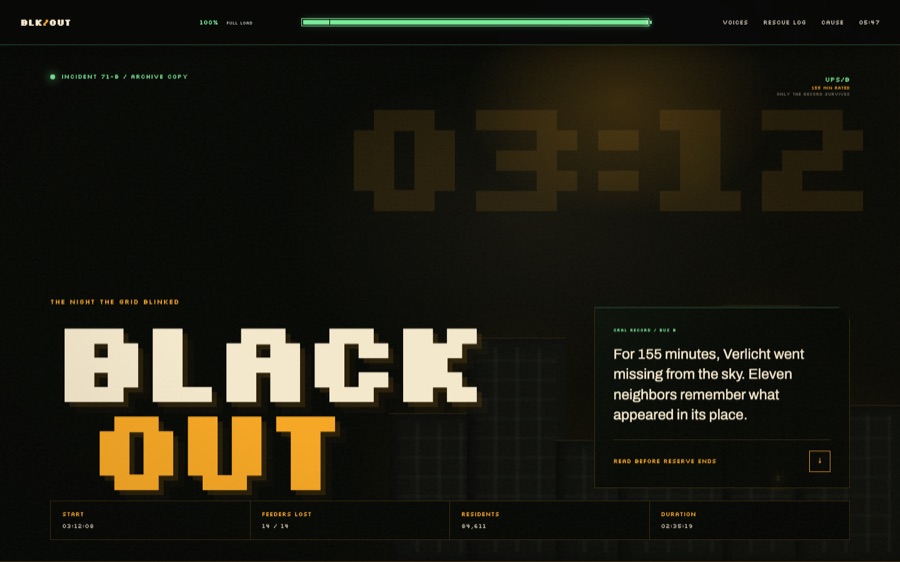
Automation pages are usually designed around the moment everything works. BLACKOUT starts at the more revealing moment: a system has run low on what it needs, and the interface must decide what to show, what to preserve, and when to recover.

Get business pricing on tech for your team
- Business-only prices and quantity discounts
- Tax-exempt purchasing
- Multiple users, one account, clear invoices
Set in a late-night field manual, the page turns resource depletion into its central narrative technique. Capacity fades in stages; status, language, and visual rhythm carry the reader through the failure instead of pretending it is a brief interruption. The result makes scarcity legible without reducing it to a progress bar or an alarm.
For people building AI tools and automated workflows, that framing raises a practical design question: when an operation is running on reserve, how can the interface earn trust while the system is still finding its way back? BLACKOUT explores the answer through a carefully paced page experience, where recovery is something the reader witnesses rather than a switch flipped behind the scenes.
The full case study unpacks the choices behind that progression, from the first signs of strain to the moment the page begins to feel whole again. And there’s one detail in that return that changes how the entire failure reads…
Read the full design teardown → · Visit the live room
uninterruptible power supply (UPS) for computers
As an affiliate, we earn on qualifying purchases.
As an affiliate, we earn on qualifying purchases.
visual indicator for system resource depletion
As an affiliate, we earn on qualifying purchases.
As an affiliate, we earn on qualifying purchases.
As an affiliate, we earn on qualifying purchases.
As an affiliate, we earn on qualifying purchases.
Halloween Picks
halloween
As an affiliate, we earn on qualifying purchases.