What can Claude for Word do in practice for lawyers and knowledge workers?
Based on the official feature set and the article context, here’s what Claude for Word can do in practice:
Contract review and redlining
A lawyer drops a counterparty’s draft into Word and asks Claude to summarise the key commercial terms — parties, governing law, payment terms, anything off-market. Claude reads the whole document, understands multi-level legal numbering, defined terms, and cross-references, then returns an answer with clickable citations pointing to the exact sections. The lawyer can then ask it to flag every provision that deviates from standard market position, ranked by severity. That triage task, which might take a paralegal two hours, runs in seconds as a first pass.
ThorstenmeyerAI.com · Analysis · April 2026
Redlines in seconds, citations in one click
What Claude for Word actually does inside a contract. Six distinct capabilities, each targeting a specific layer of document work that lawyers and knowledge workers spend real, billable time on every day.
The compression in numbers
Six capabilities, six layers of document work
Time compression by task type
How it fits into an existing workflow
Time savings by task: total hours across a typical M&A review cycle
Time estimates are illustrative, based on practitioner benchmarks and published legal workflow research. Task durations reflect unassisted first-pass times reported in Thomson Reuters Legal Tracker surveys and ILTA legal technology adoption studies. Claude for Word times represent AI-assisted first-pass duration requiring subsequent lawyer review and sign-off. All figures are directional; actual compression depends on document complexity and firm-specific workflow.
Tracked-change editing
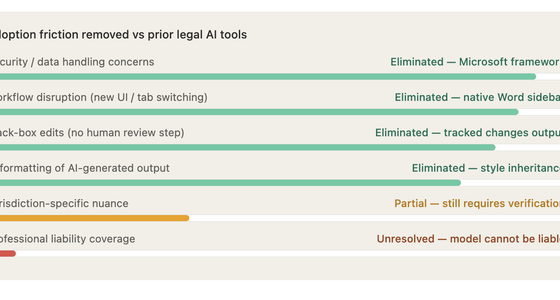
This is the feature that matters most for professional workflows. Rather than rewriting text directly, Claude outputs every edit as a tracked change in Word's native review pane. The lawyer sees exactly what changed, in the format they already use for collaboration, and accepts or rejects each revision individually. When a lawyer asks Claude to "make the indemnification clause mutual," the change lands as a redline, not as a surprise substitution. This keeps the human in the loop in a way that feels like working with a very fast colleague rather than handing off to a black box.
Working through comment threads
This is underrated. Junior associates spend significant time working through a document's comment threads — reading what a reviewer flagged, editing the anchored text accordingly, and replying to confirm what changed. Claude can do that loop autonomously across an entire document. It reads the comment, edits the relevant clause, and replies to the thread with a note on what it did. For a heavily commented counterparty draft, that can compress hours into minutes.
Template drafting with style inheritance
Claude can fill a template with drafted content that inherits the document's existing heading styles, paragraph formatting, and numbering. This matters because one of the friction points with generic AI drafting is that the output arrives unstyled and has to be reformatted by hand. Claude for Word skips that step — the drafted text arrives already conforming to the document's structure.
Semantic navigation
Rather than keyword search, Claude can find "every provision touching indemnification" or "all clauses that reference the governing law" using semantic understanding. In a 150-page agreement with complex cross-references, that kind of intelligent navigation is genuinely useful and not something a Ctrl+F search can replicate.
Cross-document context
Claude for Word shares context with Claude for Excel and PowerPoint in the same conversation. In practice that means a lawyer can ask Claude to pull figures from a financial model in Excel into a transaction memo in Word, or reference a PowerPoint term sheet while drafting a long-form agreement. For M&A or financing work where multiple documents live in parallel, this is a meaningful workflow compression.
The honest caveat is the one Anthropic states directly: Claude recognises common document patterns, but you should always verify outputs against your firm's standard positions. It is still an LLM — it does not carry professional liability, it can miss jurisdiction-specific nuance, and it does not know your client's specific risk tolerance unless you tell it. The value is in compressing the mechanical layer of document work so the lawyer's judgment goes further, not in replacing that judgment.

Microsoft Word 2007 Old Version
- Document creation and sharing: Helps create and share professional documents
- User-friendly interface: Easy-to-use writing tools included
- Efficient document assembly: Predefined parts and styles for quick construction
As an affiliate, we earn on qualifying purchases.
As an affiliate, we earn on qualifying purchases.

The AI-Powered Paralegal: Practical Tools and Prompts for Legal Research, Contract Review and Document Drafting (: The Paralegal AI Trilogy Book 2)
As an affiliate, we earn on qualifying purchases.
As an affiliate, we earn on qualifying purchases.

Financial Power of Attorney Kit – DIY Legal Forms with Sample Documents
- Complete Financial Power of Attorney: Includes comprehensive legal form for finances
- Customizable Fill-in Sections: Labeled areas for personal details and specifics
- Legally Authorizes Financial Decisions: Ensures valid decision-making and transactions
As an affiliate, we earn on qualifying purchases.
As an affiliate, we earn on qualifying purchases.
automated redlining tools for Word
As an affiliate, we earn on qualifying purchases.
As an affiliate, we earn on qualifying purchases.