
For the best computers, tablets & components in this mixed 2026 lineup, I rank the Apple iPad 11-inch with A16 as the best overall pick because it gives the broadest mix of speed, app quality, storage headroom, and long-term usefulness. The Samsung Galaxy Tab A11+ is the stronger Android value, while the Fusion5 Helios 12 makes more sense for buyers who want a Windows tablet with a larger 2K display, stylus, and laptop-like storage. The main tradeoff is platform choice: iPadOS is smoother for apps and family use, Android can cost less and expand storage, and Windows works better when desktop apps matter. Older renewed models such as the iPad 7th Generation and Surface Go 2 can save money, but their age, storage limits, and accessory costs matter more than their brand names. Continue reading for the full breakdown of which pick fits each buyer type.
Key Takeaways
- I put the Apple iPad 11-inch with A16 first because it has the fewest large compromises: current performance, 128GB starting storage, polished apps, and a longer runway than the renewed 7th-gen iPad.
- I rank the Samsung Galaxy Tab A11+ as the best Android value because it feels like a safer long-term buy than the URAO X109, even if the URAO spec sheet looks aggressive.
- I separate the Windows picks by buyer type: Fusion5 Helios 12 for the richest feature set, Surface Go 2 for compact Windows polish, QAZIPO for a keyboard-in-box bargain, and the 10.1-inch Windows tablet for light backup use.
- I treated RAM and storage claims carefully because 12GB RAM and 512GB SSD storage do not cancel out a low-power processor, older chip, or weaker support path.
- I would only recommend rugged or ultra-budget models for specific needs: the Fusion5 WIN PRO Rugged for field use, the iPad 7th Generation for a cheap Apple entry, and the URAO X109 for low-cost Android basics.



More Details on Our Top Picks
Apple iPad (7th Generation), 10.2-Inch, Wi-Fi, 32GB, Space Gray (Renewed)
I would rank the Apple iPad 7th Generation as the safest low-cost tablet here because it offers iPadOS polish, a familiar 10.2-inch screen, and Touch ID without asking buyers to gamble on a lesser-known platform. Compared with the URAO X109, it has far less storage flexibility, but it should appeal more to buyers who value app quality, accessory support, and long-term familiarity over raw spec claims. Against the QAZIPO 2-in-1, it is less useful as a laptop stand-in because there is no included keyboard and only 32GB of storage. The renewed status and 90-day warranty also make it a value pick with a clear caveat: this is better for streaming, school apps, notes, and light work than for large media libraries or desktop-style productivity.
Pros:- Familiar iPadOS app ecosystem and accessory support
- 10.2-inch display gives more room than smaller budget tablets
- Touch ID adds simple biometric security
- A10 Fusion chip is suitable for light everyday use
Cons:- 32GB storage is tight for games, videos, and offline files
- Renewed unit carries only a 90-day limited warranty
- No cellular option in this configuration
Best for: Apple users, students, and families who want an affordable iPad for streaming, notes, browsing, and school apps.
Not ideal for: Buyers who store lots of downloads or need laptop-style multitasking, since 32GB fills quickly and Wi-Fi is the only connectivity.
- Brand:Apple
- Model:iPad 7th Generation
- Display:10.2-inch
- Storage:32GB
- Connectivity:Wi-Fi
- Processor:A10 Fusion chip
- Rear Camera:8MP
- Battery Life:Up to 10 hours
Bottom line: This is the pick I would choose for a low-cost Apple tablet, as long as storage demands stay modest.
QAZIPO 2-in-1 Laptop Tablet with Magnetic Keyboard, 12″ 2K IPS Touchscreen, 12GB RAM, 512GB SSD, Intel Pentium Gold 6500Y Processor, Windows 11
The QAZIPO 2-in-1 Laptop Tablet earns its spot by giving buyers a fuller work setup than most tablets in this batch: Windows 11, a magnetic keyboard, 12GB RAM, and a 512GB SSD. Compared with the 10.1-inch Windows 11 Tablet, it has a sharper 12-inch 2K display, more storage, and more memory, making it better for documents, browser tabs, and light creative work. It also feels more productivity-focused than the Samsung Galaxy Tab A11+, which is stronger for media and casual Android use. The tradeoff is the Intel Pentium Gold 6500Y processor; it suits everyday workloads, not heavy editing, gaming, or demanding workstation tasks. I would treat it as a portable mini laptop first and a tablet second, especially because the port selection is still fairly lean.
Pros:- Includes magnetic keyboard for laptop-style work
- 512GB SSD gives far more room than most budget tablets
- 12GB RAM supports smoother multitasking
- 2K IPS touchscreen with 100% sRGB suits reading and visual work
Cons:- Pentium Gold processor is not built for heavy workloads
- Limited ports may require adapters
- Small 12-inch format can feel cramped for all-day desk work
Best for: Students and remote workers who want a compact Windows device with a keyboard, roomy storage, and Office included.
Not ideal for: Power users editing video, running heavy software, or needing several full-size ports, since the processor and connectivity are limited.
- Display:12-inch 2K IPS touchscreen
- Color Coverage:100% sRGB
- RAM:12GB
- Storage:512GB SSD
- Processor:Intel Pentium Gold 6500Y, up to 3.4GHz
- Operating System:Windows 11 Home
- Ports:USB-C, Micro HDMI, headphone jack
- Weight:1.4 lbs
- Included Software:Office 365 1-year subscription
Bottom line: This is my value pick for buyers who need Windows productivity in a small, keyboard-ready package.
URAO X109 10.1″ Android 16 Tablet with Octa-core Processor, 30GB RAM, 128GB ROM
The URAO X109 sits below the Samsung in brand confidence but above basic tablets in storage flexibility. Its strongest argument is 128GB built-in storage with expansion up to 1TB, which makes it more practical for downloaded shows, school files, and shared family use than the Apple iPad 7th Generation with 32GB. Compared with the Samsung Galaxy Tab A11+, it lacks the same display smoothness, speaker system, warranty strength, and broader ecosystem appeal. I would also read the 30GB RAM claim carefully, since it combines physical and virtual memory rather than matching laptop-class RAM behavior. Still, Wi-Fi 6, Bluetooth 5.4, fast charging, and a low-blue-light IPS panel make this a sensible Android choice for buyers who want capacity and simple media use at a likely lower price.
Pros:- 128GB storage expands up to 1TB by TF card
- Wi-Fi 6 and Bluetooth 5.4 are strong for a budget Android tablet
- Fast 1.5-hour charging helps with shared family use
- Low-blue-light IPS display is useful for reading and streaming
Cons:- 30GB RAM figure may overstate real-world performance
- 1280×800 resolution is modest for a 10.1-inch screen
- No built-in GPS
Best for: Budget Android buyers who download lots of media and want expandable storage for travel, kids, or shared household use.
Not ideal for: Buyers who want a premium screen, GPS, a known long-term update path, or Apple account sharing.
- Brand:URAO
- Model:X109
- Display:10.1-inch HD IPS
- Resolution:1280×800
- RAM:30GB listed, 6GB plus 24GB virtual
- Storage:128GB, expandable up to 1TB
- Processor:2GHz octa-core Allwinner
- Wireless:Wi-Fi 6, Bluetooth 5.4
- Battery:Up to 8 hours, 1.5-hour fast charge
Bottom line: This is the Android pick I would choose for storage-heavy casual use, not for buyers chasing premium polish.
10.1″ Windows 11 Tablet with 6GB RAM, 128GB Storage, Intel Processor
The 10.1-inch Windows 11 Tablet is the most stripped-down Windows option in this group, and that is also its purpose. Compared with the QAZIPO 2-in-1, it gives up the larger 2K screen, 12GB RAM, 512GB SSD, and included keyboard, so it is less convincing as a laptop replacement. What it offers instead is Windows compatibility in a smaller, simpler tablet with USB 3.0, Micro HDMI, Bluetooth 5.0, and microSD expansion. The claimed up to 12-hour battery life is its biggest practical advantage over the QAZIPO and URAO models for light mobile work. I would choose it only for basic browser tasks, forms, remote access, or travel use. The plastic shell and unspecified display quality keep it from feeling like a premium computer.
Pros:- Runs Windows 11 Home for desktop app compatibility
- Up to 12 hours of battery life suits mobile work
- USB 3.0 and Micro HDMI add useful wired options
- microSD expansion helps stretch the 128GB storage
Cons:- No included keyboard listed, unlike the QAZIPO model
- Plastic shell may feel less durable or premium
- No stated high-resolution display or camera details
Best for: Traveling workers who need a small Windows tablet for light apps, web tools, forms, and remote desktop access.
Not ideal for: Students or professionals who need a primary laptop, since the small screen, 6GB RAM, and 128GB storage limit headroom.
- Display:10.1-inch
- Operating System:Windows 11 Home
- RAM:6GB
- Storage:128GB
- Expanded Storage:Up to 408GB with microSD
- Battery:6000mAh, up to 12 hours
- Connectivity:Wi-Fi, Bluetooth 5.0
- Ports:USB 3.0, Micro HDMI
Bottom line: This is the right fit when Windows matters more than speed, screen quality, or premium build.
Samsung Galaxy Tab A11+ 6GB RAM, 128GB Storage
The Samsung Galaxy Tab A11+ is the most balanced Android media tablet in this batch. Compared with the URAO X109, it trades headline storage-expansion bravado for a stronger everyday package: an 11-inch display with up to 90Hz, Dolby Atmos quad speakers, AI features such as Google Gemini and Circle to Search, and a longer two-year warranty. It is less work-focused than the QAZIPO 2-in-1 because it lacks Windows and a bundled keyboard, but it should feel smoother for streaming, reading, browsing, and video calls. The 6GB RAM and 128GB expandable storage are sensible rather than flashy. My main cautions are the missing battery-capacity detail and the separate 25W charger requirement, which makes the fast-charging promise less complete out of the box.
Pros:- 11-inch display with up to 90Hz refresh rate feels smoother than basic panels
- Quad speakers with Dolby Atmos suit movies and calls
- 128GB expandable storage is practical for apps and media
- Two-year warranty adds confidence compared with shorter renewed coverage
Cons:- 25W wall charger is required separately for fast charging
- No specific battery capacity is provided
- Android tablet workflow is less desktop-like than Windows options
Best for: Android users who want a larger tablet for streaming, reading, video calls, casual games, and smart search features.
Not ideal for: Buyers who need Windows software, a physical keyboard setup, or full charging speed without buying an extra adapter.
- Display:11-inch
- Refresh Rate:Up to 90Hz
- RAM:6GB
- Storage:128GB expandable
- Speakers:Quad speakers with Dolby Atmos
- Front Camera:5MP
- Charging:Fast charging support; 25W charger sold separately
- Warranty:2 years
Bottom line: This is my pick for buyers who want the best casual Android tablet experience in this set.
Fusion5 WIN PRO Rugged Windows 11 Tablet – 12GB RAM, 512GB SSD, Intel 13th Gen
I rank the Fusion5 WIN PRO Rugged Windows 11 Tablet as the lineup’s field-work pick because it gives buyers a Windows 11 Pro machine with shockproof, dustproof construction, a 500-nit 10.1-inch screen, and a warranty that covers accidental damage. Compared with the Microsoft Surface Go 2, it is less about slip-into-a-bag portability and more about surviving warehouse carts, outdoor checklists, and shop-floor apps. It also feels more purpose-built for rough settings than the Fusion5 Helios 12, even though the Helios has the sharper 12-inch 2K display. The tradeoff is bulk and price: I would not choose it for couch browsing or class notes. Its 12GB RAM and 512GB SSD make sense when Windows apps and local files matter more than elegance.
Pros:- Rugged shockproof and dustproof build
- 2-year warranty includes accidental damage coverage
- 12GB RAM and 512GB SSD suit Windows productivity apps
- 6000mAh battery with 30W Type-C fast charging
Cons:- Heavier and less sleek than standard consumer tablets
- Higher price than basic Windows or Android tablets
- 10.1-inch screen is smaller than the Fusion5 Helios 12
Best for: Field technicians, warehouse teams, and outdoor workers who need a Windows tablet that can handle knocks, dust, and accidental damage.
Not ideal for: Students or home users who mainly want a light tablet for reading, streaming, and casual notes.
- Processor:Intel 13th Gen Alder Lake N100
- RAM:12GB
- Storage:512GB SSD, expandable with MicroSD
- Display:10.1-inch Full HD IPS, 500 nits
- Operating System:Windows 11 Pro
- Battery:6000mAh with 30W Type-C fast charger
- Connectivity:Dual-band WiFi, Bluetooth 5.0
- Warranty:2 years, including accidental damage
- Durability:Shockproof and dustproof
Bottom line: I would pick this for work sites and industrial use where durability matters more than slim design.
Microsoft Surface Go 2 – 10.5″ Touch-Screen Laptop (Intel Core m3, 8GB RAM, 128GB SSD, Windows 11 Pro) – Platinum (Renewed)
I place the Microsoft Surface Go 2 as the best ultraportable Windows option because its 1.15-pound frame and 10.5-inch PixelSense display are better suited to travel, meetings, and note-heavy days than the rugged Fusion5 WIN PRO. It gives up the WIN PRO’s 512GB storage and damage-focused warranty, and it cannot match the Fusion5 Helios 12 for ports or display size. What it offers instead is a familiar Surface format, Windows 11 Pro, and a cleaner handheld-to-desk setup for buyers who prize weight over raw capacity. I would be careful about the renewed status and the separate Type Cover cost, since those affect the final price. Still, 8GB RAM and a 128GB SSD are enough for light productivity, browser work, and streamed media.
Pros:- Very light 1.15-pound design
- Sharp 1920 x 1280 PixelSense display
- Runs Windows 11 Pro in a compact Surface form
- Up to 9 hours of battery life
Cons:- Type Cover and accessories are sold separately
- 128GB SSD is tight for large files or many installed apps
- Renewed status may not suit buyers who only want new hardware
Best for: Traveling professionals and students who want the lightest practical Windows tablet for notes, email, web apps, and video calls.
Not ideal for: Buyers who need lots of local storage, included keyboard hardware, or a brand-new device with no refurbishment concerns.
- Display Size:10.5 inches
- Resolution:1920 x 1280, 216 ppi
- Processor:Intel Core m3 up to 3.4GHz
- RAM:8GB
- Storage:128GB SSD
- Operating System:Windows 11 Professional
- Weight:Starting at 1.15 lbs
- Battery Life:Up to 9 hours
- Ports:USB-C, headphone jack, Surface Connect, MicroSDXC reader
Bottom line: I would choose this when low weight and Windows compatibility matter more than storage capacity or rugged protection.
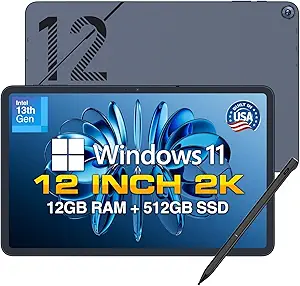
Fusion5 Helios 12 Windows 11 Tablet – 12″ 2K Display, 12GB DDR5 RAM, 512GB SSD, Stylus Pen Included
I give the Fusion5 Helios 12 the premium Windows tablet slot because it has the most desk-friendly hardware mix here: a 12-inch 2K IPS display, 12GB DDR5 RAM, 512GB SSD, HDMI, dual USB-C, and an included stylus. Compared with the Microsoft Surface Go 2, this is the stronger choice for spreadsheet-heavy work, sketching, external displays, and multitasking with several Windows apps open. Compared with the Fusion5 WIN PRO, it trades rugged protection and the accidental-damage warranty for a larger canvas and better connectivity. The weak point is mobility: average battery life is only four hours under load, and the fan-cooled body is less simple than an iPad. I would choose it when ports, pen input, and Windows flexibility outweigh long unplugged use.
Pros:- Large 12-inch 2K IPS display suits work and creative tasks
- 12GB DDR5 RAM and 512GB SSD support heavier multitasking
- Included stylus adds value for note-taking and sketching
- Strong port selection with dual USB-C, USB 3.0, HDMI, and audio jack
Cons:- Average battery life is only about 4 hours under load
- No physical keyboard included
- Less rugged than the Fusion5 WIN PRO
Best for: Windows users who want a larger tablet for desk work, pen input, external displays, and multitasking across desktop apps.
Not ideal for: Travelers who need long battery life or buyers who want a keyboard included in the box.
- Display:12-inch 2000 x 1200 IPS
- Processor:Intel 13th Gen CPU
- RAM:12GB DDR5
- Storage:512GB SSD
- Operating System:Windows 11 Home
- Battery Life:4 hours average
- Charging:36W USB-C PD
- Ports:2 x USB-C, USB 3.0, HDMI, 3.5mm jack
- Cooling:Built-in fan
Bottom line: I would buy this for a more capable Windows tablet setup where screen space and ports beat all-day unplugged use.
Apple iPad 11-inch with A16 Chip, Liquid Retina Display, and Blue Color
I rank the Apple iPad 11-inch with A16 Chip as the best mainstream tablet because it is smoother for media, apps, video calls, and casual creative work than the Windows-first picks in this batch. The Liquid Retina display with True Tone and 12MP cameras make it friendlier for family use than the Fusion5 WIN PRO, while the A16 chip should feel quicker in touch-first apps than the renewed Microsoft Surface Go 2. The catch is platform fit: it will not replace a Windows laptop for legacy desktop software, and accessories such as Apple Pencil and Magic Keyboard add cost. Compared with the Fusion5 Helios 12, it is lighter and more polished for tablet use, but less flexible for ports and file expansion. I see it as the pick when iPadOS apps and all-day battery life matter most.
Pros:- A16 chip is well suited to smooth app use and multitasking
- Liquid Retina display with True Tone is strong for media and reading
- 12MP front and rear cameras support sharp calls and 4K video
- Light 1.05-pound body is easy to carry
Cons:- Apple Pencil and Magic Keyboard are sold separately
- 128GB base storage may feel limiting for large media libraries
- Less flexible than Windows tablets for desktop software and ports
Best for: Households, students, and casual creators who want a fast tablet for apps, streaming, video calls, and Apple Pencil workflows.
Not ideal for: Windows software users or buyers who need expandable storage, included productivity accessories, or broad wired connectivity.
- Processor:A16 chip
- Display:11-inch Liquid Retina with True Tone
- Storage:128GB listed, configurations up to 512GB
- Battery Life:All-day battery life
- Cameras:12MP front and 12MP back, 4K video recording
- Connectivity:Wi-Fi 6
- Security:Touch ID
- Dimensions:9.79 x 7.07 x 0.28 inches
- Weight and Color:1.05 pounds, Blue
Bottom line: I would choose this for a polished tablet-first experience, not as a direct Windows laptop replacement.

How We Picked
I ranked this lineup by real buying fit, not just by the largest numbers on the spec sheet. Since the category blends computers, tablets & components, I weighed everyday speed, platform support, storage, keyboard and stylus readiness, display size, portability, and the risk that comes with renewed or lesser-known hardware. I checked manufacturer pages and current reporting where available, including Apple’s iPad page, Microsoft’s Surface Go 2 specs, and Galaxy Tab A11+ coverage, then treated seller-stated configurations with more caution. Products moved up when they could serve more buyers with fewer add-on costs and fewer long-term support questions.
The final order favors balanced ownership over a single flashy feature. The Apple iPad 11-inch with A16 rises because it pairs a current chip with strong apps and 128GB starting storage, while the Samsung Galaxy Tab A11+ gets a high value ranking because it gives Android buyers a safer path than off-brand alternatives. Windows tablets were judged by how believable they are as small computers: CPU class, keyboard setup, ports, and SSD space mattered more than raw RAM claims. Renewed models dropped when age, tiny storage, or accessory costs changed the deal after purchase.
Factors to Consider When Choosing Best Computers, Tablets & Components
Choosing among computers, tablets & components is less about chasing the most powerful-looking listing and more about matching the device to the work it has to replace. I would start with platform, input style, support path, and real storage needs before letting a big spec number steer the decision.
Choose The Operating System First
I would choose the operating system before comparing RAM or display size because it decides which apps, accessories, and workflows feel natural. iPadOS is the easiest fit for streaming, note-taking, family use, creative apps, and long app support, which is why the A16 iPad ranks ahead of older or lesser-known models. Android makes sense when price flexibility and expandable storage matter, especially for media libraries or shared home devices. Windows becomes the right call when the buyer needs desktop software, file-system access, browser extensions, or a keyboard-heavy workflow. The common mistake is buying Windows just because it sounds more computer-like, then finding that a small screen and low-power chip make it feel slower than a tablet OS. Start with the software the buyer cannot live without, then pick the hardware that runs it well.
Read RAM And Storage Claims Carefully
RAM and storage numbers deserve a skeptical read in this category. A tablet listing 12GB RAM and 512GB storage can still feel modest if the processor is a low-power Intel chip or if Windows background tasks eat into headroom. Android listings that advertise very high RAM may include virtual RAM, which borrows storage space and does not behave like physical memory. For most buyers, 128GB is the floor I would want in 2026; 32GB makes the renewed iPad 7th Generation a very narrow budget pick. SSD storage matters more on Windows devices because updates, Office files, downloads, and browser caches grow quickly. The best spec sheet is the one that matches the workload, not the one with the largest single number.
Decide Whether Keyboard Work Is Central
If the device will replace a laptop, I put keyboard design near the top of the list. Bundled keyboards, as with some 2-in-1 Windows options, can lower the real cost, but hinge stability, trackpad size, and lap comfort decide whether the setup feels useful for long writing sessions. The Surface Go 2 has a stronger compact-PC identity than many generic Windows tablets, yet a separate keyboard can change the total price. The iPad A16 can work with keyboard accessories, but it remains better for tablet-first use than for people who live in desktop-class windows all day. Ports also matter: USB-C, microSD, headphone jacks, and charging speed can decide whether a device fits school, travel, or field work. I would pay less attention to a keyboard bundle if the processor is weak enough to bottleneck the tasks that need a keyboard.
Price Renewed Devices By Their Age
Renewed devices can be smart buys only when the discount is large enough to offset shorter support runway, battery wear, and older storage baselines. The iPad 7th Generation has the appeal of Apple build quality and familiar apps, but 32GB makes it harder to recommend as a main device in 2026. The Surface Go 2 brings better Windows polish than most budget tablets, though its older Core m3 platform is better for light productivity than heavy multitasking. I would check return windows, battery-health policies, charger inclusion, and accessory compatibility before giving any renewed device a top ranking. A renewed model should beat a new budget model on build quality or ecosystem value, not just carry a better-known logo. If the price gap is small, newer hardware usually gives the cleaner ownership path.
Pay More Only When It Removes Friction
Paying more makes sense when it removes a daily irritation, not when it adds a spec that sounds nice in a listing. A stronger processor, a better display, and more reliable software updates will be felt more often than a storage number that never gets used. That is why iPad A16 and Galaxy Tab A11+ sit above cheaper options that may look competitive at first glance. On the Windows side, the premium should buy a more usable package: a sharper 12-inch screen, real SSD capacity, a decent stylus path, and fewer accessory gaps. Rugged hardware is worth paying for only when drops, jobsite use, or shared-device abuse are likely. For casual browsing and video, the extra spend should be modest; for school, work, or frequent typing, the cost of a better platform is easier to justify.
Frequently Asked Questions
Should I choose iPadOS, Android, or Windows from this list?
I would pick iPadOS if the buyer wants the smoothest app library, the least setup friction, and a device that works well for school, reading, video, calls, and light creative work. Android is better when price, microSD expansion, Google services, and shared home use matter more than tablet-specific pro apps. Windows is the right choice only when desktop software, full browser behavior, or a familiar file system is part of the job. The mistake is treating Windows tablets as automatically more capable; small low-power models can feel less fluid than a good iPad or Android tablet. In this lineup, the iPad A16 is the safest general pick, Samsung is the best Android value, and Fusion5 or Surface makes sense for Windows-specific needs.
Is a renewed iPad or Surface Go 2 a smart buy in 2026?
A renewed device can be smart when it is priced far below a current model and the seller gives a clear return window. The iPad 7th Generation is only appealing as a low-cost entry into iPad apps because its 32GB storage is tight for 2026. The Surface Go 2 is the stronger renewed choice for buyers who need Windows in a compact body, but its older Core m3 chip limits multitasking. I would not buy either renewed model at a price close to a newer Samsung tablet or iPad A16. Battery condition, included charger, keyboard cost, and warranty length decide whether the discount is real.
Do 12GB RAM and 512GB storage make a budget Windows tablet fast?
No, 12GB RAM and 512GB storage do not automatically make a budget Windows tablet fast. Those specs help with multitasking headroom and file storage, but the processor still sets the pace for browser tabs, app launches, spreadsheets, and video calls. A low-power Pentium or mobile Intel chip can trail a newer tablet chip even when the Windows device has more memory on paper. That is why I rank the Fusion5 Helios 12 for its complete package rather than for RAM alone. Buyers who need speed should read the CPU class and thermal design alongside the memory and SSD.
Which pick works best as a laptop replacement?
The best laptop-replacement pick here is the Fusion5 Helios 12 if Windows software, a larger 2K screen, 512GB SSD storage, and stylus input are the priority. The QAZIPO 2-in-1 may be a lower-cost alternative because it includes a magnetic keyboard, but its Pentium Gold processor makes it better for basic Office, browser, and video-call work than demanding apps. The Surface Go 2 has the most established Windows-tablet design, yet accessory costs and age pull it behind for full replacement duty. The iPad A16 can handle many daily tasks with a keyboard, but buyers who need desktop apps should not expect it to behave like a traditional PC. For true laptop replacement use, screen size, hinge comfort, ports, and sustained speed matter as much as storage.
Which choice is safest for students or family use?
For students and family use, I would start with the Apple iPad 11-inch with A16 or the Samsung Galaxy Tab A11+. The iPad is the better long-term choice for app quality, school apps, accessories, and smooth handoff with other Apple devices. Samsung is the better value route when expandable storage, Android flexibility, and a lower price are higher priorities. I would only choose the iPad 7th Generation for a child or spare device if the price is very low and 32GB will not become a problem. Cheap Windows tablets are less friendly for shared family use because updates, desktop interface scaling, and keyboard dependence add friction.
Conclusion
My final recommendation is straightforward: choose the Apple iPad 11-inch with A16 as the best overall pick because it balances speed, apps, storage, and lifespan better than the rest of the lineup. Pick the Samsung Galaxy Tab A11+ for best value and best beginner Android tablet, especially when expandable storage and a lower price matter. The Fusion5 Helios 12 is my premium Windows-style choice for buyers who want a larger 2K screen, 512GB SSD, and stylus support, while the Surface Go 2 is the compact Windows pick when brand familiarity and portability outrank raw specs. Choose the QAZIPO 2-in-1 only if the keyboard bundle and storage are the draw, and choose the Fusion5 WIN PRO Rugged when durability matters more than sleekness. The renewed iPad 7th Generation is a cheap Apple entry point, the URAO X109 is a low-cost Android gamble, and the basic 10.1-inch Windows 11 tablet is best treated as a light-duty backup rather than a main computer.