

Welcome to our comprehensive AI Tools & Automation Checklist 2026, designed specifically for enthusiasts, professionals, and businesses looking to stay ahead in the rapidly evolving world of artificial intelligence. This guide is curated to help you identify essential tools across various categories, ensuring you make informed decisions tailored to your unique needs.

Get business pricing on tech for your team
- Business-only prices and quantity discounts
- Tax-exempt purchasing
- Multiple users, one account, clear invoices
Our checklist is organized into clear sections, each focusing on a key aspect of AI and automation—from software platforms to hardware devices, machine learning frameworks, and productivity tools. Use this guide as a reference point to compare features, understand what to prioritize, and streamline your procurement process for maximum impact.
To get the most out of this checklist, review each section carefully, taking note of the recommended features and considerations. Whether you’re upgrading your existing setup or starting fresh, this resource will help you navigate the complex landscape of AI tools with confidence.
AI Software Platforms
Choosing the right AI software platform can dramatically enhance your capabilities, whether you’re developing applications, analyzing data, or automating workflows. Consider platforms that offer scalability, user-friendly interfaces, and robust support for integrating various tools. A good platform should also provide comprehensive documentation and active community support to assist you during setup and troubleshooting.
Many buyers make the mistake of selecting platforms based solely on features without considering compatibility with existing systems or the learning curve involved. It’s essential to evaluate whether the platform aligns with your technical skills and infrastructure. Pay attention to the software’s flexibility—can it adapt to your evolving needs? Additionally, check for compatibility with your preferred programming languages and data formats to avoid integration headaches.
What to look for:
- Scalability features
- Ease of use and interface clarity
- Compatibility with existing tools
- Strong developer support
- Customizable automation options
Automation Hardware Devices
Automation hardware devices are the backbone of any effective automation system. They enable real-time control, data collection, and process management, making your workflows more efficient and reliable. When selecting devices, consider their compatibility with your existing setup and whether they support the automation protocols you plan to use.
Many users overlook the importance of durability and power requirements—especially if deploying in demanding environments. Look for hardware with robust build quality and energy efficiency. Additionally, assess the device’s expandability—can it accommodate future upgrades or additional modules? Proper planning here prevents costly replacements down the line.
What to look for:
- Compatibility with automation protocols
- Durability and build quality
- Expandability and modular design
- Energy efficiency
- Real-time data processing capabilities
Machine Learning Frameworks
Select the right machine learning framework to accelerate your data projects. Frameworks should offer comprehensive libraries, support popular algorithms, and facilitate model training and deployment. Compatibility with your programming environment and ease of integration are crucial factors that can save you time and frustration.
Common mistakes include ignoring community support or overlooking the importance of documentation. A well-supported framework will have active forums, tutorials, and frequent updates. Also, consider whether the framework is optimized for your hardware, especially if you’re working with large datasets or complex models. Choosing a flexible and robust framework can significantly streamline your workflow and boost productivity.
What to look for:
- Support for popular ML algorithms
- Strong community and documentation
- Hardware acceleration support
- Ease of integration with existing tools
- Scalability for large datasets
Machine Learning for Business Analytics: Concepts, Techniques, and Applications

This book provides an in-depth overview of machine learning techniques tailored for business analytics. It covers core concepts, practical applications, and implementation in Python to help professionals leverage data-driven decision-making.
Pros:
- Comprehensive coverage of machine learning concepts
- Practical examples using Python
- Useful for business analysts and data scientists
Cons:
- Lacks detailed examples for beginners
- No information on edition or publication date
Best for: Data scientists and business analysts
Not ideal for: Steep learning curve for beginners
Bottom line: Pick a framework that balances power and usability.
Data Storage Solutions
Reliable data storage solutions are vital for safeguarding your data and enabling quick access when needed. Whether you’re dealing with sensor data, user information, or large datasets, selecting the right storage device affects your system’s overall performance and security. Look for solutions that support your data types and volume needs, and offer easy integration with your analysis tools.
Common pitfalls involve choosing storage that either lacks scalability or is overly complex to manage. The DATAQ DI-2008 Data Logger exemplifies a device designed for versatile data collection, but ensure it aligns with your specific measurement and logging requirements. Also, evaluate data retrieval speeds, backup options, and compatibility with your data analysis workflows to avoid bottlenecks or data loss.
What to look for:
- Compatibility with data types
- Ease of data retrieval
- Scalability options
- Data security features
- Integration with analysis tools
AI Development Kits
AI development kits like the ELECROW Raspberry Pi 5 Kit are fantastic for hands-on learning and prototyping. They come equipped with everything you need—hardware, software, and documentation—to kickstart your AI projects. These kits are ideal for students, hobbyists, and professionals exploring AI development in a controlled environment.
Many beginners make the mistake of underestimating the importance of compatibility and support. Confirm that the kit includes compatible sensors, cameras, or modules relevant to your project. Also, look for comprehensive tutorials and active community forums, which can be invaluable when troubleshooting or expanding your projects. The goal is to find a kit that balances ease of use with enough flexibility to grow your skills.
What to look for:
- Comprehensive hardware components
- Good documentation and tutorials
- Compatibility with popular software
- Community support
- Expandability for future projects
ELECROW Raspberry Pi 5 Kit – Crowpi3 AI Learning and Development Station with 4.
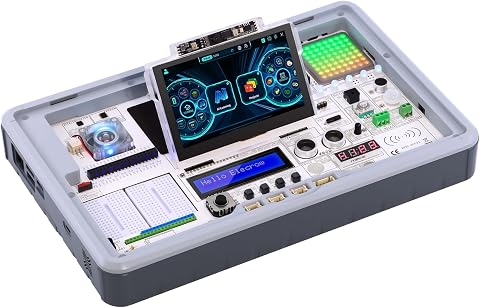
The ELECROW Crowpi3 Basic Kit is an educational Raspberry Pi 5 accessory that includes sensors, modules, a 4.3-inch touch display, and a 2-megapixel camera. It supports AI exploration with features like facial recognition and large language models, and comes with 200 step-by-step lessons for learning coding and electronics.
Pros:
- Includes a variety of sensors and modules for versatile projects
- Supports multiple development boards including Raspberry Pi 5
- Comes with extensive educational lessons for beginners
Cons:
- Raspberry Pi 5 not included
- Basic kit may require additional components for advanced projects
- Limited to the features provided in the basic version
Best for: Students and hobbyists
Not ideal for: Limited for large-scale projects
Bottom line: Choose a kit that supports your learning curve.
Productivity Automation Tools
Enhancing productivity with AI-powered automation tools can transform your workday, especially if you’re juggling multiple tasks. These tools help with time management, task prioritization, and workflow automation, freeing you to focus on high-value activities. When selecting tools, consider their integration capabilities with your existing software ecosystem and how intuitive their interfaces are.
Many busy professionals make the mistake of adopting tools without assessing actual usability or whether they address their specific pain points. Look for features like automated reminders, smart scheduling, and seamless data sharing. The right tool should feel like an extension of your workflow, not an obstacle. Proper training or onboarding is also key to maximizing benefits from these automation solutions.
What to look for:
- Seamless integrations
- User-friendly interface
- Customizable automation workflows
- Smart scheduling features
- Data security and privacy
Using AI at Work: Time Management for Busy Professionals

This book offers a non-technical, tool-agnostic approach to help busy professionals prioritize tasks, manage their calendars, and improve time management skills. It provides practical strategies for leveraging AI to increase productivity and control over work schedules.
Pros:
- Practical, non-technical guidance
- Focuses on effective time management
- Applicable to busy professionals
Cons:
- Lacks detailed technical instructions
- May not cover specific AI tools
- Limited information on content depth
Best for: Busy professionals
Not ideal for: Overly complex interfaces
Bottom line: Invest in tools that streamline your daily tasks effectively.
Starting your AI and automation journey with budget-conscious choices can lead to significant long-term savings and scalability. Prioritize tools that align with your current needs but also offer room to grow. This checklist aims to empower you to make confident, informed decisions in a complex market.
Remember, the most effective AI setup is one that integrates seamlessly into your workflow and enhances your productivity. Keep exploring, stay curious, and don’t hesitate to seek out community support or expert advice as you build your AI ecosystem for 2026 and beyond.