

Welcome to our comprehensive AI tools and automation buying guide for 2026. Whether you’re a tech enthusiast, a professional seeking to optimize workflows, or a smart home aficionado, this article is designed to help you navigate the ever-expanding world of intelligent devices and software. We’ve organized this guide into key categories, each focusing on essential products that are shaping the future of automation and AI integration.

Get business pricing on tech for your team
- Business-only prices and quantity discounts
- Tax-exempt purchasing
- Multiple users, one account, clear invoices
Each section provides an in-depth look at what makes these products stand out, common pitfalls to avoid, and expert advice on how to choose the right fit for your needs. Use this guide as a trusted resource to compare features, understand compatibility, and identify the best options for your specific environment. Remember, the right tools can elevate your productivity, security, and convenience — so take your time to select wisely.
Laptop & Desktop Computers
Choosing the right laptop or desktop is fundamental whether you’re gaming, working, or creating content. The ASUS ROG Strix G16 (2025) Gaming Laptop offers a robust balance of power and portability, thanks to its high-refresh-rate display and advanced GPU options. When shopping for gaming or high-performance machines, pay close attention to processor speed, graphics capability, and display quality. Compatibility with accessories and upgrade options are also crucial considerations to avoid future frustrations.
Common mistakes include overlooking the importance of adequate RAM, storage solutions, and port selection. A mismatch in these areas can hinder your experience or necessitate costly upgrades later. Always verify the laptop’s size and weight if portability is a priority, and ensure the hardware specifications align with your intended use. For desktop choices, focus on compatibility with your existing setup, including motherboard and power supply requirements.
What to look for:
- Powerful processor (e.g., latest Intel or AMD)
- High-refresh-rate display (at least 120Hz)
- Adequate RAM (16GB or more)
- Good cooling system
- Expandability options
ASUS ROG Strix G16 (2025) Gaming Laptop, 16” ROG Nebula Display, NVIDIA GeForce

The ASUS ROG Strix G16 (2025) gaming laptop features a 16-inch ROG Nebula display with a 240Hz refresh rate, powered by an Intel Core Ultra 9 processor and NVIDIA GeForce RTX 5070 Ti GPU. It offers 32GB DDR5 memory, 1TB SSD storage, and advanced cooling for high-performance gaming and multitasking.
Pros:
- High-refresh-rate display ideal for gaming and entertainment
- Powerful Intel and NVIDIA components for top performance
- Large, fast SSD storage and ample RAM for multitasking
- Customizable RGB lighting for personalization
Cons:
- Potentially high power consumption due to high-performance components
- Premium price point may be expensive for some users
- Battery life not specified, may be limited during intensive use
Best for: Gaming and high-performance tasks
Not ideal for: Casual users or budget-conscious shoppers
Bottom line: The ASUS ROG Strix G16 balances performance with portability.
Smart Home Devices
Smart home devices like the Amazon Echo Show 21 bring together convenience, security, and connectivity in a sleek package. This model’s 21-inch Full HD display makes it ideal for kitchen hubs, digital photo frames, or family communication centers. When selecting a smart home device, consider compatibility with your existing ecosystem, ease of use, and available features such as voice control, video calling, and smart device integration.
Many buyers make the mistake of ignoring privacy settings or not checking the device’s compatibility with other smart products. It’s also common to overlook the importance of screen size and resolution for your specific use case. For a kitchen hub, a larger, clear display with touch functionality enhances usability. Make sure the device supports your preferred voice assistants and smart home protocols to ensure seamless operation.
What to look for:
- Clear, high-definition display
- Strong voice assistant integration
- Compatibility with your smart home ecosystem
- Easy setup and user interface
- Built-in privacy controls
Amazon Echo Show 21 (newest model), 21" Full HD Kitchen Hub with Fire TV and Ale
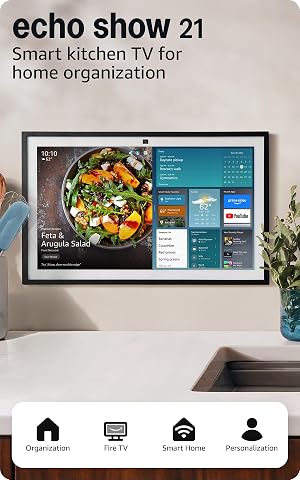
The Echo Show 21 is a large 21-inch Full HD smart display designed for kitchen and home organization. It features built-in Fire TV for streaming, a centered camera for video calls, smart home controls, and customizable widgets for calendars, weather, and photos.
Pros:
- Large 21-inch Full HD display ideal for kitchen use
- Built-in Fire TV provides extensive streaming options
- Centered camera with auto-framing enhances video calls
- Comprehensive smart home control dashboard
Cons:
- Relatively heavy at 10.7 lbs, may be less portable
- Requires WiFi 6E compatible network for optimal performance
- Subscription may be needed for some streaming services
Best for: Home automation and family communication
Not ideal for: Minimalists or those without existing smart devices
Bottom line: The Amazon Echo Show 21 is a versatile kitchen hub.
Productivity Software
Effective productivity software like ‘Continuous Delivery’ is vital for streamlining workflows and ensuring reliable releases. This type of software helps teams automate build, test, and deployment processes, reducing errors and saving time. When choosing productivity tools, focus on compatibility with your existing infrastructure, ease of integration, and support for automation features. These tools are especially valuable for developers, DevOps teams, and project managers aiming to accelerate delivery cycles.
Common errors include selecting software without understanding its core capabilities or ignoring the learning curve involved. Ensure the software’s features align with your team’s workflow and that it offers sufficient documentation and support. Compatibility with your development environment and version control systems is crucial. Also, consider scalability to accommodate future growth or project complexity.
What to look for:
- Seamless integration with existing tools
- Automation capabilities (build, test, deployment)
- Robust reporting and analytics
- User-friendly interface
- Strong support and documentation
Continuous Delivery: Reliable Software Releases through Build, Test, and Deploym

This book covers best practices for automating software build, testing, and deployment processes to ensure reliable and efficient software releases. It provides strategies and techniques for implementing continuous delivery in software development projects.
Pros:
- Comprehensive guide on continuous delivery practices
- Includes practical strategies for automation
- Suitable for software developers and DevOps teams
Cons:
- No specific edition or publication date provided
- May be technical for beginners
Best for: Software development and release management
Not ideal for: Non-technical users or small-scale projects
Bottom line: Reliable software releases are within reach with the right tools.
AI-Powered Cameras
The ONWOTE 16 Channel Security System with 6K NVR and 16 4K IP cameras offers comprehensive surveillance for large properties or business premises. AI-powered cameras enhance security by enabling features like motion detection, facial recognition, and activity alerts. When selecting security cameras, prioritize resolution, field of view, and integration capabilities with your existing security network. Understanding the coverage area and camera placement is essential for optimal protection.
Many buyers overlook the importance of network bandwidth and storage capacity, which are critical for handling high-resolution footage. Compatibility with your current NVR system and remote access features should be verified. Proper installation and calibration are vital to avoid blind spots and ensure effective monitoring. Remember, a well-designed security system is a combination of quality hardware and strategic placement.
What to look for:
- 4K resolution or higher
- AI-enabled detection features
- Remote access and control
- Expandable system capacity
- Secure network integration
ONWOTE 16 Channel Security System 6K NVR with 16 4K PoE IP Cameras, Face Recogni

This security system features facial recognition, AI-powered suspect location, and two-way audio communication. It offers smart color night vision, vandal-proof and weatherproof housing, and supports up to 16 cameras with 4TB built-in storage expandable to 20TB.
Pros:
- High-resolution 4K cameras with smart color night vision
- Facial recognition and rapid suspect search capabilities
- Vandal-proof and weatherproof design suitable for outdoor use
- Expandable storage up to 20TB for extensive recording
Cons:
- System may require technical setup expertise
- Price not specified in the data
- Potentially higher cost for additional cameras or storage
Best for: Enhanced surveillance and monitoring
Not ideal for: Small-scale setups or budget-conscious buyers
Bottom line: Advanced AI cameras provide peace of mind.
Robotics & Drones
The Manti 3 Plus UAV Flight Safety Guard Drone with parachute is designed for flight safety and security, especially for DJI Mavic series users. Drones are increasingly popular for aerial photography, inspection, and recreational use, but safety features are paramount. When selecting a drone, consider flight time, camera quality, and safety features such as obstacle avoidance and parachutes.
Common mistakes include overestimating flight range or neglecting the importance of safety accessories. Compatibility with your drone model and ease of attachment are important factors. For users concerned about safety, a parachute system adds an extra layer of security during flight. Always follow local regulations and practice responsible flying to ensure a positive experience.
What to look for:
- Compatibility with DJI Mavic series
- Safety features (parachute, obstacle avoidance)
- Extended flight time
- Compact and portable design
- Ease of installation
Manti 3 Plus UAV Flight Safety Guard Drone Parachute for DJI Mavic Series

The Manti 3 Plus drone parachute enhances safety by reducing damage and injury during crashes. It features quick deployment, high success rate, and is compatible with various DJI Mavic models, offering reusable and replaceable parts for reliable protection.
Pros:
- Provides quick and reliable parachute deployment in emergencies
- Compatible with multiple DJI drone models
- Reusable design with replaceable parts
- Reduces crash damage and personal injury
Cons:
- Parachute parts are disposable and need replacement after use
- Requires careful reading of manual for proper operation
- Limited to specific drone models listed
Best for: Aerial photography and inspection
Not ideal for: Beginners or casual users
Bottom line: Safety features make drone flying more secure.
Networking Equipment
The eero Pro 7 Tri-Band Mesh Wi-Fi 7 Router 3-pack provides seamless, high-speed internet coverage for large homes or offices. Mesh systems are essential when traditional routers can’t cover every corner, ensuring reliable connectivity across multiple devices. When selecting networking equipment, look for compatibility with your internet service, support for the latest Wi-Fi standards, and ease of setup.
Many buyers make the mistake of underestimating coverage needs or choosing outdated hardware. Consider the size of your space and the number of connected devices to determine the right system. Tri-band routers help distribute bandwidth efficiently, reducing lag and buffering. Also, check for features like security protocols and parental controls to safeguard your network.
What to look for:
- Support for Wi-Fi 7
- Tri-band technology for optimal performance
- Easy setup with app control
- Compatibility with existing hardware
- Strong security features
eero Pro 7 Tri-Band Mesh Wi-Fi 7 Router (3-Pack)

The eero Pro 7 offers next-generation Wi-Fi 7 technology with high-speed connectivity and extensive coverage suitable for homes and small to medium-sized businesses. It supports internet plans up to 5 Gbps, eliminates dead spots, and can connect over 600 devices across 6,000 sq.
Pros:
- High-speed Wi-Fi 7 performance
- Extensive coverage for large areas
- Supports over 600 devices simultaneously
- Backward compatible with previous eero models
Cons:
- Requires subscription for advanced security features
- Higher cost for a 3-pack compared to single units
Best for: Large homes or multi-device environments
Not ideal for: Small apartments or minimal internet users
Bottom line: The eero Pro 7 ensures fast, reliable Wi-Fi everywhere.
As you explore the latest in AI tools and automation, remember to prioritize your specific needs and environment. Start with a clear budget and focus on products that offer the most value and compatibility for your setup. With careful research and thoughtful choices, you can build a smarter, more efficient space that leverages the power of AI.
Don’t forget — technology is always evolving, so staying informed and adaptable is key. Happy shopping, and here’s to transforming your home or workspace into a truly intelligent environment!
Fall Picks
fall essentials
As an affiliate, we earn on qualifying purchases.