
Among these home theater projectors, I’d put the Epson Home Cinema 2350 first for its 4K PRO-UHD processing and smart streaming features. The Epson Home Cinema 980 is a simpler 1080p alternative, while the ViewSonic LS740HD suits buyers who value a laser light source. The main tradeoffs are image detail, brightness and room flexibility, plus whether you want built-in streaming or a more traditional projector. Portable smart models offer convenient setup, but they serve a different purpose from a dedicated theater room. Read on for the full breakdown and help matching each pick to your space and viewing habits.

Get business pricing on tech for your team
- Business-only prices and quantity discounts
- Tax-exempt purchasing
- Multiple users, one account, clear invoices
Key Takeaways
- The Epson Home Cinema 2350 leads the roundup by combining 4K PRO-UHD processing with smart streaming, making it the most balanced choice for a dedicated living-room setup.
- Resolution claims need context: several models decode 4K content but use native 1080p imaging, so they do not deliver the same detail as a projector with a higher-resolution imaging system.
- The two Epson models serve different buyers: the 2350 adds smart features and 4K processing, while the 980 keeps the proposition focused on straightforward 1080p projection.
- Portable smart projectors prioritize convenience over a fixed theater installation; the Aurzen, ONOAYO, X9 Pro, VIDAA, HAPPRUN, and Wimius models vary in their built-in software and setup features.
- The ViewSonic LS740HD stands apart for its laser light source, while traditional lamp-based picks may be a better fit for buyers prioritizing familiar, focused home viewing.
| Epson Home Cinema 2350 4K PRO-UHD Smart Streaming Projector | 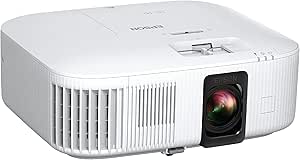 | Best Overall for Bright, Colorful Home Theater | Resolution: 3840 × 2160 maximum; 4K PRO-UHD enhancement | Display technology: 3LCD | Brightness: 2,800 lumens | VIEW LATEST PRICE | See Our Full Breakdown |
| Aurzen Roku TV D1R Portable Smart Projector |  | Best for Simple Portable Streaming | Native resolution: 1920 × 1080 | Image size: 40–200 inches | Throw distance: 3.71–18.58 feet | VIEW LATEST PRICE | See Our Full Breakdown |
| ONOAYO ONO3Pro 2.0 Portable 4K-Support Projector with AI Auto Adjustment and Dolby Audio |  | Best for Portable Built-In Audio | Video support: 4K video decoding; native resolution not specified | Operating system: Smart TV OS 2.0 | Audio: Dolby Audio, dual 50 W speakers, eARC | VIEW LATEST PRICE | See Our Full Breakdown |
| X9 Pro Smart Projector with VIDAA OS, Native 1080p, 4K Decoding, HDR10, and Auto Focus |  | Best for Integrated Audio and Connections | Native resolution: 1080p | Video decoding: 4K | Brightness: 920 ISO lumens | VIEW LATEST PRICE | See Our Full Breakdown |
| VIDAA Smart Projector with Native 1080p, 4K Decoding, Wi-Fi 6, and Bluetooth |  | Best for Streaming Features on a Compact Setup | Native resolution: 1920 × 1080 | Maximum supported resolution: 3840 × 2160 | Brightness: 550 ANSI lumens | VIEW LATEST PRICE | See Our Full Breakdown |
| Epson Home Cinema 980 3LCD 1080p Projector | 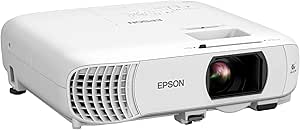 | Best for Bright, Flexible Living Rooms | Native resolution: 1920 x 1080 | Display technology: 3-chip 3LCD | Color and white brightness: 4,000 lumens each | VIEW LATEST PRICE | See Our Full Breakdown |
| HAPPRUN H1 Native 1080p Portable Bluetooth Projector |  | Best for Portable, Dark-Room Viewing | Native resolution: 1920 × 1080 | Display type: LCD | Brightness: 300 ANSI lumens | VIEW LATEST PRICE | See Our Full Breakdown |
| Optoma HD146X 1080p Full HD Home Theater Projector |  | Best for Movies and Responsive Gaming | Native resolution: 1920 x 1080 | Brightness: 3,600 lumens | Contrast ratio: 25,000:1 | VIEW LATEST PRICE | See Our Full Breakdown |
| ViewSonic LS740HD 1080p Laser Projector |  | Best for Bright, Permanent Installations | Native resolution: 1920 x 1080 | Brightness: 5,500 ANSI lumens | Image size: 30–300 inches | VIEW LATEST PRICE | See Our Full Breakdown |
| Wimius P62 Pro Smart Outdoor Projector |  | Best Smart Projector for Easy Setup | Native resolution: 1080p; supports 4K content | Brightness: 600 ANSI lumens | HDR: HDR10 | VIEW LATEST PRICE | See Our Full Breakdown |
| home theater projector | Connectivity | Native resolution | Brightness | Throw distance |
|---|---|---|---|---|
| Epson Home Cinema 2350 4K PRO- | HDMI, Wi-Fi, Bluetooth audio | — | 2,800 lumens | — |
| Aurzen Roku TV D1R Portable Sm | Wi-Fi, Bluetooth 5.2, HDMI, USB, audio | 1920 × 1080 | — | 3.71–18.58 feet |
| ONOAYO ONO3Pro 2.0 Portable 4K | — | — | — | — |
| X9 Pro Smart Projector with VI | HDMI with ARC/CEC, USB, 3.5 mm headphone jack | 1080p | 920 ISO lumens | — |
| VIDAA Smart Projector with Nat | Wi-Fi 6, Bluetooth 5.4, HDMI 2.1, 3.5 mm jack | 1920 × 1080 | 550 ANSI lumens | 4.5–16.4 feet |
| Epson Home Cinema 980 3LCD 108 | 2 HDMI ports, USB | 1920 x 1080 | — | 1–9 feet |
| HAPPRUN H1 Native 1080p Portab | HDMI, USB, 3.5 mm jack, Bluetooth, IR | 1920 × 1080 | 300 ANSI lumens | 1.2–7 meters |
| Optoma HD146X 1080p Full HD Ho | HDMI, USB, RCA | 1920 x 1080 | 3,600 lumens | 3.2–35.37 feet |
| ViewSonic LS740HD 1080p Laser | 2 HDMI 1.4 inputs, USB Type-A, RS232, 3.5 mm audio out | 1920 x 1080 | 5,500 ANSI lumens | — |
| Wimius P62 Pro Smart Outdoor P | — | 1080p; supports 4K content | 600 ANSI lumens | — |
More Details on Our Top Picks
Epson Home Cinema 2350 4K PRO-UHD Smart Streaming Projector
I rank the Epson Home Cinema 2350 first for buyers who want a bright, color-focused living-room projector with gaming and streaming built in. Its 2,800-lumen output gives it more flexibility in rooms that are not fully dark, while 3LCD imaging avoids the rainbow effect some viewers notice with single-chip projectors. Epson’s 4K PRO-UHD enhancement and HDR support add detail and range, though this is not the same as a native 4K imaging chip.
Compared with the portable Aurzen Roku TV D1R, the Epson is the stronger home theater centerpiece, with under-20-ms input lag and vertical lens shift for more flexible placement. The tradeoff is less grab-and-go convenience, and its Android TV streaming needs a wireless connection. Bluetooth audio is also limited to content played through Android TV, so I would skip it if broad Bluetooth routing matters more than picture flexibility.
Pros:- 2,800 lumens suit a wider range of home viewing conditions than the lower-brightness VIDAA Smart Projector.
- 3LCD technology delivers color without the rainbow effect associated with some projection systems.
- Android TV, Google Assistant voice search, and a built-in 10 W speaker reduce the need for separate starter devices.
- Under-20-ms input lag and vertical lens shift support gaming and more flexible placement.
Cons:- 4K PRO-UHD is resolution enhancement rather than native 4K imaging.
- Streaming requires a wireless network connection of at least 5 Mbps.
- Bluetooth audio is limited to content played through Android TV.
Best for: Movie and console gamers setting up a main living-room theater who want bright 3LCD color, built-in streaming, and low input lag.
Not ideal for: Buyers who need a lightweight projector for frequent outdoor moves or want Bluetooth audio to work with every connected source.
- Resolution:3840 × 2160 maximum; 4K PRO-UHD enhancement
- Display technology:3LCD
- Brightness:2,800 lumens
- Contrast ratio:35,000:1
- Speaker:Built-in 10 W bass-reflex speaker
- Connectivity:HDMI, Wi-Fi, Bluetooth audio
- Input lag:Under 20 ms
- Placement:Tabletop; vertical lens shift
Our verdict“Choose the Epson if you want a bright, adaptable home theater projector with gaming features, and skip it if portability or unrestricted Bluetooth audio is your priority.”
Aurzen Roku TV D1R Portable Smart Projector
The Aurzen Roku TV D1R is my pick for viewers who want a straightforward projector they can move between a bedroom, living room, or backyard. Its native 1080p resolution provides a clear Full HD baseline, and built-in Roku makes app access simpler than adding a separate streamer. Auto focus and keystone correction also cut down on manual setup, a practical advantage over the Epson Home Cinema 2350 when the projector is moved often.
The flexibility comes with home-theater compromises. The Aurzen’s dual 5 W speakers are convenient for casual viewing but have less stated power than the ONOAYO ONO3Pro 2.0’s dual 50 W system. It also requires a Roku account and internet connection for activation, and its fan produces steady noise. I would choose it for adaptable, occasional viewing rather than a quiet, dedicated cinema room.
Pros:- Native 1080p resolution delivers Full HD rather than relying on 4K decoding claims.
- Roku streaming provides built-in access to apps and free channels.
- Auto focus and keystone correction make repeated setup easier than on a projector without automatic adjustment.
- Portable 2.1 kg design includes dual-band Wi-Fi, Bluetooth 5.2, AirPlay mirroring, and dual 5 W speakers.
Cons:- Roku account registration and an internet connection are required for activation.
- The cooling fan produces steady noise during viewing.
- Dual 5 W speakers are less suited to filling a large room than the ONOAYO ONO3Pro 2.0’s higher-powered audio system.
Best for: Households that move a Full HD projector between rooms or use it for occasional outdoor movie nights and want Roku apps built in.
Not ideal for: Dedicated theater viewers who prioritize quiet operation, stronger onboard audio, or using the projector without account-based streaming activation.
- Native resolution:1920 × 1080
- Image size:40–200 inches
- Throw distance:3.71–18.58 feet
- Connectivity:Wi-Fi, Bluetooth 5.2, HDMI, USB, audio
- Speakers:Dual 5 W
- Weight:2.1 kg
- Mounting:Tabletop, foldable stand, floor stand, or ceiling mount
- Fan noise:Below 40 dB(A) at 1 meter; maximum measured 38.9 dB(A)
Our verdict“Pick the Aurzen for portable Full HD streaming and easy setup, but choose a more theater-focused option if quiet operation or room-filling sound matters most.”
ONOAYO ONO3Pro 2.0 Portable 4K-Support Projector with AI Auto Adjustment and Dolby Audio
The ONOAYO ONO3Pro 2.0 stands out for combining light weight with unusually ambitious built-in sound. At 2.4 lb, it is easier to place on a desk or tripod than the Epson Home Cinema 2350, and its dual 50 W speakers with Dolby Audio and eARC give it a stronger stated audio setup than the Aurzen Roku TV D1R’s dual 5 W speakers. Auto focus, keystone correction, obstacle avoidance, and screen fit further suit viewers who relocate their projector rather than leave it permanently installed.
Its key limitation is how much the available data leaves unspecified: there is no listed native resolution or brightness, so I cannot rank its picture clarity or room-light flexibility with confidence. “4K video decoding” describes supported input, not proof of native 4K projection. I would shortlist it for portable, self-contained viewing, but choose the Epson when measured brightness and a clearer resolution picture matter more.
Pros:- At 2.4 lb, it is easy to reposition and supports desktop, tripod, wall, or ceiling mounting.
- Dual 50 W speakers, Dolby Audio, and eARC provide a more substantial stated audio package than the Aurzen Roku TV D1R.
- Built-in apps, Wi-Fi 6, and Chromecast support reduce reliance on an external streaming device.
- Automatic focus, keystone correction, obstacle avoidance, screen fit, and orientation detection simplify setup.
Cons:- Native resolution is not provided, so buyers cannot confirm the projector’s actual pixel resolution from the supplied data.
- Brightness is not specified, making room-light suitability difficult to judge.
- The available description does not provide complete durability details.
Best for: Viewers who want a lightweight, movable projector with substantial onboard audio and automatic image adjustment for changing setups.
Not ideal for: Buyers who need a confirmed native resolution or brightness figure to plan a dedicated theater room or judge performance in ambient light.
- Video support:4K video decoding; native resolution not specified
- Operating system:Smart TV OS 2.0
- Audio:Dolby Audio, dual 50 W speakers, eARC
- Wireless connectivity:Wi-Fi 6 and Bluetooth
- Automatic adjustment:Auto focus, keystone correction, obstacle avoidance, screen fit, and orientation detection
- Zoom:50%–100%
- Weight:2.4 lb
- Mounting options:Desktop, tripod, wall, or ceiling
Our verdict“Choose the ONOAYO for a lightweight setup with powerful stated onboard audio, but favor the Epson Home Cinema 2350 if verified brightness and resolution information are priorities.”
X9 Pro Smart Projector with VIDAA OS, Native 1080p, 4K Decoding, HDR10, and Auto Focus
I give the X9 Pro a distinct place for buyers who want a 1080p projector with stronger built-in audio and flexible ways to connect. Its dual 20 W speakers, Dolby Audio, and HDMI ARC/CEC make it easier to pair with a sound system or use without one than the Aurzen Roku TV D1R, whose speakers are rated at 5 W each. VIDAA OS, AirPlay 2, and automatic image adjustment also make it a convenient fit for shared household viewing.
The picture has a defined ceiling: native resolution is 1080p, and 4K material is decoded to that resolution rather than projected as native 4K. The Epson Home Cinema 2350 is a better match for buyers seeking a brighter, color-oriented main-room image, while the X9 Pro’s 920 ISO lumens and HDR10 support suit a more controlled viewing space. Its performance claims are not independently verified in the supplied information, so I would avoid choosing it on headline features alone.
Pros:- Dual 20 W Dolby Audio speakers offer more stated onboard power than the Aurzen Roku TV D1R’s dual 5 W speakers.
- HDMI ARC/CEC supports simpler connection and control with compatible audio equipment.
- VIDAA OS, AirPlay 2, and screen mirroring add streaming and casting options.
- Auto focus, 6D keystone correction, obstacle avoidance, and auto screen fit simplify placement.
Cons:- Native resolution is 1080p; 4K content is decoded and displayed at 1080p.
- At 920 ISO lumens, it is less suited to bright rooms than the Epson Home Cinema 2350’s stated 2,800-lumen output.
- The supplied product information does not independently verify its performance claims.
Best for: Viewers seeking a native-1080p smart projector with strong built-in speakers, AirPlay 2, and HDMI ARC/CEC for a flexible home setup.
Not ideal for: Buyers who expect native 4K projection, need a highly bright image in a lit room, or require independently verified performance figures.
- Native resolution:1080p
- Video decoding:4K
- Brightness:920 ISO lumens
- HDR:HDR10
- Speakers:2 × 20 W
- Connectivity:HDMI with ARC/CEC, USB, 3.5 mm headphone jack
- Wireless casting:AirPlay 2 and screen mirroring
- Automatic setup:Auto focus, 6D keystone correction, obstacle avoidance, and auto screen fit
Our verdict“Choose the X9 Pro for convenient 1080p viewing with strong onboard audio and useful connections, not for native 4K or bright-room performance.”
VIDAA Smart Projector with Native 1080p, 4K Decoding, Wi-Fi 6, and Bluetooth
This VIDAA projector is best viewed as a feature-rich Full HD option for buyers who value streaming and automatic setup over bright-room punch. Its native 1080p resolution gives a clearer picture expectation than products that list 4K decoding without stating native resolution, such as the ONOAYO ONO3Pro 2.0. VIDAA OS, Wi-Fi 6, AirPlay, and voice control provide several ways to reach content, while auto focus and keystone correction help when the projector is moved between viewing spots.
The main constraint is its 550 ANSI lumens: that figure points toward a dim room, not daytime viewing with lights on. The X9 Pro offers higher listed brightness and more powerful speakers, while this model adds HDR10+, MEMC, and a larger stated maximum image size of 300 inches. I would treat that size as a supported maximum, not a promise of a bright, theater-like image at that scale.
Pros:- Native 1080p resolution sets a clear Full HD expectation, unlike the ONOAYO ONO3Pro 2.0, whose native resolution is not stated.
- VIDAA OS, AirPlay, voice control, and Wi-Fi 6 provide several streaming and casting routes.
- Auto focus, 6D keystone correction, obstacle avoidance, and screen alignment reduce setup effort.
- HDR10+, MEMC, and Dolby Audio add picture-processing and sound features.
Cons:- 550 ANSI lumens make it a poor fit for viewing with substantial ambient light.
- 4K is supported through decoding; native projection resolution remains 1080p.
- The stated maximum image size of 300 inches does not indicate that the image will remain bright at that size.
Best for: Streaming-focused viewers who watch in a darkened bedroom or living room and want native 1080p, casting, and automatic image setup.
Not ideal for: Buyers planning a large image in a room with substantial ambient light or expecting 4K projection rather than 4K decoding.
- Native resolution:1920 × 1080
- Maximum supported resolution:3840 × 2160
- Brightness:550 ANSI lumens
- Display type:LCD
- Connectivity:Wi-Fi 6, Bluetooth 5.4, HDMI 2.1, 3.5 mm jack
- Picture features:HDR10+, MEMC, AI auto focus, 6D keystone correction, obstacle avoidance, auto screen alignment
- Maximum image size:300 inches
- Throw distance:4.5–16.4 feet
Our verdict“Choose this VIDAA model for feature-rich Full HD streaming in a darkened room, but pick the brighter X9 Pro or Epson Home Cinema 2350 for more light-flexible viewing.”
Epson Home Cinema 980 3LCD 1080p Projector
The Epson Home Cinema 980 is my pick for a living room that needs a large, bright picture without a dedicated dark theater. Its 4,000 lumens of color and white brightness can better handle some ambient light than the HAPPRUN H1, whose listed output is 300 ANSI lumens. The 3-chip 3LCD design and native 1080p resolution suit movies, sports, and casual gaming, while two HDMI ports make it easier to leave multiple sources connected.
That brightness and flexibility come with tradeoffs: this is not a smart projector with built-in streaming apps, and its listed light-source life is 6,000 hours. The built-in speaker is handy for casual viewing, but buyers planning regular movie nights may prefer external audio. The product details also conflict on maximum image size, listing both 300 and 337 inches, so I would not base a setup around the larger figure.
Pros:- Native 1080p with 3-chip 3LCD color
- 4,000 lumens of both color and white brightness
- Two HDMI ports plus a USB power port
- Portable design and built-in speaker support flexible casual use
Cons:- No built-in streaming apps, so streaming requires a connected device
- Listed light-source life is 6,000 hours
- Maximum image size is inconsistent across product details
Best for: Households that want a bright Full HD projector for sports and movies in a multipurpose living room, with HDMI sources already available.
Not ideal for: Buyers seeking built-in streaming apps, long light-source life, or a verified image-size specification for a permanent theater installation.
- Native resolution:1920 x 1080
- Display technology:3-chip 3LCD
- Color and white brightness:4,000 lumens each
- Image size:34–337 inches listed
- Throw distance:1–9 feet
- Connectivity:2 HDMI ports, USB
- Light-source life:6,000 hours
- Contrast ratio:16,000:1
Our verdict“Choose the Epson 980 if a bright, flexible Full HD picture matters more than built-in streaming or a long-life light source.”
HAPPRUN H1 Native 1080p Portable Bluetooth Projector
The HAPPRUN H1 is the portable, simple-source option in this group: it offers native 1080p, HDMI and USB connections, and Bluetooth 5.3 audio in a unit that can sit on a desktop, tripod, or ceiling mount. That makes it easier to move between a bedroom and an outdoor setup than the installation-focused ViewSonic LS740HD. Its built-in stereo speakers also let casual viewers start without immediately adding separate audio gear.
The main compromise is brightness. At 300 ANSI lumens, this model is better suited to a dark room than the Epson Home Cinema 980 or Optoma HD146X, both of which list much higher brightness. Bluetooth carries audio, not video, and phones or tablets need a compatible HDMI adapter; streaming sticks are separate. I would choose it for portability and straightforward Full HD playback, not for daytime viewing or an all-in-one smart TV replacement.
Pros:- Native 1920 × 1080 resolution
- Portable format with desktop, tripod, and ceiling-mount options
- Bluetooth 5.3 audio and built-in stereo speakers
- HDMI, USB, and 3.5 mm audio connections
Cons:- 300 ANSI lumens limits performance in rooms that are not dark
- Bluetooth supports audio only, not video casting
- Streaming stick and compatible phone or tablet HDMI adapters are separate
Best for: Viewers who want a portable native-1080p projector for dark bedrooms, occasional travel, or a basic outdoor movie setup with an HDMI source.
Not ideal for: People who watch with substantial ambient light or expect wireless phone video casting and built-in streaming apps.
- Native resolution:1920 × 1080
- Display type:LCD
- Brightness:300 ANSI lumens
- Image size:40–200 inches
- Throw distance:1.2–7 meters
- Connectivity:HDMI, USB, 3.5 mm jack, Bluetooth, IR
- Bluetooth:Version 5.3
- Light-source life:100,000 hours listed
Our verdict“Pick the HAPPRUN H1 for portable Full HD viewing in dark spaces, but choose a brighter model for a living room with ambient light.”
Optoma HD146X 1080p Full HD Home Theater Projector
The Optoma HD146X earns its place for buyers who want one 1080p projector for films and gaming. Its 16 ms input response in Enhanced Gaming Mode gives it a clearer gaming advantage than the Epson Home Cinema 980, whose supplied details do not specify response time. The 3,600-lumen rating also makes it a stronger candidate for rooms with some ambient light than the HAPPRUN H1, though the Epson lists higher brightness.
Its 25,000:1 contrast ratio and screen support up to 301 inches point toward a cinematic setup, but that maximum should not be treated as a guaranteed result in every room. The lamp-based design is rated for up to 15,000 hours in Dynamic mode, and HDMI, USB, and RCA cover common sources without built-in streaming. I would skip it if portability or a smart interface is the priority; this is a conventional projector that rewards a planned screen and source setup.
Pros:- Native 1080p resolution for Full HD films and games
- Enhanced Gaming Mode lists 16 ms input response
- 3,600 lumens and 25,000:1 contrast ratio
- Dynamic mode lamp life listed up to 15,000 hours
Cons:- No built-in streaming apps are listed
- Lamp life depends on Dynamic mode and remains shorter than the laser life listed for the ViewSonic LS740HD
- Product data contains inconsistent image-size information
Best for: Movie-and-console households seeking a ceiling-mountable Full HD projector with a stated low-latency gaming mode.
Not ideal for: Buyers who want a portable projector, built-in streaming apps, or a source-free setup with smart features.
- Native resolution:1920 x 1080
- Brightness:3,600 lumens
- Contrast ratio:25,000:1
- Maximum image size:301 inches
- Throw distance:3.2–35.37 feet
- Input response time:16 ms
- Lamp life:Up to 15,000 hours in Dynamic mode
- Connectivity:HDMI, USB, RCA
Our verdict“Choose the HD146X if responsive 1080p gaming and movie viewing matter more than portability or built-in streaming.”
ViewSonic LS740HD 1080p Laser Projector
The ViewSonic LS740HD is the installation-first choice here. Its 5,500 ANSI lumens and laser light source make it better suited to bright rooms, classrooms, or a golf simulator than the portable HAPPRUN H1 or the lamp-based Optoma HD146X. Native 1080p keeps the image Full HD, while a 1.3x optical zoom and flexible image adjustments give installers more room to fit the picture to a space without relying only on digital correction.
This is not the pick I would make for someone who wants to carry a projector between rooms: it is designed for ceiling mounting and installed AV connections. Its RS232 port, portrait mode, and 360-degree projection serve specialized setups, but may go unused in a typical home theater. The listed laser life also varies across product information, with up to 30,000 hours specified for Dynamic Eco mode. Compared with the Epson 980, it favors installation flexibility and sustained brightness over portability.
Pros:- 5,500 ANSI lumens for brighter-room use
- Native 1080p resolution with 30–300-inch image support
- 1.3x optical zoom and extensive image adjustment options
- Laser light source listed for up to 30,000 hours in Dynamic Eco mode
Cons:- Stationary, ceiling-mount-oriented design is less convenient to move
- No built-in streaming apps are listed
- Light-source life differs between product information sections
Best for: Home theater owners with a bright room, dedicated ceiling installation, or a golf-simulator setup that benefits from high output and image adjustments.
Not ideal for: Renters and casual viewers who need a lightweight portable projector, simple plug-and-play streaming, or a clearly stated light-source life across modes.
- Native resolution:1920 x 1080
- Brightness:5,500 ANSI lumens
- Image size:30–300 inches
- Throw ratio:1.13–1.47
- Optical zoom:1.3x
- Light-source life:Up to 30,000 hours in Dynamic Eco mode
- Connectivity:2 HDMI 1.4 inputs, USB Type-A, RS232, 3.5 mm audio out
- Adjustment features:H/V keystone, 4-corner adjustment, portrait mode, 360-degree projection
Our verdict“Choose the LS740HD for a bright, installed Full HD setup, not for portable viewing or a simple smart-projector experience.”
Wimius P62 Pro Smart Outdoor Projector
The Wimius P62 Pro is the most self-contained streaming option in this five-projector group: its smart OS includes built-in apps, so it does not rely on a separate streaming stick as the HAPPRUN H1 does. Auto focus and auto keystone correction also reduce the manual setup work when moving it between viewing spots. Wi-Fi 6, Bluetooth 5.2, two HDMI ports, and two USB ports give it useful flexibility for both wireless streaming and connected sources.
Its limits are just as relevant for home theater. At 600 ANSI lumens, it is better suited to dim settings than the Epson Home Cinema 980 or ViewSonic LS740HD, both of which list far higher brightness. “4K support” means 4K content is displayed at native 1080p, not at 4K resolution. The dual 10W speakers are convenient, but a dedicated audio system may suit a more serious theater better. I would pick it for easy streaming and setup, not maximum brightness or resolution.
Pros:- Built-in streaming apps through Smart OS
- Auto focus, auto keystone, obstacle avoidance, and screen alignment
- Wi-Fi 6, Bluetooth 5.2, and dual HDMI and USB ports
- Dual 10W speakers with Dolby audio
Cons:- 600 ANSI lumens is substantially lower than the Epson Home Cinema 980 and ViewSonic LS740HD
- 4K content displays at native 1080p resolution
- Carrying case is not included
Best for: Viewers who want built-in streaming apps and automatic picture setup for a dim room, outdoor movie night, or flexible secondary viewing area.
Not ideal for: Buyers planning bright-room daytime viewing or seeking native 4K image detail for a dedicated high-resolution theater.
- Native resolution:1080p; supports 4K content
- Brightness:600 ANSI lumens
- HDR:HDR10
- Operating system:Smart OS with built-in apps
- Wireless connectivity:Wi-Fi 6, Bluetooth 5.2
- Ports:2 HDMI, 2 USB, 3.5 mm audio output
- Audio:Dual 10W speakers with Dolby audio
- Picture adjustment:Auto focus, auto keystone, obstacle avoidance, screen alignment, 50–100% zoom
Our verdict“Choose the P62 Pro if built-in streaming and quick automatic setup matter more than bright-room performance or native 4K detail.”
How We Picked
I compared these home theater projectors by how well their stated features serve real viewing setups: image resolution and processing, light-source type, streaming and connection options, and the setup help each model offers. I also weighed whether each projector is better suited to a fixed indoor room, casual flexible viewing, or outdoor use, since portability and theater-room performance are not interchangeable goals.
The ranking favors models with a strong mix of viewing capability and practical usability, rather than treating a 4K decoding claim as equivalent to native 4K imaging. The Epson Home Cinema 2350 ranks first for its broader combination of 4K PRO-UHD processing and smart streaming; the Epson 980 follows as a simpler 1080p choice. The ViewSonic’s laser light source earns a distinct role, while portable models rank by the convenience features they offer and the compromises buyers should expect from that category. Product specifications alone cannot establish performance in every room, so buyers should check throw distance, screen size, and ambient light needs before choosing.
Factors to Consider When Choosing Home Theater Projectors
Before choosing a model, I’d match the projector to the room and viewing routine rather than starting with a resolution label. These factors help reveal where a feature will change the experience—and where it may add complexity without solving your actual problem.
Match the Projector to the Room
A projector that works well in a dark, fixed room may be a poor fit for a bright living room or an outdoor gathering. Start by checking where the projector can sit, how far it will be from the screen, and whether people or furniture will block the beam. A short throw distance can help in a smaller room, but do not assume a model supports it without checking its specifications. Ambient light also affects perceived contrast, so a brighter image cannot fully make up for daylight washing out the screen. If the room is shared, think about setup time and cable routing before selecting a permanent installation. The right room match can matter more than moving up a resolution tier.
Read Resolution Claims Carefully
Projector listings may distinguish between native resolution and the resolution of content the device can decode. A 1080p projector that accepts 4K input does not display the same fine detail as a native 4K model. Processing can improve how a picture is presented, but it does not change the underlying imaging resolution. For movie viewing at a large screen size, seating distance also affects how much extra detail you can actually see. If most of your sources are HD streams or discs, a well-matched 1080p model may be a more sensible choice than paying for a feature you rarely use. Compare the exact imaging specification, not just the largest resolution number in a listing.
Choose Between a Lamp and a Laser Light Source
The light source affects ownership as well as image delivery. Traditional lamp projectors may suit buyers who want a conventional home-cinema setup, but lamps have a finite service life and may need replacement. Laser models avoid routine lamp swaps, which can make them appealing for frequent use or installations where maintenance access is awkward. That benefit does not automatically make a laser projector the best choice for every room; image placement, brightness needs, and connectivity still matter. Check the maker’s stated light-source life and replacement guidance rather than assuming all projectors share the same upkeep. If the projector will run often, include maintenance and downtime in your decision.
Decide How You Want to Stream
Built-in smart TV software can reduce the number of devices and cables in a casual setup. It can also tie you to the projector’s app support and interface, so confirm that your preferred streaming services are available before relying on it. A separate streaming device is another route: it can be easier to replace or update, but it adds a device, power connection, and sometimes another remote. Check available ports and wireless options if you plan to connect a game console, receiver, sound system, or media player. For a dedicated theater, external components may fit naturally into the setup. For occasional use, built-in streaming can save time and simplify placement.
Treat Built-In Audio as a Convenience Feature
Built-in speakers help when portability and quick setup matter, but they may not provide the scale or separation many viewers want for movie sound. A projector’s Dolby Audio support or Bluetooth connection describes a capability, not a guarantee that its speakers will replace a dedicated system. Before buying, check how the projector connects to external audio and whether the connection fits your receiver or speaker setup. Bluetooth can make pairing convenient, though some viewing setups may reveal lip-sync delays. If sound is central to your theater plans, budget space and connections for separate speakers. If you mainly watch occasional shows, onboard audio may be enough to get started.
Prioritize Setup Features Only When They Solve a Problem
Autofocus, automatic image adjustment, and smart operating systems can reduce setup friction, especially when a projector moves between rooms. They do not remove the need to place the image correctly or confirm that the projector matches the screen and throw distance. Digital correction can help with a less-than-perfect setup, but heavy image correction may affect the usable picture area. Fixed installations can benefit more from planning the mount and alignment carefully than from relying on automatic adjustments. Portable users, by contrast, may value fast focus and keystone tools every time they reposition the unit. Pick convenience features according to how often the projector will move.
Frequently Asked Questions
Is a 4K-decoding 1080p projector a good choice for a large screen?
It can be, if you want to play 4K sources but are comfortable with the projector displaying a native 1080p image. Decoding support and native imaging resolution describe different things, so the label alone does not tell you how much detail you will see. Screen size and viewing distance affect whether the difference matters to you. Compare the projector’s native resolution and processing claims, then consider whether your room and seating make finer detail worthwhile. If maximum visible detail is your priority, look beyond input compatibility.
Should I pick a projector with built-in streaming or use a separate streaming device?
Built-in streaming is convenient when you want fewer devices and a quick setup, particularly for a projector that may move around. A separate streamer may be preferable if you want to choose your own software platform or replace it without changing projectors. Check that the built-in system supports the services you use and that its interface fits your routine. Also account for the extra cable and power needs of an external device. Neither route improves the projector’s native image resolution, so treat this as a usability decision.
Does a laser projector make more sense than a lamp projector for home viewing?
A laser light source can appeal to frequent viewers who want to avoid routine lamp replacement. A lamp model may still fit a household that uses the projector less often or prefers a traditional home-theater setup. Compare stated light-source life, maintenance instructions, and the projector’s other features rather than choosing by light source alone. Laser does not automatically mean a better picture in every room or a better match for every screen size. Your usage frequency and installation access should guide the choice.
Can a portable projector replace a fixed home theater projector?
A portable model can work for casual movies, temporary setups, or viewing in more than one room. A fixed home theater projector is usually the more natural choice when you want a permanent screen, planned seating, and a dedicated audio setup. Portability features may make placement and streaming easier, but they do not guarantee the same fit for a large, controlled theater room. Check the portable model’s brightness, image resolution, connections, and supported screen distance against your intended setup. If the projector will stay in one room, flexibility may matter less than room matching.
What should I check before mounting a projector in a small room?
Confirm the throw distance needed for your target screen size and check that the projector fits the available mounting position. Then account for power, video cables, ventilation space, and any beams or furniture that could interrupt the image. A projector with automatic focus or image adjustment may make setup easier, but it cannot fix every placement mismatch. Measure the room and screen area before buying rather than assuming any projector can create a large image from a short distance. If you plan to use external audio, include its location and cable path in the layout.
Conclusion
For most buyers building a living-room theater, I’d choose the Epson Home Cinema 2350 as the best overall pick because its 4K PRO-UHD processing and smart streaming make a well-rounded combination. The Epson Home Cinema 980 is my best value-style choice for someone who wants straightforward 1080p projection without prioritizing built-in smart features. For buyers seeking a more feature-rich option, the 2350 is also the best premium fit in this lineup, while the Aurzen Roku TV D1R is a practical beginner pick for those who want an approachable portable smart setup. Choose the ViewSonic LS740HD if a laser light source is a specific priority, or look to the portable models for flexible placement and casual viewing. Before deciding, match the projector to your room, screen distance, streaming plan, and audio setup; those choices will determine whether its headline features pay off.
Fall Picks
fall essentials
As an affiliate, we earn on qualifying purchases.