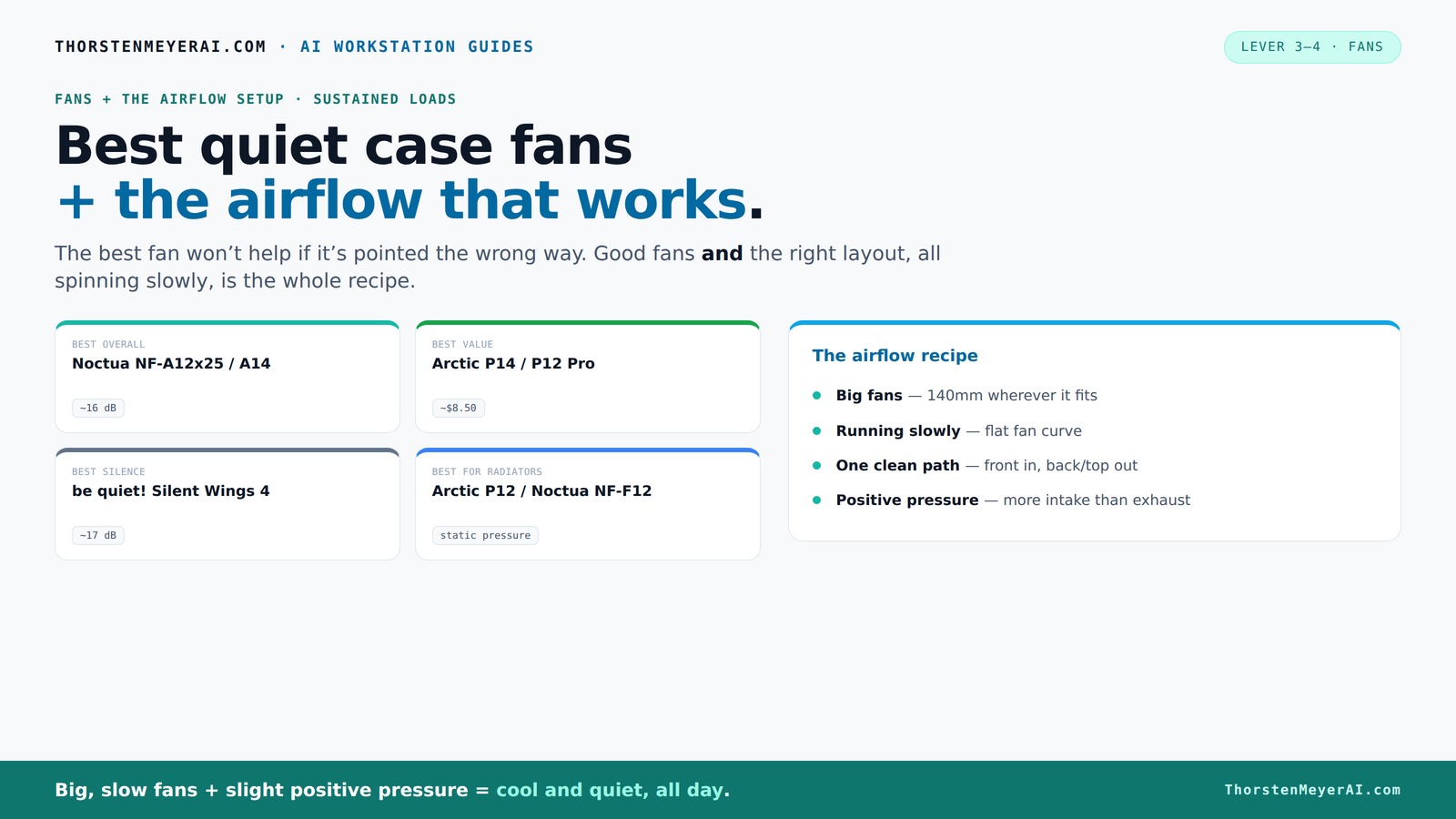

Finding quiet case fans that truly deliver effective airflow without excessive noise remains a key challenge for PC builders. The best options, like the ASUS ROG Strix XF120, stand out for their balanced performance and whisper-quiet operation. Meanwhile, fans such as the be quiet! Pure Wings 3 excel in near-silent airflow, ideal for silent builds. But the main tradeoff in this category often involves balancing noise levels with cooling power—more airflow usually means more noise. Continue reading for a detailed breakdown of the top choices, their strengths, and weaknesses.

Get business pricing on tech for your team
- Business-only prices and quantity discounts
- Tax-exempt purchasing
- Multiple users, one account, clear invoices
Key Takeaways
- High-quality fans like Noctua‘s models dominate for their quiet operation and consistent airflow, but often come at a premium price.
- Larger fans, such as 200mm models, move more air quietly but may not fit all cases or provide the same targeted airflow as smaller, high-performance fans.
- PWM control is essential for fine-tuning noise and performance, a feature present in most top picks.
- A well-designed mounting system and anti-vibration features significantly reduce noise, even under high loads.
- Price varies widely; premium fans typically offer better noise profiles and durability, but budget options can still provide decent airflow with some compromises.
| ASUS ROG Strix XF120 Whisper-Quiet 120mm PWM Fan for PC Cases, Radiators, or CPU Cooling |  | Best Overall for Versatile, High-Performance Quiet Cooling | Power Connector Type: 4-Pin | Voltage: 12 volts | Wattage: 1.08 watts | VIEW ON AMAZON | See Our Full Breakdown |
| be quiet! Pure Wings 3 120mm Silent PWM Computer Case Fan |  | Best Value for Quiet, Reliable Airflow | Power Connector Type: 4-Pin | Voltage: 12 volts | Wattage: 2.4 watts | VIEW ON AMAZON | See Our Full Breakdown |
| Noctua NF-B9 redux-1600 PWM Quiet Fan | 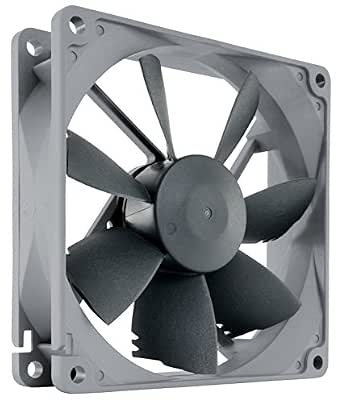 | Best for Compact, Quiet Cooling with Low Noise | Size: 92x92x25mm | Voltage: 12V | PWM: Yes | VIEW ON AMAZON | See Our Full Breakdown |
| Noctua NF-P12 redux-1300 Quiet 120mm Fan |  | Best for Efficient, Quiet Airflow at a Value | Size: 120x120x25mm | Voltage: 12V | Connector: 3-pin Molex | VIEW ON AMAZON | See Our Full Breakdown |
| Noctua NF-A12x25 G2 PWM Sx2-PP chromax Black, High-End Quiet Fans 2x120mm |  | Best Premium for High-Performance, Quiet Dual Fans | Fan Size: 120x25mm | Number of Fans: 2 | Material: Sterlox LCP | VIEW ON AMAZON | See Our Full Breakdown |
| Noctua NF-P12 redux-1700 PWM, Quiet 120mm Fan | | Best Overall for Versatile Quiet Cooling | Size: 120x120x25 mm | Voltage: 12V | PWM: Yes | VIEW ON AMAZON | See Our Full Breakdown |
| Thermaltake 200mm Pure Series Black Quiet High Airflow Case Fan with Anti-Vibration Mounting System |  | Best for High Airflow with Quiet Operation at Larger Size | Dimensions: 200 x 200 x 30 mm | Rated Voltage: 12 V | Rated Current: 0.2 A | VIEW ON AMAZON | See Our Full Breakdown |
| Noctua NF-A12x25 G2 PWM High-Performance Quiet 120mm Fan |  | Best for High-End Quiet Performance with Customization | Power Connector Type: 4-Pin | Voltage: 12 volts | Wattage: 1.8 watts | VIEW ON AMAZON | See Our Full Breakdown |
| Noctua NF-A12x25 PWM High-Performance Quiet Fan 120mm |  | Best for Premium Quiet and High Airflow in Compact Setup | Size: 120x120x25mm | Voltage: 12V | Power Connector: 4-Pin PWM | VIEW ON AMAZON | See Our Full Breakdown |
| DARKROCK 3-Pack 120mm Black Computer Case Fans | 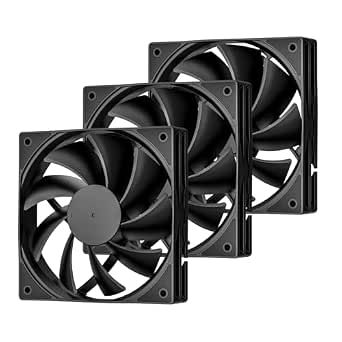 | Best for Budget-Friendly Quiet Multi-Fan Setup | Number of Fans: 3 | Fan Size: 120 mm | Maximum Speed: 1200 RPM | VIEW ON AMAZON | See Our Full Breakdown |
| quiet case fans the airflow setup that actually work | Voltage | Noise Level |
|---|---|---|
| ASUS ROG Strix XF120 Whisper-Q | 12 volts | — |
| be quiet! Pure Wings 3 120mm S | 12 volts | — |
| Noctua NF-B9 redux-1600 PWM Qu | 12V | — |
| Noctua NF-P12 redux-1300 Quiet | 12V | 19.8 dB |
| Noctua NF-A12x25 G2 PWM Sx2-PP | — | — |
| Noctua NF-P12 redux-1700 PWM | 12V | — |
| Thermaltake 200mm Pure Series | — | 28.2 dBA |
| Noctua NF-A12x25 G2 PWM High-P | 12 volts | 22.5 db |
| Noctua NF-A12x25 PWM High-Perf | 12V | 22.6 dB(A) |
| DARKROCK 3-Pack 120mm Black Co | — | 32.1 dBA |
More Details on Our Top Picks
ASUS ROG Strix XF120 Whisper-Quiet 120mm PWM Fan for PC Cases, Radiators, or CPU Cooling
The ASUS ROG Strix XF120 stands out for its combination of high airflow, static pressure, and whisper-quiet operation, making it ideal for users who want a single fan that balances multiple cooling needs. Unlike the be quiet! Pure Wings 3, which prioritizes lower noise at a slightly reduced airflow, the XF120 offers a peak of 62.5 cfm at just 22.5 dB, ensuring effective cooling without the noise. Its magnetic-levitation bearings promise a lifespan of up to 400,000 hours, surpassing typical fans and reducing maintenance. The adjustable PWM control provides flexible tuning, but this premium feature comes with a higher price tag and requires a 4-pin motherboard connection. This fan is best suited for enthusiasts who value durability and performance, even at a cost.
Pros:- Very quiet operation at 22.5 dB with high airflow
- Magnetic-levitation bearings for exceptional durability
- Adjustable PWM speed for flexible cooling performance
Cons:- Higher price compared to simpler fans
- Limited color options and aesthetic choices
Best for: High-end gamers and PC builders seeking a durable, all-around quiet fan for case, radiator, or CPU cooling
Not ideal for: Budget-conscious users who need a basic, low-cost fan without advanced features or for those with incompatible 4-pin headers
- Power Connector Type:4-Pin
- Voltage:12 volts
- Wattage:1.08 watts
- Cooling Method:Air
- Maximum Rotational Speed:1800 rpm
- Air Flow Capacity:62.5 cfm
- Item Dimensions:4.7″L x 4.7″W x 0.9″H
- Bearing Type:Magnetic-Levitation
- Lifespan:up to 400,000 hours
Our verdict“This fan makes the most sense for users who want a durable, high-performance, quiet cooling solution that covers multiple setup types.”
be quiet! Pure Wings 3 120mm Silent PWM Computer Case Fan
The be quiet! Pure Wings 3 excels as a budget-friendly fan that delivers solid airflow with minimal noise, making it suitable for users who want effective cooling without premium features. Compared to the Noctua NF-P12 redux-1600, which offers comparable static pressure, the Pure Wings 3 operates slightly louder at 25.5 dB but generally costs less. Its rifle bearing enhances longevity, with an estimated 80,000 hours of operation. While it provides decent airflow at 49.9 cfm, it may fall short for users demanding extreme cooling performance, especially compared with the ASUS XF120. This pick is ideal for those building a quiet, budget-conscious PC who prioritize reliability and noise reduction over maximum airflow.
Pros:- Quiet operation at 25.5 dB with good airflow
- Long-lasting rifle bearing for durability
- Affordable price point for a PWM fan
Cons:- Slightly higher noise than premium options
- Requires compatible 4-pin motherboard header for PWM control
Best for: Budget-conscious PC builders needing a quiet, reliable case fan
Not ideal for: Overclockers or enthusiasts requiring maximum airflow and static pressure for high-performance cooling
- Power Connector Type:4-Pin
- Voltage:12 volts
- Wattage:2.4 watts
- Cooling Method:Air
- Maximum Rotational Speed:1600 rpm
- Air Flow Capacity:49.9 cfm
- Material Type:Copper
- Operating Lifetime:80,000 hours
Our verdict“This fan is ideal for budget builds that need quiet operation and decent airflow without extra frills.”
Noctua NF-B9 redux-1600 PWM Quiet Fan
The Noctua NF-B9 redux-1600 makes sense for users who need a compact, quiet fan with solid airflow for small cases or specific cooling tasks. Its 92mm size limits its versatility compared to 120mm options like the be quiet! Pure Wings 3, but its low noise profile of 17.6 dB makes it a standout for noise-sensitive setups. Although its maximum RPM of 1600 might seem modest next to larger fans, it compensates with high static pressure, making it suitable for radiator or heatsink use. Its PWM support allows for motherboard-based speed control, but its smaller size may restrict airflow in larger cases. This model is best for tight spaces and quiet operation where size constraints matter more than sheer airflow.
Pros:- Very quiet with a noise level of 17.6 dB
- PWM control for flexible speed regulation
- High static pressure for radiator or heatsink use
Cons:- Limited to 92mm size, less versatile for larger cases
- Maximum RPM may not satisfy extreme cooling demands
Best for: Users with compact cases or specific cooling needs requiring a small, quiet fan
Not ideal for: Large cases or users needing maximum airflow for high-performance cooling
- Size:92x92x25mm
- Voltage:12V
- PWM:Yes
- Max RPM:1600
- Max Noise:17.6 dB
- MTTF:>150,000 hours
Our verdict“This fan suits small, quiet setups where space is limited but efficient airflow is still needed.”
Noctua NF-P12 redux-1300 Quiet 120mm Fan
The Noctua NF-P12 redux-1300 offers a reliable, quiet airflow solution for standard-sized cases, especially when static pressure and durability matter. Its 1300 RPM speed strikes a good balance for general use, matching the Pure Wings 3 in noise level at around 19.8 dB but with slightly higher static pressure. Its 120mm size makes it compatible with most cases, and its durable SSO2 bearing supports over 150,000 hours of operation. While it needs optional accessories for speed control, it excels in delivering consistent, quiet airflow for CPU coolers and chassis ventilation. Compared to the ASUS XF120, it sacrifices some peak airflow but offers a more affordable, straightforward solution for quieter, efficient cooling.
Pros:- Quiet operation at 19.8 dB with good static pressure
- Durable bearing with a lifespan exceeding 150,000 hours
- Good compatibility with most cases and coolers
Cons:- Speed control requires optional accessories
- Limited to 120mm size with no larger variants
Best for: Users seeking a reliable, quiet, and durable fan for general case or CPU cooling
Not ideal for: Overclockers or high-performance enthusiasts needing maximum static pressure or airflow
- Size:120x120x25mm
- Voltage:12V
- Connector:3-pin Molex
- Speed:1300 RPM
- Noise Level:19.8 dB
- MTTF:>150,000 hours
Our verdict“This fan provides a dependable, quiet airflow option for standard cooling needs at an attractive price point.”
Noctua NF-A12x25 G2 PWM Sx2-PP chromax Black, High-End Quiet Fans 2x120mm
The Noctua NF-A12x25 G2 PWM Sx2-PP earns its place for users demanding high-end, ultra-quiet airflow with maximum durability. This twin set of 120mm fans excels at providing excellent static pressure and airflow, surpassing many single fans like the Pure Wings 3 in performance, while maintaining remarkably low noise levels. The chromax Black version adds aesthetic flexibility with anti-vibration mounts and accessories, making it suitable for high-end builds. The premium price reflects its engineering quality, but for those who need the absolute quietest operation paired with high airflow, this set delivers without compromise. Compared with the ASUS XF120, it sacrifices some adjustability for a more refined, low-noise experience at a higher cost.
Pros:- Exceptional low noise levels with high airflow
- Premium build quality with durable materials
- Includes anti-vibration mounts and accessories
Cons:- High price point for a set of two fans
- Requires compatible PWM control for optimal use
Best for: Enthusiasts and high-end builders requiring the quietest, most durable, dual-fan cooling setup
Not ideal for: Budget builders or casual users who don’t need high-end noise performance or dual fans
- Fan Size:120x25mm
- Number of Fans:2
- Material:Sterlox LCP
- Bearing Type:SSO2
- MTTF:150,000 hours
- Features:PWM, anti-vibration mounts
Our verdict“This set is ideal for premium builds where maximum quietness and durability are priorities over cost.”
Noctua NF-P12 redux-1700 PWM, Quiet 120mm Fan
The Noctua NF-P12 redux-1700 PWM stands out for its balanced combination of quiet operation and reliable airflow, making it a solid choice for a variety of cooling setups. While it offers a maximum RPM of 1700, this is often sufficient for most standard cooling needs but may fall short in extreme overclocking scenarios compared to the Noctua NF-A12x25 G2 PWM, which can reach higher speeds. Its PWM control allows for smooth, automatic speed adjustments, reducing noise at lower loads. The redux edition maintains Noctua’s reputation for durability and efficiency at a more accessible price point, but the lower maximum RPM limits its performance in demanding applications. This fan is ideal for users seeking a quiet, dependable fan that won’t push noise levels above 25 dB, especially in mid-range builds.
Pros:- Low noise operation with max 25.1 dB(A)
- PWM control for smooth speed regulation
- Reliable static pressure and airflow for multiple cooling scenarios
- Cost-effective redux edition with proven quality
Cons:- Maximum RPM may be insufficient for extreme cooling demands
- Limited accessories included in basic package
Best for: Users building a quiet, versatile PC with standard cooling needs who prioritize reliability and low noise.
Not ideal for: Overclockers or gamers requiring maximum airflow and higher RPM for intensive cooling, who should consider higher-performance models.
- Size:120x120x25 mm
- Voltage:12V
- PWM:Yes
- Max RPM:1700 RPM
- Max Noise:25.1 dB(A)
- MTTF:>150,000 hours
Our verdict“This fan makes the most sense for those needing a quiet, adaptable solution without pushing into high-RPM territory.”
Thermaltake 200mm Pure Series Black Quiet High Airflow Case Fan with Anti-Vibration Mounting System
The Thermaltake Pure 20 series 200mm fan offers impressive airflow while maintaining a surprisingly quiet profile, making it ideal for large cases or radiator setups. Its maximum speed of 800 RPM might seem low, but this translates into a high airflow of nearly 130 CFM, which is excellent for cooling larger components or multiple radiators. Compared with smaller fans like the Noctua NF-P12 redux, this model prioritizes volume over speed, which can be beneficial in open or spacious cases. Its sleeve bearing ensures durability, though it’s not as long-lasting as ball bearings. The fan’s noise level of 28.2 dBA is acceptable given its high airflow, but at higher speeds, some users might notice the sound more than they would with smaller, slower fans. This pick suits those seeking a large, quiet fan for case or radiator cooling.
Pros:- High airflow of 129.64 CFM for large cooling needs
- Quiet operation at 28.2 dBA
- Durable sleeve bearing with long life
- Easy to install with anti-vibration system
Cons:- Limited maximum speed of 800 RPM
- No PWM control, fixed speed
- Requires larger case space (200mm size)
Best for: Builds where maximum airflow is needed with minimal noise in larger cases or radiator setups.
Not ideal for: Small cases or users needing high RPM for aggressive cooling, since this fan operates at a limited 800 RPM maximum.
- Dimensions:200 x 200 x 30 mm
- Rated Voltage:12 V
- Rated Current:0.2 A
- Fan Speed:800 R.P.M
- Max Air Flow:129.64 CFM
- Noise Level:28.2 dBA
Our verdict“This fan suits those prioritizing large-volume airflow in spacious cases without noise compromise.”
Noctua NF-A12x25 G2 PWM High-Performance Quiet 120mm Fan
The Noctua NF-A12x25 G2 PWM raises the bar for quiet 120mm fans, combining high airflow, static pressure, and advanced engineering. Its maximum speed of 1800 RPM outperforms many competitors, including the Noctua NF-P12 redux, providing more cooling power when needed. The PWM control ensures precise speed regulation for silent operation during low loads, while the included accessories allow flexible mounting options. Its premium-grade SSO2 bearing guarantees long-lasting durability, making it suitable for high-performance radiators and CPU coolers demanding both quiet and efficient airflow. The main tradeoff involves a higher price tag and limited color options, but for those who want a high-end, low-noise fan, this model delivers exceptional performance across the board.
Pros:- Maximum RPM of 1800 for high cooling capacity
- Quiet operation at 22.5 dB
- Advanced engineering and premium bearing for durability
- Includes versatile accessories for custom mounting
Cons:- Higher price point compared to standard fans
- Limited color options (black/white only)
Best for: High-performance PC builders who require maximum airflow at minimal noise and are willing to invest in premium quality.
Not ideal for: Budget-conscious users or those with small cases who need a less expensive or smaller fan, as this model is primarily aimed at high-end setups.
- Power Connector Type:4-Pin
- Voltage:12 volts
- Wattage:1.8 watts
- Max RPM:1800 rpm
- Air Flow Capacity:107.3 cubic meter per hour
- Noise Level:22.5 db
Our verdict“This fan is perfect for enthusiasts seeking top-tier quiet performance with maximum airflow and static pressure capabilities.”
Noctua NF-A12x25 PWM High-Performance Quiet Fan 120mm
The Noctua NF-A12x25 PWM provides a blend of impressive airflow, static pressure, and near-silent operation, making it a versatile choice for case cooling, radiators, or CPU heatsinks. It features a maximum RPM of 2000, surpassing many other high-performance fans like the Noctua NF-P12 redux, offering additional cooling headroom. Its PWM control allows for fine-tuned speed adjustments, reducing noise during light loads. The inclusion of anti-vibration mounts and extension cables simplifies installation and minimizes vibration noise. The main tradeoff is its premium cost, which might be prohibitive for budget builds, and its limited color options. For users who prioritize both quiet operation and high airflow, this fan delivers outstanding value.
Pros:- High airflow and static pressure performance
- Quiet at 22.6 dB(A)
- Comprehensive accessory kit for flexible installation
- Durable engineering for long-term reliability
Cons:- Premium price point
- Limited color options
- Maximum RPM may produce noticeable noise for sensitive users
Best for: Power users and PC enthusiasts seeking premium, quiet airflow with maximum performance headroom.
Not ideal for: Casual builders or those on a tight budget, as this model’s higher price may not be justified for basic needs.
- Size:120x120x25mm
- Voltage:12V
- Power Connector:4-Pin PWM
- Max RPM:2000 rpm
- Air Flow:102.1 cubic meters per hour
- Noise Level:22.6 dB(A)
Our verdict“This fan is ideal for those demanding top-tier quiet airflow with some budget flexibility.”
DARKROCK 3-Pack 120mm Black Computer Case Fans
The DARKROCK 3-Pack 120mm fans deliver solid cooling performance with a focus on quiet operation, making them a good choice for budget-conscious users. Operating at a maximum of 1200 RPM, they produce around 32.1 dBA, which is higher than the smaller fans like the Noctua NF-P12 redux, but still acceptable for many users seeking quietness in a multi-fan setup. The hydraulic bearings contribute to durability, and the silicone cushions help dampen vibration. Since they use 3-pin connectors, they lack PWM control, which means less precise speed regulation compared to PWM models. These fans are well-suited for users who want a straightforward, quiet airflow setup without the need for advanced speed adjustments, especially in larger cases that can tolerate slightly higher noise levels at full speed.
Pros:- Affordable multi-fan pack for comprehensive cooling
- Quiet operation at 32.1 dBA
- Durable hydraulic bearings
- Easy to install in various case types
Cons:- Requires motherboard with 3 PIN headers for speed control
- No PWM control for dynamic adjustment
- Limited maximum speed (1200 RPM)
Best for: Enthusiasts building multiple quiet fans on a budget for larger cases or general airflow enhancement.
Not ideal for: Users needing fine-tuned speed control or those with very space-constrained cases, due to fixed RPM and size.
- Number of Fans:3
- Fan Size:120 mm
- Maximum Speed:1200 RPM
- Noise Level:32.1 dBA
- Bearing Type:Hydraulic
- Connector:3 PIN
Our verdict“This set offers a budget-friendly way to add multiple quiet fans in larger cases without complex control features.”
How We Picked
In evaluating these fans, I prioritized a blend of noise levels, airflow efficiency, build quality, and ease of installation. Fans with PWM control and anti-vibration features scored higher because they offer quieter operation and better tuning. I also considered the reputation of the brand and user feedback to ensure durability and real-world performance. The ranking reflects how well each fan balances these factors—fans that deliver strong airflow at low noise levels without complex setup made the top of the list. Cost was a consideration, but only when it directly impacted performance or noise reduction, ensuring the picks offer good value for their price.Factors to Consider When Choosing Quiet Case Fans The Airflow Setup That Actually Works
Choosing the right quiet case fan involves more than just looking at decibel ratings. It’s essential to consider compatibility with your case, the size of the fan, and the airflow needs of your system. Beyond specs, paying attention to mounting options and vibration reduction can make a noticeable difference in noise levels. Balancing airflow and noise often requires tradeoffs: higher airflow fans tend to be louder, so understanding your priority—silent operation versus cooling—helps narrow options. Additionally, features like PWM control and quality bearings extend the fan’s lifespan and allow more precise noise management. Avoid choosing fans solely based on price; a well-made fan can improve your system’s acoustics and stability over time.Fan Size and Compatibility
Size is one of the first considerations. Standard 120mm fans fit most cases, but larger 140mm or 200mm fans can move more air quietly due to their bigger blades and lower RPMs. Always check your case’s maximum supported fan size before making a choice. In some cases, fitting a larger fan can significantly reduce noise while maintaining good airflow, but if space is tight, smaller fans or high-performance 120mm models may be necessary. Proper compatibility ensures you avoid installation issues and optimize airflow distribution across your system components.
Noise Levels and Bearings
Noise is often a priority, but lower decibel ratings can sometimes be misleading without context. Look for fans with high-quality bearings like fluid dynamic bearings (FDB) or ball bearings, which run quieter and last longer. PWM control is also valuable; it allows the fan to adjust speed dynamically based on system temperature, reducing unnecessary noise during light loads. Remember, the quietest fans might have lower airflow, so balancing noise and performance is key—sometimes a slightly louder fan with better airflow can keep your components cooler more effectively.
Airflow and Static Pressure
Understanding airflow and static pressure helps in matching fans to your needs. For general case cooling, high airflow fans are effective, but if you’re cooling radiators or densely packed components, static pressure fans perform better—they push air through restrictive spaces without losing performance. Some fans excel at both, but often, you’ll need to prioritize one based on your setup. Ensuring your fans can deliver the right type of airflow means your cooling setup works quietly and efficiently, preventing hot spots and minimizing noise caused by turbulence.
Build Quality and Vibration Control
Durability and vibration reduction are vital for long-term quiet operation. Fans with sturdy frames, high-quality motors, and anti-vibration mounts minimize rattling and unwanted noise. Rubber or silicone mounts can absorb vibrations, especially if the fan is mounted on metal surfaces. Investing in fans with good build quality might cost more upfront but pays off in reduced noise and longer lifespan. Skimping on mounting and vibration features can lead to increased noise over time, defeating the purpose of choosing quiet fans.
Price and Value
While premium fans like Noctua’s models tend to excel in noise and durability, budget options can still provide decent airflow with some compromises in noise and longevity. Consider your overall system needs—if you’re aiming for a silent build, investing in higher-end fans makes sense. For more casual or budget-conscious setups, mid-range fans offer a reasonable balance. Remember, the most expensive fan isn’t always the best fit; focus on features that match your priorities and avoid overpaying for bells and whistles you won’t use.
Frequently Asked Questions
How quiet can a case fan realistically get without sacrificing airflow?
Quiet case fans can operate at noise levels below 20 decibels, but maintaining effective airflow at this noise level often requires larger fans or those with advanced bearing and blade designs. Fans rated for silent operation typically run at lower RPMs, which means they move less air but do so more quietly. To balance noise and cooling, many users opt for fans with PWM control, allowing the fan to ramp up only when needed. Ultimately, the key is selecting a fan designed specifically for quiet operation, which can deliver acceptable airflow without creating disruptive noise.
Is it worth paying more for high-end fans like Noctua or be quiet!?
Investing in high-end fans often provides better noise profiles, longer durability, and more consistent airflow, which can be a significant advantage for silent or high-performance builds. Brands like Noctua and be quiet! have established reputations for quality components and quiet operation, making their products suitable for users who prioritize silence or prolonged system stability. However, for casual users or those on a tight budget, mid-range fans can still deliver acceptable performance at a lower cost. The decision depends on your specific needs and how much you value reduced noise and long-term reliability.
How important is static pressure for case fans in a typical setup?
Static pressure is crucial if your system includes radiators, dust filters, or densely packed components that restrict airflow. High static pressure fans are designed to push air through these obstacles efficiently, maintaining cooling performance without generating extra noise. For open-case setups or standard airflow configurations, high airflow fans usually suffice. Choosing the right type based on your system’s configuration ensures your cooling setup remains quiet while effectively managing temperatures.
Can I use a high-performance fan in a small case without noise issues?
Yes, but with some caveats. High-performance fans often operate at higher RPMs, which can generate more noise unless they feature good bearing technology and vibration dampening. In small cases, airflow restrictions may cause these fans to ramp up even more, increasing noise levels. To keep noise down, look for models with PWM control and quiet bearings. Additionally, ensure your case supports larger fans or those designed for quiet operation to mitigate excess noise while maintaining proper cooling.
What maintenance is needed to keep quiet case fans running smoothly?
Regular cleaning to remove dust buildup is essential, as dust can cause fans to become unbalanced and noisier over time. Use compressed air to gently blow out dust from the blades and motor housing at least every few months. Lubricating bearings or replacing fans when they start to vibrate or squeal can also extend their lifespan and maintain quiet operation. Proper mounting and vibration dampening contribute to ongoing noise reduction, so inspecting these elements periodically helps sustain optimal performance and silence.
Conclusion
For those prioritizing overall performance and long-term quiet operation, the Noctua NF-A12x25 G2 PWM stands out as the best choice, especially for users willing to invest in premium quality. Budget-conscious builders seeking decent airflow without excessive noise might opt for the be quiet! Pure Wings 3, which balances affordability and quietness. For silent enthusiasts or professional setups, the ASUS ROG Strix XF120 offers advanced blade design and PWM control for near-silent operation under load. Beginners should focus on models with straightforward installation and good vibration control, while high-performance builders should look toward premium brands that deliver both airflow and near-silence. The key is matching your case size, airflow needs, and noise tolerance to the right fan for a setup that truly works quietly.
Halloween Picks
halloween
As an affiliate, we earn on qualifying purchases.