
Disclosure: This article contains a few affiliate links, and as an Amazon Associate I earn from qualifying purchases — at no extra cost to you. I only recommend gear I’d actually use.
Every other article in this series has been about taming the heat and noise of a GPU tower. This one asks a more fundamental question: what if you sidestep most of that heat and noise entirely by choosing a different kind of machine?
That’s the real Mac-versus-tower decision for local AI. It isn’t only about tokens per second — it’s a choice between two philosophies of computing, and the heat-and-noise dimension that this whole cluster is about happens to be one of the sharpest differences between them. A GPU tower is a high-bandwidth furnace you spend five levers learning to quiet. An Apple Silicon machine is near-silent and sips power by design — but asks you to accept a different set of tradeoffs.
This is the capstone to the pillar, How to Reduce Heat and Noise in a High-Power AI Workstation — the piece that frames everything else. Here’s the honest comparison, through the lens the series has built.
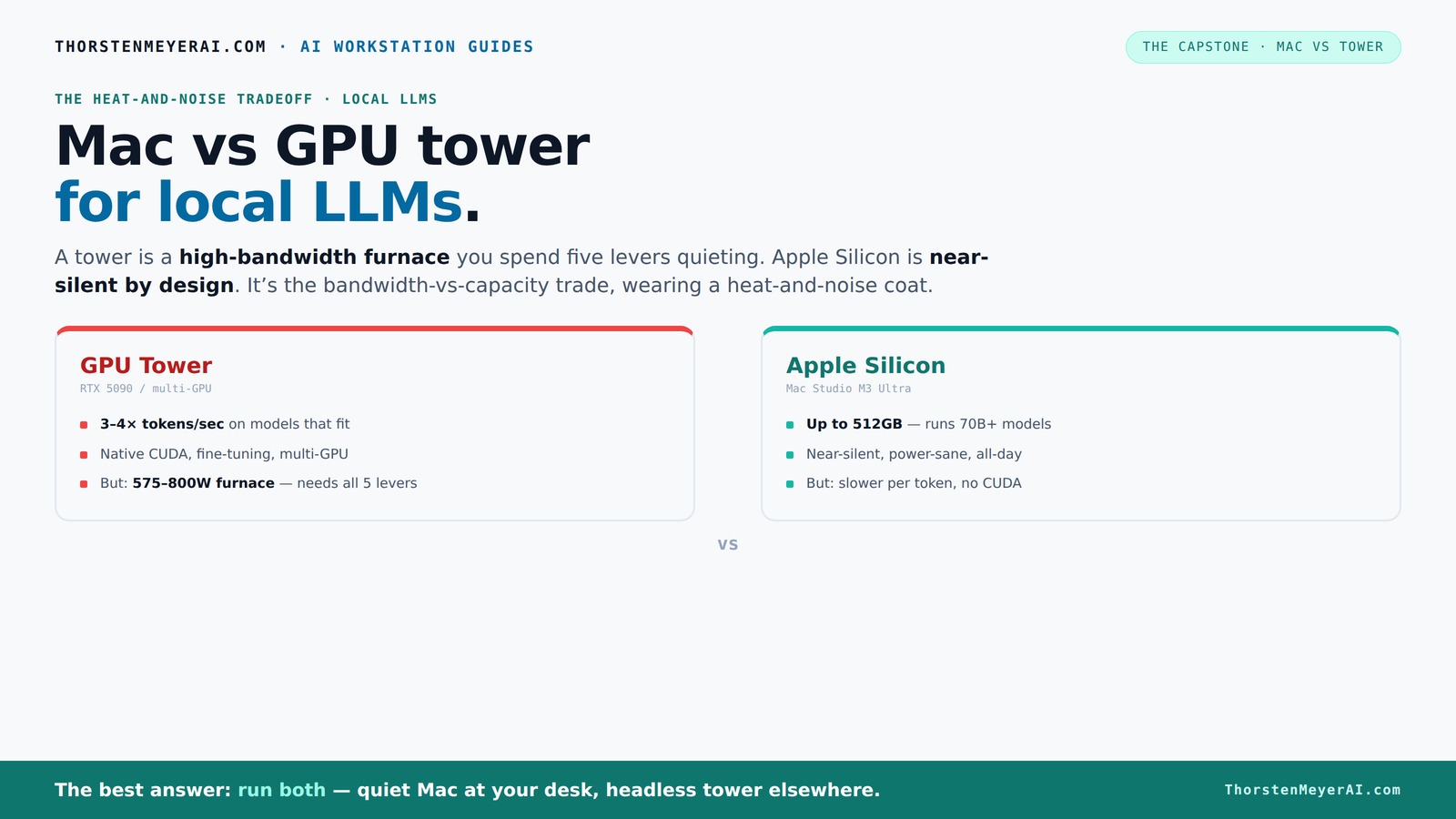
Mac vs GPU tower
for local LLMs.
What if you sidestep the heat entirely with a different kind of machine? A tower is a high-bandwidth furnace you spend five levers quieting. Apple Silicon is near-silent by design — but asks for different tradeoffs. Match your priority in Part 2.
Put the loud, hot machine where its noise doesn’t matter, and the quiet one where you do. SSH into the tower when you need raw power; let the Mac handle everything else, silently.
The architectural crux: bandwidth vs capacity
Almost every confused Mac-vs-tower argument comes from missing this one distinction. LLM inference speed is governed by memory bandwidth — how fast the chip can read the model's weights — while which models you can run at all is governed by memory capacity. The two machines optimize for opposite ends:
The GPU tower optimizes bandwidth. An RTX 5090 delivers roughly 1,792 GB/s of memory bandwidth — about 2x+ a Mac Studio M3 Ultra's ~819 GB/s. That's why, on a model that fits in its VRAM, a tower generates several times more tokens per second. But it's capped at 24–32GB per consumer card, and two GPUs don't pool their VRAM — memory doesn't stack.
Apple Silicon optimizes capacity. Its unified memory architecture lets the CPU, GPU, and Neural Engine share one enormous pool — up to 256–512GB — that can be almost entirely allocated to a single inference job. So a Mac can load a 70B (or far larger) quantized model that simply won't fit in a consumer GPU's VRAM at all. It reads that model more slowly, but it can hold it.
So the question that actually decides it is: "does it fit?" or "how fast?" If your ceiling is throughput on models that fit in 32GB, the tower wins decisively. If your ceiling is running a model too big for any single GPU, the Mac changes the game. Hold that thought — it's the whole decision.

HELLOLAND Ocean of Stars AI Gaming PC Desktop - AMD Ryzen 7 9700X 8-Core 3.8GHz - RTX 5070 12GB - 32GB DDR5 RAM- 1TB PCIe +1TB SATA SSD- 850W PSU- Win 11 - RGB Lights with Software Control - White
- Powerful AMD Ryzen 7 Processor: 8-Core, 16-Thread, up to 5.5GHz
- High-Speed DDR5 RAM: 32GB for multitasking and AI work
- Next-Gen RTX 5070 GPU: 12GB VRAM for gaming and AI
As an affiliate, we earn on qualifying purchases.
As an affiliate, we earn on qualifying purchases.
Where the heat and noise come in
Here's why this belongs as the capstone to a heat-and-noise series. The two architectures sit at opposite ends of the thermal spectrum, and it's not close:
The GPU tower is a space heater you manage. A single RTX 5090 draws 575W; a dual-GPU rig pushes past 800W, nearly all of it becoming heat your room has to absorb and your fans have to evacuate. Everything in this cluster — undervolting, cooler choice, case airflow, fan tuning, placement — exists to make that heat livable. A well-built tower can be made quiet, but it takes all five levers and ongoing attention.
Apple Silicon is quiet and cool by design. An M-series chip running inference draws a small fraction of a GPU tower's power and produces correspondingly little heat. A Mac Studio is near-silent under load and sips power — which is exactly why it's become the default recommendation for people who want an always-on local AI box that disappears into a room. There are no levers to pull; the silence is the default state, not an achievement.
For a machine that lives on your desk and runs around the clock, that difference is enormous. The tower asks you to become a thermal engineer. The Mac asks you to accept slower tokens. Which trade is right depends entirely on how you work.

Apple 2025 MacBook Pro Laptop with Apple M5 chip with 10‑core CPU and 10‑core GPU: Built for AI, 14.2-inch Liquid Retina XDR Display, 16GB Unified Memory, 1TB SSD Storage; Space Black
- Processor: Apple M5 with 10-core CPU/GPU
- Display: 14.2-inch Liquid Retina XDR
- Memory: 16GB Unified Memory
As an affiliate, we earn on qualifying purchases.
As an affiliate, we earn on qualifying purchases.
Head to head
| Factor | GPU Tower (RTX 5090 / multi-GPU) | Apple Silicon (Mac Studio M3 Ultra) |
|---|---|---|
| Memory bandwidth | ~1,792 GB/s — far higher | ~819 GB/s |
| Tokens/sec (fits in VRAM) | 3–4x faster | Slower (but usable) |
| Memory capacity | 24–32GB/card (no pooling) | Up to 256–512GB unified |
| Biggest models | Capped by VRAM | Runs 70B+ that won't fit a GPU |
| Power draw | 575–800W+ | A fraction of that |
| Heat produced | Large — needs all 5 levers | Minimal by design |
| Noise | Manageable with effort | Near-silent default |
| Multi-GPU scaling | Yes (complex, hot) | No multi-unit scaling |
| CUDA / fine-tuning | Native, full ecosystem | Limited; MLX, not CUDA |
| Upgradeability | Swap GPUs, expand | Fixed at purchase |

Mastering AI Workstations for High-Performance Computing: Your Guide to Configuring, Optimizing, and Harnessing the Power of AI-Ready Workstations for Maximum Productivity
As an affiliate, we earn on qualifying purchases.
As an affiliate, we earn on qualifying purchases.
When the GPU tower wins
Maximum throughput on models that fit. If your models live in 32GB and you want the most tokens per second — interactive, latency-sensitive work, or serving many requests — nothing consumer-grade beats a tower. The bandwidth gap is decisive.
CUDA-native work and fine-tuning. Training, LoRA fine-tuning, and the vast CUDA ecosystem run natively on NVIDIA. Apple's MLX is capable and improving, but CUDA is still the lingua franca of serious model development.
Multi-GPU scaling and upgradeability. You can add cards, swap generations, and grow the rig. A Mac is fixed at purchase.
You'll do the thermal work. If you're willing to pull the five levers — and this whole cluster is your manual — a tower gives you the highest ceiling.
👉 See the quiet GPU picks — or a top card on Amazon

Noctua NF-P12 redux-1700 PWM, Quiet Fan 120mm
- Size: 120x120x25 mm
- Voltage: 12V
- PWM Control: 4-pin PWM
As an affiliate, we earn on qualifying purchases.
As an affiliate, we earn on qualifying purchases.
When the Mac wins
Running models too big for a single GPU. This is the headline. With 256–512GB of unified memory, a Mac Studio runs 70B and larger quantized models on-device that no single consumer GPU can fit. If your ceiling is "does it fit," the Mac is in a different league.
Silent, always-on, power-sane operation. For a desk-side machine that runs 24/7, the Mac's near-silence and low power draw are transformative. No fan roar, no 800W heater, no five-lever thermal project — it just runs, quietly. For many people, this alone settles it.
Memory-per-dollar and simplicity. Unified memory is comparatively cheap per gigabyte, and a Mac is a single appliance — no PSU headroom math, no CUDA toolchain maintenance, no GPU priesthood. A simpler pipeline you trust beats a hair-on-fire cluster you fear.
Batch and agentic workloads where latency is secondary. If you're running nightly batch jobs or RAG-heavy agentic workflows where "fast enough" beats "fastest," the Mac's throughput is plenty and its other virtues dominate.
👉 Check Mac Studio configurations on Amazon
How to decide
Walk these in order:
- Do your models fit in 32GB? If no — you want to run 70B+ on a single box — the Mac's unified memory is the clean answer. If yes, continue.
- Is your priority maximum tokens/sec or CUDA fine-tuning? If yes, the tower wins on bandwidth and ecosystem. If you're doing inference where "fast enough" suffices, continue.
- Does the machine live on your desk and run all day? If yes, the Mac's silence and low power are worth a great deal — it disappears into the room. If it'll live in a closet or basement where noise doesn't matter, the tower's noise is a non-issue (see the placement guide).
- Are you willing to do the thermal work? A tower rewards the five levers with the highest ceiling. If you'd rather not become a thermal engineer, the Mac asks nothing of you.
The honest meta-answer: pick the side of the bandwidth-vs-capacity trade that matches how you actually work, not how you imagine you might work someday. Most people overestimate how often they'll need the tower's peak throughput and underestimate how much they'll value silence and simplicity day to day.
The hybrid most serious setups land on
In practice, the best answer for many is both — and it dovetails with the placement lever. Use a near-silent Mac on or near your desk for interactive work and models that benefit from huge unified memory, and keep a GPU tower (running headless, possibly in another room) for throughput-heavy jobs, fine-tuning, and CUDA work. You SSH into the tower when you need its raw power and let the Mac handle everything else quietly.
This is the setup that resolves the heat-and-noise tension completely: the loud, hot machine lives where its noise doesn't matter, and the quiet machine lives where you do. It's the natural endpoint of taking this whole series seriously — produce less heat, cool it, contain it, tune it, move it... or simply choose a machine that never made much heat to begin with, and let each tool do what it's best at.
The bottom line
The Mac-vs-tower decision is the bandwidth-vs-capacity trade wearing a heat-and-noise coat. The GPU tower wins raw throughput on models that fit, plus CUDA and upgradeability — at the cost of being a 575–800W furnace that needs all five levers of this cluster to run quietly. Apple Silicon wins silent, power-efficient operation and the ability to run enormous models in unified memory — at the cost of slower tokens and no CUDA. For a desk-side, always-on machine, the Mac's silence is a genuine feature, not a consolation; for maximum throughput and model development, the tower's ceiling is unmatched.
And the most sophisticated answer is to stop choosing: pair a quiet Mac at your desk with a headless tower elsewhere, and you get throughput and silence. Whichever way you go, the framework that makes a tower livable — and the reasons a Mac may not need it — is the whole of this series, anchored in the pillar guide.
Bandwidth, capacity, and throughput figures from 2026 comparisons (BIZON, independent benchmarks, Apple Silicon and NVIDIA datasheets). Token rates are ballpark for Q4_K_M quantized models and vary by model, quantization, and workload. As an Amazon Associate I earn from qualifying purchases.