AI coding tools are now everywhere. Teams talk about Claude Code, Cursor, GitHub Copilot, Codex, Windsurf, Devin, and frontier models like GPT-5.4 or Claude Opus 4.7 as if they all belong in the same category. They do not.

Get business pricing on tech for your team
- Business-only prices and quantity discounts
- Tax-exempt purchasing
- Multiple users, one account, clear invoices
That confusion is not harmless. It creates bad buying decisions, bad internal debates, and bad expectations about what these tools can actually do. When a leadership team compares a model, an IDE, and a harness as if they were interchangeable, it is not comparing products. It is mixing layers.
The clearest way to understand the market is to think in layers.
The stack, bottom to top
The modern AI coding stack has six layers.

At the bottom sits the model. This is the raw neural network: the engine itself. It predicts tokens, writes text, explains code, and reasons through problems. By itself, it has no memory, no tools, no shell access, no ability to open files, and no identity beyond the prompt it receives.
Above that sits the harness. This is the code that wraps the model and turns it into something useful. The harness decides what tools the model can call, how context is managed, how memory works, what safety rules apply, and how the orchestration loop runs. If the model is the engine, the harness is the drivetrain, steering, and control system.
From that combination comes the agent. An agent is not usually the product being sold. It is what emerges when a model and a harness are given a goal and allowed to act in a loop. That loop is what makes the system feel autonomous. It reads, plans, decides, acts, evaluates, and continues until it finishes or fails.
Next comes the interface or surface. This is where the human actually meets the system. It may be a CLI, a web app, a desktop app, or an IDE extension. The same harness can appear through several surfaces, which is why product names often seem bigger and more ambiguous than they really are.
Around that sits the IDE or editor. This is the environment where code gets written and changed. VS Code, Cursor, Windsurf, Zed, and JetBrains products live here. Some are traditional editors with AI bolted on. Others are AI-native environments.
At the top is the workflow surface. This is where work begins, gets handed off, reviewed, and completed. GitHub pull requests, Linear issues, Slack threads, ticket systems, and email live here. This is where the business actually experiences the output of AI tooling.
Understanding this stack changes how you see the entire category.
Products Worth Considering

Logitech MX Mechanical Wireless Illuminated Keyboard, Tactile Quiet, Graphite

Anker SOLIX C1000 Gen 2 Portable Power Station

LG UltraGear 32GX850A-B 32-inch 4K UHD Glossy OLED Gaming Monitor
As an affiliate, we earn on qualifying purchases.
Why the market feels confusing
Most confusion in AI tooling comes from layer confusion.
People ask, “Should we use Cursor or Claude Code?” But that sounds more sensible than it really is. Cursor is primarily an IDE. Claude Code is primarily a harness that can appear through several interfaces, including inside an IDE. Those are not direct substitutes in the cleanest sense. In many teams, they are complements.
The same thing happens when someone says, “We switched from Claude to GPT.” In many cases, what they actually changed was the model layer. They may have kept the same harness, the same IDE, the same workflows, and the same interfaces. They changed the engine, not the vehicle.
This is why the stack matters. It lets you ask the right question.
Instead of asking which “AI coding tool” is best, you ask:
Which model should power hard tasks?
Which harness should manage interactive work?
Which interface best fits how our team operates?
Which editor should developers live in all day?
Which workflow surface will become the system of record?
That is a much more useful conversation.
Layer 1: The model
The model layer is where most executives start, because it is the easiest layer to understand commercially. There is a provider, a capability level, a price, and a context window.
This is where names like GPT-5.4, Claude Opus 4.7, Gemini 3, or open-weight alternatives enter the conversation. The model decides the baseline capability ceiling: reasoning quality, coding ability, latency, and cost efficiency.
But the model is also the easiest layer to overvalue.
A strong model matters, especially for complex engineering work. Yet many real-world failures blamed on “the model” are actually failures of the layer above it. Poor context retrieval, bad tool design, weak memory handling, and unstable execution loops can make an excellent model perform badly.
That is why raw model evaluations rarely tell the whole story. A benchmark win is not the same thing as reliable production work inside an engineering organization.
For executives, the decisions at this layer are usually contractual and economic. Which providers do you trust? Which tasks require frontier capability? Which workflows can run on cheaper coding-tuned or open-weight options? What is your acceptable price per million tokens?
Those are important questions, but they are only the start.
Layer 2: The harness
The harness is the most important layer that many non-technical buyers still do not recognize by name.
It is also the layer that often determines success.
A harness handles tool access, file reads and writes, shell execution, git operations, prompt assembly, memory behavior, checkpoints, safety controls, approvals, and the loop that decides what happens next. Two harnesses can run the same model and produce dramatically different outcomes.
That is why the harness, more than the model, often defines the actual product experience.
A plan-first, high-visibility harness may be ideal for sensitive code changes, regulated environments, or teams that want frequent approval gates. A more autonomous, fire-and-forget harness may be better for background delegation, overnight work, or large batches of repetitive tasks.
When organizations say an “agent” is amazing or disappointing, what they usually mean is that the harness is amazing or disappointing.
This is also the layer where buying gets messy, because costs often split in two directions. There may be a harness subscription on one side and model API spend on the other. If leaders do not recognize that these are separate line items, forecasting gets distorted quickly.
Layer 3: The agent
“Agent” is one of the most overused words in enterprise AI.
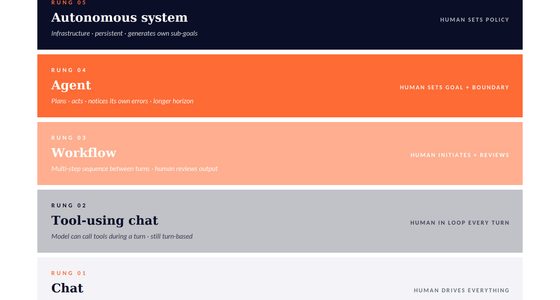
The practical definition is simpler than most marketing pages make it sound. An agent is a system that takes a goal and chooses its own actions in a loop. It does not wait for the human to specify every micro-step. It keeps going until it completes the task, gets stuck, or decides it needs help.
That loop is the heart of agent behavior.
A copilot suggests.
An agent acts.
That does not mean every agent should be fully autonomous. In many cases, the best systems are human-in-the-loop agents that pause at sensible checkpoints. For codebases that matter, that balance is usually healthier than blind autonomy.
This is also why “agent” should not be treated as a clean product category. What matters operationally is not whether a vendor says “agent” on the homepage. What matters is how much autonomy the system actually has, how long it can run, how well it self-corrects, and how safely it escalates uncertainty.
Those are execution questions, not branding questions.
Layer 4: Interface and surface
The interface layer is where people often start forming strong preferences.
Some developers want a terminal-first experience because it feels direct, fast, and transparent. Others prefer a desktop app or a browser-based environment because it reduces friction. Others want everything inside the editor they already use.
The same underlying harness can often serve multiple surfaces. That is why the same product name can show up in a CLI, an IDE extension, a web experience, and a desktop app. The name stays constant, but the user experience and governance implications change.
This layer matters more than it first appears because it shapes adoption and control.
Security, auditability, permissions, logging, and compliance often depend on the surface through which the tool is used. A team using an IDE extension is not having the same governance conversation as a team using a consumer chat app, even if both are powered by the same model family.
For executives, this means deployment policy should not stop at the model name. It should include the approved surfaces through which that capability can be accessed.
Layer 5: The IDE or editor
The IDE layer is where much of the competitive heat in AI coding now lives.
Traditional editors used to compete on language support, extension ecosystems, debugging, speed, and developer ergonomics. Now they also compete on how deeply AI is embedded into the product architecture.
That creates an important distinction between an editor with AI features and an AI-native editor.
Some tools treat AI as an add-on. Others rebuild the experience around autocomplete, multi-file editing, background task execution, codebase retrieval, and agent-style workflows. This changes not only what the editor can do, but how the developer works inside it hour by hour.
That said, editor choice and harness choice are still separate decisions.
A team may standardize on one editor while supporting multiple harnesses inside it. Another team may prefer a best-of-breed harness for deep work and keep a different editor for everyday coding. Treating those as separate decisions usually leads to better outcomes than assuming one purchase solves every layer at once.
Layer 6: Workflow surfaces
The top of the stack is where AI tooling becomes organizational rather than individual.
Developers may love or hate a specific IDE, but the long-term switching cost often accumulates elsewhere. It accumulates in workflow surfaces: issue systems, pull request review, chat-based handoffs, design-to-build transfers, and automated triage.
This is where the most durable platforms tend to form.
Once a company’s tickets, reviews, design artifacts, and team handoffs start flowing through a connected AI ecosystem, the stickiness rises fast. The editor is no longer the only control point. The workflow becomes the product.
This matters because executives often focus first on individual developer productivity. That is understandable, but incomplete. The deeper strategic question is which workflow surfaces the organization wants to standardize around. The strongest long-term moat may not be in the text box where a developer prompts the model. It may be in the system where work gets assigned, reviewed, and shipped.
Three rules executives should remember
Three practical rules fall out of the stack.
First, layer confusion creates category confusion. If you do not know what layer a product occupies, you will compare the wrong things and buy the wrong bundle.
Second, the model and the harness are separate decisions. The same model can behave very differently depending on the harness wrapped around it. Treating the harness as a minor detail is one of the fastest ways to misunderstand why one tool succeeds and another fails.
Third, agent quality usually depends more on harness quality than on model quality. The best model in the world cannot compensate for poor context management, weak tool use, or a broken execution loop. If you want reliable task completion, look closely at the harness.
What this means for Thorsten Meyer AI readers
If you are evaluating AI coding tools, stop asking which brand is “best” in the abstract. Start asking where each product sits in the stack.
That one move clarifies the market.
It tells you what a product actually does.
It tells you what it competes with.
It tells you what it complements.
It tells you whether you are replacing a model, a harness, an editor, or a workflow.
And it tells you whether a debate inside your company is real or just a category mistake.
The companies that win with AI in software delivery will not necessarily be the ones with the flashiest demos. They will be the ones that understand the layers, separate the decisions, and design their stack intentionally.
That is the real value of the six-layer model. It gives leaders a mental model strong enough to cut through the noise.