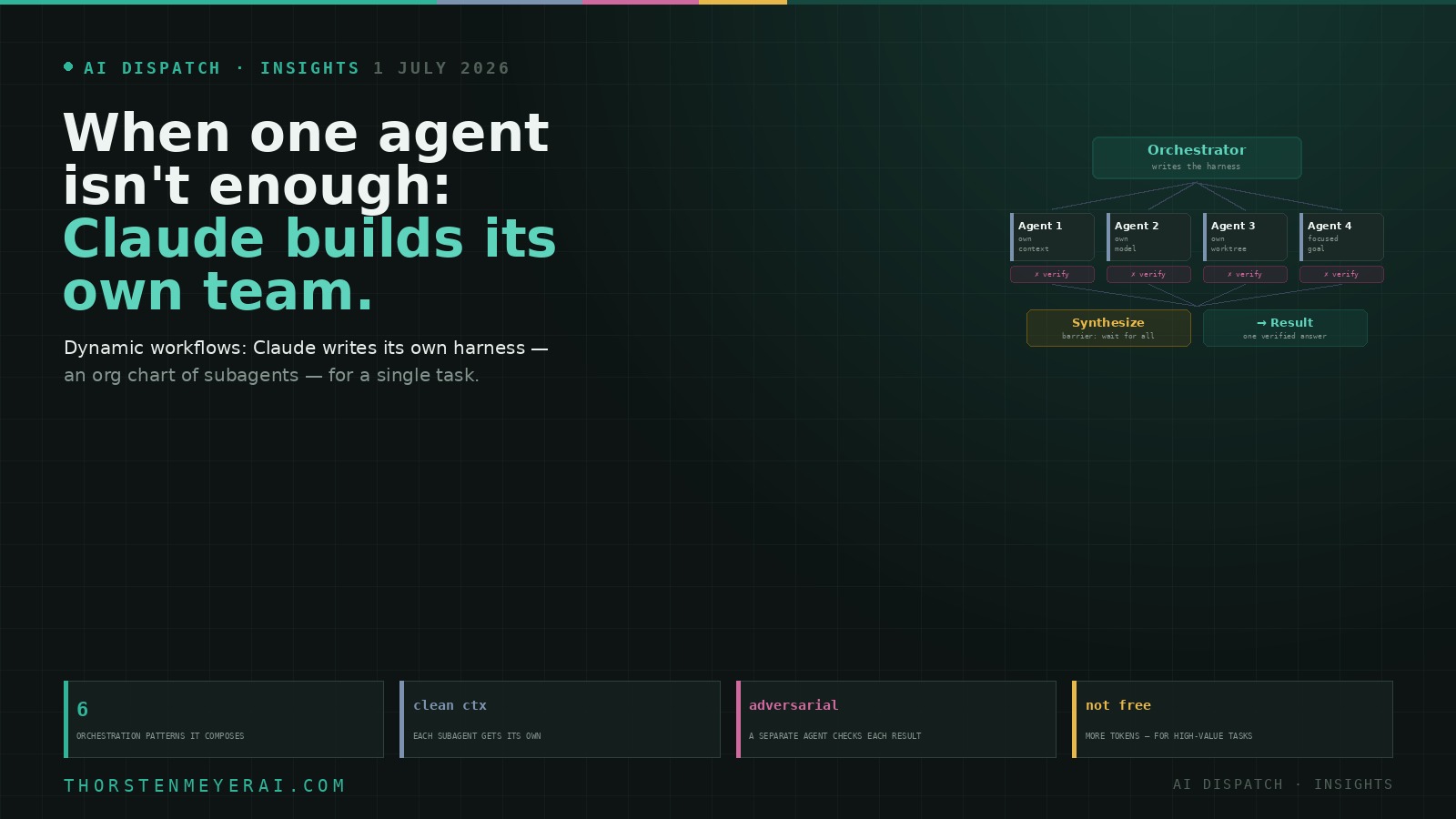

This is the third piece in a loose trilogy from Anthropic’s Claude Code team, and it completes a neat arc. Skills package what your organization knows. Loops decide when and how far you delegate over time. Dynamic workflows are the third axis: within a single task, Claude can now assemble its own team.

Get tech for your team delivered free — and shop member deals
- Fast, free delivery on millions of items
- Access to Prime Big Deal Days deals on October 6–7
- Prime Video, Amazon Music and more included
The feature is called dynamic workflows, and the plain description is that Claude writes its own harness — the orchestration scaffolding around the model — custom-built on the fly for the task in front of it. The more useful way to picture it: Claude drawing an org chart for one job — hiring a dispatcher, a few specialists, an independent reviewer, maybe a panel of judges — each with a clean desk and a focused brief, then disbanding the team when the work is done.
Anthropic’s caveat comes first, and it’s the honest one: this uses meaningfully more tokens and is built for complex, high-value tasks. It is not how you should ask Claude to fix a typo. With that said, here’s how it works, the moves it composes, and — the part that matters most — how to tell when a task actually needs a committee.
When one agent isn’t enough: Claude now builds its own team on the fly
Skills package what you know; loops decide how far you delegate over time. Dynamic workflows are the third axis — within a single task, Claude writes its own harness and assembles a temporary team of subagents. Think of it as Claude drawing an org chart for one job.
The shift is from prompting a worker to commissioning a team — more output, more cost, and a manager’s judgment required. Reach for a workflow when a task is big, parallel, adversarial, or judgment-heavy — and when you can feel a single agent getting lazy, grading its own homework, or losing the plot. Bound it (token budgets, pilot first) — workflows can spawn hundreds of agents and burn far more tokens. For everything else, don’t hire five people to change a lightbulb.
Why one agent grinding alone underdelivers
Start with the problem, because it’s the most transferable idea in the piece. The default way an agent works is to plan and execute inside a single context window. For ordinary coding that’s ideal. But stretch it across a long, highly parallel, or adversarial task and three failure modes reliably show up — and every one of them has a human equivalent.
Agentic laziness: it stops early and declares victory on partial work — closing out a 50-item security review after handling 35. Self-preferential bias: asked to check or grade its own output against a rubric, it tends to like what it already produced. Goal drift: across many turns, especially after the context gets summarized to save room, the original objective quietly erodes — the “don’t do X” constraint and the edge-case requirement fall out of memory.
Read those again and they’re not AI quirks; they’re the exact failure modes of one person doing a huge project alone. You cut corners when you’re tired, you’re a poor judge of your own work, and you lose the thread on a weeks-long slog. The cure a manager reaches for is the same one a workflow encodes: divide the work, give each person an isolated and focused brief, and have someone independent check the result. That’s precisely what a workflow does — it orchestrates separate subagents, each with its own context window and a single clear goal.
AI workflow orchestration software
As an affiliate, we earn on qualifying purchases.
As an affiliate, we earn on qualifying purchases.
What it actually is, under the hood
Mechanically, a dynamic workflow is a small JavaScript program Claude writes and runs. That program has special functions for spawning and coordinating subagents, plus ordinary JavaScript for wrangling data. Two details are worth a technical reader’s attention: the workflow can decide which model each subagent uses — a cheap, fast one for grunt work, a powerful one for judgment — and whether each agent runs in its own isolated worktree, so parallel agents don’t step on each other. If it’s interrupted, it can resume where it left off.
The “dynamic” part is the leap. You could always wire up multiple Claude instances by hand with the Agent SDK — a static workflow — but hand-built harnesses have to cover every case, so they end up generic. With a model capable enough to reason about the task first (this shipped alongside Claude Opus 4.8), Claude can instead write a harness tailor-made for your specific job. You trigger it by asking for a workflow, or with the keyword “ultracode.”
As an affiliate, we earn on qualifying purchases.
The six moves it composes
Under the hood, Claude mixes and matches a handful of orchestration patterns. Knowing them is what lets you nudge it toward the right structure — and each maps to something a business already recognizes.
Classify-and-act — a dispatcher agent reads the task and routes it to the right specialist (the switchboard). Fan-out-and-synthesize — split a job into many small pieces, run an agent on each in its own clean context, then a barrier step waits for all of them and merges their structured outputs into one answer (map/reduce, but for agents). Adversarial verification — every result gets a separate agent whose only job is to attack it against a rubric (the independent auditor). Generate-and-filter — brainstorm widely, then keep only the ideas that survive verification and dedup (a funnel). Tournament — instead of dividing work, have agents compete: spawn several attempts with different approaches and judge them head-to-head until one wins, because comparative judgment is more reliable than absolute scoring. Loop-until-done — when you don’t know how much work there is, keep spawning agents until a stop condition is met (no new findings, no errors left) rather than a fixed number of passes.
The through-line for a non-technical reader: these are the same structures a competent team lead uses — route, parallelize, audit, shortlist, compete, and keep going until it’s actually finished.
As an affiliate, we earn on qualifying purchases.
Where it earns its keep — often away from code
The counterintuitive claim in the piece is that workflows are frequently more useful for non-technical work, and the examples back it. Yes, there’s a headline engineering feat — the Bun runtime was reportedly rewritten from Zig to Rust using workflows, by breaking the job into thousands of small fixes, each handled by a subagent in its own worktree and adversarially reviewed before merging. But look at the rest of the range: a deep-research routine that fans out searches, verifies each source, and synthesizes a cited report; a fact-checker that isolates every claim in a document and dispatches an agent to verify each one; ranking a thousand support tickets by severity through pairwise tournaments (a deterministic bracket holds the standings so the model’s context doesn’t have to); a root-cause post-mortem that generates independent hypotheses from separate evidence and puts each in front of verifiers and refuters — which works just as well for “why did sales drop in March?” as for a failed pipeline; triaging an overflowing backlog by classifying, deduping, and acting on each item; exploring design or naming options against a rubric and picking a winner by tournament; and even routing the task itself to the cheapest capable model via a classifier that sizes up the job first.
The pattern behind all of them is easy to state: reach for a team when the work is large, parallelizable, judgment-heavy, or adversarial — the kind of job a single overloaded worker would botch.
As an affiliate, we earn on qualifying purchases.
The one security pattern worth memorizing
Buried in the use cases is a guardrail every builder pointing AI at the open internet should internalize: quarantine. In a triage workflow, the agents that read untrusted public content are barred from taking high-privilege actions; anything privileged is handed to a separate agent that never touched the untrusted input. That’s separation of duties, applied to autonomous agents — and as you wire these systems into real tools and real data, it’s the difference between “read the web and summarize” and “read a malicious web page and let it drive your database.” Worth designing in from the start, not bolting on later.
When not to build a team
Here’s where Anthropic’s restraint deserves amplifying, because the excitement makes it easy to forget. Workflows are new, best practices are still forming, and they can burn significantly more tokens than a single agent — a dynamic workflow can spawn hundreds of them. The team’s own gut-check for ordinary coding is the right one to adopt everywhere: does this task really need more compute? Most traditional coding does not need a panel of five reviewers.
So bound it deliberately. You can set an explicit token budget (“use 10k tokens”) to cap a run. Pilot on a small slice before turning it loose on the whole backlog. And be honest that this leans on frontier-level intelligence to write a good harness in the first place — this is Anthropic’s Claude Code implementation, and while multi-agent orchestration is now an industry-wide idea, the specifics here are theirs. Powerful, but not free, and not universal.
How it fits — and the take
Put the trilogy together and it’s a clean stack. Skills are the institutional knowledge, packaged. Loops decide the trigger, the stop condition, and how far you hand off over time. Dynamic workflows are the org chart Claude draws inside a single run — and they compose with the other two: a workflow can call your skills, pair with a goal for a hard finish line and a loop for continuous operation, and be saved and shared as a skill itself.
The real shift is from prompting a worker to commissioning a team — and, like any team, it delivers more but costs more, and it needs a manager with judgment. That judgment is the actual skill here: knowing which jobs are worth a committee and which just need one good worker done well. When a task is big, parallel, adversarial, or heavy on taste — and when you can feel a single agent getting lazy, grading its own homework, or losing the plot — hand it a team. For everything else, don’t hire five people to change a lightbulb.
Source: “A harness for every task: dynamic workflows in Claude Code,” by Thariq Shihipar and Sid Bidasaria (Anthropic), published June 2, 2026, on the Claude blog. The mechanics, orchestration patterns, use cases (including the Bun rewrite, attributed there to Jarred Sumner), and cautions are Anthropic’s; the “org chart / build-your-own-team” framing and analysis are the author’s. Dynamic workflows are a recent, still-evolving feature; documentation lives at code.claude.com/docs.
Fall Picks
fall essentials
As an affiliate, we earn on qualifying purchases.