
Part 3 of a five-day series on the 2026 memory crunch. Part 1 and Part 2 explained why prices exploded. This one is about what to actually do at the checkout.
You’ve read why memory got expensive. Now you have a build to spec, an upgrade to weigh, or a quote to approve — and two questions are fighting in your head. Should I buy now at these prices, or wait for them to fall? And should I wait for DDR6, which I keep reading is “coming soon”?
Here is the short version, and it’s the opposite of the instinct that served you well for twenty years: buy the DDR5 you genuinely need now, and don’t wait for DDR6. The rest of this guide is the reasoning, the specific parts, and the handful of exceptions.
DDR5 now, DDR6 soon
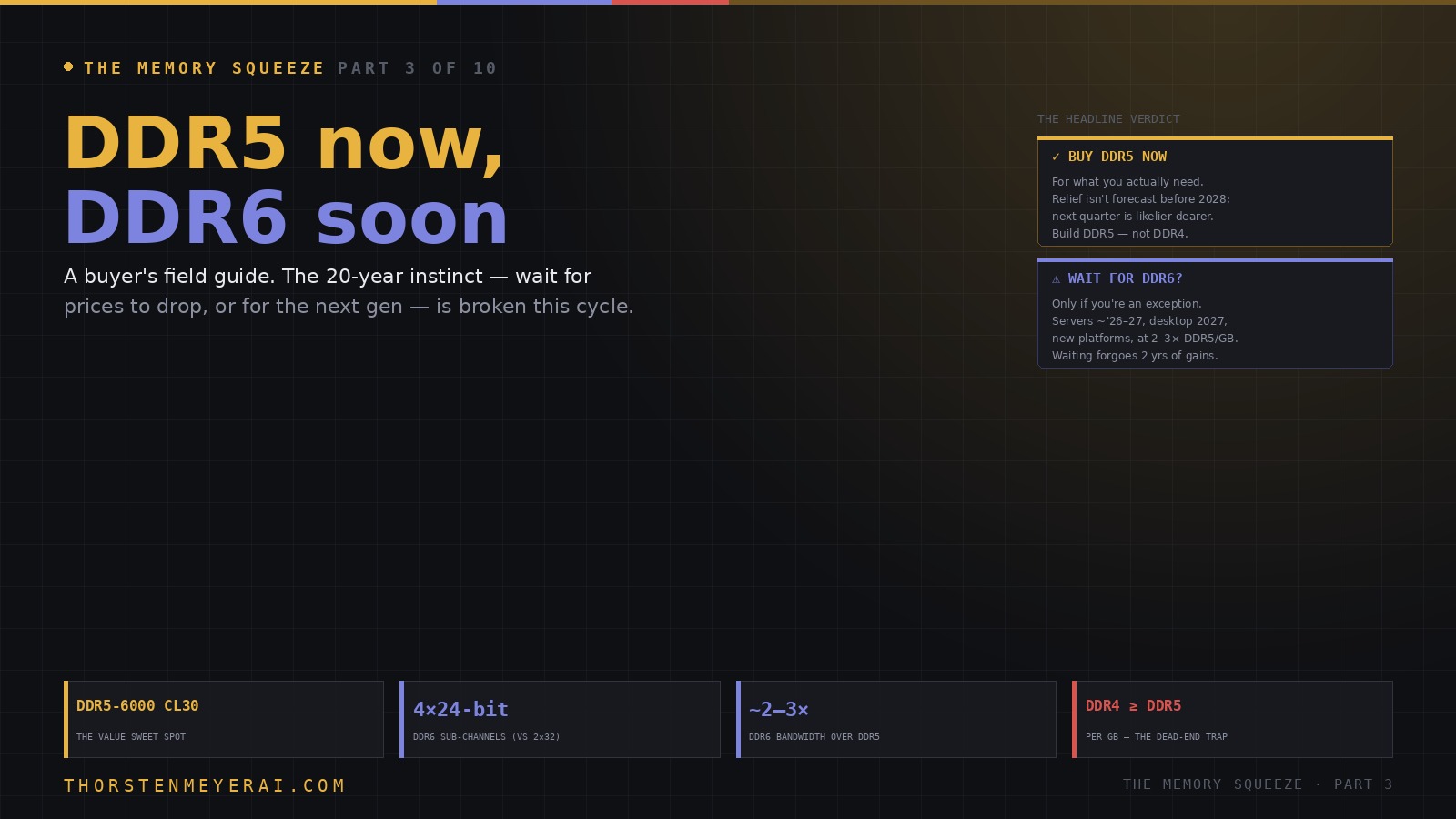
A buyer’s field guide. The 20-year instinct — wait for prices to drop, or wait for the next generation — is broken this cycle. Buy the DDR5 you actually need now; don’t wait for DDR6. Here’s the reasoning.
Driven to end-of-life, production slashed. Same money, dead-end socket. Leave a working DDR4 box alone — but never start a new build on DDR4 to “save.”
A framework, not a gamble. Buy the DDR5 you need now, at the sweet spot, in the capacity you’ll actually use — don’t buy DDR4, don’t wait for DDR6. The two costliest mistakes in this market are the ones that feel prudent: waiting for a price drop that isn’t coming, and waiting for a next-gen part that launches dearer than what’s on the shelf. Next: The SSD Squeeze.
The headline verdict
In every past component cycle, patience paid: wait a few months, prices soften, or the next generation lands and you get more for your money. Both halves of that wisdom are broken this cycle.
Prices aren’t drifting down — forecasts put meaningful relief in 2028 at the earliest, and the next quarter is more likely to be dearer than cheaper. So “wait for it to get cheap” is, right now, usually a bet you lose. And DDR6 isn’t the rescue either: it arrives in servers around 2026–27 and mainstream desktops in 2027, on entirely new platforms, at a launch premium of 2–3× DDR5 per gigabyte. Waiting two years for a more expensive part, while forgoing two years of CPU, GPU, and platform improvements, is not a saving. It’s a delay you pay for twice.
So the framework is simple: buy what the machine needs to do its job today; don’t over-buy capacity you won’t use; and build on DDR5, not DDR4. Now the specifics.

Lexar ARES Gen2 RGB DDR5 RAM 32GB Kit (2x16GB) 6000MHz CL30, 288-Pin UDIMM Desktop Memory, PC Gaming Computer Memory, for Intel XMP 3.0/AMD EXPO/CL30-38-38-76/1.4V(LD5U16G60C30BR-RGD)
- Vibrant RGB Lighting: Illuminates gaming setups with RGB sync
- High-Performance DDR5: Supports 6000MT/s CL30 for gaming
- Overclocking Support: Compatible with Intel XMP 3.0 and AMD EXPO
As an affiliate, we earn on qualifying purchases.
As an affiliate, we earn on qualifying purchases.
DDR5: what to actually buy
For a mainstream build or upgrade through at least 2028, the value sweet spot hasn’t moved: DDR5-6000 with CL30 timings. It’s the configuration both AMD and Intel platforms run happiest at, and faster, pricier kits buy you little in real-world work or games — modern titles are rarely memory-bandwidth-limited at DDR5-6000 and up. Paying a premium for DDR5-8000 to chase frame rates is, for almost everyone, wasted money in a market where money is already scarce.
On capacity, the discipline that matters most in 2026 is right-sizing. Buy for the workload in front of you, not a hypothetical future one. For general desktop and gaming, 32GB remains comfortable. For content creation and heavier multitasking, 64GB. The temptation to buy 128GB “to be safe” is exactly the trap this market sets: you’d be locking today’s worst-ever prices into capacity that may sit empty until after the shortage ends. If you genuinely run large local AI models, that calculus changes — but size it to the models you actually run, a point Part 7 takes up in full.
Two platform notes worth knowing. On newer boards, CUDIMMs (clocked DIMMs, now natively supported on platforms like AMD’s X970E) add an onboard clock driver that stabilizes higher speeds — useful if you do push past the sweet spot. And on workstations, the trend is toward registered memory (RDIMM): high-core Xeon W and Threadripper platforms still allow two DIMMs per channel, but more boards are dropping it for signal-integrity reasons, so check the QVL before buying eight sticks you can’t run stably.

Crucial Pro DDR5 RAM 64GB Kit (2x32GB) 6000MHz CL40, Overclocking Desktop Gaming Memory, Intel XMP 3.0 & AMD Expo Compatible – Black CP2K32G60C40U5B
- Stylish Black Aluminum Heat Spreader: Unique origami design for aesthetics and cooling
- High-Speed 6000MHz Performance: Stable overclocking with low latency for gaming
- Compatible with Intel & AMD: Supports latest desktop CPUs from both brands
As an affiliate, we earn on qualifying purchases.
As an affiliate, we earn on qualifying purchases.
The DDR4 trap
The one genuinely dangerous move in 2026 is buying into DDR4 to “save money.” You won’t.
Manufacturers have driven DDR4 to end-of-life and slashed production, and the result is an inversion that breaks every old rule of thumb: DDR4 now costs roughly the same per gigabyte as DDR5 — sometimes more — on a platform with no future. If your current machine is DDR4 and runs fine, leave it alone. But do not start a new build on DDR4 in 2026 to economize. You’d pay DDR5 money for a dead-end socket. If you’re building new, build DDR5, full stop.

Crucial 32GB DDR5 RAM Kit (2x16GB), 5600MHz (or 5200MHz or 4800MHz) Laptop Memory 262-Pin SODIMM, Compatible with Intel Core and AMD Ryzen 7000, Black – CT2K16G56C46S5
- Memory Capacity: 32GB DDR5 RAM Kit (2x16GB)
- Memory Speed: 5600MHz, 5200MHz, or 4800MHz
- Performance Boost: Enhances multitasking and responsiveness
As an affiliate, we earn on qualifying purchases.
As an affiliate, we earn on qualifying purchases.
DDR6: what’s coming, and when
DDR6 is real and genuinely exciting on paper — it just isn’t your 2026 purchase. The architecture is a real leap: it abandons DDR5’s two 32-bit sub-channels for four 24-bit sub-channels, widening each module’s bus and roughly doubling to tripling effective bandwidth. Launch speeds start around 8,800 MT/s and scale toward 17,600, against DDR5’s ~8,400 ceiling. It also ushers in a new physical form factor, CAMM2 — a flat, screwed-down module that mounts against the board like a CPU rather than standing up in a slot — to keep signals clean at those speeds.
The catch, beyond price, is that DDR6 is not backward compatible with anything. It needs a new CPU with a DDR6 controller, a new chipset, and the new module — no adapters, no slotting DDR6 into a DDR5 board, no reusing your current sticks. The rollout is staged: enterprise and AI servers first (2026–27, where the bandwidth pays for itself), mainstream desktops and high-end laptops in 2027, and broad commoditization not until roughly 2030 — the same slow curve DDR4 took from 2014 to ubiquity around 2018.

V-Color DDR5 256GB (64GBx4) 6400MHz CL60 ECC R-DIMM (ECC Registered DIMM) 1.1V Memory Ram for Server and Workstations with Hynix IC (TR564G64D460Q)
- Compatibility with Servers and Workstations: Compatible with server and workstation motherboards
As an affiliate, we earn on qualifying purchases.
As an affiliate, we earn on qualifying purchases.
Who should actually wait for DDR6
Almost nobody buying in 2026 should. The narrow exceptions:
- You’re building a long-life workstation (five-plus years) and can time the purchase to a 2027 platform.
- Your work is AI/ML, scientific computing, or heavy rendering — the bandwidth-bound workloads where DDR6’s extra throughput genuinely shows up. (For gaming, it largely won’t; frame rates are not where DDR6 helps.)
- You have budget for early-adopter pricing and early-adopter pain — immature memory training, unstable profiles, and limited capacities are the price of going first.
For everyone else, a well-specced DDR5 system bought in 2026 will outperform an entry-level DDR6 system in 2027, cost less, and let you skip the first-generation teething. The right signal to watch isn’t a hype headline; it’s the JEDEC DDR6 standard moving from draft to adopted, and validated “CPU + CAMM2 DDR6 kit” combinations appearing on motherboard compatibility lists. Until then, DDR6 is a roadmap, not a product.
The take
This is a decision framework, not a forecast to gamble on. Buy the DDR5 you need now, at the sweet spot, in the capacity your workload actually uses. Don’t buy DDR4. Don’t wait for DDR6 unless you’re one of the narrow exceptions. The market has inverted the old patience-pays logic, and the most expensive mistakes available right now are the two that feel prudent: waiting for a price drop that isn’t coming, and waiting for a next-gen part that will launch dearer than what’s already on the shelf.
Optimize the memory you already own, buy deliberately for the job, and put any savings somewhere capacity-per-dollar is still sane. Which is a useful segue, because storage is the next front — and it joined the party for the same reasons. Next in the series: The SSD Squeeze — why storage prices are climbing too.
Sources: TrendForce, TechPowerUp, OC3D, HWCooling (DDR6 specs, CAMM2, 2026–27 timeline, 8,800–17,600 MT/s, 4×24 sub-channel architecture); JEDEC (DDR6/LPDDR6 standards status); buyer-guidance syntheses from DirectMacro, Alibaba Electronics, and Tom’s Hardware (DDR5-6000 CL30 sweet spot, DDR4 inversion, launch-premium estimates). Pricing and timeline figures reflect reporting as of late June 2026 and are fast-moving. Analysis and recommendations are the author’s and not financial advice.