The best mechanical keyboards balance typing feel, layout, connectivity, and price, and my best overall pick is the AULA F75 Pro for its compact 75% layout, hot-swappable switches, and tri-mode wireless. The Logitech MX Mechanical is a better fit for quiet, polished productivity, while the Razer BlackWidow V4 X suits gaming-focused buyers who want a wired board with dedicated controls. The main tradeoffs are compactness versus a full number pad, wireless convenience versus wired simplicity, and customizability versus a straightforward setup. Switch feel and key layout matter as much as lighting, especially if you type for long stretches or switch between work and play. Read on for the full comparison and guidance on which mechanical keyboard fits your desk and habits.

Get business pricing on tech for your team
- Business-only prices and quantity discounts
- Tax-exempt purchasing
- Multiple users, one account, clear invoices
Key Takeaways
- The AULA F75 Pro leads as the most flexible pick: its 75% layout keeps arrow keys and a function row while tri-mode connectivity and hot-swap support leave room to change the setup.
- The AULA F99 is the better fit when a number pad matters: it offers wireless flexibility in a larger layout, while the F75 Pro takes up less desk space.
- The Logitech MX Mechanical favors productivity over gaming flair: its low-profile wireless design and tactile switches suit office typing, but it offers less switch customization than the hot-swappable AULA options.
- Gaming needs split by feature priorities: the Razer BlackWidow V4 X emphasizes gaming controls and Yellow switches, while the Logitech G413 SE is a simpler full-size wired alternative.
- Redragon’s wired models cover different levels of flexibility: the K668 adds hot-swap capability, while the K580 and K671 suit buyers who prefer a more direct wired setup and should compare their layouts and included controls before choosing.
| AULA F75 Pro Wireless Mechanical Keyboard |  | Best Compact Wireless Pick | Layout: 75% (81 keys) | Connectivity: Bluetooth 5.0, 2.4GHz wireless, USB-C wired | Switches: Pre-lubed LEOBOG Reaper linear | VIEW LATEST PRICE | See Our Full Breakdown |
| Razer BlackWidow V4 X Mechanical Gaming Keyboard |  | Best for Macro-Heavy Gaming | Switch type: Razer Yellow linear | Actuation distance: 1.2mm | Actuation force: 45g | VIEW LATEST PRICE | See Our Full Breakdown |
| Redragon K668 108-Key Hot-Swap Wired RGB Gaming Keyboard |  | Best Full-Size Customization Value | Layout: 108-key QWERTY | Switches: Red linear, hot-swappable | Hot-swap compatibility: Most 3-pin and 5-pin switches | VIEW LATEST PRICE | See Our Full Breakdown |
| Redragon K580 VATA Wired RGB Mechanical Gaming Keyboard |  | Best for Clicky Controls and Onboard Macros | Layout: 104-key QWERTY | Switches: Outemu Blue clicky, hot-swappable | Connectivity: Wired USB-C | VIEW LATEST PRICE | See Our Full Breakdown |
| Logitech G413 SE Full-Size Mechanical Gaming Keyboard |  | Best for a Straightforward, Durable Setup | Layout: Full-size QWERTY, 108 keys | Switches: Tactile mechanical | Connectivity: USB 2.0 wired | VIEW LATEST PRICE | See Our Full Breakdown |
| Logitech MX Mechanical Wireless Illuminated Keyboard – Tactile (Graphite) |  | Best for Quiet, Multi-Device Work | Layout: Full-size, 104-key QWERTY | Switch type: Tactile Quiet mechanical | Connectivity: Bluetooth Low Energy and Logi Bolt receiver | VIEW LATEST PRICE | See Our Full Breakdown |
| Redragon K671 Wired Mechanical Gaming Keyboard |  | Best for Switch-Swap Gaming on a Wired Setup | Layout: 104-key QWERTY | Switch type: Linear red | Hot-swappable: Yes | VIEW LATEST PRICE | See Our Full Breakdown |
| AULA F99 Tri-Mode Wireless Mechanical Keyboard | 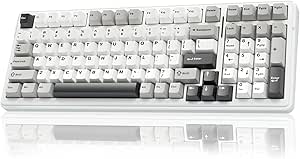 | Best Compact Feature-Rich Wireless Pick | Layout: 99-key, 96% | Connectivity: Bluetooth 5.0, 2.4 GHz wireless, and USB-C wired | Device connections: Up to five | VIEW LATEST PRICE | See Our Full Breakdown |
| mechanical keyboard | Connectivity | Layout | Backlighting | Keycaps |
|---|---|---|---|---|
| AULA F75 Pro Wireless Mechanic | Bluetooth 5.0, 2.4GHz wireless, USB-C wired | 75% (81 keys) | RGB, 16.8 million colors | Side-printed PBT |
| Razer BlackWidow V4 X Mechanic | Wired | — | — | Double-shot ABS |
| Redragon K668 108-Key Hot-Swap | Wired USB-C | 108-key QWERTY | RGB with music sync | — |
| Redragon K580 VATA Wired RGB M | Wired USB-C | 104-key QWERTY | RGB | Double-shot ABS |
| Logitech G413 SE Full-Size Mec | USB 2.0 wired | Full-size QWERTY, 108 keys | Single-color white LED | PBT |
| Logitech MX Mechanical Wireles | Bluetooth Low Energy and Logi Bolt receiver | Full-size, 104-key QWERTY | — | — |
| Redragon K671 Wired Mechanical | Wired | 104-key QWERTY | 11 modes with adjustable brightness and speed | — |
| AULA F99 Tri-Mode Wireless Mec | Bluetooth 5.0, 2.4 GHz wireless, and USB-C wired | 99-key, 96% | RGB with 16 lighting effects | Double-shot PBT |
More Details on Our Top Picks
AULA F75 Pro Wireless Mechanical Keyboard
The AULA F75 Pro pairs a space-saving 75% layout with tri-mode connection, making it a more flexible desk companion than the wired Redragon K668. Bluetooth, 2.4GHz, and USB-C let it move between computers and mobile devices, while the 4000mAh battery supports use away from a cable. Its pre-lubed linear switches and sound-dampening structure suit buyers who want a smoother, quieter feel than the clicky Redragon K580. Hot-swap sockets also make switch changes accessible without soldering, and the knob gives quick access to volume or lighting. The compact layout means fewer keys than a full-size board, though, and software is needed for advanced customization. Check the supplied layout before buying: the listed QWERTZ arrangement may not suit QWERTY typists.
Pros:- Bluetooth, 2.4GHz, and USB-C connectivity support both wireless and wired setups.
- Hot-swap sockets accept 3-pin and 5-pin switches, allowing solder-free customization.
- Pre-lubed linear switches and sound-dampening construction favor a smooth, restrained typing sound.
- Multi-function knob offers convenient volume and lighting control.
Cons:- The 75% layout omits the dedicated number pad found on the Redragon K668 and K580.
- The listed QWERTZ layout may be awkward for users accustomed to QWERTY.
- Advanced macro and lighting customization requires software.
Best for: Desk-space-conscious typists and gamers who want wireless device switching, a knob, and room to customize switches.
Not ideal for: Buyers who need a full-size number pad, prefer a standard QWERTY layout, or want advanced macros without installing software.
- Layout:75% (81 keys)
- Connectivity:Bluetooth 5.0, 2.4GHz wireless, USB-C wired
- Switches:Pre-lubed LEOBOG Reaper linear
- Hot-swap:Yes; supports 3-pin and 5-pin switches
- Keycaps:Side-printed PBT
- Battery:4000mAh rechargeable
- Backlighting:RGB, 16.8 million colors
- Special features:Multi-function knob, programmable keys, N-key rollover, Win key lock
Our verdict“Choose the AULA F75 Pro if you want compact wireless flexibility and switch customization more than a full-size key layout.”
Razer BlackWidow V4 X Mechanical Gaming Keyboard
The Razer BlackWidow V4 X is the most gaming-focused choice here for players who rely on custom commands: its six dedicated macro keys keep those inputs within easy reach, unlike the more general-purpose Logitech G413 SE. The yellow linear switches use a short 1.2mm actuation distance and light 45g force, which favors quick presses over the more deliberate tactile feel of the Logitech. Per-key Chroma RGB and built-in media controls add hands-on customization, while foam beneath the PCB and lubricated stabilizers are intended to temper keyboard noise. Its main compromise is the fixed wired connection, so it offers less placement freedom than the wireless AULA F75 Pro. Double-shot ABS keycaps are built to resist fading, but this board does not offer the PBT keycaps found on the Logitech.
Pros:- Six dedicated macro keys provide direct access to custom commands.
- Yellow linear switches have a 1.2mm actuation distance and 45g force for light, quick presses.
- Per-key Chroma RGB allows individual lighting customization.
- Media roller and secondary keys keep common controls on the keyboard.
Cons:- Wired-only connectivity limits desk placement compared with the AULA F75 Pro.
- Linear switches may not suit buyers who want a distinct tactile bump.
- Double-shot ABS keycaps lack the PBT material offered by the Logitech G413 SE.
Best for: PC gamers who use frequent macros and want fast linear inputs with per-key lighting and onboard media controls.
Not ideal for: Wireless-first users, typists who prefer tactile feedback, or buyers who specifically want PBT keycaps.
- Switch type:Razer Yellow linear
- Actuation distance:1.2mm
- Actuation force:45g
- Macro keys:6 dedicated
- Media controls:Multi-function roller and secondary media keys
- Lighting:Per-key Chroma RGB, 16.8 million colors
- Keycaps:Double-shot ABS
- Acoustic features:Foam layer under PCB and lubricated stabilizers
- Connectivity:Wired
Our verdict“Pick the BlackWidow V4 X if dedicated macros and quick linear inputs matter more than wireless use or tactile feedback.”
Redragon K668 108-Key Hot-Swap Wired RGB Gaming Keyboard
The Redragon K668 makes switch experimentation accessible in a full-size layout: its hot-swap sockets accept most 3-pin and 5-pin switches, so owners can change the feel without soldering. That gives it more customization headroom than the Logitech G413 SE, while its 108-key QWERTY layout preserves the number pad that the compact AULA F75 Pro leaves out. Red linear switches, adjustable feet, and noise-dampening details suit extended sessions where a sharp click would be distracting. Two included keycap sets let buyers change the board’s look without replacing the whole set. The tradeoff is a wired USB-C connection and a plastic enclosure that feels less substantial than the Redragon K580’s aluminum plate. Its full-size footprint also takes more desk space than the AULA.
Pros:- Hot-swap sockets support most 3-pin and 5-pin switches for solder-free changes.
- Full-size QWERTY layout includes a number pad.
- Two sets of mixed-color keycaps offer a straightforward way to change its appearance.
- Red linear switches and noise-dampening details suit quieter shared spaces better than clicky switches.
Cons:- Wired USB-C connection lacks the placement flexibility of the AULA F75 Pro.
- Plastic enclosure feels less substantial than the Redragon K580’s aluminum plate.
- Full-size dimensions take more desk space than compact options.
Best for: Full-size keyboard buyers who want to try different switches, keep a number pad, and customize the look without soldering.
Not ideal for: Wireless users, people with limited desk space, or buyers seeking a more substantial metal construction.
- Layout:108-key QWERTY
- Switches:Red linear, hot-swappable
- Hot-swap compatibility:Most 3-pin and 5-pin switches
- Connectivity:Wired USB-C
- Backlighting:RGB with music sync
- Keycap extras:Two sets of mixed-color keycaps
- Weight:880g
- Dimensions:17.3 × 4.7 × 17.3 inches
- Compatibility:Windows, PC, laptop
Our verdict“Choose the K668 if you want a full-size board with easy switch swapping and can accept a wired connection and plastic case.”
Redragon K580 VATA Wired RGB Mechanical Gaming Keyboard
The Redragon K580 VATA suits buyers who want a traditional full-size board with tactile, audible feedback and controls close at hand. Its Outemu Blue clicky switches provide a more pronounced response than the linear switches in the Redragon K668 or the Razer BlackWidow V4 X, but that sound can carry across a shared room. Five dedicated macro keys and a media wheel give it more built-in control than the Logitech G413 SE, while full anti-ghosting supports simultaneous inputs during play. Hot-swap sockets let owners change compatible switches, and the aluminum plate adds rigidity beneath the ABS case. This is a wired keyboard, not a compact or quiet choice; buyers seeking wireless convenience should look to the AULA F75 Pro instead.
Pros:- Clicky Outemu Blue switches provide distinct audible and tactile feedback.
- Five dedicated macro keys and a media wheel keep common controls within reach.
- Hot-swap support allows compatible switch changes without soldering.
- Aluminum plate, double-shot keycaps, and full anti-ghosting support regular gaming use.
Cons:- Clicky switches can be disruptive in shared offices or quiet rooms.
- Wired USB-C connection is less flexible than the wireless AULA F75 Pro.
- Advanced RGB customization requires additional software.
Best for: Desktop gamers and typists who want clicky feedback, dedicated macro keys, a number pad, and direct media controls.
Not ideal for: People working in quiet shared rooms, wireless-first buyers, or anyone seeking a compact keyboard.
- Layout:104-key QWERTY
- Switches:Outemu Blue clicky, hot-swappable
- Connectivity:Wired USB-C
- Backlighting:RGB
- Keycaps:Double-shot ABS
- Plate and case:Aluminum plate, ABS plastic case
- Controls:Five macro keys and media wheel
- Anti-ghosting:Full anti-ghosting
- Weight:1200g
Our verdict“Pick the K580 if you want clicky full-size typing with onboard macros and media control, and do not need a quiet or wireless board.”
Logitech G413 SE Full-Size Mechanical Gaming Keyboard
The Logitech G413 SE is the straightforward pick for buyers who value sturdy materials and a full-size layout over wireless features or elaborate lighting. Its tactile mechanical switches offer more feedback than the linear Redragon K668, and the PBT keycaps are a material advantage over the ABS caps on the Redragon K580 and Razer BlackWidow V4 X. An aluminum-magnesium top case gives the board a more solid surface than the K668’s plastic enclosure. White-only backlighting keeps the look restrained but cannot match the RGB customization of those alternatives. The six-key rollover supports common simultaneous gaming inputs, though it is less expansive than the K580’s full anti-ghosting. There are no dedicated macro keys or wireless connection, so this model favors dependable basics over customization.
Pros:- PBT keycaps resist heat and wear better than the ABS keycaps on several alternatives here.
- Tactile mechanical switches provide feedback absent from linear-switch options such as the Redragon K668.
- Aluminum-magnesium top case gives the board a sturdy upper surface.
- Twelve function-key media controls and six-key rollover cover common everyday needs.
Cons:- White-only LED backlighting lacks the color customization of the Redragon K580 and K668.
- Wired USB connectivity offers less placement freedom than the AULA F75 Pro.
- No dedicated macro keys, and six-key rollover is more limited than the K580’s full anti-ghosting.
Best for: Buyers who want a full-size wired keyboard with tactile switches, durable PBT keycaps, and a restrained white backlight.
Not ideal for: RGB enthusiasts, wireless users, or gamers who need dedicated macro keys or broader anti-ghosting support.
- Layout:Full-size QWERTY, 108 keys
- Switches:Tactile mechanical
- Connectivity:USB 2.0 wired
- Keycaps:PBT
- Backlighting:Single-color white LED
- Anti-ghosting:6-key rollover
- Media controls:12 function-key controls
- Top case:Aluminum-magnesium alloy
- Compatibility:Windows, macOS
Our verdict“Choose the G413 SE if durable PBT keycaps and tactile full-size typing matter more than wireless use, RGB, or dedicated macros.”
Logitech MX Mechanical Wireless Illuminated Keyboard – Tactile (Graphite)
The Logitech MX Mechanical is the office-focused choice here: its low-profile, quiet tactile switches provide feedback without the louder character of many gaming keyboards. Compared with the wired Redragon K671, it trades hot-swappable switches and adjustable lighting modes for wireless device switching, a metal chassis, and a full-size layout suited to spreadsheets and everyday typing. Its backlight adjusts to hand proximity and ambient light, while Bluetooth and Logi Bolt let you pair up to three devices. The tradeoff is a restrained single-color backlight rather than RGB, and the battery runs down faster with illumination active. Some customization also depends on Logi Options+ software. I’d choose it for a quieter, polished desk setup, not for switch experimentation or gaming-style lighting.
Pros:- Quiet tactile switches provide typing feedback without loud click sounds
- Bluetooth and Logi Bolt support pairing with up to three devices
- Low-profile aluminum chassis offers a sturdy, streamlined design
- Proximity- and ambient-light-responsive backlighting
Cons:- Single-color backlighting offers less customization than RGB models such as the AULA F99
- Battery life drops when the backlight is used continuously
- Deeper customization requires Logi Options+ software
Best for: Office workers and multi-device users who want a full-size mechanical keyboard with quieter tactile feedback and easy switching between computers or tablets
Not ideal for: Keyboard hobbyists who want to swap switches, or RGB fans seeking extensive lighting customization
- Layout:Full-size, 104-key QWERTY
- Switch type:Tactile Quiet mechanical
- Connectivity:Bluetooth Low Energy and Logi Bolt receiver
- Charging:USB-C
- Battery:1500 mAh; up to 15 days with backlighting or up to 10 months with backlighting off
- Chassis:Aluminum/metal
- Weight:29.2 oz (828 g)
- Compatibility:Windows, macOS, Linux, Chrome OS, iOS, iPadOS, and Android
Our verdict“Choose the MX Mechanical for quiet, low-profile full-size typing and multi-device convenience, rather than switch swapping or elaborate lighting.”
Redragon K671 Wired Mechanical Gaming Keyboard
The Redragon K671 makes a practical case for a wired gaming keyboard: its linear red switches are hot-swappable, so owners can try compatible replacements without soldering, and full-key anti-ghosting supports simultaneous key presses during play. Compared with the wireless Logitech MX Mechanical, the K671 gives up multi-device convenience and quiet office-focused design, but adds switch swapping, macro editing, and 11 adjustable lighting modes. Those modes change brightness and speed, not color, so this is a functional lighting setup rather than a customizable RGB display. The included spare switches offer a few replacements, though not a broad switch sampler. I’d place it ahead of keyboards that lock users into their original switches, but behind the AULA F99 for buyers who need wireless connections or more elaborate lighting.
Pros:- Hot-swappable linear red switches allow compatible switches to be changed without soldering
- Full-key anti-ghosting supports simultaneous key presses
- Eleven backlight modes include adjustable brightness and speed
- Macro editing, key remapping, and multimedia shortcuts add control options
Cons:- Wired-only connectivity limits placement and use across multiple devices
- Backlight color cannot be changed
- Software is needed for macro editing and key remapping
Best for: PC gamers who want a full-size wired keyboard with linear switches, anti-ghosting, and the option to replace compatible switches
Not ideal for: Desk setups that need wireless use, multi-device pairing, or customizable RGB colors
- Layout:104-key QWERTY
- Switch type:Linear red
- Hot-swappable:Yes
- Connectivity:Wired
- Backlighting:11 modes with adjustable brightness and speed
- Key rollover:Full-key anti-ghosting
- Multimedia shortcuts:12
- Included spare switches:4
Our verdict“Pick the K671 if you want a full-size wired gaming board with hot-swappable linear switches, and skip it if wireless flexibility or configurable RGB matters more.”
AULA F99 Tri-Mode Wireless Mechanical Keyboard
The AULA F99 packs a numpad into a more compact 96% layout, making it a strong fit for buyers who want a smaller footprint without giving up number entry. Its Bluetooth, 2.4 GHz, and USB-C connections support up to five devices, while hot-swappable sockets and pre-lubed linear switches leave room to change the typing feel later. Compared with the Logitech MX Mechanical, the F99 leans toward customization: it has RGB lighting, PBT keycaps, programmable keys, and a gasket structure with sound-dampening layers. That flexibility comes with added setup demands; RGB customization and music effects require the driver, and the listed Windows compatibility may limit appeal for some mixed-device users. I’d choose it over the wired Redragon K671 when wireless options and compactness matter more than a simple plug-in setup.
Pros:- Bluetooth, 2.4 GHz, and USB-C connections support varied desk and device setups
- Connects to up to five devices
- Hot-swappable sockets accept 3-pin and 5-pin switches
- Double-shot PBT keycaps, RGB lighting, and sound-dampening construction add customization and a more contained typing sound
Cons:- The 96% layout is more compact than full-size boards and may take adjustment
- RGB customization and music effects require the driver
- Listed operating-system compatibility is limited to Windows
Best for: Windows users who want a compact keyboard that keeps a numpad, supports multiple connection types, and allows switch changes
Not ideal for: Buyers who need a standard full-size layout, confirmed support for non-Windows operating systems, or lighting controls without installing a driver
- Layout:99-key, 96%
- Connectivity:Bluetooth 5.0, 2.4 GHz wireless, and USB-C wired
- Device connections:Up to five
- Switch type:Pre-lubed linear
- Hot-swappable:Supports 3-pin and 5-pin switches
- Backlighting:RGB with 16 lighting effects
- Keycaps:Double-shot PBT
- Battery:8000 mAh rechargeable
- Compatibility:Windows; listed for gaming consoles, laptops, PCs, smartphones, and tablets
Our verdict“Choose the F99 for a compact numpad-equipped keyboard with wireless flexibility and customization, provided its Windows-focused compatibility and driver requirements suit your setup.”

How We Picked
I ranked these keyboards by how well each serves a distinct buyer need, weighing layout, switch flexibility, connectivity, build and day-to-day usability. Hot-swappable models score well for buyers who may want to change switches later, while wireless options earn credit when they combine practical layout choices with connection flexibility. I also weighed whether a board’s gaming controls or productivity-focused design match its intended use rather than treating RGB or feature counts as automatic advantages.
The order favors models that offer a strong balance across common uses, then places more specialized or simpler wired options lower for buyers whose needs are narrower. Layout and switch feel matter more than feature volume: a full-size board can be the right choice for number entry, but a compact option can free desk space for a mouse. Product names alone do not settle questions such as exact switch behavior, sound, or fit, so buyers should check the specific configuration before purchase.
| mechanical keyboard | Connectivity | Switches | Keycaps | Switch type |
|---|---|---|---|---|
| AULA F75 Pro Wireless Mechanic | Bluetooth 5.0, 2.4GHz wireless, USB-C wired | Pre-lubed LEOBOG Reaper linear | Side-printed PBT | — |
| Razer BlackWidow V4 X Mechanic | Wired | — | Double-shot ABS | Razer Yellow linear |
| Redragon K668 108-Key Hot-Swap | Wired USB-C | Red linear, hot-swappable | — | — |
| Redragon K580 VATA Wired RGB M | Wired USB-C | Outemu Blue clicky, hot-swappable | Double-shot ABS | — |
| Logitech G413 SE Full-Size Mec | USB 2.0 wired | Tactile mechanical | PBT | — |
| Logitech MX Mechanical Wireles | Bluetooth Low Energy and Logi Bolt receiver | — | — | Tactile Quiet mechanical |
| Redragon K671 Wired Mechanical | Wired | — | — | Linear red |
| AULA F99 Tri-Mode Wireless Mec | Bluetooth 5.0, 2.4 GHz wireless, and USB-C wired | — | Double-shot PBT | Pre-lubed linear |
Factors to Consider When Choosing Mechanical Keyboards
Choosing a mechanical keyboard starts with how you use your desk, not with lighting or a long feature list. These broader tradeoffs can help narrow the field before you pick a model.
Choose a Layout Around Your Daily Tasks
A full-size keyboard keeps the number pad close at hand for spreadsheets, bookkeeping, and frequent numeric entry. A 75% layout retains many commonly used keys, including arrows and a function row, in a smaller footprint. Compact boards can leave more room for mouse movement, which may matter in games or on a crowded desk. The common mistake is to buy the smallest layout for its appearance, then discover that missing keys disrupt familiar shortcuts. Before choosing, list the keys you use daily and check how the board handles functions that do not have dedicated keycaps. A layout that feels natural is more useful than one that is compact on paper.
Pick Switch Feel for Your Environment
Switch labels can suggest a general feel, but they do not tell the whole story about sound, spring weight, or how a keyboard feels during a long session. Tactile switches provide a noticeable bump, while linear switches move without that bump; neither is automatically better for typing or gaming. In shared rooms, the sound of the complete keyboard matters, including its case and keycaps, not just its switch type. Buyers often focus on color-coded switch names without checking the exact configuration. If you are sensitive to noise or unfamiliar with mechanical switches, look for a return option or a way to try a switch sample. Choosing for comfort and room acoustics can matter more than choosing by gaming category.
Treat Hot-Swap Support as Future Flexibility
Hot-swappable sockets let you replace compatible switches without soldering, which can extend a keyboard’s usefulness as your preferences change. This feature is most valuable if you expect to experiment with switch feel or replace a faulty switch yourself. It does not mean every switch will fit, so check socket compatibility and whether the board supports the switch type you want. A buyer who is happy with a fixed configuration may gain little from paying extra for customization. Hot-swap also does not change a keyboard’s layout or guarantee that its case will sound quieter. Decide whether you want a board to grow with your preferences or prefer a simpler set-and-use choice.
Choose Wired or Wireless Based on Desk Habits
A wired keyboard keeps the connection simple and avoids charging, which can suit a permanent desk or a gaming setup where a cable is no inconvenience. Wireless models can reduce desk clutter and make it easier to move a keyboard between devices, but connection modes and battery needs vary. Tri-mode boards offer more ways to connect, though that flexibility is useful only if you will use more than one mode. A frequent mistake is to buy wireless for convenience without checking charging routines, device compatibility, or how the keyboard switches between connections. Consider whether the keyboard stays in one place, travels, or serves several computers. That routine should guide the choice more than the number of connection options.
Pay for Features You Will Actually Use
Dedicated media controls, a volume knob, per-key lighting, and programmable keys can make daily use smoother when they match your habits. They also add complexity, and lighting may matter less than reliable key placement or a comfortable typing feel. Productivity buyers may prefer a restrained design and convenient device switching, while gaming-focused buyers may value extra controls and lighting options. A number pad is worth prioritizing if your work depends on numeric entry, but it can take space away from mouse movement. Avoid treating a longer feature list as proof of a better fit. Identify two or three features that would change how you use the keyboard, then compare models around those needs.
Check Maintenance and Long-Term Practicality
Keyboards collect dust and debris, so removable keycaps and accessible spaces between keys can make routine cleaning easier. Hot-swap support can help with switch replacement, but it does not make every repair simple or protect a board from spills. Wireless models add charging to the upkeep routine, while wired ones avoid battery management. Check whether the keycap profile and legends will be comfortable to read and whether the layout makes replacement caps easy to source. Buyers sometimes overlook these details because they focus on the first week of use. A little attention to cleaning, parts, and connection needs can help prevent an otherwise suitable keyboard from becoming inconvenient.
Frequently Asked Questions
Is a 75% keyboard too compact for everyday work?
Not necessarily: a 75% layout typically keeps arrow keys and a function row while taking up less desk space than a full-size board. It can work well for writing, browsing, and general office tasks if you rarely enter numbers with a dedicated keypad. Spreadsheet-heavy work or frequent numeric entry may make the AULA F99 or another full-size model a more natural fit. Check how the keyboard handles navigation and function-layer commands before committing. The right answer depends on which keys you reach for repeatedly, not the layout label alone.
Should I choose a hot-swappable keyboard if I am new to mechanical switches?
Hot-swap support is useful if you expect your switch preferences to change, but it is not a requirement for a first mechanical keyboard. A fixed-switch model can be easier to choose when you already know the feel you want and do not plan to modify the board. The AULA F75 Pro and Redragon K668 offer more scope to experiment than a simpler fixed configuration. Check switch compatibility before buying replacement switches, since hot-swap sockets do not accept every type. If you are unsure about feel, trying switches in person or checking a return policy may be more helpful than choosing by customization alone.
Is wireless reliable enough for gaming?
It can be, but reliability depends on the keyboard’s wireless implementation, connection conditions, and the games you play. The AULA F75 Pro and AULA F99 offer multiple connection modes, giving you the option of wired USB-C as well as wireless connections. A wired model such as the Razer BlackWidow V4 X or a Redragon option avoids battery charging and wireless setup. Competitive players who want the simplest connection may prefer wired, while casual players may value the cleaner desk. Check the exact connection specifications and your device setup rather than assuming every wireless keyboard behaves the same way.
Do I need a full-size keyboard if I use a number pad only occasionally?
Occasional number entry does not always justify keeping a full-size board on your desk. A compact layout can leave more room for your mouse and still cover many everyday typing needs, though using a function layer for missing keys may feel slower. If you enter numbers in bursts, a separate keypad can be an alternative to a permanently attached number pad. Buyers who work in spreadsheets all day are more likely to appreciate the full-size AULA F99 or Logitech G413 SE. Think about frequency and speed: occasional use and constant use call for different compromises.
Is the Logitech MX Mechanical a better choice than a gaming keyboard for office work?
It may be a better match if you prioritize a low-profile wireless design and tactile typing over gaming controls or extensive switch customization. Gaming models such as the Razer BlackWidow V4 X put more emphasis on gaming-oriented features, while the MX Mechanical is designed around productivity use. That does not make it the right office choice for everyone: switch feel, key height, layout, and shared-room noise all affect comfort. If you want to modify switches later, a hot-swappable AULA model offers a different kind of flexibility. Compare the keyboard’s feel and connection needs with your work routine before choosing by category.
Conclusion
For the broadest mix of desk space, connection options, and future switch flexibility, I recommend the AULA F75 Pro as best overall. The Redragon K668 is my value-oriented pick for buyers who want a wired, hot-swappable board, while the Logitech MX Mechanical is the best premium productivity fit for someone who prefers a low-profile wireless design. Newcomers who want a straightforward full-size wired option can start with the Logitech G413 SE; buyers interested in experimenting with switches should compare it with the hot-swappable K668. For a number pad with wireless flexibility, choose the AULA F99, and for gaming controls and Yellow switches, look at the Razer BlackWidow V4 X. If your needs are simpler, compare the Redragon K580 and K671 by their exact layouts and features before deciding.