A DIY playbook for spinning up a multi‑agent workflow using nothing but free, open‑source tools — ideal for cash‑strapped startups, weekend hackers and privacy‑sensitive teams.
Why “micro” orchestration?
- Zero cloud fees — run everything on a single laptop or a $5‑month VPS.
- Data stays local — no PII leaves your box.
- Full hackability — every layer is MIT or Apache‑licensed, so you can dive into the code.
The idea is to replace pay‑per‑token SaaS stacks with local inference + open‑source tooling, while still enjoying agent‑level coordination.
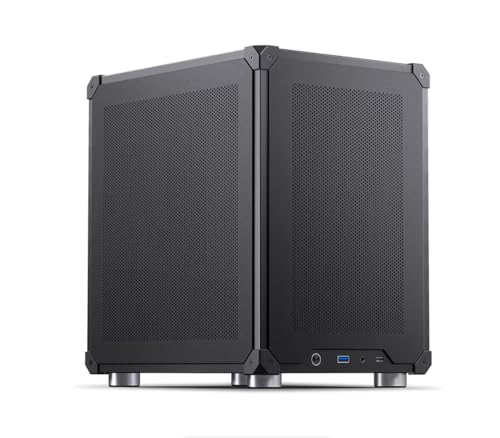
Compact Local AI Server, AI Mini PC,Serve Local LLM Models Right Out of Box, 30+ Tokens/Second, Pre-Installed Ubuntu Linux, Qwen3, LLama3, RAG, OCR, vLLM, TensorRT LLM, NVIDIA RTX 5060 Ti (16GB)
- Easy Setup in 3 Steps: Power, connect, scan QR code
- Pre-Installed Local LLM Models: QWen3, LLama3, embeddings, rerankers
- Supports Multiple AI Frameworks: vLLM, TensorRT LLM, RAG, OCR
As an affiliate, we earn on qualifying purchases.
As an affiliate, we earn on qualifying purchases.
The FOSS Component Menu
| Layer | Pick‑1 Tool | Licence | Why It Fits |
| LLM inference | llama.cpp + Mistral‑7B | MIT / Apache‑2.0 | 7 B model runs on a mid‑range GPU or even CPU; full local control |
| Model gateway | LiteLLM Proxy | MIT | One OpenAI‑style endpoint for 100 + models, plus cost & guard‑rails |
| Agent graph | LangGraph | MIT | Graph‑native orchestration; open‑source core, no vendor lock‑in |
| (Alt.) | CrewAI | MIT | Lightweight, LangChain‑free multi‑agent framework |
| Memory / Vector DB | Chroma | Apache‑2.0 | Drop‑in, serverless, zero cost |
| (Scale option) | Milvus | Apache‑2.0 | Handles billions of vectors when you outgrow Chroma |
| Async & retries | Temporal | Apache‑2.0 | Durable workflow engine; restarts agents exactly where they crashed |
All seven pieces are free to install and run offline.

Design Multi-Agent AI Systems Using MCP and A2A: Engineer your own Python-based agentic AI framework with tool use, memory, and multi-agent workflows
As an affiliate, we earn on qualifying purchases.
As an affiliate, we earn on qualifying purchases.
30‑Minute Quick‑Start
Prereqs: macOS/Linux, 16 GB RAM, Python 3.10, Homebrew/apt + Docker.
Step 0. Pull a local model
brew install ollama # or curl script on Linux
ollama run mistral:7b # downloads ≈4 GB and starts REST server
The Ollama runtime wraps GGUF files so they stream efficiently on CPU/GPU .
Step 1. Stand up a unified LLM endpoint
pip install litellm
litellm –model ollama/mistral –api_base http://localhost:11434
Now any library that expects an OpenAI‑style /v1/chat/completions URL will talk to your local model — cost tracking and guard‑rails included .
Step 2. Install the orchestrator
pip install langgraph # or: pip install crewai
LangGraph lets you describe agents and edges as a directed graph; every node can pause, stream or retry without extra code .
Step 3. Add a vector memory
pip install chromadb
python -m chromadb –path ./db # starts local serverless store
Chroma’s Apache licence keeps the stack 100 % FOSS .
Step 4. Code a three‑agent micro‑flow
from langgraph.graph import StateGraph
from litellm import completion
import chromadb, os
os.environ[“OPENAI_API_BASE”] = “http://localhost:4000” # LiteLLM proxy
memory = chromadb.Client().get_or_create_collection(“project”)
def planner(state): …
def researcher(state): …
def drafter(state): …
def reflector(state): …
g = StateGraph()
g.add_node(“plan”, planner)
g.add_node(“research”, researcher, after=”plan”)
g.add_node(“draft”, drafter, after=”research”)
g.add_node(“reflect”, reflector, after=”draft”).loop_until(criteria)
g.compile().invoke({“objective”: “Write launch email”})
Outcome: a self‑critiquing email generator that never touches the public cloud.
Step 5. Make it durable & asynchronous
Wrap the invoke() call in a Temporal Workflow to survive reboots and network blips:
@workflow.defn
class EmailCampaignWF:
@workflow.run
async def run(self, objective):
return await g.invoke({“objective”: objective})
Temporal checkpoints every step, restarts failed tasks, and scales workers horizontally .
Total elapsed wall‑clock ≈ 30 minutes once dependencies are cached.
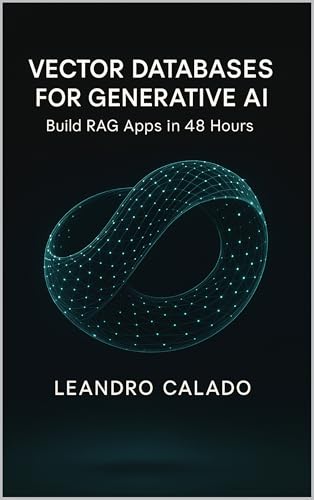
Vector Databases for Generative AI: Build RAG Apps in 48 Hours (Data Engineering & Governance Series)
As an affiliate, we earn on qualifying purchases.
As an affiliate, we earn on qualifying purchases.
Performance & Cost Snapshot
| Resource | Typical Footprint |
| RAM at idle (Mistral 7B Q4) | ~9 GB CPU, 7 GB GPU |
| Tokens/sec (M1 Pro, llama.cpp) | 30‑35 t/s |
| Monthly cost | $0 cloud spend; only your electricity bill |
After the first gigabytes, every additional token is essentially free — a stark contrast to $2‑$8 per million output tokens on GPT‑4‑class APIs.

OpenClaw Unleashed: The Ultimate 2026 Guide to the World's Most Viral Self-Hosted AI Agent: Build Your Personal Lobster-Powered Assistant – … Automation with Zero Subscriptions
As an affiliate, we earn on qualifying purchases.
As an affiliate, we earn on qualifying purchases.
Common Pitfalls & Fixes
| Symptom | Root Cause | Fix |
| “CUDA out of memory” | Q4 model too big | Use mistral.Q2_K.gguf or CPU inference |
| Agents loop forever | No reflection stop condition | Add max_iterations or a reward threshold |
| Requests time‑out | LiteLLM proxy defaults to 30 s | LITELLM_TIMEOUT=120 env var |
Where to Go Next
- Policy Guard‑rails — integrate an open policy LLM (e.g., caispp/policies) as a Governor node.
- Multi‑model routing — point LiteLLM at both local Mistral and an occasional cloud GPT‑4o for “hard” tasks.
- Observability — scrape LangGraph traces into Grafana or use Temporal’s built‑in Web UI.
- Fleet Scaling — swap Chroma for Milvus when you hit millions of embeddings .
Bottom Line
You no longer need a VC budget to explore agentic AI. In half an hour, a single developer can:
- run a modern 7 B model locally;
- expose it via LiteLLM’s unified API with budgets & guard‑rails;
- orchestrate multiple agents and memory with LangGraph (or CrewAI);
- achieve crash‑proof durability using Temporal;
- store vectors in a free Apache‑licensed database.
All seven layers are 100 % open source and privacy‑preserving. Micro‑orchestration puts an enterprise‑grade AI control‑tower on your laptop — and leaves your AWS bill at $0.