
“Designing loops instead of prompting” is the phrase of the moment in AI engineering — and if you go looking for what a loop actually is, you’ll find a dozen answers. Anthropic’s Claude Code team just published a clean one, and it’s worth stealing.
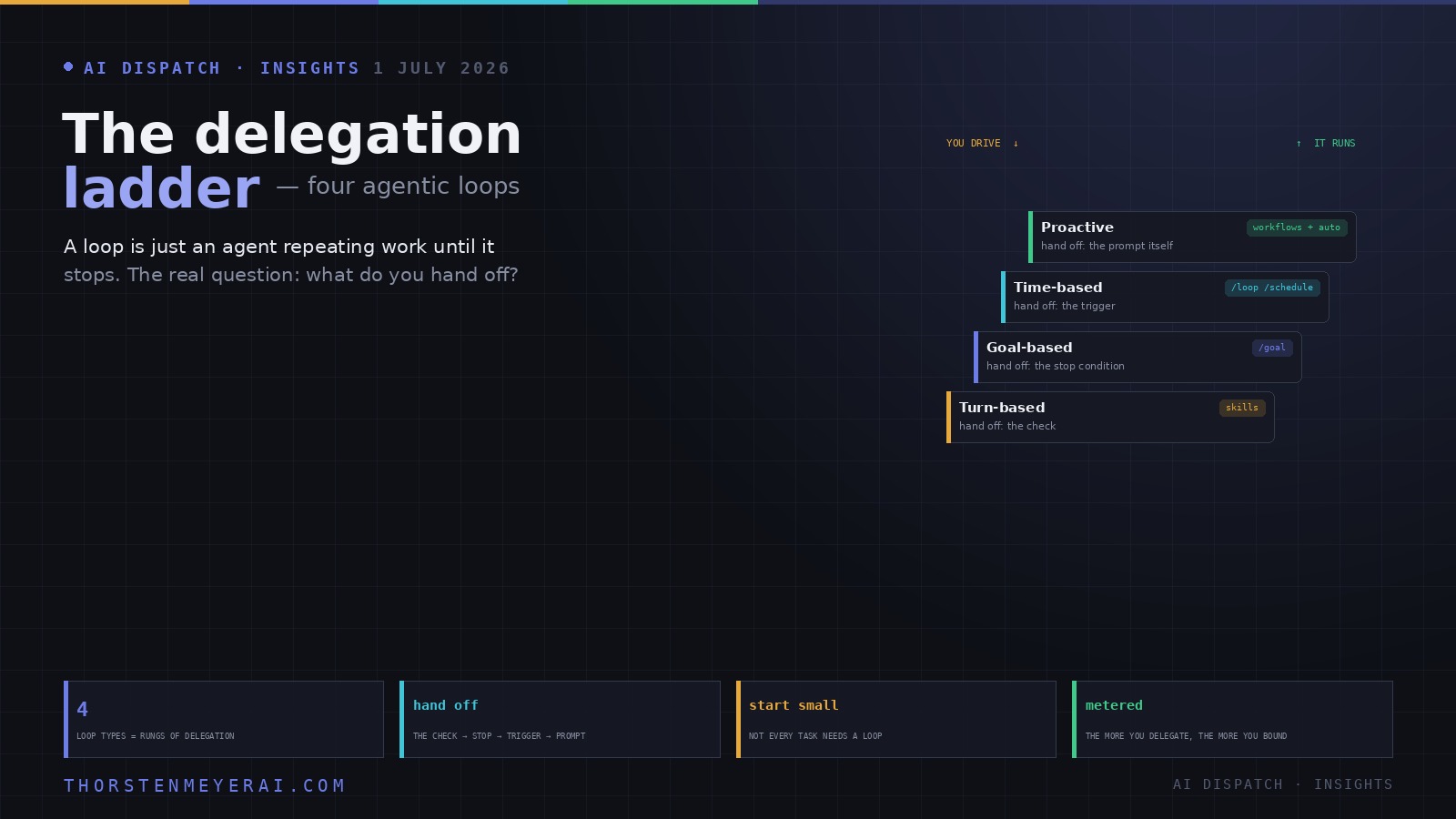
Their definition is refreshingly plain: a loop is an agent repeating cycles of work until a stop condition is met. That’s it. The interesting part isn’t the mechanics — it’s the lens the framework reveals once you line the loop types up. Each one is defined by what you hand off. Move up the ladder and you stop doing one more piece of the work yourself: first the checking, then the deciding-when-to-stop, then the starting, and finally the asking altogether.
That reframing turns a developer how-to into something a business should read. Loops are the shift from AI as a tool you operate to AI as a process that runs — and the four rungs are a map of exactly how far you’re willing to let go. Anthropic’s own caution comes first, though, and it’s the right one: not everything needs a loop. Start with the simplest thing that works and climb only when the task earns it.
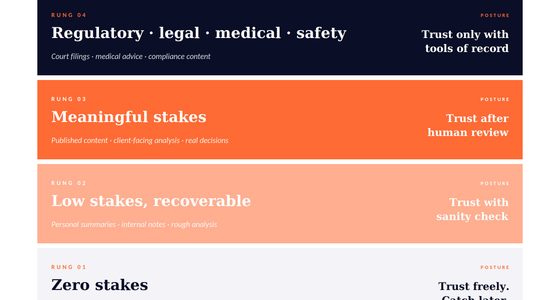
The delegation ladder: four agentic loops, and what each lets you stop doing
Strip the hype and a “loop” is simple — an agent repeating work until a stop condition is met. The useful lens isn’t the mechanics, it’s what you hand off. Four loop types = four rungs of delegation, from a tool you operate to a process that runs.
The whole framework reduces to one question about your own work: where am I the bottleneck, and which single piece can I hand off? Can you write the check? Is the goal concrete? Does the work arrive on a schedule? That answer picks your rung — and you climb one step at a time. The real skill isn’t operating a loop; it’s the judgment of what to delegate and how far — enough hands off to gain leverage, enough on the wheel that “runs without you” doesn’t become “runs away from you.”
Rung 1 — Turn-based: you hand off the check
This is the loop you already use without naming it. You send a prompt; the agent gathers context, takes an action, checks its own work, repeats if needed, and hands something back. Then you inspect it and write the next prompt. You’re still driving every turn.
The upgrade that matters here isn’t prompting harder — it’s handing off the check. You encode your own verification steps into a Skill so the agent can validate its work end-to-end instead of declaring victory after a successful edit. Anthropic’s example is a front-end skill that refuses to call a UI change “done” until the agent has actually started the dev server, clicked the new control, screenshotted before and after, confirmed the browser console is clean, and run a performance trace. The principle for a technical reader: the more quantitative the check, the better the agent self-verifies. The principle for a business reader: your quality bar becomes something the machine enforces, not something you personally re-inspect every time.
Best for shorter, one-off tasks. Manage the cost with specific prompts and good verification, which cuts the number of turns.
![Claude AI for Beginners Bible: [5 in 1] The Ultimate Guide to Automate Your Work, Save Hours Every Week, and Use AI for Real-World Results](https://m.media-amazon.com/images/I/415+fSJacsL._SL500_.jpg)
Claude AI for Beginners Bible: [5 in 1] The Ultimate Guide to Automate Your Work, Save Hours Every Week, and Use AI for Real-World Results
As an affiliate, we earn on qualifying purchases.
As an affiliate, we earn on qualifying purchases.
Rung 2 — Goal-based (/goal): you hand off the stop condition
Sometimes one turn isn’t enough, and agents genuinely do better when allowed to iterate. The trap is that left to its own judgment, an agent decides “good enough” and stops too early. The fix is to stop being the one who defines “done.”
With a goal command, you declare the success criterion up front — say, get the homepage performance score above 90, and stop after five attempts. Now, each time the agent tries to quit, a separate evaluator model checks your condition and sends it back to work until the goal is actually met or the turn cap is hit. This is why deterministic criteria — a test suite passing, a score crossing a threshold — work so much better than vague ones: there’s no wiggle room for the agent to talk itself into finishing.
For a business, this is the rung where you stop babysitting completion. For a builder, the turn cap is your cost circuit-breaker: “stop after 5 tries” is what keeps a stubborn goal from quietly burning your token budget.

The Multi-Agent Organization: How Humans and AI Agents Share Work Without Losing the Plot (Systems for the Strategic Self)
As an affiliate, we earn on qualifying purchases.
As an affiliate, we earn on qualifying purchases.
Rung 3 — Time-based (/loop, /schedule): you hand off the trigger
Some work isn’t a one-off at all — the task stays the same and only the inputs change (summarize the team’s messages every morning), or it depends on an external system you need to watch (a pull request that keeps getting review comments and failing tests). For these, you hand off the trigger: instead of you starting the work, a clock does.
A loop command re-runs a prompt on an interval — every five minutes, check the PR, address comments, fix the failing build. Run locally, it stops when you close your laptop; promote it to a scheduled routine and it moves to the cloud and keeps running without you. The cost lever here is judgment about frequency: match the interval to how often the thing you’re watching actually changes, and where you can, react to events rather than polling on a timer.
The business translation is stark: the work now starts itself. That’s real leverage — and the first rung where something is happening while you’re asleep, which is exactly why the guardrails section below stops being optional.

Designing Multi-Agent Systems: Principles, Patterns, and Implementation for AI Agents
As an affiliate, we earn on qualifying purchases.
As an affiliate, we earn on qualifying purchases.
Rung 4 — Proactive: you hand off the prompt itself
The top rung removes the last piece of you: the prompt. A proactive loop is triggered by an event or a schedule with no human in real time, and it composes everything below it — scheduled routines, goal-based stop conditions, verification skills, plus two heavier primitives: auto mode (so it runs without pausing to ask permission) and dynamic workflows (so it can orchestrate many agents at once).
Anthropic’s worked example is a feedback pipeline: on a schedule, check a channel for new bug reports; with a goal that won’t quit until every report this run is triaged, fixed, and answered; using a workflow that explores several solutions in parallel and has a separate agent adversarially review them before anything ships. That is not a tool you operate — it’s an autonomous process you supervise. Highest leverage on the ladder, and by a wide margin the highest need for discipline. The cost-and-quality move Anthropic flags: route the routine, repetitive steps to smaller, faster models and reserve the expensive model for the actual judgment calls.

Microsoft Copilot Studio User Guide for Beginners 2026: A Beginner's Guide to AI copilots, automation, workflows, Power Platform, integrations, … and more with images and illustrations.
As an affiliate, we earn on qualifying purchases.
As an affiliate, we earn on qualifying purchases.
Keeping the output good — the system matters more than the loop
Here’s the part that separates a loop that helps from one that quietly makes a mess: a loop is only as good as the system around it. The team’s guidance is unglamorous and correct. Keep your codebase clean, because the agent imitates the patterns already there. Give it a way to verify itself (those Skills again). Keep your docs reachable so it works from current best practices. And use a second agent with fresh context to review the first one’s work — a reviewer that wasn’t part of the original reasoning catches what the author can’t.
The highest-leverage habit is the one that compounds: when a result misses the bar, don’t just fix that one instance — encode the fix so every future run inherits it. That’s the same principle that makes a Skills library an appreciating asset rather than a pile of notes. A loop without that feedback step repeats its mistakes at scale; a loop with it gets better every time it runs.
Keeping the bill sane — autonomy is metered
The uncomfortable truth under all of this: the further up the ladder you go, the more the meter runs, and a dynamic workflow can spawn hundreds of agents. So the cost discipline isn’t optional bookkeeping — it’s part of the design. Pick the smallest primitive and the cheapest capable model for each job. Write stop criteria specific enough that the agent finishes as soon as it’s genuinely done — but not so loose it stops early or so tight it never stops. Pilot on a small slice before a large run. Prefer deterministic scripts over reasoning for repetitive steps — running a saved script is far cheaper than re-deriving the code each time. Don’t poll more often than the work actually changes. And instrument everything: the tooling can break recent spend down by skill, sub-agent, and workflow, and let you kill a runaway agent mid-run.
The honest caveats
A few things worth saying plainly. Anthropic itself leads with “not every task needs a loop,” and that restraint is easy to lose in the excitement — over-looping is just an expensive way to do simple work. The top two rungs run without asking permission, which means the guardrails (self-verification, a second reviewer, piloting, turn and interval caps) are the price of admission, not nice-to-haves. Some of the most powerful pieces — scheduled routines, dynamic workflows — are still labeled research preview, so treat them as moving targets. And while the loop concept is now an industry-wide conversation (that’s why there are a dozen definitions on X), the specific primitives here are Anthropic’s Claude Code implementation; the ideas transfer, the exact commands may not.
The take
Skip the jargon and the whole framework reduces to one question you can ask about your own work today: where am I the bottleneck, and which single piece of that can I hand off? Can you write the verification check? Is the goal concrete enough to define “done”? Does the work arrive on a schedule? Your answer tells you which rung to reach for — and you only ever need to climb one step at a time.
The real skill being described here isn’t operating a loop; it’s the judgment of knowing what to delegate and how far. Get that right and you move from typing instructions all day to designing systems that run without you — while keeping enough hands on the wheel that “runs without you” doesn’t become “runs away from you.” Pick one task, hand off one piece, watch where it stalls or overreaches, and iterate. That’s the entire game.
Source: “Getting started with loops,” by Delba de Oliveira and Michael Segner (Anthropic), published June 30, 2026, on the Claude blog. Loop definitions, primitives (/goal, /loop, /schedule, auto mode, dynamic workflows), examples, and guidance are Anthropic’s; the “delegation ladder” framing and analysis are the author’s. Documentation lives at code.claude.com/docs. Some features are research previews and may change.



![SenseTime #KAFD - A #PIF Partner HQ By AMAQ[Interiors] Aja Wilson (zD3RJ9DxZV) - Mshale](https://thorstenmeyerai.com/wp-content/uploads/2026/08/sensetime-kafd-a-pif-partner-hq-by-amaq-interiors-aja-wilson-zd3rj9dxzv-mshale-featured-260x140.jpg)