
Disclosure: This article contains affiliate links, and as an Amazon Associate I earn from qualifying purchases — at no extra cost to you. I only recommend gear I’d put in my own rigs. Prices and availability change constantly; confirm current pricing and VRAM before you buy.

Get business pricing on tech for your team
- Business-only prices and quantity discounts
- Tax-exempt purchasing
- Multiple users, one account, clear invoices
The GPU is the heart of a local AI rig — and it’s also the loudest, hottest component by a wide margin, producing 70% or more of your total heat under inference. So this roundup looks at GPUs through a lens most “best GPU for LLM” guides ignore: not just raw tokens per second, but how cool and how quiet each card runs under a sustained load. Because a card that benchmarks beautifully but sounds like a leaf blower for eight hours a day is the wrong card for a machine you sit next to.
This is the GPU companion to the pillar, How to Reduce Heat and Noise in a High-Power AI Workstation. Below are the cards I’d actually buy in 2026, organized by the thing that matters most for local AI — VRAM — with honest notes on the heat and noise each one brings, and the single most important trick for making any of them quiet.
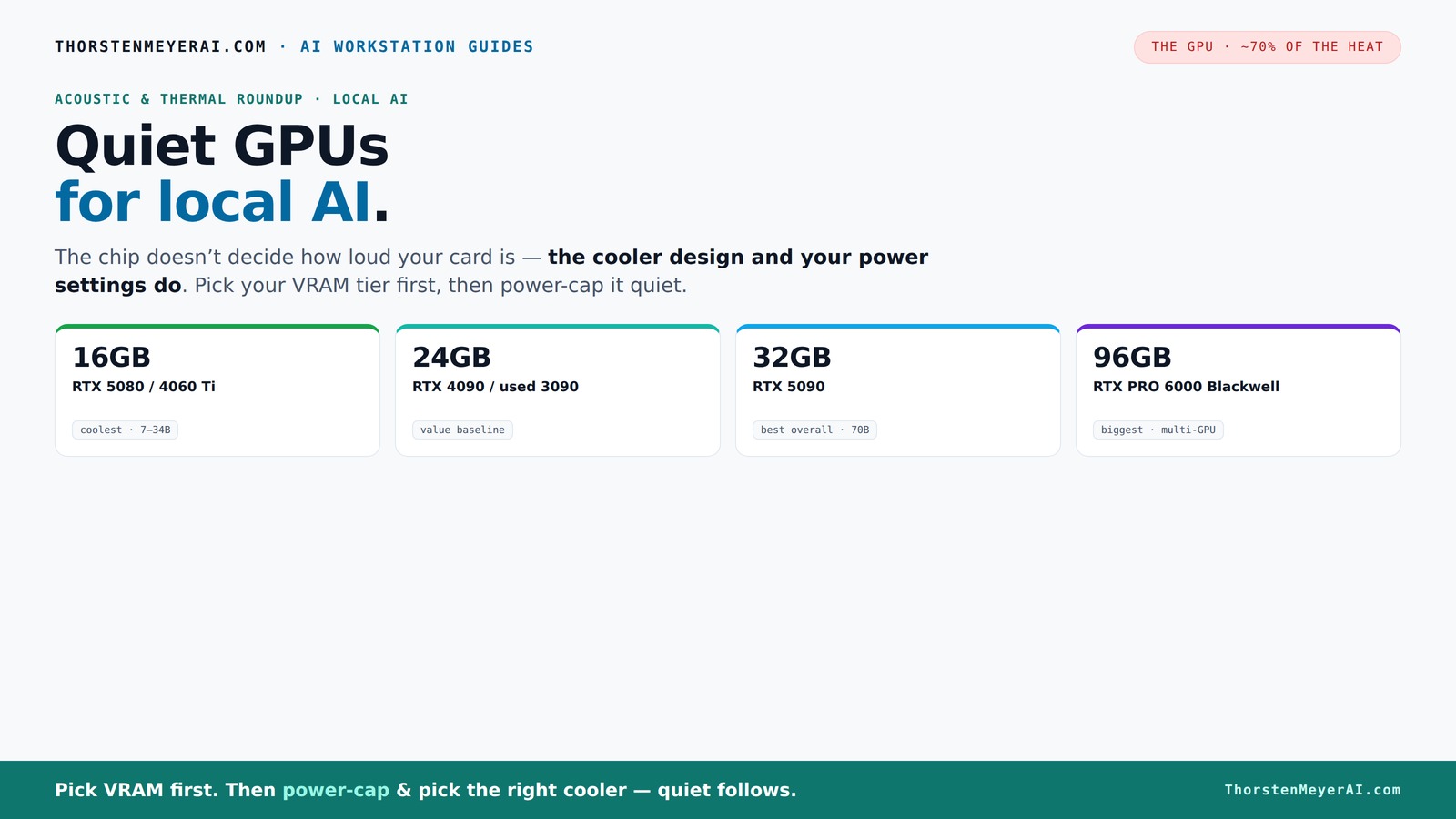
Quiet GPUs
for local AI.
The GPU makes ~70% of your heat and most of your noise. But here’s the secret: the chip doesn’t decide how loud your card is — the cooler design and your power settings do. Match your VRAM tier in Part 2, then make it quiet.
Capping to 70–80% sheds a huge amount of heat for almost no inference loss — because inference is memory-bound. A capped 5090 is dramatically cooler & quieter than stock. Do this first.
Within one GPU model, partner cards differ enormously. For a single card, a large triple-fan open-air with zero-RPM idle runs slow & quiet. For multi-GPU, the calculus flips →
With room to breathe, a large triple-fan open-air cooler spreads heat across a big fin stack and runs its fans slowly. The quietest choice — what most people should buy.
First, the rule that overrides everything: VRAM is the hard limit
Before acoustics, before anything: if your model doesn't fit in VRAM, performance collapses — no amount of raw power saves a card that's out of memory. So pick your VRAM tier first, then optimize for quiet within it. The rough map for 2026:
- 16GB — runs 7–8B models at full precision and ~34B models at Q4 quantization. The efficient mid-tier.
- 24GB — the enthusiast baseline; 13–30B models natively, 70B with aggressive quantization.
- 32GB — opens up 70B models at Q4 without offloading, plus headroom for context and growth.
- 96GB — professional territory; 70B at full FP16, or 100B+ MoE models at Q4 on a single card.
Quantization (GGUF Q4_K_M, AWQ, or Blackwell's native FP4) stretches every tier further by cutting VRAM use 50–75% with small quality loss. Now, within your tier, here's how to choose for quiet.
quiet high VRAM GPU for AI inference
As an affiliate, we earn on qualifying purchases.
As an affiliate, we earn on qualifying purchases.
The trick that makes any GPU quiet: undervolt + the right cooler design
Here's the most important thing in this entire roundup: the chip doesn't determine how loud your card is — the cooler design and your power settings do. The same RTX 5090 silicon can be near-silent or screaming depending on which partner card you buy and whether you've power-capped it.
Two levers matter most:
Power-cap it (free). As covered in the undervolting guide, capping a GPU to 70–80% power sheds a huge amount of heat for almost no loss in inference speed (because inference is memory-bound). A power-capped 5090 is dramatically cooler and quieter than a stock one. Do this first — it changes the acoustic picture more than your choice of card.
Buy the right cooler variant. Within a given GPU model, partner cards differ enormously in cooling. For a quiet sustained rig, favor a large triple-fan open-air design with a generous heatsink and a "zero-RPM" idle mode — these run their fans slow and quiet under load. For a multi-GPU build, the calculus flips (see below). Either way, the cooler is a real buying decision, not an afterthought.
With those two levers, almost any card on this list can be made to run quietly. Now the picks.
thermal and acoustic optimized GPU for local AI
As an affiliate, we earn on qualifying purchases.
As an affiliate, we earn on qualifying purchases.
The picks, by VRAM tier
Best overall for local AI — RTX 5090 (32GB)
The RTX 5090 is the best consumer GPU for local AI in 2026, full stop. Its 32GB of GDDR7 and ~1.79 TB/s of bandwidth (memory bandwidth being the primary driver of token throughput) let it run 70B models at Q4 without offloading, and it's roughly 30% faster than a 4090 on large models. For a serious single-GPU inference rig, this is the card.
The acoustic and thermal reality: it's the hottest consumer card here, with a 575W TDP that demands a 1,200W+ PSU and strong cooling. But — and this is the whole point of this article — power-capped to ~70% and paired with a good triple-fan variant, it runs far cooler and quieter than its spec sheet implies, while keeping nearly all its inference speed. Buy a well-cooled model, cap the power, and the heat champion becomes perfectly livable.
Best for: the best single-GPU local AI rig; 70B models; anyone who wants headroom for growing model sizes. 👉 Check current price on Amazon
Best value baseline — RTX 4090 (24GB) / used RTX 3090 (24GB)
The RTX 4090 remains the proven 24GB baseline — reliable, well-understood, and still excellent for 13–30B models (and 70B with aggressive quantization). If you can find one at a reasonable price, it's a known quantity that runs cooler than the 5090 simply because it draws less power (450W vs 575W).
For pure VRAM-per-dollar, the used RTX 3090 is the value play that keeps coming up: the same 24GB as a 4090 at a fraction of the price, and the cheapest genuinely-usable daily-driver path into serious local LLMs. It's older and less efficient, so it runs warmer per token — which makes power-capping and a good cooler variant especially worthwhile here. But on a budget, 24GB of VRAM for the money is hard to argue with.
Best for: the value-conscious 24GB build; the used-3090 route is the cheapest serious entry. 👉 Check current price on Amazon
Best efficient mid-tier — RTX 5080 / RTX 4060 Ti (16GB)
If your models live in the 7–34B range (at Q4), a 16GB card is the efficiency sweet spot — meaningfully lower power draw, less heat, and a quieter rig as a result. The RTX 5080 is the modern, efficient choice; the RTX 4060 Ti 16GB is a stable, low-power option that sips power and stays cool and quiet. You give up the ability to run the largest models, but for a rig focused on small-to-medium models, a 16GB card is the easiest path to a cool, quiet workstation — it simply produces less heat to deal with.
Best for: 7–34B models; efficiency-first builds; the quietest, coolest rig for moderate model sizes. 👉 Check current price on Amazon
Best for big models / dense builds — RTX PRO 6000 Blackwell (96GB)
The RTX PRO 6000 Blackwell is the first professional card with 96GB of GDDR7 ECC at retail — enough to run a 70B model at full FP16, or 100B+ MoE models at Q4, on a single card. For anyone whose models exceed what 32GB can hold, this is the step up (at roughly $8,500).
For our purposes, it has a quietly important acoustic advantage: professional and blower-style cards are engineered for sustained, dense, multi-card operation in a way oversized consumer cards aren't. They're built to be packed tightly and run flat-out continuously, exhausting heat directly out the back rather than dumping it into the case. In a multi-GPU rig — where consumer open-air cards choke each other and the inner card throttles 10–15% — that blower-style, heat-out-the-back design is exactly what you want.
Best for: models over 32GB; multi-GPU and dense builds; professional sustained operation. 👉 Check current price on Amazon
As an affiliate, we earn on qualifying purchases.
Comparison at a glance
| GPU | VRAM | Power | Models (Q4) | Acoustic/thermal note | Rough price |
|---|---|---|---|---|---|
| RTX 5090 | 32GB | 575W | up to 70B | Hottest; tame with power-cap + good cooler | $$$$ |
| RTX 4090 | 24GB | 450W | 30B (70B aggressive) | Cooler than 5090; proven | $$$ |
| Used RTX 3090 | 24GB | 350W | 30B (70B aggressive) | Best VRAM/$; warmer per token | $$ |
| RTX 5080 / 4060 Ti | 16GB | ~250–360W | up to ~34B | Coolest & quietest; less heat | $–$$ |
| RTX PRO 6000 Blackwell | 96GB | ~600W | 100B+ MoE | Blower design ideal for multi-GPU | $$$$$ |
Prices shift constantly; links show live pricing. VRAM is the hard limit — pick your tier first. AMD's RX 7900 XTX (24GB) is a VRAM-per-dollar alternative, but verify your LLM software supports ROCm before buying.
power-efficient quiet GPU for machine learning
As an affiliate, we earn on qualifying purchases.
As an affiliate, we earn on qualifying purchases.
Open-air vs blower: which cooler design for your build
This is the acoustic decision that trips people up, and it flips depending on how many cards you're running:
Single GPU → large open-air (triple-fan). With one card and room to breathe, a big open-air cooler with a generous heatsink and zero-RPM idle is the quietest choice. It spreads heat across a large fin stack and runs its fans slowly. This is what most people should buy.
Multi-GPU → blower or workstation-style. Stack two or three open-air cards together and they suffocate each other — each one breathes its neighbor's exhaust, and the inner card throttles and ramps its fans to a roar. Blower-style and professional cards (like the RTX PRO 6000) exhaust heat straight out the back of the case, so they can be packed tightly without cooking each other. For a dense rig, blower design beats open-air despite being slightly louder per card, because the alternative is thermal throttling and runaway fan noise.
How to choose
Pick your VRAM tier first. Match it to the models you actually run: 16GB for 7–34B, 24GB for the enthusiast baseline, 32GB for 70B headroom, 96GB for the biggest models. Don't buy on gaming benchmarks — a fast card with too little VRAM "physically fails to load" the model you want.
Then optimize for quiet within the tier. Power-cap the card (free, biggest acoustic win), and buy the cooler design that matches your build — open-air for a single card, blower for multi-GPU.
Then handle the rest of the system. Even the quietest GPU needs airflow to stay quiet — pair it with a mesh case and good fans, and if it's running hot after years of use, a fresh repaste brings temperatures (and fan noise) back down.
Or sidestep the heat entirely. If silence matters more than raw throughput, Apple Silicon offers near-silent, power-efficient inference with large unified memory — a fundamentally different tradeoff covered in Mac vs GPU Tower for Local LLMs.
The bottom line
For local AI, pick VRAM first and quiet second — but don't skip the second step, because the GPU is where most of your heat and noise originate. The RTX 5090 is the best single-GPU card (and far quieter than its 575W suggests once power-capped); the RTX 4090 or used 3090 is the value 24GB route; a 16GB RTX 5080 / 4060 Ti is the coolest, quietest path for moderate models; and the RTX PRO 6000 Blackwell is the answer for the largest models and dense multi-GPU builds.
The single most important move applies to all of them: power-cap the card and buy the right cooler design. Do that, and the loudest component in your workstation becomes one you can happily sit next to — the full sequence is in the pillar guide.
Specs and figures from 2026 local-LLM GPU guides (BIZON, Spheron, Fluence, and independent reviewers). VRAM capabilities depend on quantization; acoustic behavior varies by partner card, cooler design, and power settings. As an Amazon Associate I earn from qualifying purchases.
Fall Picks
fall essentials
As an affiliate, we earn on qualifying purchases.