
By Thorsten Meyer | November 19, 2026 | ThorstenMeyerAI.com

Get business pricing on tech for your team
- Business-only prices and quantity discounts
- Tax-exempt purchasing
- Multiple users, one account, clear invoices
When Apple launched its new Mac mini on August 25, 2026, the headline did not mention photos, music or spreadsheets. It called the little box “the leading desktop for always-on agentic computing”. Since then, small Macs have become the default answer to a question many people now ask: what should I buy to run AI myself?
Often that is the right answer. Sometimes it is not. A Mac mini that runs an agent around the clock has a different job from a machine that trains a model, serves a team or runs the largest open models. Three days ago we looked at what a Mac mini’s 16 to 64 GB of memory can run. This piece takes the next step: which machine fits which job, from a cloud API to a Mac Studio to a PC with an Nvidia graphics card. All specifications come from Apple’s and Nvidia’s spec pages and from the documentation of the tools, checked on November 19, 2026.
Key takeaways
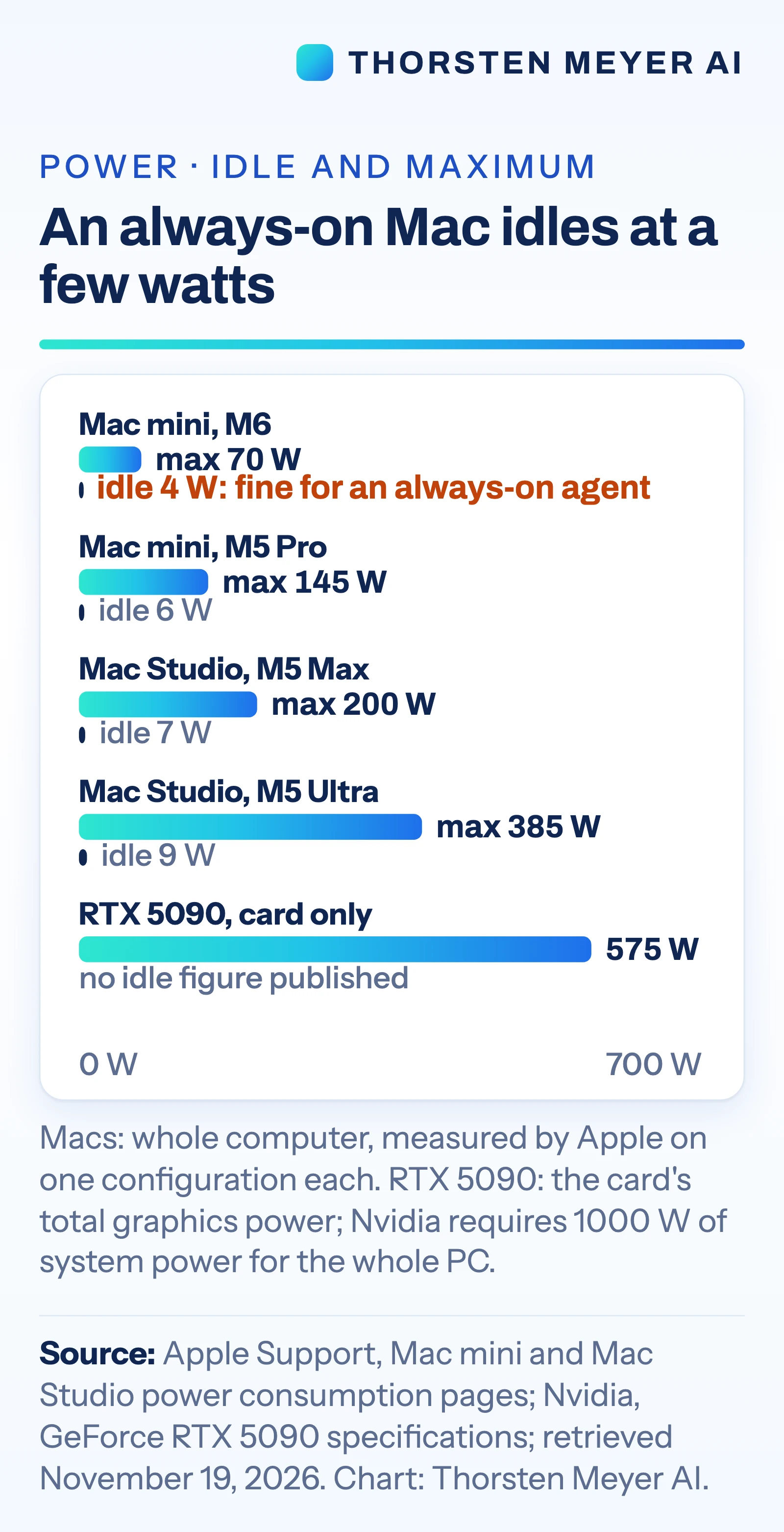
- Many always-on agents do not need a big machine at all. If the agent calls a cloud model, the box only runs the loop, the files and the tools. Apple lists the base Mac mini at 4 W when idle.
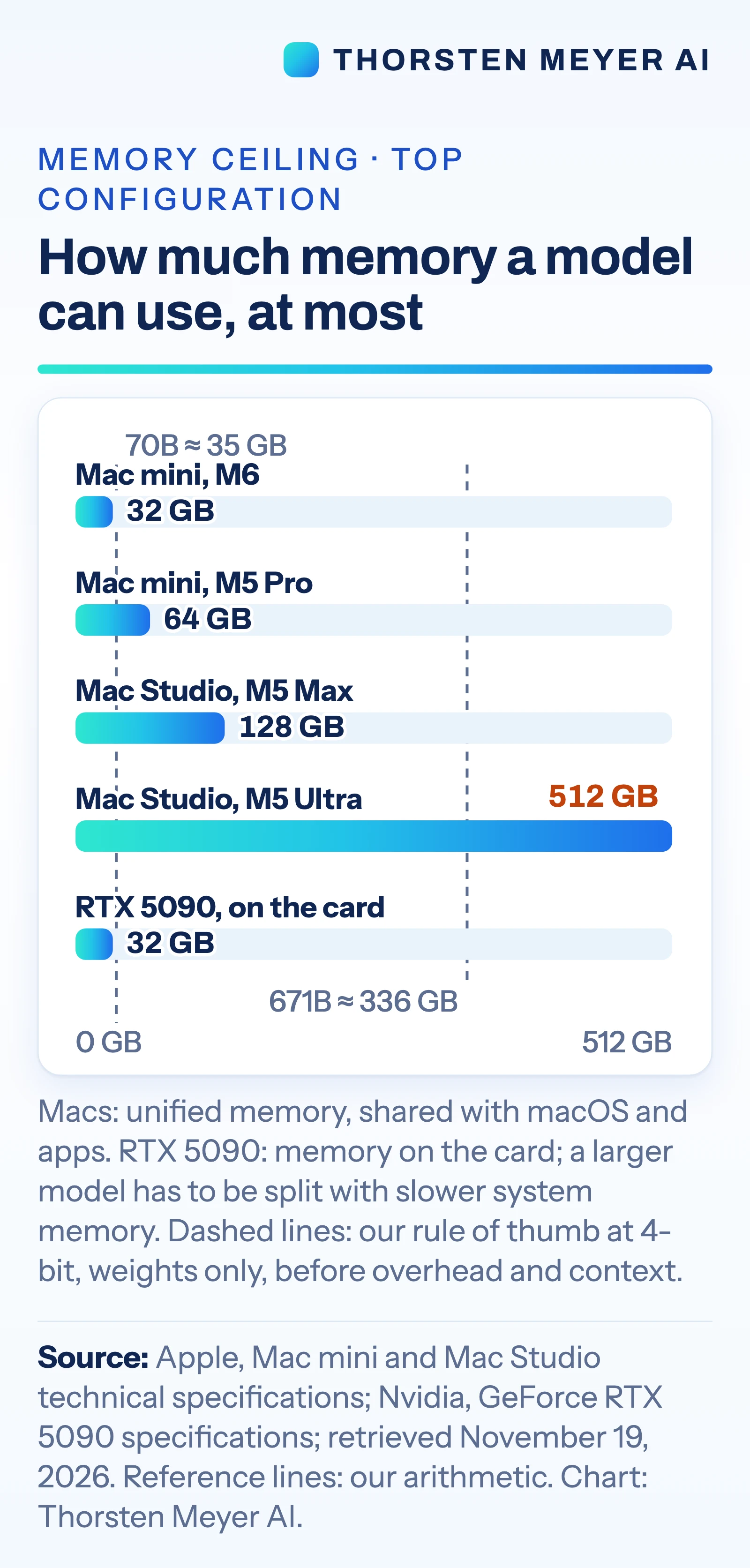
- For local models, memory decides. A Mac mini tops out at 64 GB of unified memory, a Mac Studio at 128 GB with M5 Max or 512 GB with M5 Ultra. Nvidia’s GeForce RTX 5090 has 32 GB on the card.
- A GPU PC wins where the tools are built for Nvidia first. vLLM, a widely used serving engine, ships CUDA binaries; on Apple silicon it points to a community-maintained plugin.
- Small fine-tunes work on a Mac. Apple’s MLX tools support LoRA and QLoRA, and PyTorch’s Mac backend supports training on the GPU. Training large models is not a desktop job on any machine.
- Power and size differ by an order of magnitude. The Mac Studio with M5 Ultra draws at most 385 W as a whole system. The RTX 5090 card alone is rated at 575 W, and Nvidia asks for a 1000 W system power supply.
- Clustering Macs is documented, but it is a project. Fast links need Thunderbolt 5, a cable between every pair of Macs and a setting changed in macOS recovery. The base Mac mini with M6 has Thunderbolt 4.
- The cloud stays the answer for the strongest models. The leading closed models cannot be downloaded at all.
Decision guide · local AI hardware
Which machine fits which AI job?
Five common jobs, one after another, with the machine that fits each best on today’s specifications.
First question: does the model run in the cloud, or on your own machine? If it runs in the cloud, the box only keeps the agent going.
The job
- 1An agent that calls cloud models, running around the clock
→ Mac mini - 2A private assistant with a small open model
→ Mac mini - 3Huge open models with hundreds of billions of parameters
→ Mac Studio - 4Tools built for Nvidia’s CUDA, training, serving many users
→ GPU PC - 5The strongest models and the hardest tasks
→ Cloud API
The machine
Mac mini
up to 64 GB · 4 W at idle
Mac Studio
up to 512 GB · 385 W at most
GPU PC
32 GB on the card · 575 W card
Cloud API
strongest models · per-token bills
Sources: Apple, Mac mini and Mac Studio technical specifications and power pages; Nvidia, GeForce RTX 5090 specifications; all retrieved November 19, 2026. Matching of jobs to machines: our reading, not a buying recommendation.
Graphic: Powered by Thorsten Meyer AI
Products Worth Considering

DJI Mini 4K Drone with 4K UHD Camera

Kindle Paperwhite Signature Edition 32GB (2024 Model) – Metallic Black

Jackery Fridge Guard 1024Wh Backup Power Station with Mount
As an affiliate, we earn on qualifying purchases.
The one-line recap: memory first
A model only runs well if its weights, plus room for the conversation, fit into memory the chip can reach quickly; our Mac mini piece shows the math with published figures. For a quick check, our own rule of thumb: at 4-bit precision, each billion parameters needs about half a gigabyte for the weights alone, before overhead and context. That puts a 70-billion-parameter model at about 35 GB and a 671-billion-parameter model at about 336 GB.
The decision matrix
| The job | Best fit | Why | Watch out for |
|---|---|---|---|
| An agent that calls cloud models: coding agents, inbox, automation | Mac mini with M6, or a Mac you already own | Always on, 4 W at idle, small and quiet | The agent acts with your access; the model and your prompts still go to the cloud |
| A private chat or document assistant with a small open model, for one person | Mac mini with M6, 16 to 32 GB | LM Studio recommends “16GB+ RAM” | Answers come slower than from the big cloud services |
| Mid-size open models, long documents, a small team | Mac mini with M5 Pro and 64 GB, or Mac Studio with M5 Max and up to 128 GB | More memory and 307 to 614 GB/s of memory bandwidth | Memory is fixed when you order |
| Very large open models with hundreds of billions of parameters | Mac Studio with M5 Ultra, up to 512 GB | One memory pool that the GPU can use | Starts at $5,499 (US list price on apple.com, November 19, 2026); no independent speed tests at that size |
| Fast inference on models that fit in 32 GB; image and video tools built for Nvidia | PC with an Nvidia graphics card | CUDA is supported everywhere | 575 W for the card, a bigger case, more fan noise to plan for |
| Serving many users, training, large fine-tunes | Nvidia GPUs, in a PC or rented in the cloud | Serving and cluster tools are built for CUDA first | Cost and setup; large training needs a cluster |
| Small fine-tunes (LoRA, QLoRA) | A Mac with enough memory, or a GPU PC | Both are documented | Fine-tuning needs more memory than running the same model |
| The strongest models, the hardest tasks, bursty use | Cloud API | The leading closed models only run there | Per-token bills, and your data leaves your machine |
The matrix is our reading of the specifications and documentation below. It is not a buying recommendation, and it does not replace a test with your own work.
Mac Studio or GPU PC?
This is the real fork for anyone who wants to run large open models at home or in the office.
Memory size favours the Mac Studio. Apple sells the Mac Studio with M5 Max with 36 GB, configurable to 48, 64 or 128 GB, and the M5 Ultra with 96 GB, configurable to 256 or 512 GB. On Apple silicon, as Apple’s MLX documentation puts it, “The CPU and GPU have direct access to the same memory pool.” Apple says the M5 Ultra can “run huge LLMs with hundreds of billions of parameters entirely on device.” Nvidia’s GeForce RTX 5090, which Nvidia calls “the most powerful GeForce GPU ever made”, comes with “32 GB of super-fast GDDR7 memory”. A model larger than that has to be split. Ollama’s documentation shows what that looks like: “48%/52% CPU/GPU means the model was loaded partially onto both the GPU and into system memory.”
Tools favour the GPU PC. Almost every AI tool supports Nvidia’s CUDA first. On a Mac, the common local tools work: LM Studio, Ollama (“Ollama supports GPU acceleration on Apple devices via the Metal API”), llama.cpp and Apple’s own MLX. Other tools reach the Mac later or through plugins, as the vLLM example below shows.
Speed depends on the model. Apple lists 1.2TB/s of memory bandwidth for the M5 Ultra and 460 or 614 GB/s for the M5 Max. Nvidia’s page lists a 512-bit memory interface for the RTX 5090 but no bandwidth figure. Neither company publishes a token-speed comparison against the other. When a model fits in the card’s 32 GB, a GPU PC is the speed play. When it does not, the Mac Studio can hold it in one place.
Price: Apple’s US list prices on apple.com, November 19, 2026, start at $2,499 for the Mac Studio with M5 Max and $5,499 with M5 Ultra. Nvidia’s product page lists no price for the RTX 5090, and a GPU PC’s price depends on every other part in the case.
Training and CUDA-only tools
What works on a Mac. Running models works well with MLX, LM Studio, Ollama and llama.cpp, which aims at “a wide range of hardware”. Fine-tuning works too. The mlx-lm package can “fine-tune an LLM with low rank adaptation (LoRA)” and supports quantized LoRA (QLoRA) and full fine-tuning. It warns that “Fine-tuning a large model with LoRA requires a machine with a decent amount of memory.” PyTorch’s Mac backend “enables high-performance training on GPU for macOS devices”.
Where the Mac stops.
- Precision. PyTorch’s Mac backend “does not support torch.float64”. The documentation states: “A computation that genuinely requires double precision has to run on the CPU.”
- Serving engines. vLLM, a popular engine for serving models to many users, “contains pre-compiled C++ and CUDA (12.9) binaries”. For Apple silicon it points to vLLM-Metal, “a community-maintained hardware plugin”.
- Clusters for training. Even Apple’s MLX lists Nvidia’s NCCL as “The backend of choice for CUDA environments.”
- Large training runs. Training a large model from scratch needs many GPUs working together. That is a data-center job, not a desktop job, on any brand.
Our reading: before you buy, check the install page of every tool you depend on. If it lists only Nvidia GPUs, a Mac will run it on the CPU at best, or not at all.
Noise, size and power
| Machine | Size | Weight | Power at idle | Power at maximum | Noise figure published |
|---|---|---|---|---|---|
| Mac mini, M6 | 12.7 × 12.7 × 5.0 cm | 0.67 kg | 4 W | 70 W | 5 dBA at idle |
| Mac mini, M5 Pro | 12.7 × 12.7 × 5.0 cm | 0.73 kg | 6 W | 145 W | Not listed separately |
| Mac Studio, M5 Max | 19.7 × 19.7 × 9.5 cm | 2.7 kg | 7 W | 200 W | None |
| Mac Studio, M5 Ultra | 19.7 × 19.7 × 9.5 cm | 3.6 kg | 9 W | 385 W | None |
| GeForce RTX 5090, card only | 304 × 137 mm, 2-slot | Not listed | Not listed | 575 W for the card; 1000 W system power required | None |
Apple measured power on specific configurations: the M6 Mac mini with 16 GB and the M5 Ultra Mac Studio with 512 GB, for example. Its noise figure is a sound pressure level at the operator position, “5 dBA at idle”, for the Mac mini only, and Apple notes that “Acoustics may vary by configuration.” Nvidia’s figure is the card’s total graphics power; the 1000 W is the power supply Nvidia requires for the whole PC.
Two numbers from our own arithmetic put this in perspective. A Mac mini that idles at 4 W all year uses about 35 kWh. And the space Nvidia asks you to keep free for the card, 304 × 137 × 61 mm, is about 2.5 litres, roughly three times the volume of a whole Mac mini (about 0.8 litres).
For an always-on agent, idle power and silence matter more than peak speed. For a machine that crunches models all day, the maximum matters, and so do cooling and the noise it brings.
Clustering several Macs: what the documentation says
Apple itself suggests it: “Thunderbolt 5 also allows users to cluster multiple Mac mini systems together to run large AI models entirely on device.” Note the condition. The Mac mini with M5 Pro has three Thunderbolt 5 ports; the one with M6 has three Thunderbolt 4 ports.
MLX distributed. Apple’s MLX can spread “the computational cost of training or inference” across several machines. Its fastest option, called JACCL, uses a feature added in macOS 26.2: “RDMA over thunderbolt is available and enables low-latency communication between Macs with thunderbolt 5.” MLX says this brings latency “an order of magnitude lower than the ring backend”, its simpler option over normal network connections. Three conditions apply:
- It must be switched on in macOS recovery. Enabling it “cannot be done remotely even with sudo”.
- Every Mac needs a direct cable to every other Mac. JACCL “supports only fully connected topologies”. By our arithmetic, four Macs need six cables. With three Thunderbolt 5 ports, a Mac mini with M5 Pro can link directly to at most three others.
- It is new. MLX describes the setup as “slightly more involved” “Until the feature matures”.
exo. The open-source project exo (Apache-2.0 licence) “connects all your devices into an AI cluster” and uses MLX underneath. It promises automatic device discovery and reports “up to 1.8x speedup on 2 devices and 3.2x speedup on 4 devices” with tensor parallelism. Those are exo’s own figures, and its examples use Mac Studios, not Mac minis. All devices must run the same version of exo, and RDMA over Thunderbolt needs macOS Tahoe 26.2 or later.
Our reading: a cluster makes sense when a model does not fit into one machine and a bigger one is not an option. For most buyers, one Mac Studio with more memory is simpler than four Mac minis and six cables.
From my desk: how I run my own agents
Personal note. I run my own AI agents on a small fleet of Macs: a laptop as the hub, Mac minis and Mac Studios as always-on workers. I steer them through T3 Code, which puts several coding agents on one surface (our T3 Code piece explains how it works). Most of the hard thinking still comes from cloud models. The Macs keep the agents running around the clock, hold the work and run local open models for routine jobs. Three lessons so far: memory decides what runs locally, idle power matters more than peak power, and keeping several machines updated is real work.
What it means for businesses
- Start with the job, not the box. Write down which tasks run locally and which call a cloud model. Many agent setups need only a small, always-on machine.
- Check your tools before you buy. If your pipeline depends on vLLM or other CUDA-first software, plan for Nvidia hardware or cloud GPUs.
- Buy memory for the model you will run, not the one you run today. Memory on a Mac is chosen when you order and cannot be added later.
- Count the running costs. Power, cooling, updates and security are yours once the machine sits in the office.
What it means for users
- Try before you buy. If you already own an Apple-silicon Mac, a local model in LM Studio or Ollama shows you in an afternoon whether local AI fits your work.
- An agent box can be modest. If your agents use cloud models, the smallest Mac mini is enough to keep them running.
- Local is private only when the model is local. Some local tools also offer cloud models; check which one you use.
What is not known
- Noise under load. Apple publishes a noise figure only for an idle Mac mini; Nvidia publishes none for the card.
- Independent speed tests. Apple’s AI speed claims compare its new Macs with older Macs. We found no independent comparison of the M5 Ultra and the RTX 5090 on the same models.
- How well clusters scale outside the vendors’ own tests. The exo figures are the project’s own.
- How fast tool support for the Mac grows. vLLM-Metal is community-maintained, and MLX calls its fastest cluster option new.
I’m Thorsten Meyer. More reality checks are at thorstenmeyerai.com.
Sources
- Apple Newsroom: Apple’s new Mac mini, featuring M6 and M5 Pro, August 25, 2026
- Apple Newsroom: Apple introduces M6 and M5 Ultra, August 25, 2026
- Apple Newsroom: The new Mac mini and Mac Studio are available today, September 22, 2026
- Apple: Mac mini technical specifications and Mac Studio technical specifications, retrieved November 19, 2026
- Apple Support: Mac mini power consumption and thermal output and Mac Studio power consumption and thermal output, retrieved November 19, 2026
- Apple Store (U.S.): Buy Mac mini and Buy Mac Studio, list prices retrieved November 19, 2026
- Nvidia: GeForce RTX 5090 specifications, retrieved November 19, 2026
- MLX documentation: Distributed Communication and Unified Memory, retrieved November 19, 2026
- mlx-lm: Fine-Tuning with LoRA or QLoRA, retrieved November 19, 2026
- exo: project README, retrieved November 19, 2026
- PyTorch: MPS backend, retrieved November 19, 2026
- vLLM: GPU installation, retrieved November 19, 2026
- Ollama: GPU support and FAQ, retrieved November 19, 2026
- LM Studio: System Requirements, retrieved November 19, 2026
- llama.cpp: README, retrieved November 19, 2026
Further reading on ThorstenMeyerAI.com
- Local AI on a Mac Mini: What 16 to 64 GB Can Run, and Where It Falls Short
- T3 Code: One Workspace for Your Claude Code, Codex and Other AI Coding Subscriptions
This article explains published specifications and documentation; it is not investment or purchasing advice. Prices are U.S. list prices on apple.com as of November 19, 2026, and can change. No company named here reviewed or sponsored this article. Researched and drafted with AI assistance, including Anthropic’s Claude. The personal note describes the author’s own setup. Our own text and graphics contain no affiliate links; offer and product boxes added by the site may contain Amazon affiliate links. Sources checked on November 19, 2026. Images: AI-generated illustration (Runware), animation and charts by Thorsten Meyer AI from the published numbers; our own images show no real people or logos. Boxes added by the site may show product photos or people.