
Executive Overview
Based on its structure and runtime flow, this codebase appears to be the core runtime for an AI-powered work assistant, likely aimed at software and technical workflows.

This is not a typical web app, backend service, or simple command-line tool. It is a platform that lets an AI assistant:
- interact with a user in real time
- call tools such as shell, file editing, search, and external integrations
- manage permissions and safety checks
- run background and multi-step tasks
- extend itself through plugins, skills, and external servers
For a business audience, the simplest way to think about it is this:
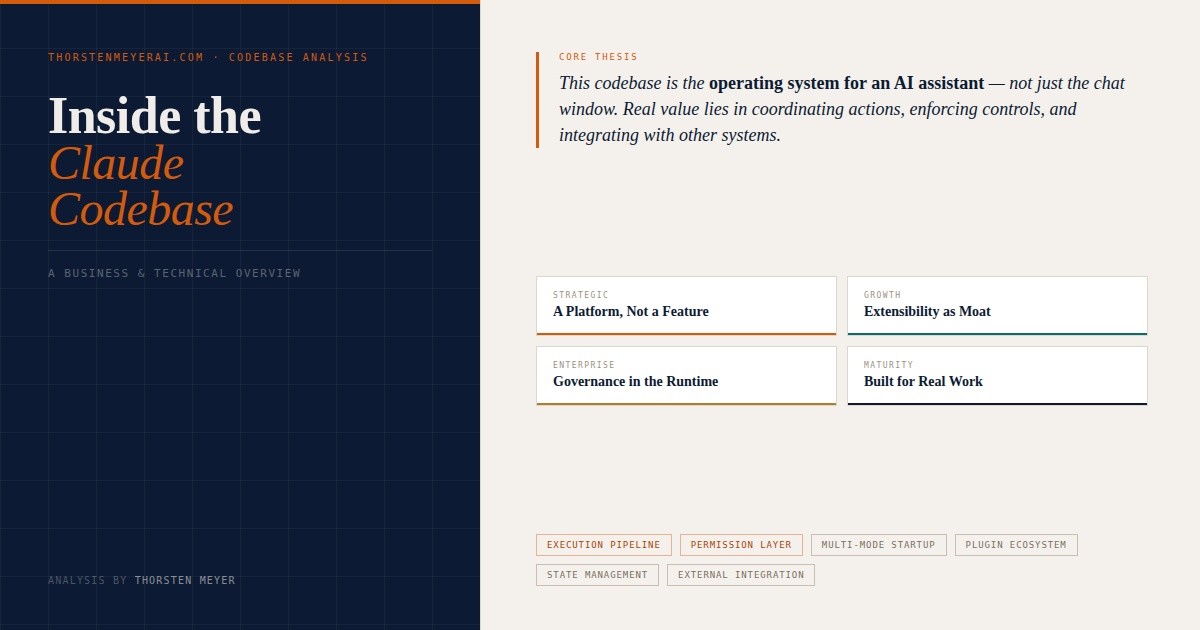
This codebase is the operating system for an AI assistant, not just the assistant’s chat window.
Inside the Claude Codebase
This is not a typical web app, backend service, or simple command-line tool. It is a platform that lets an AI assistant interact in real time, call tools, manage permissions, run background tasks, and extend itself through plugins and external servers.
As an affiliate, we earn on qualifying purchases.
Why This Matters to Business
- Multiple packaging options without rebuilding
- Monetisation across product surfaces
- One engine, many product forms
- Faster expansion into new use cases
- Ecosystem potential and lock-in
- Higher switching costs post-integration
- What the AI can access
- What requires human approval
- How actions are logged and controlled
- Durable session transcripts
- Background task state management
- Headless and automated execution
As an affiliate, we earn on qualifying purchases.
Technical Architecture
real-time AI task management tools
As an affiliate, we earn on qualifying purchases.
As an affiliate, we earn on qualifying purchases.
Business Implications
That distinction matters. The real product value is not only in generating answers, but in coordinating actions, enforcing controls, integrating with other systems, and maintaining working context across a session.

Integration of AI Tools into Corporate Tax Liability Analysis: A Step-by-Step Roadmap to Automating Tax Compliance, Reducing Penalties, and Transforming Finance Functions with ERP, BI, AutoML & NLP
As an affiliate, we earn on qualifying purchases.
As an affiliate, we earn on qualifying purchases.
What the Product Seems Designed to Do
At a high level, the system is built to support an AI assistant that can move beyond chat and into execution.
Instead of only responding with text, it can:
- interpret user requests
- decide whether to answer directly, run a command, or invoke a structured workflow
- connect to external systems through a standard integration layer
- request approval before risky actions
- maintain a durable transcript of work, tools used, and task state
- support both interactive use and headless or automated execution
That means the product is positioned closer to an AI work platform than a narrow chatbot.
Why This Matters to a Business Person
1. It is a platform, not a feature
This architecture supports many product surfaces from the same core:
- interactive assistant
- automated task runner
- remote or background execution
- plugin ecosystem
- enterprise-controlled tool access
That gives the business multiple monetization and packaging options without rebuilding the core engine each time.
2. Extensibility is a strategic asset
The system has clear support for plugins, skills, commands, and external tool servers. In business terms, that means the product can grow by connecting to more systems rather than by shipping every feature natively.
This creates:
- faster expansion into new use cases
- stronger ecosystem potential
- higher switching costs once customers wire it into their workflows
3. Governance is built into the product
Permissions, approval flows, and tool restrictions are not afterthoughts. They are central to the runtime.
That is important for enterprise adoption because buyers increasingly care about:
- what the AI can do
- what it is allowed to access
- what requires approval
- how actions are logged and controlled
A product with governance built into the execution engine is much more defensible than one that adds security as a thin layer later.
4. The codebase is optimized for real work, not demos
The presence of long-running tasks, task state, tool orchestration, transcript compaction, and remote-session handling suggests this system is designed for sustained workflows, not just short prompt-response interactions.
That is a strong signal of product maturity.
Technical Overview
Technically, the architecture revolves around five core ideas.
1. Startup routes into multiple operating modes
The entry layer does more than launch a UI. It routes into different modes such as interactive operation, background sessions, remote control, daemon-style services, and headless runners.
This suggests the same core engine is reused across several product experiences.
2. Commands and tools are separate concepts
The code distinguishes between:
- commands: user-facing actions, shortcuts, and workflows
- tools: capabilities the AI model can call, such as shell access, file operations, search, and external integrations
This separation is smart product design. It keeps the user experience flexible while preserving tighter control over what the model can actually execute.
3. Every user turn goes through a structured execution pipeline
A request is not sent directly to the model. It is first processed for:
- slash-command handling
- attachment extraction
- pasted content and image handling
- hook execution
- permission context
- possible local execution without model involvement
Only then does it enter the query loop, where the model can respond, call tools, and continue the workflow.
This is one of the strongest indicators that the system is designed for reliable agent behavior rather than simple chat completion.
4. State management is central and unusually rich
The app keeps explicit state for:
- tools and permissions
- plugins and external servers
- active tasks and background work
- UI overlays and dialogs
- remote connections
- notifications and prompts
- transcript and session behavior
This is not lightweight state for a terminal interface. It is the runtime state of an agent platform.
5. External integration is first-class
The codebase has a strong integration layer for external tool servers and resources. That means outside systems can become part of the assistant’s working environment in a structured way.
This is a major architectural advantage because it allows the assistant to become more useful by connecting to the customer’s stack rather than trying to replace it.
Business Implications
If this product is executed well, its business value comes from four things:
- Workflow depth: it can participate in real tasks, not just conversations
- Expansion potential: integrations and plugins can widen the product’s reach
- Enterprise readiness: permissions and approvals are built into the runtime
- Reuse of core technology: one engine can power several product forms
The main tradeoff is complexity. Systems like this are harder to maintain than a standard application because they combine UI, orchestration, permissions, integrations, background execution, and model interaction in one runtime. But that same complexity is also where much of the moat lives.
Bottom Line
This codebase appears to be the foundation of an AI execution platform: a system that lets an assistant understand requests, use tools, manage approvals, integrate with external systems, and carry out multi-step work over time.
For a technical audience, the architecture is notable because it treats the assistant as a runtime with state, policy, and extensibility.
For a business audience, the takeaway is simpler:
This is the kind of codebase you build when you want an AI product to do real work inside customer workflows, not just answer questions.